
Kinesis Advantage2 KB600 Review — A Decade-Long Investment in Your Hands
| Ergonomic Comfort | 9.8 |
|---|---|
| Build Quality | 9.5 |
| Value for Heavy Typists | 8.5 |
A contoured split ergonomic keyboard with Cherry MX Brown switches, built for heavy typists, programmers, and anyone fighting RSI. The two-week learning curve is real — so is the decade of pain-free typing on the other side.

$379.00
Description
Quick Specs
| Layout | Contoured split with thumb clusters |
| Switches | Cherry MX Brown (Red and Silent Red options) |
| Keycaps | PBT dye-sublimated |
| Connection | USB (detachable cable) |
| Programmability | Onboard macros, remaps, and layers (no software) |
| Built-in Software | SmartSet (firmware-resident) |
| Foot Pedal Port | Yes (optional accessory) |
| Compatibility | Windows, macOS, Linux |
| Warranty | 2 years |
Source: Kinesis official Advantage2 product page
The Kinesis Advantage2 KB600 isn’t a keyboard you buy because it looks cool on your desk. You buy it because your wrists are screaming, your typing hours add up to a full work day, or you’ve watched a friend with carpal tunnel disappear into one of these contoured bowls and emerge two months later typing pain-free. It’s expensive, it looks like a kitchen appliance from 1998, and people who type on it for a living will tell you it’s the best $379 they ever spent.
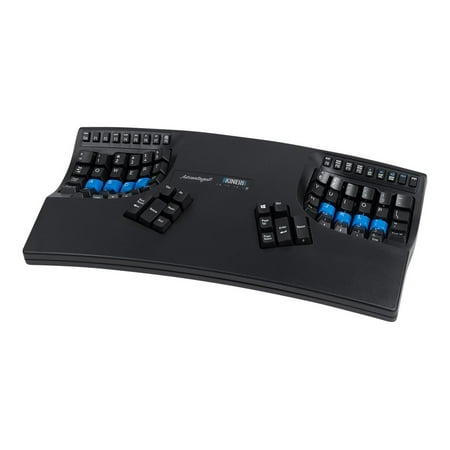
The defining feature is the contoured key wells. Your fingers don’t reach forward and out to hit the top row — they curl down into a slight bowl, which keeps your wrists neutral and your hand muscles relaxed. The thumb clusters take over duties that normally belong to your weakest fingers: Backspace, Enter, Space, Delete, Ctrl, Alt. After your hands adapt, you stop pinky-stretching for Enter and Backspace, which is where a huge chunk of typing fatigue comes from.
The Cherry MX Brown switches are the right call here. Browns give you a soft tactile bump without the loud click of a Blue, so you get the feedback your fingers crave without driving coworkers crazy. Paired with the PBT dye-sublimated keycaps, this thing feels and sounds significantly more premium than its plastic shell suggests. The legends will not wear off in your lifetime.
Programmability is where the Advantage2 quietly outclasses keyboards twice its price. Onboard macros, remappable keys, layers — all stored on the keyboard itself, no software required. Drop it on any machine and your custom layout goes with it. For programmers, this is huge. For writers, it’s a way to bind Find/Replace and other common commands to a thumb tap.
The big trade-off is the learning curve. The first two weeks are rough. Expect to type at maybe 40% of your normal speed while your hands recalibrate to the bowls and the thumb cluster. Some users hit the wall and return them. Most push through and come out the other side typing faster than they did on a flat board — and the wrist pain stops. If you don’t have the patience for that ramp-up, skip it. If you’re staring down a decade more of full-time typing, the math is obvious.
Gaming on this thing is honestly fine for slower-paced stuff — strategy, MMOs, MOBAs — but it’s not built for FPS. The thumb cluster handling Space (jump) takes some adapting, and there’s no QMK-style game layer out of the box. You’re buying this for work, not for ranking up.
Verdict
The Advantage2 is the kind of purchase you make once and then evangelize for the next ten years. Ugly, expensive, and unbeatable for long-term typing comfort. If your job involves more than four hours a day on a keyboard, the cost works out to pennies a day over its lifespan. The two-week learning curve is the only real barrier — once you’re through it, nothing else feels right.
Reviews (0)
User Reviews
Be the first to review “Kinesis Advantage2 KB600 Review — A Decade-Long Investment in Your Hands”
Related Products


There are no reviews yet.