The Ultimate Guide to Gaming Mouse Pads (2026)
Computer Station Nation is reader-supported.
When you buy through links on our site, we may earn an affiliate commission. Learn more.
Gaming Mouse Pads at a Glance
A gaming mouse pad is one of the most overlooked upgrades you can make to your battlestation. It gives you a consistent surface for precise mouse tracking, protects your desk from scratches, and can even add wireless charging or RGB lighting to your setup. Whether you are a competitive FPS player who needs pixel-perfect aim or a desk worker who wants a comfortable extended mat for keyboard and mouse, there is a gaming mouse pad built for your needs.

If you’ve got a killer mouse, then get the right mouse mat to make it a deadly combination. Go big with the Razer Gigantus V2 XXL textured micro-weave cloth surface. Up your game with fluid swipes and pixel-precise aim, while the soft mat cushions your wrist as you take care of the competition.
Introduction
Gaming mouse pads have come a long way from basic cloth mats. Modern options include hard surfaces for speed, hybrid pads that balance control and glide, RGB-lit extended desk mats, and models with built-in Qi wireless charging for your phone or mouse. The right pick depends on your play style, desk size, and which features actually matter for how you use your computer.
This guide covers surface materials, size options, stitched edges, non-slip bases, wireless charging, and everything else you need to pick the right gaming mouse pad for your setup.
Why Your Gaming Mouse Pad Matters
Your mouse pad directly affects tracking accuracy, sensor performance, and comfort during long sessions. A quality pad gives your mouse sensor a consistent surface to read from, something a bare desk or a worn promotional pad cannot deliver.
This matters most in competitive gaming, where inconsistent glide or surface wear can cost you. For everyday browsing and productivity, a good pad reduces wrist fatigue and keeps your desk organized. Extended XXL desk mats are especially popular because they cover the full keyboard-and-mouse area, protecting your desk and cutting down on clutter.
Types of Gaming Mouse Pads: Cloth vs. Hard vs. Hybrid
Cloth Mouse Pads
Cloth pads are the most common type and the best starting point for most gamers. They offer a balanced feel with moderate glide and good control, stay quiet during use, and give you enough texture for precise tracking. Quality cloth pads use a dense-weave fabric bonded to natural rubber foam for thickness and stability. The Razer Gigantus V2 uses a thick high-density foam base and a cloth surface that balances speed and control well.
Hard Mouse Pads
Hard pads use plastic, aluminum, or glass to create a low-friction surface that maximizes glide speed. Competitive FPS players who run low sensitivity and make large mouse movements tend to prefer them because the reduced friction allows faster flicks. Hard pads are also easier to clean than cloth. The tradeoffs: they are louder, some older mouse sensors struggle on glossy surfaces, and they wear down mouse feet (skates) faster than cloth pads.
Hybrid Mouse Pads
Hybrid pads blend cloth and hard surface traits. That includes silicone-coated cloth pads that feel fast like a hard surface but comfortable like cloth, and raised-texture pads that give you tactile feedback without killing glide. They are a middle-ground option for gamers who want elements of both but do not want to commit to one surface type.
Gaming Mouse Pad Size Guide
Size matters more than you might think. Here is a breakdown of standard sizes and what they work best for:
- Small (under 11″ x 9″) — Traditional mouse-only pads. Good for tight desk spaces or laptops. Affordable and portable, but limited surface area.
- Medium (11-14″ x 9-12″) — The standard gaming size. Enough room for medium-sensitivity gaming without crowding your keyboard.
- Large (14-18″ x 12-16″) — Extra room for low-sensitivity aimers and larger mouse movements.
- XXL / Extended (31″ x 11-16″) — Covers both keyboard and mouse. The most popular choice for gaming setups. Common sizes like 31.5″ x 11.8″ give you full coverage for your keyboard, mouse, and maybe a drink or phone.
- 3XL+ (36″+ x 16″+ ) — Full desk mats that cover your entire work surface. For the cleanest look and maximum desk protection.
For most gamers, an XXL extended pad (31″ x 12″ or larger) hits the sweet spot between coverage and value. It creates a clean look and keeps your mouse from running off the edge mid-game. If you are shopping for desk-spanning options, our Best Extended Mouse Pad guide covers the top models in detail.
Key Features to Look For
Non-Slip Rubber Base
A natural rubber base keeps your pad planted during aggressive mouse movements. Look for textured or patterned rubber bottoms that grip your desk firmly. Every quality gaming mouse pad has this, and you should not settle for one that does not.
Stitched Edges
Stitched edges keep the pad from fraying or peeling over time, especially on extended mats where your wrists rest on the edges while typing and gaming. Look for low-profile stitching that sits flush with the surface. Poor stitching will feel rough on your wrist during long sessions.
Waterproof Surface
Many modern gaming mouse pads have a waterproof coating that protects against spills and makes cleaning simple. A quick wipe with a damp cloth keeps them looking new. This matters most on extended mats that cover your full work surface.
RGB Lighting
RGB lighting has become a common feature on gaming mouse pads. Most models offer multiple lighting modes, brightness levels, and sometimes sync capabilities. The lighting is typically perimeter-based or logo-focused and powered by USB. For the best look, aim for pads with evenly diffused lighting and at least 9 to 11 lighting modes.
Wireless Charging
Wireless charging is one of the most genuinely useful features on modern gaming mouse pads. Qi-compatible pads let you charge your phone, wireless earbuds, or Qi-enabled mouse just by setting them on the charging zone. Models with 15W fast charging can charge a phone at normal wireless charging speeds. It eliminates an extra cable from your desk and keeps your devices topped off through the day.
Top Gaming Mouse Pads Worth Considering
Here are a few gaming mouse pads covering different budgets and needs, from premium extended mats with wireless charging to budget oversized cloth pads. For a full ranking, check out our Best Mouse Pads For Gaming roundup.
If you’ve got a killer mouse, then get the right mouse mat to make it a deadly combination. Go big with the Razer Gigantus V2 XXL textured micro-weave cloth surface. Up your game with fluid swipes and pixel-precise aim, while the soft mat cushions your wrist as you take care of the competition.
The Razer Gigantus V2 Cloth Gaming Mouse Pad (XXL) is a premium cloth pad from one of gaming’s most recognized peripheral brands. It uses thick high-density foam for comfort and stability, with a cloth surface tuned for accurate mouse sensor tracking. It holds a 5-star average from hundreds of buyers and gives you enough XXL room for both keyboard and mouse at $26.98.
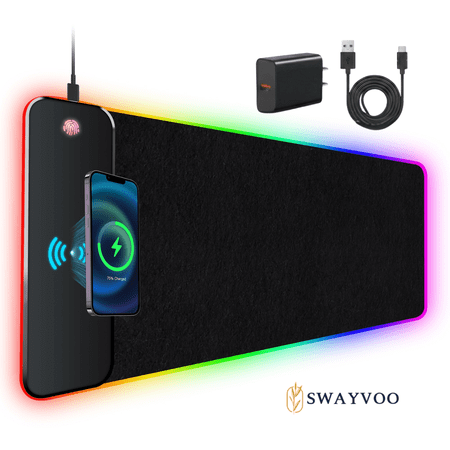
The Swayvoo wireless charging desk protector mat measures 31.5 x 11.8 inches, combining a spacious desk blotter with built in wireless charging to power compatible devices without cluttered cords. The waterproof surface helps protect your desk from spills, stains, and scratches, while the non...
The Swayvoo RGB Gaming Mouse Pad gives you extended desk coverage with built-in 15W wireless charging and 9 RGB lighting modes. The waterproof surface and stitched edges hold up over time, and the non-slip rubber base keeps it planted. At $30.98, it packs a lot of features into an extended pad.
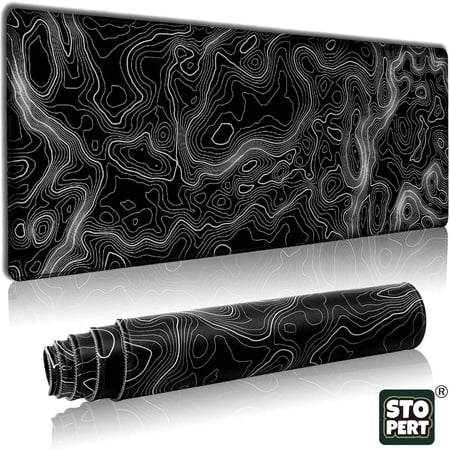
Upgrade Your Desk Setup with STOPERT XXL Extended Gaming Mouse Pad Transform your workspace with the STOPERT Large Gaming Mouse Pad - the ultimate desk mat designed for gamers, office workers and home users who demand precision, comfort and durability. 【EXTRA LARGE XXL COVERAGE】 Measuring 31.5"...
If you are on a budget, the STOPERT Large Gaming Mouse Pad gives you XXL coverage for just $11.99. It still includes stitched edges, a waterproof surface, 3mm thickness, and a non-slip rubber base, with a 5-star average from a large base of buyers. You do not have to spend much to get a decent extended mouse pad.
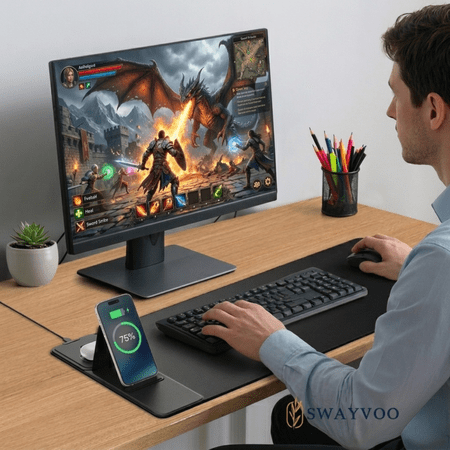
The Swayvoo wireless charging desk protector mat combines a stylish desk blotter with built-in wireless charging to power compatible devices without cluttered cords. The waterproof surface protects your desk from spills, stains, and scratches, while the non-slip base keeps the mat securely in...
The Swayvoo Gaming Mouse Pad with Wireless Charging adds a phone holder to the extended mat, giving you a spot to keep your device visible and charging during sessions. The 15W fast charging works with Qi-compatible devices, and the waterproof surface handles spills.
Is a Gaming Mouse Pad Worth It?
For most people, yes. But which one you need depends on your setup.
Buy one if:
- You play competitive games where consistent mouse tracking matters
- You want to protect your desk from scratches and wear
- You are building a clean-looking battlestation
- You want wireless charging without adding another desk accessory
Skip it if:
- You mostly browse and do not game
- Your desk is very small and you prefer minimal surfaces
- You are happy with your bare desk surface for mouse tracking
For anyone gaming on a PC, a decent mouse pad is a low-cost upgrade you will notice every day. Even a basic $10 extended cloth pad beats a bare desk or a worn promotional pad by a wide margin. If wrist comfort is a concern, our Best Ergonomic Mouse Pad guide covers options with extra cushioning.
Frequently Asked Questions
Are expensive gaming mouse pads worth it?
Premium pads from Razer, SteelSeries, and similar brands use denser foam, more consistent fabric weave, and better stitching that lasts longer. Budget pads under $15 can still perform well. The main tradeoff is long-term durability and surface consistency.
How do I clean a gaming mouse pad?
Hand-wash cloth pads with mild soap and warm water, then air-dry them. Waterproof-coated pads can be wiped clean with a damp cloth. Avoid machine washing or harsh detergents, which can damage the surface texture.
Does a mouse pad affect gaming performance?
Yes. A consistent tracking surface directly affects aim precision in FPS games. Inconsistent surfaces cause sensor tracking errors that can translate to missed shots, especially with modern high-DPI gaming mice.
What size gaming mouse pad should I get?
For most gamers, an XXL extended pad around 31″ x 12″ is the sweet spot. It covers both keyboard and mouse, gives you a unified look, and leaves enough room for your mouse not to run off the edge. If space is tight, a large pad at 14″ x 12″ works fine for mouse-only use.
Can I use a gaming mouse pad for office work?
Yes. Extended desk mats are popular in office and productivity setups too. They protect the desk, reduce typing noise, and give you a comfortable surface for resting your wrists. Waterproof models are a good fit for work-from-home desks where drinks sit nearby.