Computer Station Nation is reader-supported.
When you buy through links on our site, we may earn an affiliate commission. Learn more.
- Best Overall: Aula F75 — wireless tri-mode, hot-swap, strong value at $76
- Best for Gaming: ATTACK SHARK R85 HE — Hall Effect, 8KHz polling, rapid trigger
- Best for Typing: KN85 — custom gasket design, hot-swap, thocky sound
- Best Premium: COSTOM WK75 — wireless, knob, hot-swap, premium build
- Best Budget: COSTOM 75% — hot-swap, RGB, under $40
Selection methodology: These 5 keyboards were chosen after evaluating wireless connectivity options, switch technology (Hall Effect vs mechanical), hot-swap availability, build quality, and price-to-value ratio across the current 75% keyboard market.
The 75% layout is the layout that has it all. You keep the function row — real F-keys, not FN layer shortcuts — plus dedicated arrow keys, and you lose the numpad. The result is a keyboard that feels complete without taking over your desk.
The 75% market right now spans from $35 hot-swap basics up to wireless premium boards with all the trimmings. Here are the five that stand out.
| Keyboard | Best For | Price | Rating |
|---|---|---|---|
| Aula F75 | Wireless + hot-swap | $75.99 | 4.5/5 |
| ATTACK SHARK R85 HE | Competitive gaming | $57.79 | 4.4/5 |
| KN85 | Typing / gasket sound | $58.95 | 4.3/5 |
| COSTOM WK75 | Premium wireless | $89.99 | 4.2/5 |
| COSTOM 75% | Budget entry | $39.59 | 4.0/5 |
Table of Contents
1. Aula F75 — Best Overall
short description is not available
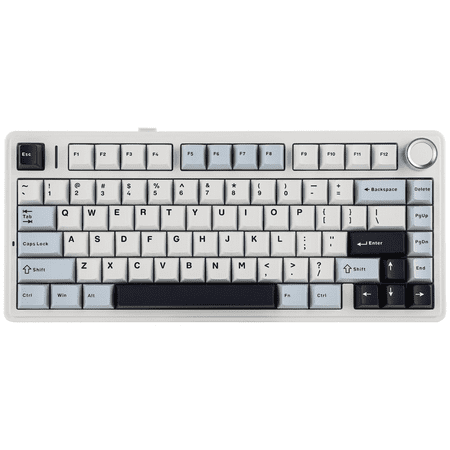
| Layout | 75% / 84 keys |
| Connection | Bluetooth 5.0 / 2.4GHz / USB-C |
| Hot-swap | Yes |
| Backlighting | RGB per-key |
| Price | ~$76 |
Rating: 4.5/5
The Aula F75 is the full package at $76. Tri-mode wireless (Bluetooth 5.0, 2.4GHz dongle, USB-C wired), hot-swap sockets, per-key RGB, and a 75% layout with all the function keys and arrows. That combination used to cost you $120+. Not anymore.
The wireless is the feature that earns it the top spot. Bluetooth for moving between devices, 2.4GHz for low-latency gaming, USB-C when you want zero wireless overhead. Most people use all three depending on context. A keyboard that handles all three without a premium price tag is hard to beat.
Hot-swap means the switches are not permanent. Start with the stock options and try different feels as you go. The board accommodates most MX-style switches without modification.
- Tri-mode wireless at $76
- Hot-swap sockets
- Full function row + arrow keys
- Per-key RGB
- Aula software is less polished than major brands
- Battery life varies by RGB intensity
2. ATTACK SHARK R85 HE — Best for Gaming
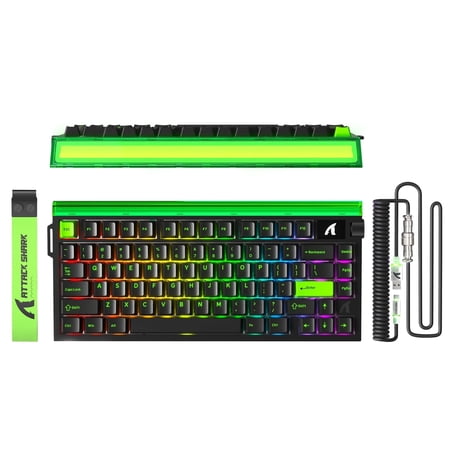
The ATTACK SHARK R85 HE 75% Magnetic Wired Gaming Keyboard is designed for gamers who want faster response, more precise control, and a cleaner desktop setup. Built with Hall Effect magnetic switches, it supports adjustable actuation and rapid trigger functionality, helping deliver smoother...
| Layout | 75% / 85 keys |
| Switch Type | Magnetic Hall Effect |
| Polling Rate | 8000 Hz (8KHz) |
| Rapid Trigger | Yes |
| Price | ~$58 |
Rating: 4.4/5
The R85 HE is ATTACK SHARK’s 75% Hall Effect board and it is punching above its weight. 8KHz polling rate and rapid trigger in a 75% layout for under $60. The polling rate alone is notable — most gaming keyboards run at 1000 Hz. 8000 Hz means the board reports inputs eight times more frequently, which reduces input latency to near-zero in competitive play.
Hall Effect switches with rapid trigger means the key resets the instant you release it rather than waiting for a fixed return point. Pair that with 8KHz polling and you have a keyboard built specifically for games where every millisecond counts.
The 75% layout keeps the function row, so you have real F-keys for keybinds, Escape, and arrow keys without layers. That matters in-game more than it sounds.
- 8KHz polling rate
- Hall Effect with rapid trigger
- Real function row + arrow keys
- Under $60
- Wired only
- 8KHz advantage mostly relevant to competitive gaming
- Less established brand
3. KN85 — Best for Typing
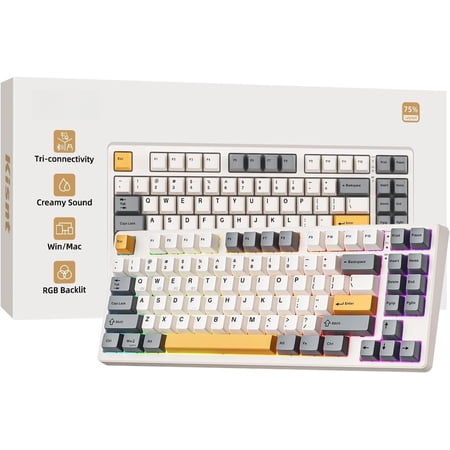
Product description The Compact Without Numpad What's the ? Weighing 1.98 lb, its compact 75% layout (13.68*5.51*1.77 inches) saves desk space by omitting the number pad. For a full-sized option, please refer to KN104. How can get the software for KN85? The custom keyboard works seamlessly with...
| Layout | 75% / 85 keys |
| Mount | Custom gasket design |
| Hot-swap | Yes |
| Backlighting | RGB per-key |
| Price | ~$59 |
Rating: 4.3/5
The KN85 gets attention for its sound profile. The custom gasket-like mounting structure isolates the PCB from the case, which produces a deeper, less hollow typing sound than typical plate-mounted boards. If you spend a lot of time typing and care about how your keyboard sounds, this is the one to look at.
Hot-swap is included, so the switches are not a permanent decision. The RGB is per-key. At $59 it sits right between the budget picks and the wireless options, which makes it the value choice for anyone who types more than they game.
- Gasket mount for better sound
- Hot-swap sockets
- Per-key RGB
- Good value at $59
- Wired only
- Less brand recognition
4. COSTOM WK75 — Best Premium
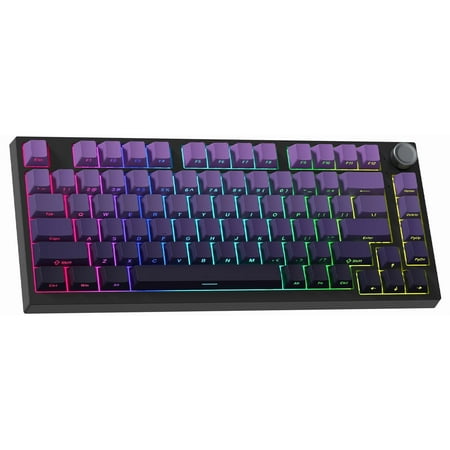
Take your desk to the next level with this versatile 75% keyboard built for gamers and multitaskers. A gasket structure with multiple sound-dampening layers reduces keystroke noise while creating a smooth, creamy keyboard feel. Its vibrant 16.8M RGB with 12 music-synced effects makes this...
| Layout | 75% / 84 keys |
| Connection | Bluetooth / 2.4GHz / USB-C |
| Hot-swap | Yes |
| Knob | Yes — programmable rotary |
| Price | ~$90 |
Rating: 4.2/5
The COSTOM WK75 is the premium pick if you want everything in one package. Tri-mode wireless, hot-swap, a programmable rotary knob, and a build quality that reflects the $90 price tag. The knob is the differentiator — programmable for volume, media, brightness, or whatever function you want to assign it. Once you use a keyboard with a knob, going back is annoying.
The wireless covers Bluetooth for multi-device switching and 2.4GHz for low-latency work. Hot-swap handles switch flexibility. It is a competent board that packages the features most people want without the hardcore gaming marketing angle.
- Tri-mode wireless
- Programmable rotary knob
- Hot-swap sockets
- Premium build quality
- $90 is the most expensive on this list
- COSTOM brand has less community support than Keychron
5. COSTOM 75% — Best Budget
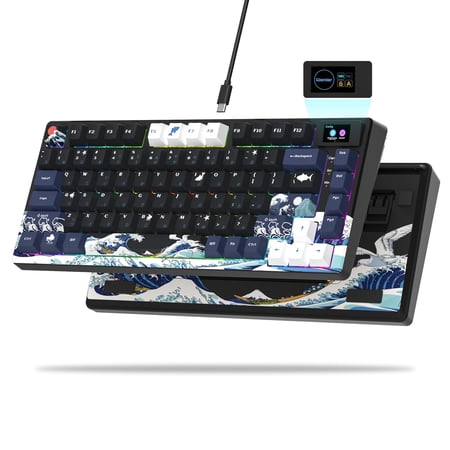
COSTOM SK80 75% Gaming Keyboard is a custom keyboard that combines appearance and performance, featuring a DIY multimedia display screen that allows you to easily create a personalized visual experience; it adopts a 75% layout and cherry profile art theme keycaps, which not only saves desktop...
| Layout | 75% / 84 keys |
| Hot-swap | Yes |
| Backlighting | RGB per-key |
| Connection | Wired USB-C |
| Price | ~$40 |
Rating: 4.0/5
Under $40 with hot-swap and the full 75% layout. The COSTOM budget 75% is the entry point for people who want to try the form factor without much risk. Hot-swap sockets are included, RGB is per-key, and the layout gives you the function row and arrow keys you actually want. Build is basic ABS plastic but it does not feel cheap for the price.
- Hot-swap under $40
- Full 75% layout
- Per-key RGB
- ABS plastic build
- No wireless
- Limited software
Verdict
The Aula F75 is the best 75% keyboard for most people right now. Tri-mode wireless, hot-swap, and per-key RGB at $76 is a strong package. The ATTACK SHARK R85 HE is the competitive gaming pick — Hall Effect switches, rapid trigger, and 8KHz polling at $58 is hard to argue with if FPS is your thing. The KN85 wins for typing with its gasket mount sound profile. The COSTOM WK75 is the premium choice if you want a knob and top-tier wireless. The COSTOM 75% is the no-risk entry point under $40.
Frequently Asked Questions
What is a 75% mechanical keyboard?
A 75% keyboard keeps the letter keys, function row, arrow keys, and a small cluster of navigation keys, cutting the numpad. You get around 84 keys versus 104 in a full-size board. The key advantage over 65%: a real function row with dedicated F-keys, which matters for gaming keybinds and productivity shortcuts.
75% vs 65% — which should I get?
Get 75% if you use F-keys regularly — whether for gaming binds, IDE shortcuts, or just Escape and F5. Get 65% only if you never use the function row and want the most compact footprint possible. For most desktop users, 75% is the better all-rounder. See the best 65% keyboards for comparison.
What is Hall Effect on the ATTACK SHARK R85?
Hall Effect switches use a magnetic sensor to detect keypress depth rather than a physical contact. The result is rapid trigger support (key resets the instant you release, not at a fixed point) and adjustable actuation. Combined with 8KHz polling on the R85, this reduces input latency to negligible levels for competitive gaming.
What does a gasket mount feel like?
Gasket mounting isolates the PCB from the case using silicone or foam gaskets. The typing feel is softer with a slight flex, and the sound is deeper and less hollow than a standard plate-mounted board. The KN85 uses a custom gasket-like structure that approximates this feel at a budget price point.