Computer Station Nation is reader-supported.
When you buy through links on our site, we may earn an affiliate commission. Learn more.
It’s all about the best computer desks, baby.
Your desk is the foundation of your entire setup. Everything else — the monitors, the peripherals, the cable management — sits on top of it. Get the wrong desk and you’re fighting wobble, running out of surface space, or staring at a cable spaghetti nightmare every single day. Get the right one and everything clicks.
Whether you’re building a focused work-from-home workstation or an epic gaming battlestation, this guide covers the best computer desks available right now — across every budget and use case.
Our top pick at a glance
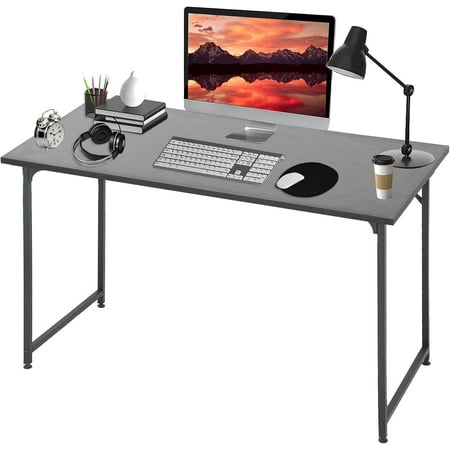
Elevate your workspace with our Modern Simple Style Computer Desk, designed to blend seamlessly into any setting. Crafted with a sturdy metal frame, this desk offers a perfect balance of durability and contemporary aesthetics.Upgrade your work or study area with the Modern Simple Style Computer...
Best overall: The BestOffice 47″ is a rock-solid desk at an unbeatable price. Adjustable metal frame, tons of surface space, and over 600 reviewers backing it. Hard to argue with that at under $45.
Best computer desks: quick picks
- Best overall: BestOffice 47″ Computer Desk — $41.99
- Best budget: edx 31″ Computer Desk — $27.99
- Best gaming starter: Bestier 42″ LED Gaming Desk (White) — $54
- Most popular overall: Bestier 42″ LED Gaming Desk (Red) — $59.99
- Best standing desk: Richryce 48″ Electric Standing Desk — $90.99
- Best L-shaped setup: Bestier 55″ L-Shaped Desk — $161.99
Best overall: BestOffice 47″ Computer Desk
Elevate your workspace with our Modern Simple Style Computer Desk, designed to blend seamlessly into any setting. Crafted with a sturdy metal frame, this desk offers a perfect balance of durability and contemporary aesthetics.Upgrade your work or study area with the Modern Simple Style Computer...
This bad boy hits a sweet spot that’s surprisingly hard to find. At 47 inches wide, you get real working space — enough for a monitor, keyboard, mouse, and still have room for a drink and your notes. The adjustable metal frame means you can dial in the height to fit your chair, and the build doesn’t feel like it’s going to collapse the second you lean on it.
Over 620 reviews and they’re averaging five stars. That’s not a fluke. Most buyers say assembly took under 30 minutes, the frame doesn’t wobble, and the minimalist look works whether you’re on a work call or deep in a game session.
Best for: Anyone who wants a reliable, no-nonsense desk that works for both WFH and gaming. If you don’t have a strong preference for a specific style, start here.
| Spec | Details |
|---|---|
| Width | 47 inches |
| Frame | Metal, adjustable height legs |
| Surface | MDF board |
| Price | $41.99 |
| Buyer rating | 5/5 (622 reviews) |
Pros: Solid stability, great surface size for the price, adjustable legs
Cons: MDF surface (not real wood), no built-in cable management
Best budget: edx 31″ Computer Desk
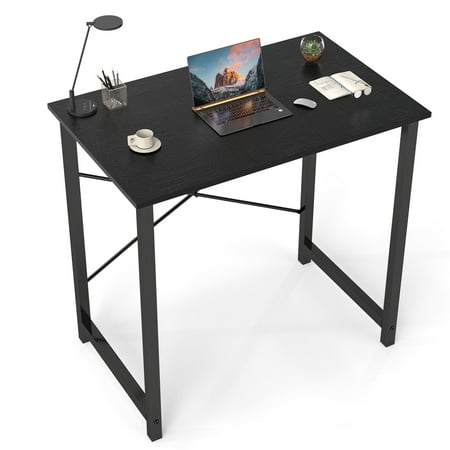
The spacious desktop accommodates multiple books and stationery items, meeting your study or work needs. Its sleek and modern design complements any home decor style, making this desk an ideal choice for home offices or student dormitories.
At under $30, the edx 31″ is for when you need a functional surface and not much else. Small footprint, industrial style, and it gets the job done. This isn’t a desk you build a dream setup around — it’s a desk you grab when space is tight and budget is tighter.
The 31-inch surface will fit a single monitor and keyboard comfortably. That’s it. If you’re running dual monitors or plan to add a lot of peripherals, size up. But for a laptop desk, a side workstation, or a first setup in a small room? It earns its keep.
Best for: Small spaces, secondary workstations, students, or anyone on an ultra-tight budget who just needs something functional.
| Spec | Details |
|---|---|
| Width | 31 inches |
| Style | Industrial / modern writing desk |
| Surface | MDF, black finish |
| Price | $27.99 |
| Buyer rating | 5/5 (148 reviews) |
Pros: Lowest price on the list, compact footprint, clean industrial look
Cons: Very limited surface area — not suitable for multi-monitor setups
Best gaming starter: Bestier 42″ LED Gaming Desk
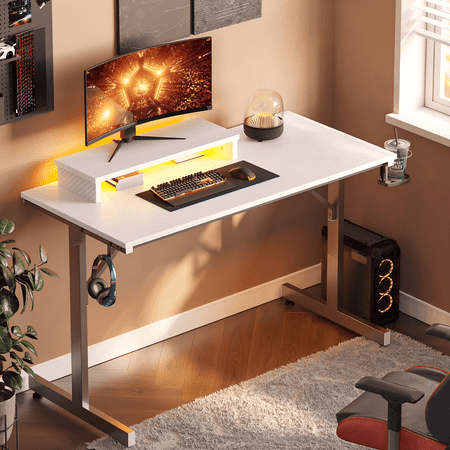
The Bestier 42-inch gaming desk is a perfect blend of style, functionality, and convenience for gaming enthusiasts. It features LED lights that create an immersive gaming environment, enhancing your overall gaming experience. The desk includes a monitor stand for comfortable viewing during long...
The Bestier 42″ comes loaded — built-in monitor stand, RGB LED lighting, and a gaming aesthetic right out of the box. If you’re building a battlestation and want a desk that looks the part without spending three figures, this is your move.
The elevated monitor stand at the back gives you the riser effect without buying a separate accessory. That frees up the main surface for your keyboard, mouse, and whatever else is in your setup. The LED strip runs under the surface — subtle enough during the day, fun when the room lights go down.
Assembly instructions are clear and most buyers finish it solo in under 45 minutes. At 42 inches it’s not a huge desk, but for a single-monitor gaming setup it handles it fine.
Best for: First-time battlestation builders, gamers in smaller rooms, anyone who wants the gaming look without a premium price.
| Spec | Details |
|---|---|
| Width | 42 inches |
| LED lighting | Yes (RGB strip) |
| Monitor stand | Built-in elevated shelf |
| Price | $54 |
| Buyer rating | 5/5 (160 reviews) |
Pros: Built-in monitor riser, LED lighting included, gaming look at a budget price
Cons: 42 inches isn’t huge — tight for dual monitors or wide setups
Most popular: Bestier 42″ LED Gaming Desk (Red)
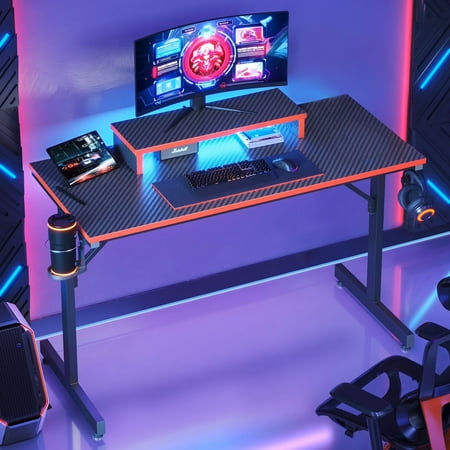
The Bestier 42-inch gaming desk is a perfect blend of style, functionality, and convenience for gaming enthusiasts. It features LED lights that create an immersive gaming environment, enhancing your overall gaming experience. The desk includes a monitor stand for comfortable viewing during long...
Same core desk as the white version above, but in red — and it’s the most-reviewed option on this entire list with nearly 1,400 buyer ratings. Numbers like that mean a lot. When that many people buy something and come back to say it’s good, you can trust the pattern.
The red colorway is bold. If your battlestation has a red-and-black theme going, this fits right in. Same features — LED strip, monitor stand, solid frame — just a different look.
Best for: Red/black themed battlestations, gamers who want the most battle-tested pick on this list.
| Spec | Details |
|---|---|
| Width | 42 inches |
| Color | Red / black |
| LED lighting | Yes (RGB strip) |
| Monitor stand | Built-in elevated shelf |
| Price | $59.99 |
| Buyer rating | 4/5 (1,387 reviews) |
Pros: Most popular pick, proven track record, bold red/black look
Cons: Same size limitations as the white version
Best standing desk: Richryce 48″ Electric Standing Desk
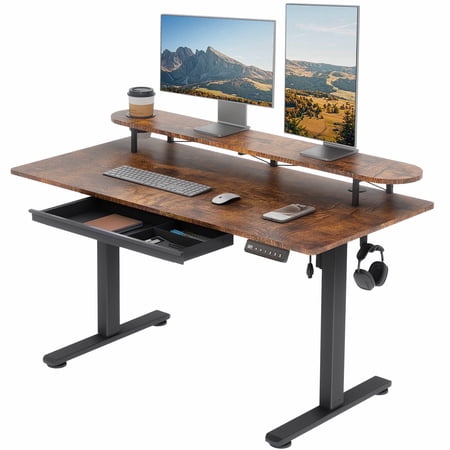
This height-adjustable standing desk transitions smoothly from 28.3" to 47.2" at 20mm/s, offering a quick and quiet way to switch between sitting and standing with one-touch presets. Its generous work surface includes a 19-inch drawer and a two-tier shelf to organize your essentials and promote...
Want to actually stand up and move during the day? The Richryce electric standing desk makes it easy. The motorized frame adjusts from sitting to standing height at the push of a button — no cranking, no fumbling. At 48 x 24 inches you get a real working surface, and the built-in drawer and cup holder are practical touches that competing standing desks at this price often skip.
Sitting all day wrecks your back. Everyone knows it. A sit-stand desk lets you break that cycle without completely overhauling your workflow — you just hit the button when you need to move. The Richryce electric model does this at under $100, which is a strong value proposition for motorized height adjustment.
Best for: Anyone who works long hours at a desk and wants the health benefits of a sit-stand setup without going over $100.
| Spec | Details |
|---|---|
| Width | 48 inches |
| Depth | 24 inches |
| Height adjustment | Electric motorized |
| Extras | Built-in drawer, cup holder, splice board |
| Price | $90.99 |
Pros: Electric height adjustment, built-in storage, great price for a motorized standing desk
Cons: Fewer buyer reviews than other picks — newer to market
Best L-shaped setup: Bestier L-Shaped Desk
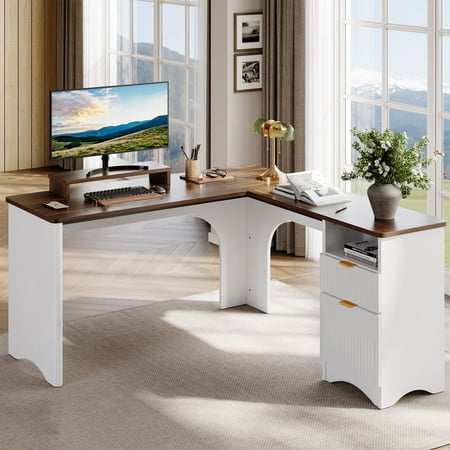
Bestier L-shaped desk combines style, functionality, and durability for an ideal office setup. With its spacious 55.7" x 55" desktop, it offers ample space for multiple monitors, documents, and essential office supplies, perfect for multitasking. The desk features rounded corners and curved...
If you’re ready to go all-in on your setup, the Bestier L-shaped desk is where you end up. At 55.7 x 55 inches of total surface area, you’ve got room for a full battlestation — dual monitors, keyboard, external drives, lighting — and still have the corner section free for whatever else you need.
The built-in drawers keep things organized, and the monitor stand brings your screens up to proper eye level without buying a separate riser. The white and walnut finish is legitimately attractive — it looks like a setup upgrade, not just a furniture purchase. The fluted panel detailing on the side is a nice touch that elevates the overall aesthetic.
For a serious workstation or full-size battlestation, this is the pick.
| Spec | Details |
|---|---|
| Width x Depth | 55.7″ x 55″ (L-shape) |
| Storage | Built-in drawers |
| Monitor stand | Yes, integrated |
| Finish | White and walnut |
| Price | $161.99 |
| Buyer rating | 5/5 (136 reviews) |
Pros: Massive surface area, premium aesthetic, built-in storage and monitor stand
Cons: Most expensive pick, requires more floor space
Matching your desk to your actual setup
Before you buy anything, do a quick audit of what you’re actually putting on it. List out every piece of hardware and how much desk real estate it takes up. Most people skip this step and end up undersizing.
The single-monitor home office setup
You need a monitor (about 25 inches wide for a 24″ display), a keyboard (around 17 inches), a mouse pad (10–12 inches), and probably a mug and maybe a notebook. Add that up and you’re looking at 50–55 inches of minimum useful space. A 47″ desk like the BestOffice works for this. A 31″ desk will feel cramped immediately.
The dual-monitor workstation
Two 27″ monitors side by side sit at about 52–54 inches combined. Add keyboard, mouse, and any peripherals and you’re at 65+ inches of useful width. Either go L-shaped or get a 60″ desk minimum. The Bestier L-shaped at 55″ x 55″ handles this with room to spare.
The gaming battlestation
Gaming setups tend to accumulate stuff. A controller dock here, a headset stand there, a stream deck somewhere else. The more peripherals in your rig, the more surface you need. Gaming desks with built-in monitor stands (like the Bestier 42″ LED options) help here — elevating your monitor frees up the surface below for more gear.
The hybrid WFH-and-gaming desk
This is where most setups land. You need it to look professional enough for video calls and function well enough for gaming sessions. The BestOffice 47″ threads that needle — neutral enough for work, spacious enough for a serious gaming setup. If you can stretch the budget, the Bestier L-shaped white and walnut looks sharp in both contexts.
What to look for in a computer desk
There’s no single best computer desk — it depends on your setup and your space. Here’s how to narrow it down fast.
Surface size
This is the most important spec. A single-monitor setup with a standard keyboard needs at least 40 inches. Dual monitors need 55+ inches. An ultrawide setup or a gaming rig with a lot of peripherals? You want 60 inches or an L-shape. Undersizing your desk is the #1 regret buyers report.
Stability and frame material
MDF tops with steel frames are the standard at most price points. They hold up fine for most setups. If you’re running heavy equipment — multiple large monitors, a heavy PC case on the desk — look for a reinforced steel frame and check reviewer comments specifically about wobble. Some budget desks wobble noticeably once fully loaded.
Cable management
Grommets (those round holes in the desk surface) make routing cables dramatically cleaner. Most gaming desks include at least one. If clean cable management matters to you — and it should — prioritize desks with built-in grommets or cable trays.
Height adjustability
Fixed-height desks work for most people. But if you’re taller or shorter than average, adjustable legs are worth the premium. Electric sit-stand desks are the top tier — the Richryce above does this well under $100.
Assembly complexity
Almost every desk on this list requires some assembly. Most are straightforward (under an hour). Check reviewer feedback — assembly horror stories are usually accurate, and a desk with consistently positive assembly comments is worth noting.
Understanding desk materials
MDF (medium-density fiberboard)
This is what most budget and mid-range desks use, including everything on this list. MDF is smooth, easy to finish, holds screws reasonably well, and is stable in normal indoor conditions. The surface texture also tends to work well with most mouse pads. Just don’t let liquids sit on it — clean up spills immediately.
Solid wood
Real wood desks look beautiful and last decades, but you’re paying for it. A quality solid wood desk starts around $300. For most setup builders, MDF is the smarter spend — put the savings into better peripherals or monitors.
Steel frames
The legs and frame are where stability comes from. Steel frames on a budget desk will outlast MDF tops. If you’re choosing between two similarly-priced desks, prioritize the one with a heavier steel gauge frame. Check reviewer comments for “wobble” or “shaky” — those complaints show up fast when there’s a real problem.
Workstation vs battlestation: picking the right desk
Here’s a question worth asking before you buy: is this primarily a workstation, a battlestation, or both?
Workstation setup means you’re here to get things done. You need surface space for productivity — monitors, keyboard, maybe a second screen. You want clean lines, good cable management, and something that doesn’t distract. The BestOffice 47″ and the Bestier L-shaped are the workstation picks on this list.
Battlestation setup is about the full PC gaming experience. RGB matters. Aesthetics matter. You want a desk that looks as good as it functions. The Bestier 42″ LED options were made for this — they show up looking the part on day one.
Dual-purpose setup (WFH by day, gaming by night) is where most of us actually live. You want a neutral, spacious desk that doesn’t scream “gaming” during work calls but still handles a full battlestation build. The BestOffice 47″ or the Bestier L-shaped in white/walnut both walk that line well.
Desk accessories worth adding
A great desk gets better with the right accessories. These are the ones that actually make a difference:
A full-surface desk pad is the easiest win — protects the surface, keeps mouse tracking consistent, and makes the whole thing look intentional. Worth every dollar.
If your desk didn’t come with a monitor stand, a monitor arm is the next upgrade. It lifts the monitor off the surface entirely, frees up that footprint, and lets you dial in exact height and tilt. A single arm runs $25–$50 and pays for itself in desk real estate alone.
Under-desk cable tray: mount one, route your power strips and cables into it, done. The cable mess disappears. It takes 15 minutes and costs under $20. Highly recommend.
Headset stand: if you don’t have a dedicated spot for your headset, it ends up on the desk or draped over something. A $10 stand fixes this and keeps the surface clear.
What the community says
Across r/battlestations, r/buildapc, and r/homeoffice, a few consistent themes come up when people talk about desk satisfaction and regret:
Surface size regret is the most common theme — people who bought 40-inch desks upgrading to 55+ within a year. The advice is consistent: size up from whatever you think you need.
Wobble comes up constantly for budget picks. If the frame flexes when you’re gaming hard, it ruins the experience. Check reviewer comments specifically about stability before buying.
Cable management is the other big one. People who set up a cable tray and ran everything through desk grommets say it changed the look of the entire setup. Takes 30 minutes. The people who skipped it say they wish they hadn’t.
Anyone who went L-shaped says the corner space always got used — second PC, microphone arm, stream deck, whatever. If the room can fit it, it fills up.
Quick comparison
| Desk | Width | Best for | Price |
|---|---|---|---|
| BestOffice 47″ | 47″ | Best overall | $41.99 |
| edx 31″ | 31″ | Budget / small space | $27.99 |
| Bestier 42″ LED (White) | 42″ | Gaming starter | $54 |
| Bestier 42″ LED (Red) | 42″ | Most popular gaming | $59.99 |
| Richryce Electric 48″ | 48″ | Sit-stand / ergonomic | $90.99 |
| Bestier L-Shaped 55″ | 55″ x 55″ | Full battlestation | $161.99 |
FAQ
What size computer desk do I need for dual monitors?
At minimum, 55 inches wide. Two standard 24-inch monitors side by side take up about 50 inches, and you still need room for a keyboard and mouse. An L-shaped desk gives you even more flexibility if space allows.
Are gaming desks actually better than regular desks?
Not necessarily better — just different. Gaming desks typically include RGB lighting, monitor risers, and headphone hooks. If those features matter to you, they’re worth it. If you just want a functional surface, a standard desk like the BestOffice 47″ does the job for less money.
Is a standing desk worth it?
For anyone spending 6+ hours a day at a desk, a sit-stand option is worth serious consideration. The Richryce electric model gets you motorized height adjustment under $100, which is a solid value for the ergonomic benefit.
What’s the best computer desk for small spaces?
The edx 31″ is the most compact option here. Corner desks and L-shaped options can also work well in small rooms since they use corner space that would otherwise go to waste.
How do I keep cables organized under my desk?
Look for desks with grommets (holes in the surface for routing cables), and add an under-desk cable management tray. Velcro cable ties and a power strip mounted under the desk surface clean up the rest. It takes about 30 minutes to set up and makes a massive visual difference.
How long does desk assembly typically take?
Most desks on this list take 30–60 minutes to assemble solo. The Bestier L-shaped may take closer to 90 minutes due to its size. Having a second person makes the process faster and easier, especially for aligning the frame before fully tightening bolts.