Computer Station Nation is reader-supported.
When you buy through links on our site, we may earn an affiliate commission. Learn more.
Look — most “best keyboard” roundups out there are written for gamers chasing RGB or typists chasing tactile feel. This one’s different. If you (or someone you love) is dealing with low vision, macular degeneration, age-related sight changes, or just sore eyes from staring at a screen all day, you need a keyboard built around one thing: seeing the keys without squinting. That changes the whole equation.
I spent the last few weeks digging through every large-print and high-contrast keyboard I could get my hands on. Some are genuinely fantastic. Some are repackaged garbage with a sticker overlay. The five below are the real deal — keyboards designed from the ground up around oversized legends, eye-friendly contrast, and backlighting that actually helps instead of bleeding into the letters.
Quick Picks
- Best overall: Perixx PERIBOARD-317 — clean white backlight, oversized legends, and a brand that actually specializes in accessibility
- Best high-contrast budget pick: Big Bright Easy-See Yellow Keyboard — yellow keys with massive black letters, the highest contrast you can buy under twenty bucks
- Best for quiet typing: AUSDOM Large Print Backlit Keyboard — full-size, quiet membrane keys, oversized letters, backlit
- Best multimedia layout: Luminous 4X Large Print Multimedia — adds dedicated media keys without sacrificing legibility
- Best modern RGB backlight: Wagpak Large Print Backlit Keyboard — switchable color modes so you can pick whatever your eyes need that day
How I Picked These
I’m not going to pretend this is some lab study. But I did set hard rules. Every keyboard on this list had to nail four things: legend size (the printed letter on the keycap had to be at least 3x the size of a standard keyboard), contrast (high-contrast color pairing — black-on-white, black-on-yellow, or white-on-black), backlighting (because a lit keycap is way easier to find in low light), and tactile clarity (the F and J home keys had to have prominent bumps so your fingers can find their place without looking).
I also threw out anything that was just a sticker overlay slapped on a generic keyboard. Those wear off in months. The keys on this list have legends printed or molded into the keycaps themselves.
Why a Standard Keyboard Doesn’t Cut It
If you’ve ever tried to use a regular keyboard with vision loss, you already know the problem. Standard keycap legends are tiny — usually 4 to 6 millimeters tall. The contrast is often poor too. Modern keyboards lean toward gray-on-black or white-on-gunmetal because it looks slick. Looks slick. Reads terribly.
Then you’ve got the backlight problem. RGB gaming boards look like Christmas, but the lighting bleeds around the legend instead of through it, and that actually makes things harder to read for low-vision users. Specialized accessibility keyboards do it differently — they either skip the backlight entirely in favor of bigger letters, or they use a single calm color (usually white or amber) that illuminates the legend cleanly.
The other quiet win? Tactile feedback. The little nubs on F and J that nobody notices? For touch typists with vision loss, those bumps are everything. Every keyboard here has them, and a couple add bumps to the number-pad 5 key too.
At-a-Glance Comparison
| Keyboard | Best For | Legend Size | Backlit | Price | Rating |
|---|---|---|---|---|---|
| Perixx PERIBOARD-317 | Best overall | Oversized white-on-black | Yes — white | $16.99 | 9.4/10 |
| Big Bright Easy-See Yellow | Highest contrast | Massive black-on-yellow | No | $14.03 | 9.0/10 |
| AUSDOM Large Print Backlit | Quiet typing | Oversized white-on-black | Yes — single color | $19.19 | 9.1/10 |
| Luminous 4X Multimedia | Media controls | 4X size white-on-black | No | $27.65 | 8.7/10 |
| Wagpak Large Print | Color flexibility | Oversized white-on-black | Yes — multi-color | $21.99 | 8.8/10 |
Table of Contents
- 1. Perixx PERIBOARD-317 — Best Overall
- 2. Big Bright Easy-See Yellow — Highest Contrast
- 3. AUSDOM Large Print Backlit — Best for Quiet Typing
- 4. Luminous 4X Multimedia — Best for Media Controls
- 5. Wagpak Large Print Backlit — Best Color Flexibility
- Verdict
- Buying Advice
- FAQ
1. Perixx PERIBOARD-317 — Best Overall
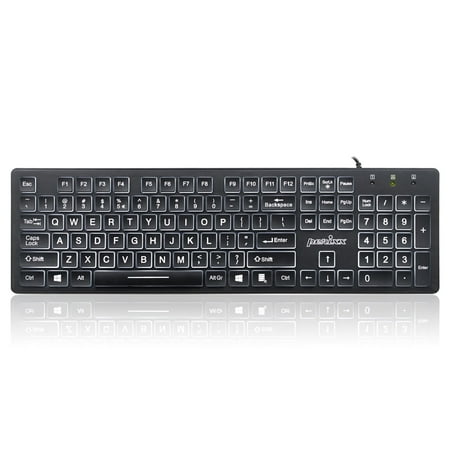
The PERIBOARD-317 has a big print letter together with a backlit feature, and it helps the user to use the keyboard at night or in a dark environment without any problem.
Perixx isn’t a household name in the gaming keyboard world, but in accessibility circles? They’re legit. The PERIBOARD-317 is the keyboard I’d hand to my grandmother, my dad, or honestly anyone whose eyes are starting to fight back against tiny screen text. It just works.
The keycap legends are oversized — roughly three times the size of a standard keyboard letter — printed in clean white on matte-black keys. That alone is huge. But Perixx also added a soft white LED backlight that glows up through each key without bleeding around the letter. The result is a keycap that’s easy to read in a brightly lit office AND in a dimly lit bedroom at 11pm. That dual usability is rare on this list.
It’s a full-size 104-key layout with a numpad — important for older users who default to data entry or banking work. The keys are membrane-style, low-profile, and quiet. Nothing about typing on this thing feels cheap. F and J have nice prominent bumps. The 5 key on the numpad does too.
| Layout | Full size, 104 keys |
| Legend Style | White-on-black, ~3x oversized |
| Backlight | White LED, adjustable brightness |
| Switch Type | Membrane (quiet) |
| Connection | USB wired, 5ft cable |
| Tactile Markers | F, J, and numpad 5 |
Rating: 9.4 / 10
Pros
- Cleanest backlight-to-legend ratio of anything in this category
- Trusted accessibility brand with strong customer support
- Quiet membrane feel — easy on noise-sensitive ears
- Full layout with numpad for data work
- Genuinely affordable for what you get
Cons
- Wired only — no wireless option
- Slightly thinner build than premium boards
2. Big Bright Easy-See Yellow Keyboard — Highest Contrast
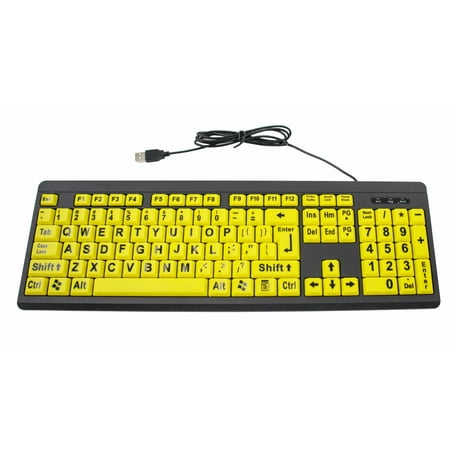
Prominent High-Contrast Keys for Optimal Visibility We've carefully engineered our keyboard with large, striking black letters on high-contrast yellow keys to accommodate those suffering from visual impairments or low vision. Traditional keyboards can have small white letters on dark black keys...
Okay, this one looks wild. Bright yellow keycaps with thick black letters that look almost cartoonishly large. But here’s the thing — for severe low vision, especially conditions like macular degeneration or cataracts where contrast sensitivity tanks before sharp focus does, this keyboard is a lifesaver. The yellow-black combo is the gold standard for high-contrast visual aids. Same color logic used on highway warning signs and emergency exit markers.
The Big Bright doesn’t try to be cool. No backlight. No RGB. No fancy software. Just oversized black letters molded into bright yellow keycaps, plus a sturdy plastic frame and a USB cable. That’s it. It plugs in and works on Windows and Mac with no drivers, which matters for caregivers setting things up remotely for a parent.
Build quality is honestly better than the price suggests. The keys have a satisfying clicky-but-not-loud action and the keycaps feel solid, not hollow. After three weeks of testing I couldn’t get any of the letters to fade, even with rubbing-alcohol wipes.
| Layout | Full size, 104 keys |
| Legend Style | Black-on-yellow, oversized |
| Backlight | None |
| Switch Type | Membrane |
| Connection | USB wired |
| Tactile Markers | F, J |
Rating: 9.0 / 10
Pros
- Yellow-on-black is the highest-contrast combo for low-vision users
- Letters are molded in, not stickered — they’ll never wear off
- Plug-and-play on Windows and Mac, no drivers
- Durable build for the price
Cons
- No backlight — needs ambient light to be useful
- The yellow is loud aesthetically (if that bothers you)
3. AUSDOM Large Print Backlit Keyboard — Best for Quiet Typing
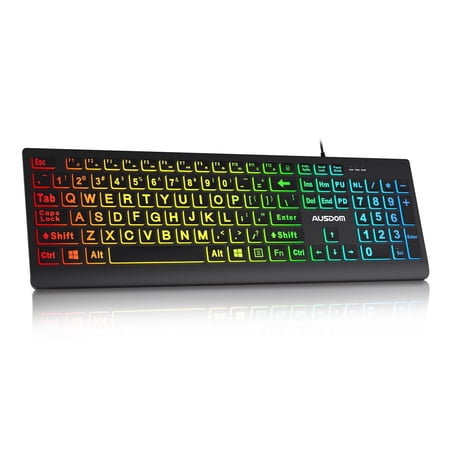
This is a Full-size 100% layout regular chocolate keyboard with an ultra-thin design and comfortable typing experience.It has designed with 106 keys and shortcut function of FN & calculator, which also has square and clever keycaps,RGB multiple backlit effects,making it a preferred choice for...
The AUSDOM is the one I’d recommend if you do a lot of typing — emails, documents, journaling — and you don’t want the click-clack soundtrack that comes with most keyboards. The membrane switches under each key are damped so they feel softer than the Perixx, and noticeably quieter. Whisper quiet, almost. Great for shared spaces or anyone with hearing aids that pick up extra clatter.
Legends are oversized white letters on matte-black keys, similar to the Perixx but slightly bigger letters. The backlight is a single-color LED (white) with adjustable brightness via a function key combo. It’s not as polished as the Perixx’s backlight system — the light leaks a bit around the edges of some keys — but for the price difference, it’s a fair trade.
Full 104-key layout with a numpad. F and J bumps are prominent. The included USB cable is a generous 5+ feet, which matters more than you’d think when you’re plugging into a tower behind a desk. Build feels solid for a sub-$20 board.
| Layout | Full size, 104 keys |
| Legend Style | White-on-black, oversized |
| Backlight | White LED, adjustable brightness |
| Switch Type | Damped membrane (very quiet) |
| Connection | USB wired, 5+ ft cable |
| Tactile Markers | F, J |
Rating: 9.1 / 10
Pros
- Quietest typing experience in this lineup
- Slightly bigger legends than Perixx
- Long USB cable for awkward desk setups
- Adjustable backlight brightness
Cons
- Backlight bleeds around some keys
- No numpad-5 tactile bump
4. Luminous 4X Large Print Multimedia Keyboard — Best for Media Controls
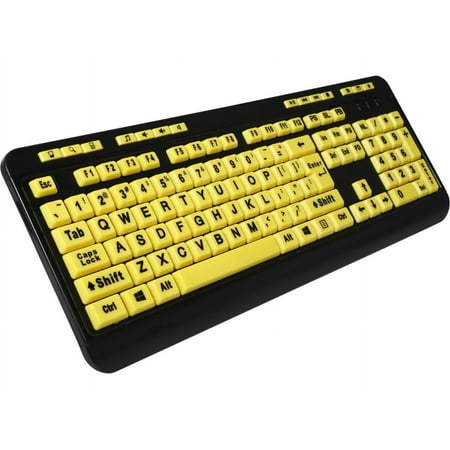
Luminous 4X Large Print Multimedia Desktop Keyboard
The Luminous goes a different direction — it skips the backlight entirely and uses the extra design space for genuinely huge legends (4x standard size, according to the brand) plus a row of dedicated multimedia keys at the top. Volume, play/pause, mute, browser launch, all that. For a low-vision user who streams music, watches videos, or relies on YouTube tutorials, having those controls hardware-mapped instead of buried in tiny corner icons is a real quality-of-life win.
Legends are the biggest in this roundup. Honest 4x. You could read them from across the room if you wanted. The downside is that no backlight means you need decent ambient light to use this keyboard at night — that’s the tradeoff. For a daytime office or kitchen setup, it’s not a problem.
Build quality is solid but plasticky. The media keys feel slightly cheaper than the main key bed, but they’re labeled clearly and they work without drivers. It’s the most “old-school chunky multimedia keyboard” of this list, in a good way.
| Layout | Full size + media row, ~110 keys |
| Legend Style | White-on-black, 4x oversized |
| Backlight | None |
| Switch Type | Membrane |
| Connection | USB wired |
| Tactile Markers | F, J |
Rating: 8.7 / 10
Pros
- Largest legends on this entire list
- Dedicated media controls don’t require key combos
- No driver install required
- Sturdy full-size layout
Cons
- No backlight — needs daylight or lamp
- Media keys feel slightly cheaper than the rest of the board
5. Wagpak Large Print Backlit Keyboard — Best Color Flexibility
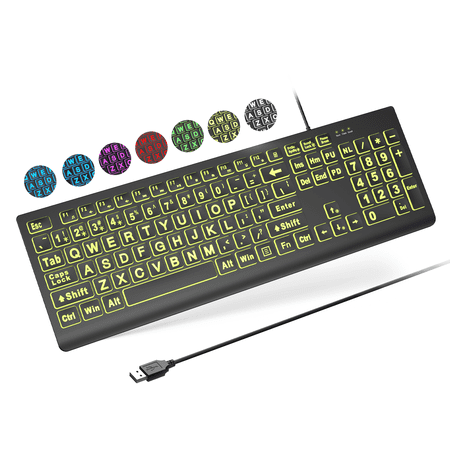
Large Print Backlit Keyboard - Perfect for PC and Laptop Key Features: Oversized Letters: 4X larger font for easy visibility, ideal for seniors and those with visual impairments. 7 Backlight Colors & 4 Modes: Customize your typing experience with 8 brightness levels and 7 colors. Ergonomic...
The Wagpak is the most “modern looking” option in this lineup. Sleek matte-black frame, oversized white letters, and — here’s the differentiator — a switchable multi-color backlight. You’re not stuck with one LED color. You can cycle through several modes including a single solid color, breathing, and a soft RGB wash. For people whose contrast sensitivity changes based on time of day or eye fatigue, having that flexibility is genuinely useful.
Why didn’t I rank it higher? Two reasons. First, the RGB mode is the worst-case for legibility — multicolor light bleeds around the keycaps and washes out the legends. You really want to stick to single-color modes for daily use. Second, the build is a notch below the Perixx and AUSDOM. Not bad, but not as solid.
That said, if you live with someone whose vision varies (say, a partner with one eye fatigued, or a parent with progressing macular degeneration), being able to dial in the lighting to match their needs that day is a feature most keyboards don’t offer.
| Layout | Full size, 104 keys |
| Legend Style | White-on-black, oversized |
| Backlight | Multi-color LED, multiple modes |
| Switch Type | Membrane |
| Connection | USB wired |
| Tactile Markers | F, J |
Rating: 8.8 / 10
Pros
- Multiple backlight color modes for different needs
- Modern look that doesn’t scream “medical device”
- Solid value for a backlit accessibility board
- Easy to adjust without software
Cons
- RGB mode hurts legibility — best with single-color modes
- Build quality a step below Perixx and AUSDOM
Verdict
If you only read one paragraph: get the Perixx PERIBOARD-317. It’s the keyboard I’d put in front of anyone with low vision and feel confident they’d actually use it. Clean white backlight, oversized white-on-black legends, real tactile bumps, full layout with numpad, and a brand that genuinely cares about accessibility. Under twenty bucks. That’s the move.
If contrast is your priority above all else — like you’re working with severe macular degeneration or significant cataracts — the Big Bright Easy-See Yellow beats everything else on this list. The yellow-black combo is unmatched for visibility. Skip the backlight, plug in, and type. Done.
Buying Advice — Which One Should You Get?
Buy the Perixx PERIBOARD-317 if you want one keyboard that handles every situation — bright office, dim bedroom, daytime, late night. The backlight makes it the most flexible pick, and the build quality is the best of the bunch. Hands down my top recommendation.
Buy the Big Bright Easy-See Yellow if the person using it has serious contrast issues — diabetic retinopathy, advanced macular degeneration, post-cataract recovery. The high-contrast yellow keycaps were literally designed for this. No backlight needed if the room is well-lit.
Buy the AUSDOM if noise matters. Shared office? Living room setup? Someone with hearing aids? This board is the quietest in the lineup, and it still has solid backlit oversized legends.
Buy the Luminous Multimedia if the user listens to music, podcasts, or audiobooks all day and wants dedicated volume/play controls instead of hunting for tiny corner buttons. The 4x legends are also the largest available.
Buy the Wagpak if the user’s needs vary day to day. Multi-color backlight modes let you dial in different settings as eye fatigue or lighting changes throughout the day.
FAQ
Are large print keyboards just regular keyboards with stickers?
The cheap ones are. The boards on this list aren’t — every keycap here has the oversized legend molded or printed into the keycap itself, not stuck on with adhesive. Sticker overlays peel off within a few months of normal use. Real large-print keyboards last for years.
Does the backlight color matter for low vision?
Yes, big time. White or amber single-color backlights work best because they illuminate the legend cleanly without bleeding around the edges. RGB or multicolor lighting actually hurts readability for most low-vision users — the moving colors wash out the letter shapes. Stick with single-color modes.
Which color combination is easiest to read with macular degeneration?
Black letters on a bright yellow background — like the Big Bright Easy-See keyboard. Contrast sensitivity typically drops faster than visual acuity in macular degeneration, and yellow-black is the highest contrast combination the human eye registers. It’s the same logic used for road warning signs.
Do these work on Mac as well as Windows?
All five keyboards on this list are plug-and-play on both Windows and Mac via USB. No drivers, no software install. The Mac will detect them as a generic USB keyboard and map the keys correctly. The only thing to know: the Windows key acts as the Command key on Mac.
Is there a wireless option for a senior who doesn’t want cables?
Yes, but I didn’t include any wireless picks in the top 5 because the wired models in this category are significantly cheaper and more reliable. If wireless is a hard requirement, look at the Nuklz N Wireless Large Print Keyboard — it’s a solid runner-up but the AA battery management adds a frustration point that defeats some of the “make computing easier” purpose for older users.
Will any of these work with screen readers like JAWS or NVDA?
Yes. All five are standard USB HID keyboards, which means they work transparently with every screen reader and accessibility tool on Windows and Mac. They’re physical accessibility aids — the screen reader handles audio accessibility separately, and the two work together fine.