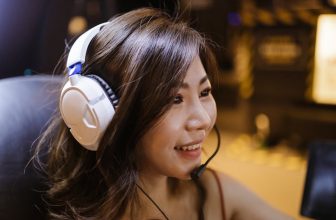
Best Gaming Headphones — Your Complete Guide to Sound That Wins Games

Computer Station Nation is reader-supported.
When you buy through links on our site, we may earn an affiliate commission. Learn more.
Best Gaming Headphones — Your Complete Guide to Sound That Wins Games
If there’s one peripheral that makes or breaks your gaming session, it’s the headset. Good ones pull you into the action — footsteps have direction, bass hits harder, and your squad sounds like they’re in the same room. Bad ones? Muffled everything, sore ears after an hour, and teammates asking “can you repeat that?” on loop. We’ve tested dozens of gaming headsets across every price range to bring you this complete guide. Whether you grind ranked matches, game casually on the couch, or stream to a chat that expects clean audio, there’s something here for you.
What Makes a Great Gaming Headphone?
Not all gaming headsets are created equal. The best ones excel in four key areas:
- Sound Quality — Clear highs, punchy mids, and bass that doesn’t muddy the rest of the frequency range. For competitive gaming, soundstage and imaging matter more than raw volume. You need to hear where that footstep is coming from, not just that it exists.
- Comfort — Gaming sessions run 2–6 hours. Clamping force, ear pad material (velour vs leatherette), headband padding, and weight all affect whether you’ll still want to wear them after hour three.
- Microphone Quality — A muddy mic ruins team comms. The best gaming headsets use noise-canceling mics that filter out keyboard clicks and room noise. See our Best Gaming Headsets with Mic (2026) guide for top picks with proven mic performance.
- Build Durability — Plastic hinges break. Metal-reinforced headbands and braided cables last years instead of months.
Wired vs Wireless: Which Should You Choose?
This is the fork in the road, and every other choice flows from it.
Wired headsets offer zero latency, no battery anxiety, and often better audio quality for the same price. The trade-off is a cable that can snag on your chair or desk edge. For competitive gamers who can’t afford a single missed audio cue, wired is still the standard. USB headsets also enable virtual surround sound (7.1 or Dolby Atmos) without needing a separate sound card.
Wireless headsets have come a long way. Modern options use 2.4GHz RF (not Bluetooth) for lossless, low-latency audio. The convenience of standing up and walking to the kitchen without taking your headset off is hard to give up once you’ve tried it. Battery life ranges from 15 to 80 hours depending on the model. The catch? You’ll pay a $30–50 premium for wireless, and you’ll eventually need to charge.
Some headsets split the difference — wired when you need zero latency, wireless when you want to grab a drink without muting yourself. If you game across multiple platforms — PC and console, or PC and mobile — a dual-mode headset saves you from owning two separate pairs.
Open-Back vs Closed-Back: The Soundstage Trade-Off
Closed-back gaming headsets isolate you from room noise and prevent sound leakage. They deliver punchier bass and are the go-to for multiplayer gaming where you don’t want your teammates hearing your game audio through your mic. Most gaming headsets on the market are closed-back for this reason.
Open-back headphones have vented ear cups that let air and sound pass through. The result is a dramatically wider soundstage — audio sounds like it’s coming from the room around you, not inside your head. This is a genuine advantage for positional audio in games like Valorant, CS2, and Apex Legends. The downside: sound leaks out (people near you will hear your game), and you’ll hear everything around you. Our Best Open-Back Headphones for Gaming guide covers the top options if this sounds like your style.
Best Gaming Headphones by Category
Best Overall Gaming Headset
The SteelSeries Arctis Nova Pro Wireless keeps showing up at the top of roundups for good reason — great audio, genuine comfort, and features that actually matter. It uses simultaneous 2.4GHz + Bluetooth so you can take calls while gaming, and the hot-swap battery system means zero downtime. The Audeze Maxwell 2 (RTINGS’ top pick as of 2026) uses planar magnetic drivers for audiophile-level sound that most gaming headsets can’t touch.
Best Budget Gaming Headsets
You don’t need to spend $200+ for a good gaming experience. Options like the Turtle Beach Recon 50 ($28) and the Logitech G432 deliver solid sound, decent mics, and comfortable fit for under $50. The Turtle Beach Recon 70 at $42 holds its own across Xbox, PlayStation, and PC without missing a beat. See our full Best Gaming Headphones (2026): Top Picks for Every Budget for a complete breakdown of value picks.
Best Wireless Gaming Headsets
Tom’s Hardware’s 2026 roundup names the Razer Blackshark V2 Pro (2023 edition) as the top wireless option, with the Corsair Void Wireless v2 and HyperX Cloud Alpha Wireless close behind. For pure battery life, the HyperX Cloud Alpha Wireless lasts an incredible 300 hours on a single charge. The Turtle Beach Atlas Air uses a unique open-back mesh design that combines wireless convenience with better-than-average soundstage for a wireless headset.
Best Gaming Headphones Under $100
The Turtle Beach Stealth 600 Gen 3 is RTINGS’ top pick under $100, with an impressive 85-hour battery life for the wireless version. The HyperX Cloud Stinger 2 Core offers excellent value at around $50 with good comfort and solid sound. If you’re gaming on a strict budget, options like the Froura Wireless Gaming Headset ($19) and Ecomoment Gaming Headset ($19) prove you can get acceptable audio without breaking the bank — though you’ll sacrifice some build quality and mic clarity at this price point. If over-ear headphones aren’t your style, check out our Best Gaming Earbuds guide for compact alternatives.
One tip: don’t judge a budget headset by its plastic construction alone. Many sub-$50 headsets use lightweight ABS plastic that actually improves comfort for long sessions — the weight difference between a $30 headset (around 250g) and a $200 one (350g+) is noticeable after hour three. The trade-off is usually in the ear pads and headband padding, which wear out faster. Replacement ear pads cost $10–20 and can extend a budget headset’s life by years.
Key Features to Look For
- Driver Size — 50mm drivers are the sweet spot for gaming. Smaller drivers (40mm) lack bass punch; larger ones need more power to drive.
- Frequency Response — Look for 20Hz–20kHz minimum. Extended low-end (down to 10Hz) adds rumble for explosions but isn’t critical for competitive play.
- Impedance — Under 32 ohms drives easily from any controller or motherboard. Higher impedance headphones (80+ ohms) benefit from a dedicated DAC/amp.
- Microphone Type — Unidirectional or cardioid patterns reject background noise better than omnidirectional mics. Detachable mics are a nice bonus if you also listen to music with your headset.
- Surround Sound — Virtual 7.1 surround (Dolby Atmos, DTS Headphone:X, Windows Sonic) can help with spatial awareness. It’s software-based, so any stereo headset can use it — don’t pay extra for “7.1” hardware.
Comfort Considerations for Long Sessions
If you wear glasses, you know the pain of headsets that press the arms into your temples. Our Best Gaming Headset For Glasses guide covers models with generous ear cup depth and low clamping force. Beyond glasses, look for memory foam ear pads, adjustable headbands with good suspension, and weight under 350g for all-day wear.
So, What Should You Get?
There is no single “best” gaming headphone for everyone — the right choice depends on your budget, platform, and priorities. Competitive FPS players should prioritize soundstage and imaging (look at open-back options or premium closed-back sets). Casual and solo gamers can prioritize comfort and wireless convenience. Streamers need a clean mic feed above all else.
Start with your budget, decide wired vs wireless, then pick closed or open-back. From there, the right choice becomes obvious. And remember: a great gaming headset doesn’t just make your games sound better — it makes you play better.
Where to Buy
Ready to upgrade your audio? Here are some of the top budget-friendly options available now:
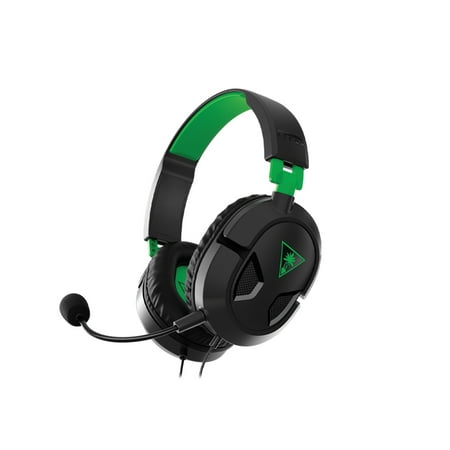
Take gaming audio and comfort to the next level with the Turtle Beach® Recon 50 gaming headset, featuring a lightweight and comfortable design, high-quality 40mm over-ear speakers, and convenient in-line controls. Features Lightweight & Comfortable Design: The Recon 50 features Turtle Beach’s...
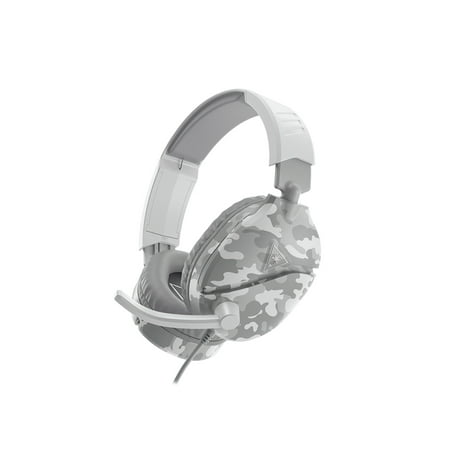
The Turtle Beach® Recon 70 gaming headset features a lightweight and comfortable design for hours of play, high-quality 40mm over-ear speakers to hear ever critical audio cue, and a high-sensitivity flip-up mic to ensure you are heard loud and clear on games that support in-game chat capability....
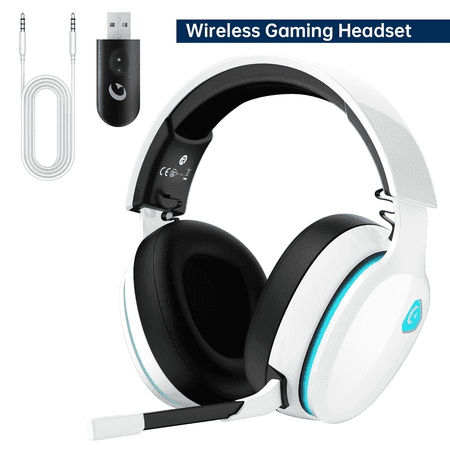
Product details Ecomoment is professionally focusing on wireless gaming headsets & consumer electronic supplies. In the future, we will continuously develop and expand our product portfolio to inspire more and more gamer & audiophile to enjoy every brilliant moment in their lives. Why Choose...
Prices and availability are accurate as of June 2026 and may vary.
Frequently Asked Questions
Are gaming headsets actually worth buying over regular headphones?
It depends. Gaming headsets pack a mic and tune for game audio. Regular headphones (especially audiophile models) often sound better for music and have better build quality, but you’ll need a separate mic. For most gamers, an all-in-one headset is more convenient and delivers perfectly good audio.
Can I use wireless gaming headsets with Xbox?
Xbox uses a proprietary wireless protocol, so not all wireless headsets work with it. Look for “Xbox licensed” on the box or use a headset with a 3.5mm wired connection to the controller.
How long do gaming headsets typically last?
A quality gaming headset should last 2–4 years with regular use. The most common failure points are: ear pad foam degradation (replaceable), cable fraying (detachable cables fix this), and mic failure. Spend more upfront on build quality and you’ll replace it less often.
Do I need a DAC or sound card for gaming headphones?
For most gaming headsets under $150, your motherboard or controller audio is sufficient. High-impedance headphones (80+ ohms) or serious audiophile cans benefit from a USB DAC/amp. For competitive gamers, a dedicated DAC can reduce electrical noise from the motherboard and improve clarity.
What’s more important for competitive FPS — soundstage or accuracy?
Both matter, but imaging accuracy (knowing exactly where a sound is coming from, not just its general direction) is more important for competitive play. Open-back headphones typically offer better imaging and soundstage than closed-back at the same price point.