Computer Station Nation is reader-supported.
When you buy through links on our site, we may earn an affiliate commission. Learn more.
Quick picks
- Best overall: Logitech G Pro X Superlight 2 — the benchmark for competitive FPS, $149.99
- Best wired under $50: Razer DeathAdder V3 — flawless sensor, ergonomic shape, $43.99
- Best mid-range wireless: Razer Viper V3 HyperSpeed — lightweight wireless at $49.99
- Best value wireless: SteelSeries Rival 3 Wireless — dual-mode wireless, 400-hour battery, $47
- Best budget wireless: Logitech G305 — LIGHTSPEED for $39.99
- Best entry-level: Logitech G203 — solid wired starter with RGB, $29.99
- Best ultra-budget: Razer DeathAdder Essential — proven ergonomic shape, $24.98
A gaming mouse doesn’t need to be expensive to perform well. It doesn’t need RGB or 20 side buttons or a flashy name. What it needs: an accurate sensor, low click latency, and a shape that works for your hand across a long session. That’s it.
Seven mice across four price tiers — $25 budget wired to $150 premium wireless. We’ll tell you exactly who each one is for and who should skip it.
At a glance
| Mouse | Best for | Weight | Connectivity | Price |
|---|---|---|---|---|
| G Pro X Superlight 2 | Competitive FPS, premium | ~60g | Wireless | $149.99 |
| Razer DeathAdder V3 | Competitive FPS, budget | ~59g | Wired | $43.99 |
| Razer Viper V3 HyperSpeed | Mid-range wireless | ~82g | Wireless | $49.99 |
| SteelSeries Rival 3 Wireless | Value wireless, dual-mode | ~88g | Wireless + BT | $47 |
| Logitech G305 | Budget LIGHTSPEED wireless | ~99g | Wireless | $39.99 |
| Logitech G203 | Entry-level wired with RGB | ~85g | Wired | $29.99 |
| Razer DeathAdder Essential | Ultra-budget wired | ~96g | Wired | $24.98 |
Logitech G Pro X Superlight 2 — best overall
| Sensor | HERO 2 (32,000 DPI, 500 IPS) |
| Weight | ~60g |
| Switches | LIGHTFORCE optical-mechanical |
| Polling rate | Up to 2,000 Hz wireless |
| Battery | ~95 hours |
| Price | $149.99 |
Rating: 9.2/10
This is the mouse every other gaming mouse is benchmarked against. At 60 grams with no honeycomb cutouts, LIGHTFORCE optical-mechanical switches, and 2,000 Hz LIGHTSPEED wireless, the Superlight 2 hits the current ceiling for competitive FPS hardware. The HERO 2 sensor tracks with near-zero jitter at any competitive sensitivity.
Fair complaints: no DPI button on the mouse body, and the scroll wheel click is stiff. The $149.99 price isn’t cheap. But if you’re treating your mouse as a long-term investment and performance is the only variable that matters, nothing here beats it. Read the full Logitech G Pro X Superlight 2 review.
- LIGHTFORCE switches — no debounce delay, 100 million click rating
- 2,000 Hz wireless polling — first mouse to offer this wirelessly
- ~95 hours battery; Powerplay compatible
- 60g solid shell with no structural compromise
- No DPI button on the mouse body
- Stiff scroll wheel click
- $150 is steep for a 5-button mouse
Razer DeathAdder V3 — best wired under $50
| Sensor | Focus Pro 30K (500 IPS) |
| Weight | ~59g |
| Switches | Razer optical-mechanical gen-3 |
| Polling rate | 1,000 Hz (8,000 Hz with adapter) |
| Connectivity | USB-C wired |
| Price | $43.99 |
Rating: 8.8/10
At $43.99, the DeathAdder V3 has no business being this capable. The Focus Pro 30K matches the Superlight 2’s HERO 2 in practical tracking accuracy — near-zero jitter, no angle snapping at competitive speeds. Razer’s gen-3 optical switches fire without debounce delay. The right-handed ergonomic shape is one of the most refined forms in the industry.
The only thing you’re giving up versus the Superlight 2 is wireless. Add Razer’s HyperPolling adapter ($30) and you push to 8,000 Hz polling. Skip it and you still have a world-class competitive mouse for under $50. Check the full head-to-head against the Superlight 2.
- Focus Pro 30K sensor — flagship-class accuracy at a budget price
- 59g — matches the Superlight 2 in weight
- Ergonomic right-handed shape for palm and claw grip
- Wired only
- HyperPolling adapter is a separate $30 purchase
- Right-handed shape only
Razer Viper V3 HyperSpeed — best mid-range wireless
| Sensor | Focus X (26,000 DPI) |
| Weight | ~82g |
| Polling rate | 1,000 Hz |
| Battery | ~280 hours (AAA) |
| Connectivity | HyperSpeed 2.4 GHz wireless |
| Price | $49.99 |
Rating: 8.3/10
Wireless gaming under $50 used to be a bad idea. The Viper V3 HyperSpeed changed that. HyperSpeed 2.4 GHz, 82g, symmetrical shape that works for both hands, and around 280 hours of battery on a single AAA. That’s a lot of mouse for the price.
The Focus X sensor is Razer’s mid-tier option — 26,000 DPI max, 300 IPS tracking speed. Fully capable for most competitive play, but it doesn’t hit the accuracy ceiling of the top-tier sensors. For first-time wireless buyers who don’t want to spend $100+, this is the pick.
- Wireless under $50 — rare at this price point
- ~280-hour battery life on a single AAA
- Symmetrical shape — works for both hands
- Focus X sensor is a step below flagship accuracy
- 82g — heavier than competitive lightweight mice
SteelSeries Rival 3 Wireless — best value wireless
| Sensor | TrueMove Air (18,000 DPI) |
| Weight | ~88g |
| Polling rate | 1,000 Hz |
| Battery | ~400 hours |
| Connectivity | 2.4 GHz wireless + Bluetooth |
| Price | $47 |
Rating: 8.0/10
The Rival 3 Wireless is for players who use more than one device and hate thinking about charging. It does both 2.4 GHz for your gaming PC and Bluetooth for a laptop or second machine. Battery life hits around 400 hours on a AAA — about two months between charges. The TrueMove Air sensor handles everything from casual gaming to mid-level competitive. Solid value at $47.
- ~400-hour battery — charge every two months
- Dual wireless: 2.4 GHz and Bluetooth
- Good build quality for the price
- 88g — not a lightweight option
- TrueMove Air accuracy ceiling is below flagship tier
Logitech G305 — best budget LIGHTSPEED wireless
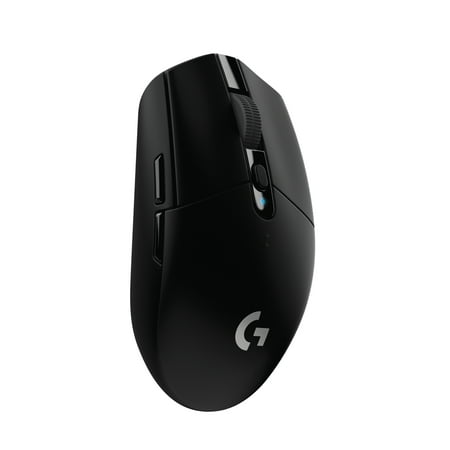
G305 features the next-gen HERO sensor with 12,000 DPI sensitivity and LIGHTSPEED wireless 1 ms performance. It’s long-lasting with 250 gaming hours from one AA battery (an indicator light reminds you before you need a new AA), ultra-portable with built-in nano receiver storage, lightweight...
| Sensor | HERO (12,000 DPI) |
| Weight | ~99g (with AA battery) |
| Polling rate | 1,000 Hz |
| Battery | ~9 months (AA) |
| Connectivity | LIGHTSPEED wireless |
| Price | $39.99 |
Rating: 7.9/10
The G305 is the cheapest way into Logitech’s LIGHTSPEED ecosystem. At $39.99 you get the same 2.4 GHz wireless the $150 Superlight 2 runs on, a HERO sensor accurate enough for most competitive play, and nine months of battery on a AA battery. You basically never have to think about charging it.
The tradeoff is weight. At ~99g with the battery installed, it’s noticeably heavier than the rest of this list. Coming from a typical office mouse, that feels normal. Coming from a 60g mouse, it’ll feel heavy.
- LIGHTSPEED wireless for $39.99
- ~9-month battery life on a AA — no charging needed
- HERO sensor is accurate and power-efficient
- ~99g — significantly heavier than modern lightweight mice
- 12,000 DPI sensor ceiling below flagship tier
Logitech G203 LIGHTSYNC — best entry-level wired
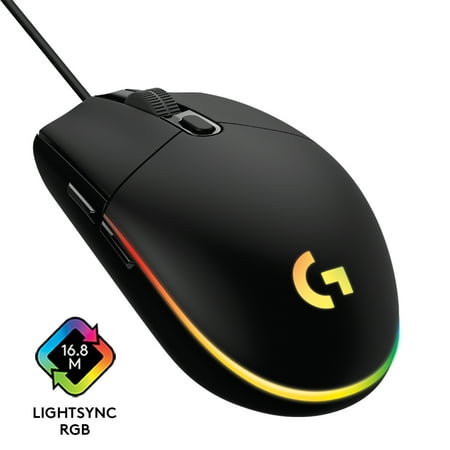
G203 LIGHTSYNC is ready to play with an 8,000 DPI sensor and customizable, vibrant LIGHTSYNC RGB. LIGHTSYNC RGB can be customized with color wave effects or patterns across ~16.8 million colors to suit your play style, setup, and mood. * A classic 6-button design gets you right into the game and...
| Sensor | Logitech custom optical (8,000 DPI) |
| Weight | ~85g |
| Polling rate | 1,000 Hz |
| RGB | Yes — LIGHTSYNC |
| Connectivity | USB wired |
| Price | $29.99 |
Rating: 7.7/10
For $29.99, the G203 is a solid first gaming mouse. 8,000 DPI sensor, 1,000 Hz polling, LIGHTSYNC RGB. The symmetrical shape works for palm and claw grip. It’s not a high-level performance mouse, but it does the job for new gamers and secondary-PC setups without requiring a second thought at the price.
- Strong entry-level value at $29.99
- LIGHTSYNC RGB
- Comfortable shape for beginners
- Sensor accuracy below the competitive tier
- Standard mechanical switches with debounce delay
- Wired only
Razer DeathAdder Essential — best ultra-budget
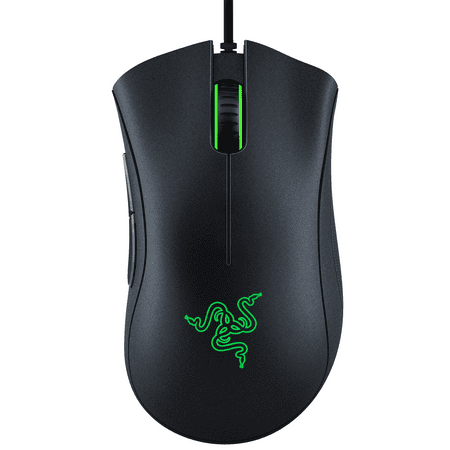
The Razer DeathAdder Essential is the essential gaming mouse to kickstart a proper gaming rig. The 6,400 DPI optical sensor enables fast and precise swipes for great control, while an ergonomic form allows for extended hours of gaming. It’s also built for durability, featuring 5 Hyperesponse...
| Sensor | Razer optical (6,400 DPI) |
| Weight | ~96g |
| Polling rate | 1,000 Hz |
| Buttons | 5 |
| Connectivity | USB wired |
| Price | $24.98 |
Rating: 7.5/10
The DeathAdder Essential puts the classic right-handed ergonomic shape at $24.98. The 6,400 DPI sensor tracks cleanly at casual-to-moderate speeds. Build quality is solid — you can use this mouse daily for years without problems. Don’t expect flagship accuracy or optical switches at $25. What you get is a reliable, comfortable mouse with a proven shape that doesn’t require any justification at this price.
- DeathAdder ergonomic shape at $25
- 1,000 Hz polling
- Durable, proven build
- 6,400 DPI sensor is below competitive tier
- ~96g — heavier than modern performance mice
Verdict
The Logitech G Pro X Superlight 2 is the best gaming mouse available if performance is your only variable. LIGHTFORCE switches, 2,000 Hz wireless, 60g solid shell, 95-hour battery — no meaningful weakness for competitive play.
If $150 is out of reach, the Razer DeathAdder V3 at $43.99 is the runner-up for competitive FPS. Same sensor class, same optical switch tech, proven ergonomic shape — at less than a third of the price. Crazy value.
Buying advice
Competitive FPS players on any budget should prioritize sensor accuracy and low click latency. Weight matters at low DPI where you’re making large arm movements. The DeathAdder V3 at $44 and the Superlight 2 at $150 are the two picks — one for budget-conscious players, one for people who want the best available.
Players who want wireless without spending $100+ should look at the Viper V3 HyperSpeed ($50) or SteelSeries Rival 3 Wireless ($47). The G305 ($40) is the call if you’re already in the Logitech ecosystem and specifically want LIGHTSPEED.
New or casual gamers won’t go wrong with the G203 ($30) or DeathAdder Essential ($25). Neither will hold you back at beginner-to-intermediate play levels, and both leave money for the rest of your battlestation.
Frequently asked questions
What DPI should I use for gaming?
Most competitive FPS players use 400 to 800 DPI. Higher DPI isn’t better — it just moves the cursor faster. The right number is whatever lets you aim precisely at your monitor size and in-game sensitivity. Check our guide on how to set the right DPI for gaming for the full breakdown.
Is wireless gaming mouse lag a real concern?
Not with modern 2.4 GHz wireless. LIGHTSPEED and HyperSpeed both measure at sub-1ms latency consistently — matches or beats most wired connections. Bluetooth is slower and not recommended for competitive play.
How much should I spend on a gaming mouse?
Solid performance starts at $40–$50. Above $100 you’re paying for wireless tech and premium switches — meaningful for serious competitive players, irrelevant for casual gaming. The DeathAdder V3 at $44 is the best price-to-performance ratio on this list.
Does a lighter mouse help with gaming performance?
At low sensitivities with large arm movements, lighter mice reduce fatigue and allow faster repositioning. It’s real for high-level competitive players. For casual gaming, the difference between a 60g and 96g mouse is minimal in everyday play.