Computer Station Nation is reader-supported.
When you buy through links on our site, we may earn an affiliate commission. Learn more.
So you need a microphone for your computer. Simple enough, right?
Not even close. Scroll any mic aisle for five minutes and you’ll hit condenser mics, dynamic mics, USB mics, XLR mics, cardioid patterns, omnidirectional patterns, with prices anywhere from thirteen bucks to twelve hundred. It’s a lot.
This guide cuts through all of it. You’ll learn what actually matters, what’s marketing fluff, and how to match a mic to the thing you actually do. If you want the short version first, our Best Computer Microphone roundup covers the top picks by use case. Otherwise, read on.
TL;DR
Most people should buy a USB mic with a cardioid pattern in the $50–$150 range. If your room is noisy or echoey, pick a dynamic mic instead of a condenser. It rejects background noise. Skip XLR unless you’re recording music or doing professional voiceover, because the USB quality gap has mostly closed. And never skip a pop filter or a boom arm: placement fixes more bad audio than price.
On this page
- What to look for: mic type, connection, polar pattern, specs, extras
- Key specs explained, by price tier
- Who it’s for: the buyer profiles
- Top picks from current listings
- Red flags to avoid
- FAQ
What to look for
Every microphone is a bundle of tradeoffs. Here are the decisions that actually change your audio, in the order you should make them.
Dynamic vs. condenser
Mic type is the biggest decision, and the question isn’t which one is “better.” It’s what your room sounds like. Dynamic mics use a moving coil and are less sensitive, which means they ignore background noise, room echo, and keyboard clatter. Condensers use a charged diaphragm and capture far more detail, along with every car that drives past. Reddit streamers hammer this point constantly: in an untreated room, a dynamic mic gets you cleaner audio than a condenser that costs three times as much.
If your space is quiet and treated, a condenser rewards you with detail. If it isn’t, buy dynamic and thank yourself later. The tradeoff is real: the same sensitivity that makes a condenser flattering on a quiet voice makes it merciless in a loud one.
USB vs. XLR
USB mics are plug-and-play: the preamp and the analog-to-digital converter live inside the mic body. XLR mics connect to a separate audio interface, which gives you room to upgrade components later but adds cost and setup. For almost everyone reading this, USB is the right call. The quality gap has narrowed a lot. A good USB mic sounds genuinely good. Go XLR if you’re recording music or doing paid voiceover and you expect to keep growing the setup over time.
One middle path worth knowing about: hybrid mics with both USB and XLR outputs. You start with USB, and when you eventually buy an interface, the same mic moves over with you. It’s a small insurance policy that costs a little more up front.
Polar patterns
A polar pattern is the shape of the mic’s pickup area. Cardioid picks up mostly what’s in front of it and rejects the sides and rear. That’s the one you want for solo voice work. Omnidirectional grabs everything in the room, which is useful for conference calls and bad for streaming. Bidirectional (figure-8) handles two-person interviews. Stereo is for instruments. Multi-pattern mics let you switch between several; nice to have, not required.
If you’re buying one mic for one voice, cardioid is the answer nine times out of ten. The only common exception is a round-table meeting where multiple people speak from different directions. That’s when an omnidirectional or multi-pattern mic earns its keep.
Sample rate and bit depth
For USB mics, 48kHz/16-bit is plenty for voice. 24-bit/96kHz is nicer if you plan to edit heavily, but you won’t hear the difference on a stream or a podcast. The gain stage matters more than these numbers. A clean preamp at 48kHz beats a noisy one at 96kHz.
As a point of reference, the fundamentals of adult speech sit around 90–255 Hz depending on the speaker, and even the modest telephone voice band of 300–3400 Hz carries speech clearly. That’s why even budget mics, which all cover the full 20 Hz–20 kHz range, sound fine for talking: the hardware ceiling was never the problem.
Self-noise
Self-noise (equivalent noise level) is the hiss the mic itself produces, measured in dB-A. Lower is better. Condenser spec sheets list it, and you want it as low as you can afford. Dynamic mics rarely list it because it isn’t relevant to how they work. In practice, this number matters most for quiet recordings; a loud gaming session covers it up anyway.
Max SPL
Max SPL is how loud a sound the mic can handle before distorting. Voice is not loud. Anything above 120 dB SPL is plenty for speech. This spec only matters if you’re miking drums or guitar amps, so for 99% of computer users it’s a checkbox you can ignore.
The extras that actually matter
Mute button: huge for gaming and meetings. Gain knob: adjusts input level without digging through software. Headphone jack with live monitoring: lets you hear yourself in real time, which is the single best tool for fixing bad mic technique. A built-in pop filter and shock mount save you twenty bucks in accessories later. Skip RGB unless it sparks joy.
One extra that doesn’t get enough credit: a mute light. Mics with a visible indicator on the body or the desk tell you at a glance whether you’re live. On a gaming headset or a busy call, that single detail prevents most of the awkward “can you hear me now” moments.
Key specs explained, by price tier
Here’s how the specs above shake out by price tier, using current listings. Prices change, but the shape of the market doesn’t.
| Tier | Typical price | Type & pattern | What you get |
|---|---|---|---|
| Budget | Under $30 | Condenser, cardioid or multi | Fine for calls and casual gaming; watch out for higher self-noise |
| Mid | $30–$100 | Condenser or dynamic, USB | The sweet spot: clean audio for streaming, podcasting, and work |
| Enthusiast | $100–$250 | Dynamic or condenser, USB or hybrid | Pro-grade sound; often adds gain control and live monitoring |
| Pro | $250+ | Dynamic, usually XLR | Broadcast standards like the Shure SM7B; needs an interface |
The biggest jump in quality happens between budget and mid tier. That’s where you stop sounding like you’re talking through a blanket. Beyond that, you’re paying for better build, better software, and features like multi-pattern switching rather than a dramatic sound upgrade.
One honest note on the top end: the Shure SM7B is a legendary mic. It’s the one engineer Bruce Swedien used on most of Michael Jackson’s lead vocals for Thriller. But that pedigree doesn’t make it the right mic for a Discord call. It needs an interface with real gain, it’s heavier than most boom arms want to hold, and it costs more than every other part of a typical desk setup combined.
Who it’s for
Match the mic to the job. Here are the profiles we see most, with the spec targets that fit each one.
Gamers and streamers
If your mic sits six inches from your mouth while you game, you want a USB mic with a cardioid pattern and a mute button you can hit blind. A condenser is fine in a quiet room; in a loud one, go dynamic. Budget $50–$150, and put the rest toward a boom arm. A mic on an arm six inches from your mouth beats a better mic on a desk stand three feet away, every single time. If you stream, think about what’s on your desk while you play: mechanical keyboards, fans, and roommates all show up in the recording. The category moves fast, so our Best USB Microphone For Streaming guide ranks the current options in detail, including which models handle mechanical keyboards without picking up every keystroke.
Content creators on YouTube
You’re on camera, which means the mic is in frame and the room is whatever it is. Same advice as streamers, plus one extra: a boom arm keeps the mic close and off the desk. Audio matters more than resolution for retention. Viewers forgive average video, but they bounce fast from muffled sound. If you’re shooting talking-head videos in an untreated bedroom, lean toward a dynamic mic with tight pickup and accept that you’ll need to sit fairly close to it. You also want to record a quick test clip and listen on headphones before you commit to a final choice, because mics that sound impressive in a spec sheet can sound thin in practice. If you’re trying to stay under a hundred bucks, our Best Cheap Microphone For YouTube roundup is a solid starting point, and it separates the mics that sound good on camera from the ones that only look good in the thumbnail.
Podcasters and voiceover work
Voiceover favors a dynamic mic for its noise rejection, or a large-diaphragm condenser if your room is treated. You’ll also want a pop filter and an arm stand. The difference between “podcast audio” and “voiced over a laptop” is mostly those two pieces. If you record interviews with a guest, a bidirectional pattern lets you both share one mic, which is cheaper and simpler than buying two. Think about your editing workflow too: a mic with a consistent tone across your speaking range saves you hours of EQ work later, and a built-in gain knob means you can set levels without opening software mid-session. Whatever you pick, give yourself a week with it before judging — mics take a few sessions to get used to, and your first recording will always sound stranger than your tenth. For the current favorites, check our Best USB Microphone For Voice Over guide, which breaks down the picks by room type and budget.
Musicians, singers, and ASMR
These are the cases where sensitivity is the feature, not the bug. A large-diaphragm condenser captures the detail you’re after, and ASMR in particular lives and dies on a quiet room plus a sensitive capsule. Singing adds one more requirement: a mic that handles loud peaks without distortion. You also want a pop filter no matter what. Vocals and plosives go together like peanut butter and jelly. And if you record music, leave headroom in your levels: a vocal that peaks around -6 dB gives your editor room to work without clipping, which matters more than any frequency-response spec on the box. If you’re recording both voice and guitar or piano, a mic with a switchable pad will save you from clipping on the loud strummed chords, so it’s worth checking for one. The Best USB Microphone For Singing guide covers the options that handle vocals well, from entry-level condensers to models that survive a loud bridge section.
Remote workers
Meetings are the most common use case and the easiest to satisfy. Any decent USB mic beats a laptop’s built-in array, and a headset with a boom mic is even simpler. No positioning required, no room echo from a mic sitting far away. If your days are full of calls, comfort is the hidden spec: a headset you’d rather take off after twenty minutes is a headset you won’t use, no matter how good it sounds. Look for a plush band, a lightweight frame, and a mute switch that’s easy to find by feel. Test it on your actual meeting app, not just a voice memo, because call software applies its own processing and can make a great mic sound worse. The picks in our Best Headset Microphone For Recording Audio guide are built for exactly that: clear speech, a comfortable fit for eight hours, and a mute switch that’s easy to find when your kid walks in mid-sentence.
Top picks from current listings
These are the products that currently sit in the price ranges most buyers should target. Prices and ratings come from live listings and change often.
HyperX SoloCast 2 — $59. The default recommendation. USB-C plug-and-play, built-in pop filter and shock mount, 24-bit/96kHz, compact tiltable stand. Sounds good out of the box in a normal room.
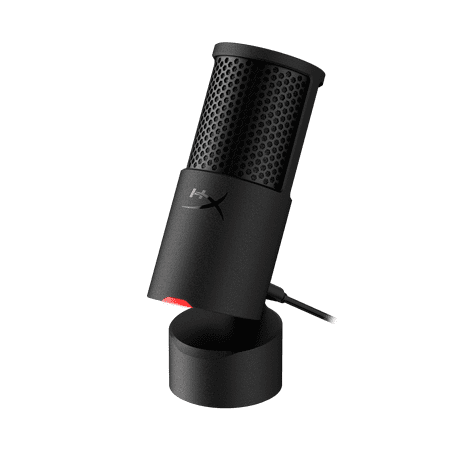
HyperX Solo Cast 2 is an all-in-one USB microphone designed for gamers and creators who want great sound without the fuss. Featuring a built-in shock mount, internal pop filter, and tiltable stand, this plug-and-play mic delivers clear audio in a compact, self-contained form. Customize your...
onn USB Tri-Pattern Microphone — $29.83. Budget all-rounder with volume and mute controls plus a 3.5mm headphone jack, three features you usually pay double for.
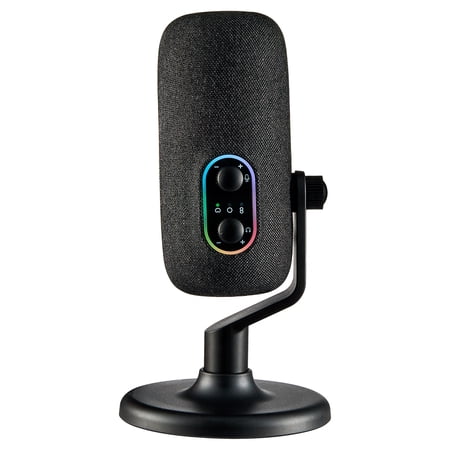
Clear sound starts with the onn USB Tri-Pattern Microphone. It is designed to help you record, stream, or chat with consistent audio that is easy to manage. You can choose from three recording patterns, including cardioid, omnidirectional, and bidirectional, so it works for different setups like...
onn USB Tri-Pattern Gaming Microphone — $41.87. The gaming variant of the onn above, with the same volume, mute, and headphone controls. Pick this one if you want the extra features tuned for streaming.
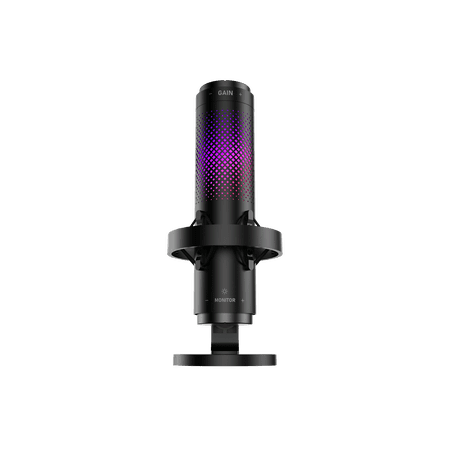
The onn USB Tri-Pattern Gaming Microphone is built to help you sound clear and in control while you play, stream, or record. It offers three recording patterns, including cardioid, omnidirectional, and bidirectional, so you can match your setup whether you are solo or with others. The built-in...
Atzeste USB Microphone — $21.99. Cheap gaming mic with a headphone output, volume control, and a mute button that lights up. A solid first mic for calls and casual streaming.
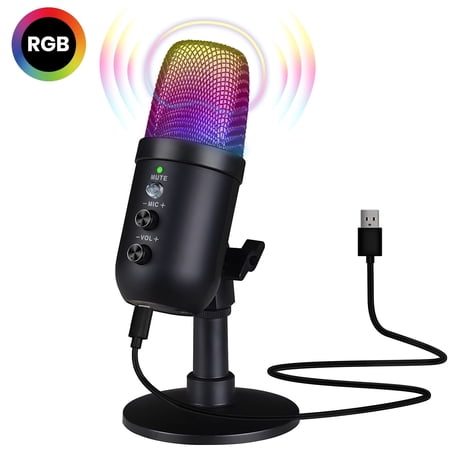
Elevate your content creation with this premium USB microphone, featuring intelligent noise cancellation, a cardioid pickup pattern, and customizable RGB lighting that enhances your streaming or gaming setup. With a high-quality audio processing chip, adjustable gain, volume, and reverb...
Popu Pine USB Condenser — $13.09. The “prove you need a better mic” pick. It works, it’s thirteen bucks, and it will show you exactly where your audio falls short before you spend real money.
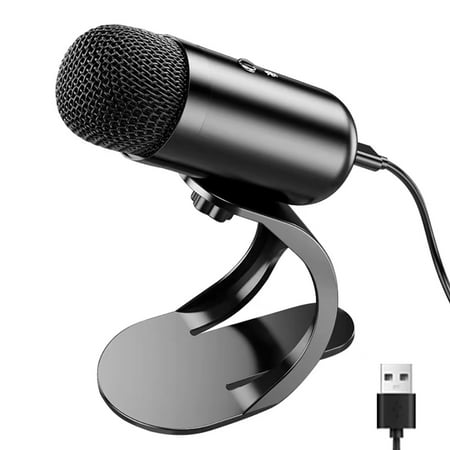
♫【All Metal Cavity & Plug and Play】Popu Pine USB Microphone body with metal material, provide stability. Easy Plug and play microphone, built-in sound card, no drivers to install, use type-c port simply plug the microphone into any available USB port, select and default it as your input device...
Bower Wireless Lavalier — $20.72. Not a desk mic. It’s a clip-on lavalier for content creators who move around or record on camera. Different tool, same purpose: audio that doesn’t embarrass you.
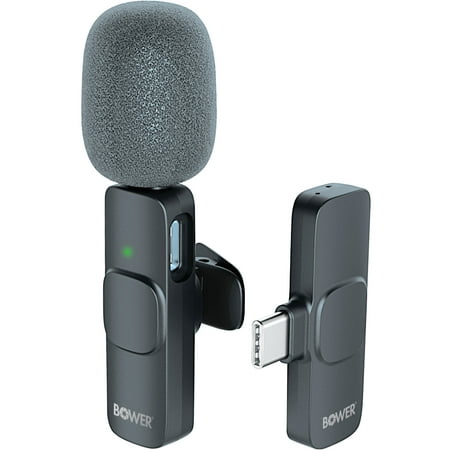
Introducing the Bower wireless Lavalier Microphone - your go-to solution for seamless wireless audio recording. Say goodbye to tangled cables and hello to convenience. This compact device revolutionizes audio recording, allowing you to move and speak freely while maintaining impeccable sound...
Red flags to avoid
A few mistakes I see over and over.
Buying a condenser for a loud, untreated room. That sensitive capsule will faithfully record your A/C, your roommate, and the car outside. Get a dynamic, or treat the room first.
Assuming expensive means better for your use case. A studio broadcast mic is overkill for Discord. Most people need a $50–$100 USB mic, and plenty of people are served fine by a budget gaming mic like the ones in our Best Budget Mic For Gaming guide.
Ignoring mic placement. The most common cause of bad audio isn’t a bad mic. It’s a mic sitting three feet away on the desk. Boom arm, six to twelve inches from your mouth, slightly off-axis to cut plosives. A $60 mic placed well beats a $200 mic placed badly.
Skipping the pop filter. It’s ten bucks and it kills the harsh “p” and “b” pops. No excuse.
Chasing specs you don’t need. Sample rate, bit depth, max SPL. None of it fixes a noisy room or a mic that’s too far away. Spend on placement and acoustics before you spend on the next tier up.
FAQ
Do I need an XLR microphone and an audio interface?
Only for music recording or professional voiceover. For streaming, podcasting, gaming, and meetings, a USB mic sounds great and skips the interface entirely. You can always upgrade to XLR later without losing much. Your mic arm, pop filter, and software all carry over.
What’s the difference between dynamic and condenser microphones?
Dynamic mics are less sensitive and reject background noise. That makes them the right choice for untreated rooms. Condensers capture more detail and need a quieter space. Neither is “better”; it’s about matching the mic to your room. The classic test: clap your hands next to the mic. A dynamic barely reacts; a condenser gives you the whole room.
Why does my voice sound bad on calls even though my mic is fine?
Usually placement, not the mic. Keep the mic six to twelve inches from your mouth, slightly off to one side, and use a pop filter. Also check that you’re speaking into the correct side of a cardioid mic. They’re directional, and the dead side is behind them. If it still sounds thin, check your OS input level: a mic set too low gets boosted by software, and that boost adds noise.
How much should I spend on a first microphone?
A $50–$100 USB cardioid mic is the sweet spot and will sound good for years. Under $30 is fine for casual calls. Above $150 you’re mostly paying for extras you won’t need until you’re serious about recording. Spend the difference on a boom arm and a pop filter first. They improve your audio more than doubling the mic budget.
Do I need a shock mount or a boom arm?
A boom arm is the bigger upgrade: it puts the mic at mouth height and keeps desk vibrations out of the recording. A shock mount matters if you’re on a wobbly desk or you type heavily while recording. Both are cheap compared to a mic, and both fix the two most common causes of bad-sounding audio.
The bottom line
For most people reading this, the answer is a USB cardioid mic in the $50–$150 range. Gamers, streamers, remote workers, podcasters, that’s you. Noisy or echoey room? Lean dynamic. Quiet and treated? A condenser will make your voice sound great. Place it well, add a pop filter, and you’re done.
Don’t overthink it. The best mic is the one that sounds good in your actual space, for your actual use case. Now go make some noise.