Computer Station Nation is reader-supported.
When you buy through links on our site, we may earn an affiliate commission. Learn more.
Your mic matters more than you think. You can have a clean audio chain on your end, but if your voice arrives muddy, compressed, or echoey, nobody sticks around for the podcast, the stream, or the call. A headset microphone keeps the capsule locked in a fixed position relative to your mouth, so your levels stay consistent session after session. That consistency is the whole reason headset mics still earn a spot next to fancy standalone condensers.
This guide is for anyone who records their voice on a computer: podcasters starting out, streamers, remote workers on back-to-back calls, students recording lectures, and teachers running online classes. You don’t need a studio to sound decent. You need a mic that sits close to your mouth, rejects the noise around you, and doesn’t make you fight the software.
We evaluated six headset microphones available right now, judged them on voice clarity, background noise rejection, comfort for long sessions, and price. The picks below cover the full range, from a $14 call-center workhorse to a wireless option that frees you from the desk. If you just want the short version: the Logitech H390 is the best all-around pick for recording and calls, and the Ecomoment Gaming Headset is the best budget gaming option.
Quick Picks
- Best overall: Logitech H390 — the reliable USB workhorse for recording, calls, and everything in between
- Best for gaming: Ecomoment Gaming Headset — wired over-ear with noise-canceling mic and RGB
- Best wireless: Froura Wireless Headset — 2.4GHz Bluetooth freedom at a budget price
- Best ultra-budget: USB Headset with Boom Mic — $14, noise-canceling, and it just works
- Best USB-C: Over-Ear USB-C Wired Headset — foldable, travel-friendly, and modern-port ready
- Best for teaching: JZROCKER Wireless Mic Headset — hands-free voice amplification for classrooms
How We Chose
After evaluating six headset microphones based on voice clarity, noise rejection, comfort, connectivity, and price, we selected the picks above for different jobs: calls, gaming, wireless use, tight budgets, USB-C setups, and live teaching. We leaned on store ratings and review counts from real buyers, cross-checked the top picks against other 2025-2026 headset roundups, and kept the list honest about each product’s weak spots. No product here gets a free pass just because it is cheap.
If you are weighing a headset against a full-size desktop mic, our Best Computer Microphone guide covers the standalone options and walks through that decision step by step.
Things to Consider
Before you buy, think about how you’ll actually use the mic. Wired USB headsets like the Logitech H390 are plug-and-play on any computer, never run out of battery, and cost less. Wireless options free you from the desk but add charging and occasional pairing quirks. For recording, a boom-style mic that sits close to your mouth will sound cleaner than a far-field mic, because it picks up more of your voice and less of the room. And if you’re on calls all day, weight and padding matter as much as audio quality.
Three questions settle most purchases. First, wired or wireless: wired wins on reliability and price, wireless wins on freedom. Second, what platform: most USB headsets work on everything, but gaming headsets like the Ecomoment add console compatibility, while USB-C models suit modern laptops. Third, how much noise surrounds you: if your space is loud, prioritize a noise-canceling boom mic over raw frequency response. Answer those three and the right headset picks itself.
Two more details are easy to overlook. Cable length matters more than you’d expect: a short cable forces you to sit hunched over a USB hub, while a long one lets the headset reach a desktop tower or a wall jack without a fight. And check the mic type, not just the marketing. A real boom mic with a noise-canceling capsule beats a tiny in-line remote mic on every recording test, because the capsule sits closer to your mouth and away from your shirt collar. Most of the picks below use boom-style mics for exactly that reason.
At a Glance
| Product | Best For | Price | Rating |
|---|---|---|---|
| Logitech H390 | Overall / calls & recording | $19.88 | 4.0 |
| Ecomoment Gaming | Gaming & streaming | $15.99 | 4.0 |
| Froura Wireless | Wireless work | $25.99 | 4.0 |
| USB Headset with Boom Mic | Ultra-budget | $13.98 | 4.0 |
| Over-Ear USB-C | USB-C laptops & travel | $15.99 | 4.0 |
| JZROCKER Wireless | Teaching & voice amplification | $10.18 | — |
Contents
- Logitech H390 — best overall
- Ecomoment Gaming Headset — best for gaming
- Froura Wireless Headset — best wireless
- USB Headset with Boom Mic — best ultra-budget
- Over-Ear USB-C Headset — best for USB-C setups
- JZROCKER Wireless Mic — best for teaching
- Headset mic vs. standalone mic
- Verdict
- Buying advice
- FAQ
Logitech H390 — Best Overall
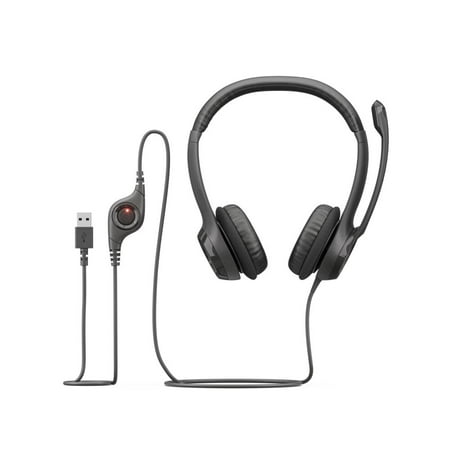
Experience clear internet calls a with simple plug-and-play USB connection and a noise-canceling mic. Rigid left-sided mic boom is moveable and can be tucked out of the way when you're not using it. In-line controls let you control volume or mute without interrupting calls. Laser-tuned drivers...
The Logitech H390 is the pick we keep coming back to, and it shows up on roundup after roundup for a reason. It is a wired USB headset with a noise-canceling boom mic, inline volume control, and a mute button right on the cable. Plug it in and it works on Windows, macOS, and Linux with zero driver hassle.
| Spec | Detail |
|---|---|
| Connection | Wired USB |
| Microphone | Noise-canceling boom mic |
| Controls | In-line volume + mute |
| Audio | Stereo headphones |
| Price | $19.88 |
| Rating | 4.0 / 5 (3,021 reviews) |
Voice comes through clear, the mic cuts a reasonable amount of background noise, and the headset is comfortable for a full workday. No battery, no pairing, no software. That simplicity makes it a natural fit for recording sessions, Zoom calls, and Teams meetings. Buyers rate it 4.0 out of 5 across more than 3,000 reviews, which says a lot at this price.
Where it sits in your setup: if you decide later that you want a dedicated desktop mic for streaming or voiceover work, the H390 still earns its place as a spare headset for calls. It also pairs well with a Best USB Microphone For Streaming pick in a second room or on a second machine, so the two setups don’t fight over one mic.
Pros: Plug-and-play on every OS; reliable noise-canceling mic; comfortable padding; unbeatable price.
Cons: Wired only; mic is good, not studio-grade; on-ear cups press a bit during marathon sessions.
Check the Logitech H390 price on Walmart
Ecomoment Gaming Headset — Best for Gaming
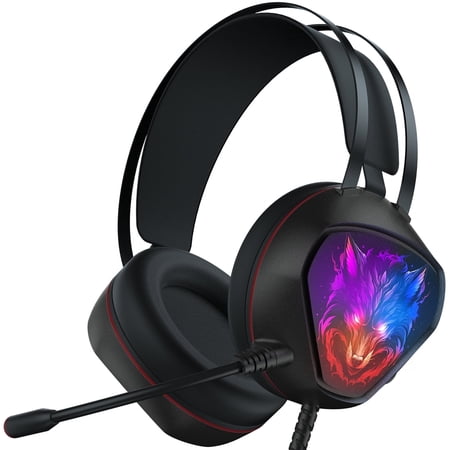
Feel complete immersion without feeling the weight—introducing the a USB PC gaming headset that allows you to game on, and on, and on. The ultra-light USB gaming headset made for gaming marathons. The mic and drivers for greater sound, ear cushions for greater comfort, your gaming is set to go...
If the headset is mostly for gaming and streaming, the Ecomoment brings the features gamers actually use: a noise-canceling mic, bass-heavy surround sound, and RGB lighting, all for $15.99. It connects over a wired 3.5mm or USB-style hookup and works with PC, PS5, Xbox Series X/S, Xbox One, Switch, and Mac, so one headset covers every device in the room.
| Spec | Detail |
|---|---|
| Connection | Wired over-ear |
| Microphone | Noise-canceling mic |
| Audio | Bass surround sound |
| Extras | RGB lighting |
| Compatibility | PC, PS5, Xbox, Switch, Mac |
| Price | $15.99 |
| Rating | 4.0 / 5 (645 reviews) |
The mic does a solid job of keeping your voice front and center while muting keyboard clicks and room noise, which is what your squad actually hears. The RGB is a nice touch for a battlestation, and the over-ear cups stay comfortable through long sessions. At 4.0 stars from 645 reviews, it’s a budget pick with real buyer confidence behind it.
For a dedicated gaming setup, the Best Budget Mic For Gaming guide covers the sub-$25 desktop alternatives if you prefer the mic off your head entirely.
Pros: Multi-platform compatibility; noise-canceling mic; bass-heavy sound; RGB looks great on a battlestation.
Cons: Wired, so no roaming; RGB needs power, so it’s not ideal for pure work use; plastic build feels light.
Check the Ecomoment Gaming Headset price on Walmart
Froura Wireless Headset — Best Wireless
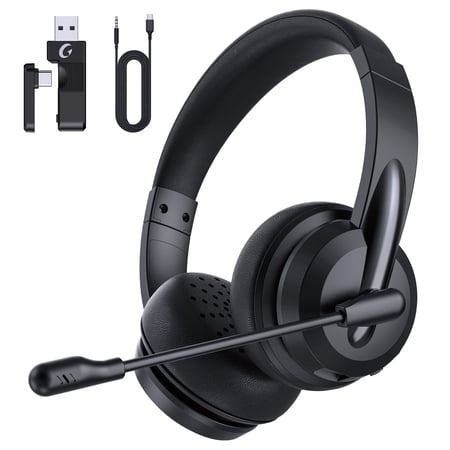
Brand Froura Color Black Wireless Headset with Microphone About this item ✅【 Noise Cancellation & Mic Mute】 Bluetooth headset wireless equipped with rotating flexible sensible and omni-directional microphone providing high-end noise cancellation for clear dialogue with your teammates. Plus,...
The Froura Wireless Headset is the answer when you want to pace around the room during calls. It uses a 2.4GHz Bluetooth connection to your phone, computer, or laptop, with a noise-canceling mic that keeps your voice clear even in a busy room. At $25.99, it undercuts most wireless headsets by a wide margin.
| Spec | Detail |
|---|---|
| Connection | 2.4GHz Bluetooth wireless |
| Microphone | Noise-canceling mic |
| Compatibility | Phone, computer, laptop |
| Use case | Work calls, meetings |
| Price | $25.99 |
| Rating | 4.0 / 5 (744 reviews) |
For work-from-home users who bounce between calls, the wireless freedom is the whole point. The mic quality holds up for meetings and light recording, and the noise cancellation helps when your household is louder than you’d like. Buyers give it 4.0 out of 5 from 744 reviews, and the most common praise is the price-to-feature ratio.
If your calls are mostly video meetings, pair the Froura with the Best Microphone For Video Conferencing guide for a full picture of what to expect from different mic types in meeting software.
Pros: Real wireless range; noise-canceling mic; works with phone and computer; cheap for wireless.
Cons: Battery needs charging; Bluetooth can occasionally need re-pairing; not for studio-grade recording.
Check the Froura Wireless Headset price on Walmart
USB Headset with Boom Mic — Best Ultra-Budget
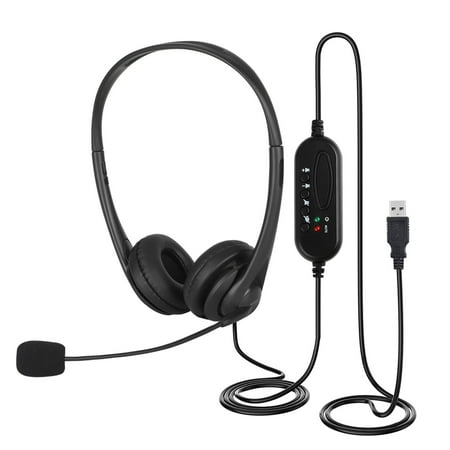
TSV prvides two types of USB Headset(U11/T900 ) with noise cancel microphone & comfortable wearing & volume control for office cal center computer Over-Ear Headphones. In terms of details, these TSV Business-grade Wideband USB Headsets are equipped with digital signal processing (DSP) &...
At $13.98, this USB headset is the cheapest way to get a decent recording voice without gambling on no-name gear. It has a noise-canceling boom mic, volume controls on the cable, and a wired over-ear design aimed at call centers, offices, Skype, and Zoom. If the budget is the budget, this is the safe floor.
| Spec | Detail |
|---|---|
| Connection | Wired USB |
| Microphone | Noise-canceling boom mic |
| Controls | Volume controls on cable |
| Design | Wired over-ear |
| Use case | Call center, office, Skype, Zoom |
| Price | $13.98 |
| Rating | 4.0 / 5 (153 reviews) |
It won’t win any audio awards, but it nails the basics: clear voice, workable noise rejection, and a boom you can position close to your mouth. For students recording lectures, customer service roles, or anyone who needs a spare headset on hand, it gets the job done for less than the price of a pizza.
Need it for a YouTube channel on a budget? The Best Cheap Microphone For YouTube guide covers the sub-$20 options and what each one is actually good at.
Pros: Dirt cheap; noise-canceling mic; plug-and-play USB; volume controls without software.
Cons: Plastic build; average speaker quality; no wireless option.
Check this USB headset price on Walmart
Over-Ear USB-C Headset — Best for USB-C Setups
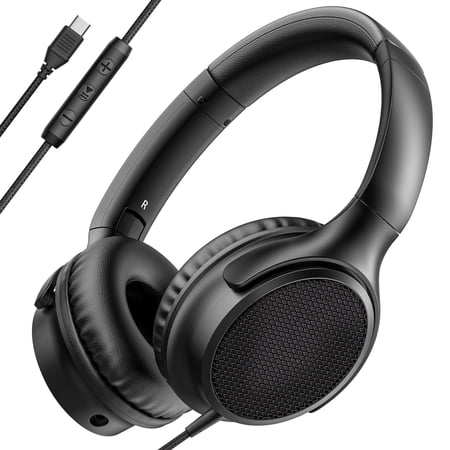
?? Premium Sound, Ultimate Comfort – Your Perfect Everyday Headphones! Experience high-quality stereo sound with deep bass and crystal-clear highs, making every song, call, and video come to life. Designed for all-day comfort, these lightweight headphones feature soft, cushioned ear cups and an...
Newer laptops are dropping USB-A ports, and this foldable USB-C headset is built for exactly that world. It packs HD stereo sound, a built-in microphone, volume control, and a foldable frame for travel, all over a single USB-C connection. At $15.99 it’s a cheap way to keep a mic working with a modern machine.
| Spec | Detail |
|---|---|
| Connection | USB-C wired |
| Microphone | Built-in mic |
| Audio | HD stereo sound |
| Extras | Volume control, foldable |
| Use case | Gaming, travel, relaxing |
| Price | $15.99 |
| Rating | 4.0 / 5 (83 reviews) |
This one is for the person whose laptop has only USB-C ports and who doesn’t want to carry a dongle. The foldable design slips into a bag, the mic is fine for calls and casual recording, and the price is easy to swallow. Reviewers give it 4.0 out of 5, and the foldable travel angle is what sets it apart.
If voiceover work is the goal and the budget allows, a desktop condenser gives you more headroom for vocal range than any headset mic. That route is covered in our Best Desktop Microphone For Gaming guide, which applies beyond gaming if you mostly record from one fixed spot.
Pros: Modern USB-C plug; foldable for travel; HD stereo; works for gaming and work.
Cons: Fewer reviews behind it; not for studio recording; USB-C only, so older PCs need an adapter.
Check this USB-C headset price on Walmart
JZROCKER Wireless Mic Headset — Best for Teaching
short description is not available
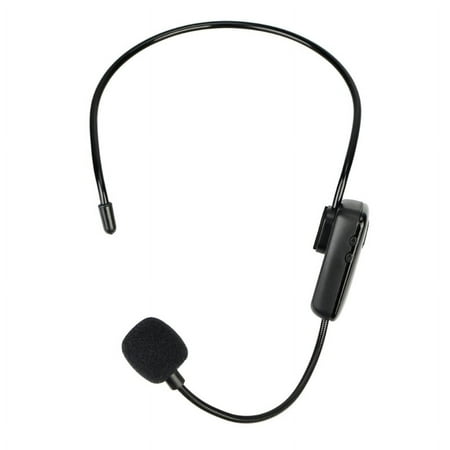
The JZROCKER takes a different angle: it is a wireless mic headset built for voice amplifiers and classroom speakers, not for plugging into a PC. Teachers, tour guides, and anyone who projects to a room can clip the transmitter to an amplifier and talk hands-free at $10.18.
| Spec | Detail |
|---|---|
| Type | Wireless mic headset |
| Use case | Voice amplifier, teaching |
| Compatibility | Voice amplifier speakers |
| Price | $10.18 |
It is the cheapest way to stop shouting over a classroom, and it pairs with the amplifier systems most schools already own. It is not a recording mic, so don’t expect it to replace a USB headset for podcasts or calls. But for its actual job, amplifying a live voice, it is a legitimately useful budget tool.
Pros: Very cheap; wireless and hands-free; works with existing amplifier systems; comfortable for long sessions.
Cons: Not for PC recording; requires a voice amplifier to be useful; no rating data from buyers yet.
Check the JZROCKER mic headset price on Walmart
Headset Mic vs. Standalone Mic
A standalone condenser on a boom arm will almost always beat a headset mic on raw audio quality, because the capsule is bigger and you can position it precisely. But headset mics win on consistency: the capsule stays the same distance from your mouth, which means predictable levels take after take. For streamers who move around, podcasters who want to hit record and go, or anyone who hates fiddling with mic placement, that consistency is worth more than a marginal quality gain.
If your goal is broadcast-grade voiceover, a dedicated XLR mic with an audio interface is the right road. If your goal is clear, reliable audio for calls, streaming, and light recording, a headset mic gets you there for a fraction of the cost and setup time.
Verdict
The Logitech H390 is the clear winner for most people. It balances price, reliability, and sound quality better than anything else here, and its 3,000-plus reviews give it a confidence floor the others can’t match. If gaming is the priority, the Ecomoment Gaming Headset takes the crown at $15.99. If you want to roam during calls, the Froura Wireless is the budget wireless pick to beat.
Buying Advice
Match the headset to the job, not the other way around. Recording or daily calls on a fixed desk setup: get the wired Logitech H390 and never think about batteries again. Gaming across PC and console: the Ecomoment covers every platform with a noise-canceling mic. Moving around during meetings: the Froura Wireless is worth the extra $6. On a hard budget: the $13.98 USB headset is a perfectly usable floor. New USB-C-only laptop: grab the foldable USB-C model and skip the dongle.
One habit improves any of these: position the boom mic an inch or two from the corner of your mouth. The closer the capsule, the less room noise your recording picks up, and the more consistent your levels will be. Pair that with a quiet room and a pop filter if plosives bother you, and a $20 headset will sound closer to a $100 mic than most people expect.
Set your levels once and leave them alone. Aim for peaks around minus 6 dB in your recording software, so there’s headroom for loud words without clipping. Test-record a minute, play it back, and adjust the mic position before you touch any EQ. Nine times out of ten, moving the boom fixes the problem that software settings can’t.
FAQ
Are headset mics good enough for recording?
For podcasts, streams, voice chat, and most voiceover work, yes. A quality headset mic with a noise-canceling boom positioned close to your mouth will sound clean and consistent. It won’t match a large-diaphragm studio condenser, but it’s more than enough for online content.
Wired or wireless headset for recording?
Wired is more reliable and cheaper, with zero battery anxiety and no pairing issues. Wireless is worth it only if you need to move around while talking. For fixed recording sessions, wired USB headsets like the Logitech H390 are the safer choice.
What makes a headset mic sound bad?
Usually positioning. If the boom is too far from your mouth, the mic picks up more room and reverb. Keep the capsule close, avoid pointing it at your keyboard, and turn down gain if your audio clips. A $15 headset positioned well beats a $100 headset positioned badly.
Can I use a gaming headset mic for recording?
Yes, as long as the mic is a noise-canceling boom style rather than an in-line remote mic. Gaming headsets like the Ecomoment are built for voice clarity in noisy rooms, which translates fine to podcasting and streaming.