Computer Station Nation is reader-supported.
When you buy through links on our site, we may earn an affiliate commission. Learn more.
You don’t need to drop four figures on a Neumann to get voice-over audio that sounds professional. I get it, the demo reels from big studios make it look like you need a rack of hardware and a treated booth. But most beginner and mid-level voice-over work, from audiobook narration to YouTube intros to corporate explainers, comes down to one thing: a clean USB microphone that captures your voice clearly and keeps the background noise out. This list is every solid option I found under $60.
Everything here plugs straight into a computer with USB, no audio interface required. If you want the short version, the ZealSound USB is the best all-rounder, the Logitech Yeti Orb is the step-up pick when you want a real condenser at a fair price, and the Bower wireless lavalier is the one to grab if you record on camera or on the move. For the gaming crowd looking to upgrade their stream audio, our best desktop microphone for gaming guide is the companion piece to this one.
Quick picks
- Best overall: ZealSound USB Microphone: full-metal build, pop filter and gain control, built for voice-over and podcasting
- Best step-up condenser: Logitech Yeti Orb: real cardioid condenser from a name brand at a fair price
- Best compact: Razer Seiren V3 Mini: tiny desk footprint, tap to mute, shockingly good for the size
- Best for on-camera / mobile: Bower Wireless Lavalier: clip-on wireless that frees you from the desk
- Best ultra-budget desktop: Popu Pine USB Condenser: under $15 and genuinely usable for voice
- Best budget wireless set: Core Innovations Wireless Lavalier: noise-cancelling plug-and-play pair
How we picked
I judged every mic on four things: how clean the voice capture is for speaking, not singing or gaming, how easy it’s to get usable results without an audio interface, how well it suits a specific recording setup, and, honestly, whether the price makes sense for someone starting out. USB-only, since that’s what removes the most friction for a new voice-over artist. I kept the picks under $60 so the list stays realistic for a first mic.
What to look for in a voice-over microphone
Before the individual picks, it helps to know what actually moves the needle for voice-over, as opposed to gaming or general-purpose webchat. A few things matter more than the price tag.
USB versus XLR
USB mics have the audio interface built in, so you plug them straight into a computer and pick them as your input device. XLR mics need a separate audio interface, which adds cost and another box to your desk. For starting out, USB wins every time. You can add an interface later if you ever move to XLR gear.
Condenser versus dynamic
Condensers are more sensitive and capture a fuller, more detailed vocal tone, which is why they’re the default for studio voice-over. The trade-off is that they also pick up more room noise, so a condenser needs a reasonably quiet space. Dynamics are tougher and reject background noise better, but they tend to sound a little less open for spoken word. For a home voice-over setup, a condenser in a quiet room is the usual recommendation.
Desk mic or lavalier
A desk condenser sits in front of you for scripted, seated narration. A lavalier clips to your collar and lets you move, which suits on-camera work, interviews, and demonstrations. If you’re not sure which you need, think about whether your recordings happen at a desk or on your feet, and buy for that. If it’s mostly video calls and meetings, the best microphone for video conferencing list is worth a look too.
Controls
Gain control is the one feature I would not skip. It lets you set a clean input level so your voice sits at a healthy volume without clipping, and you can do it right on the mic instead of hunting through a driver panel. A physical mute button is a close second, because you’ll be grateful for it the first time you need to cough or take a phone call mid-session.
At a glance
| Microphone | Best for | Price | Rating |
|---|---|---|---|
| ZealSound USB | Best overall voice-over | $38.68 | 5/5 |
| Logitech Yeti Orb | Step-up condenser | $59.99 | 5/5 |
| Razer Seiren V3 Mini | Compact desk | $39.99 | 5/5 |
| Bower Wireless Lav | On-camera / mobile | $20.72 | 4/5 |
| Popu Pine USB | Ultra-budget desktop | $12.89 | 4/5 |
| Core Innovations Lav | Budget wireless set | $20.97 | 5/5 |
Table of contents
- ZealSound USB Microphone — best overall
- Logitech Yeti Orb — best step-up condenser
- Razer Seiren V3 Mini — best compact
- Bower Wireless Lavalier — best on-camera
- Popu Pine USB Condenser — best ultra-budget
- Core Innovations Wireless Lavalier — best budget wireless set
- The verdict
- Buying advice
- FAQ
ZealSound USB Microphone — best overall for voice-over
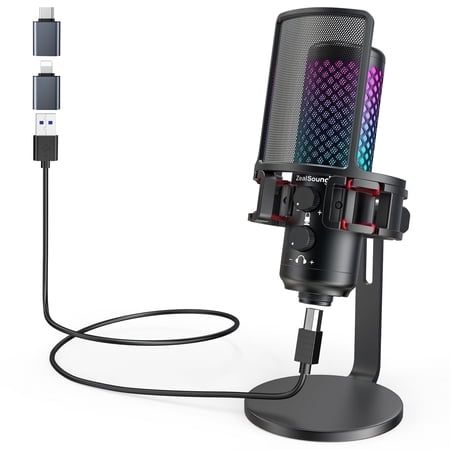
This plug-and-play gaming microphone for streaming is compatible with PS Consoles PS4/PS4pro/PS5 desktop computer and laptop with the 78.7 inch-long detachable USB cable. Come with USB adapter for iPhone and iPad Pro(iPhone 5 onwards & the fourth-generation iPad onwards), Type C adapter for all...
The ZealSound is the first mic I point a new voice-over artist toward. It’s a full-metal USB condenser that lists voice-over, podcasting, streaming, and YouTube in its own product name, so it’s clearly built with spoken-word recording in mind. The controls you actually use are all on the body: a mute button, a pop filter, and gain control. That last one matters more for voice-over than people expect, because it’s how you set a clean input level without digging through driver menus.
Setup is genuinely plug-and-play. Connect it over USB, select it as your input in whatever you record into, tweak the gain until your voice sits comfortably in the meter, and you’re rolling. The full-metal construction also means it doesn’t feel like a toy that will break in a month. For the price, this is the mic that gives you the fewest excuses.
| Type | USB condenser microphone |
| Build | Full metal |
| Controls | Mute, pop filter, gain |
| Price | $38.68 |
Pros: Full-metal build feels durable, physical mute and gain on the mic, included pop filter helps clean up plosives, five-star rating from 255 buyers, broad compatibility across desktop and mobile.
Cons: It’s an RGB gaming-focused look, so it may not match a serious studio aesthetic, and like any condenser it will pick up room noise if your space is loud. Keep it close to your mouth and treat your room before blaming the gear.
Logitech Yeti Orb — best step-up condenser
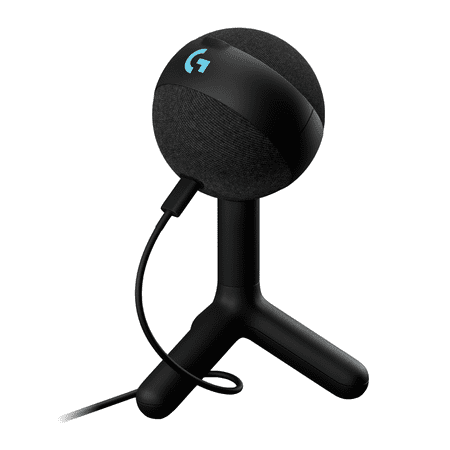
Logitech G Yeti Orb is a premium RGB gaming microphone with LIGHTSYNC that delivers best-in-class audio performance and ease of use. With LIGHTSYNC RGB and a condenser capsule optimized for game streaming, plus Blue VO!CE presets, Yeti Orb is the easiest way to game with clear, focused audio....
If you want to spend a little more and get a name-brand condenser, the Logitech Yeti Orb is the pick. It’s a wired cardioid condenser, meaning it focuses on what is in front of it, which is exactly what you want when you’re narrating at a desk and the dog is barking two rooms away. Logitech’s Yeti line has a long track record, and the Orb brings that into a compact, desk-friendly package with its LIGHTSYNC RGB lighting.
The cardioid pattern is the feature that justifies the higher price for voice-over specifically. It does real work rejecting sound from the sides and rear, which keeps your narration clean even in a room that’sn’t perfectly treated. That’s the difference between a mic that sounds fine and a mic that sounds deliberate.
| Type | Wired cardioid condenser |
| Brand | Logitech (Yeti) |
| Lighting | LIGHTSYNC RGB |
| Price | $59.99 |
Pros: Cardioid pickup isolates your voice from room noise, reputable Yeti brand, five-star rating from 215 buyers, compact footprint that leaves desk room for a script or tablet.
Cons: Highest price on this list, and the RGB lighting is a gaming touch you can’t turn off. For pure voice-over, the money is mostly going to the brand and the lighting rather than a massive jump in sound.
Razer Seiren V3 Mini — best compact
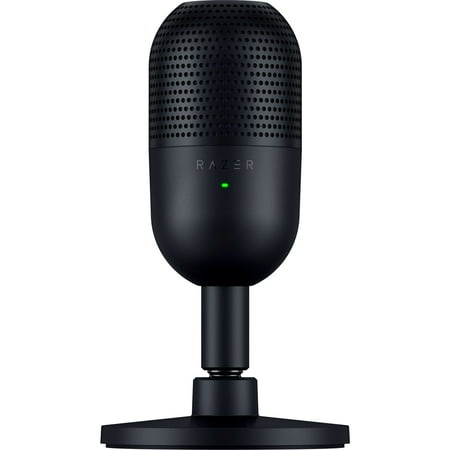
Meet the Razer Seiren V3 Mini—an ultra-compact USB microphone that now packs even more. Featuring a new tap-to-mute function and advanced audio customization, enjoy studio-quality voice capture with the perfect pint-sized companion for gaming, streaming, and chatting. Through the microphone...
Desk space is a real concern when you record at home, and the Razer Seiren V3 Mini solves that by being genuinely tiny. It’s an ultra-compact USB microphone with a tap-to-mute function on top, a feature that sounds small until you need to cough mid-sentence and glance down at a button you can hit without fumbling. It disappears on your desk, which is the whole point.
That small footprint works in your favor on a crowded workstation. It’s also light enough that it doesn’t feel like it’s straining whatever stand or boom you sit it on. For a secondary mic, a travel rig, or just a tidy desk, it’s hard to beat at the price.
| Type | Ultra-compact USB |
| Mute | Tap to mute |
| Brand | Razer |
| Price | $39.99 |
Pros: Tiny footprint, convenient tap-to-mute, five-star rating from 237 buyers, solid brand reputation, clean look that works in any setup.
Cons: It’s small, so it needs to sit close to your mouth for the best pickup, and it doesn’t have the full control set the ZealSound does. Buy it for space, not for the most adjustable mic on the list.
Bower Wireless Lavalier — best for on-camera and mobile
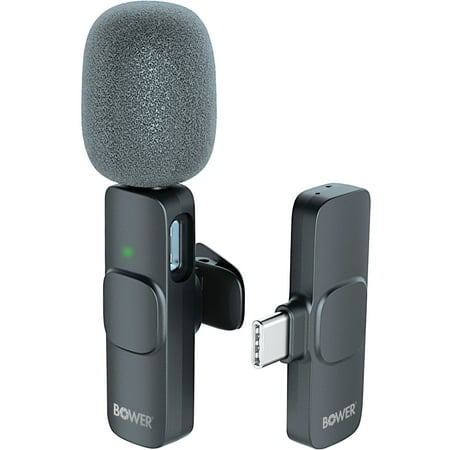
Introducing the Bower wireless Lavalier Microphone - your go-to solution for seamless wireless audio recording. Say goodbye to tangled cables and hello to convenience. This compact device revolutionizes audio recording, allowing you to move and speak freely while maintaining impeccable sound...
Not all voice-over happens at a desk. If you record on camera, walk around, or shoot product demos, a stationary desk condenser just won’t follow you. That’s where a wireless lavalier comes in. The Bower clips onto your collar and transmits wirelessly, which keeps you free to move and keeps the mic at a consistent distance from your mouth no matter how much you gesture. It’s a different tool for a different job, and the right one when movement is part of the gig.
| Type | Wireless lavalier |
| Best for | Content creation, on-camera |
| Price | $20.72 |
Pros: Wireless freedom for camera work, consistent distance from your voice, 4-star rating from 374 buyers, genuinely cheap for what it does.
Cons: A lavalier is a different tool than a desk condenser; it won’t have the same studio tone for narrating a full audiobook. Pick it for mobility, not as your only voice-over mic. If you do sit-down narration on a desk, our best USB microphone for voice over guide rounds up that specific style.
Popu Pine USB Condenser — best ultra-budget
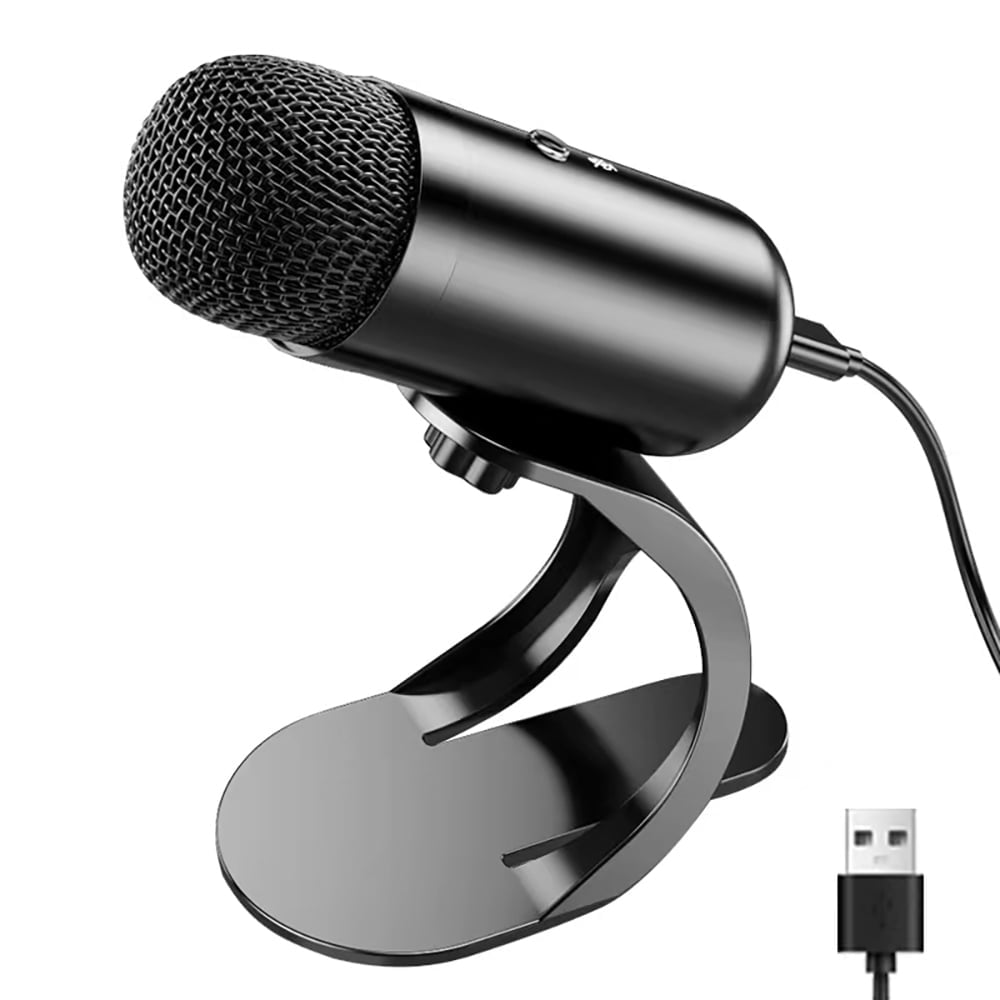
♫【All Metal Cavity & Plug and Play】Popu Pine USB Microphone body with metal material, provide stability. Easy Plug and play microphone, built-in sound card, no drivers to install, use type-c port simply plug the microphone into any available USB port, select and default it as your input device...
Under $15, most microphones are a waste of money. The Popu Pine is the exception that keeps working. It’s a wired desktop condenser with USB connectivity, pitched specifically at high voice quality for computer use. For someone testing whether voice-over is something they want to keep doing, this is the cheapest real microphone that doesn’t embarrass you on a first recording.
Treat it as an entry point, not a destination. It gets you recording today so you can learn whether you actually enjoy the work, and nothing about the experience is hostile to a beginner. When you outgrow it, you’ll know exactly what to spend on next.
| Type | Wired desktop condenser |
| Connection | USB |
| Price | $12.89 |
Pros: Price, plain and simple, plus a working condenser capsule and a 4-star rating from 164 buyers. It’s the lowest-risk way to find out if you actually enjoy recording. If you want a fuller field of affordable desktop options, the best USB microphone under $50 roundup covers this price band.
Cons: It’s a budget mic, so don’t expect the clarity of the ZealSound or the Yeti Orb. You’ll likely upgrade later, which is fine; that’s the point of starting cheap.
Core Innovations Wireless Lavalier — best budget wireless set
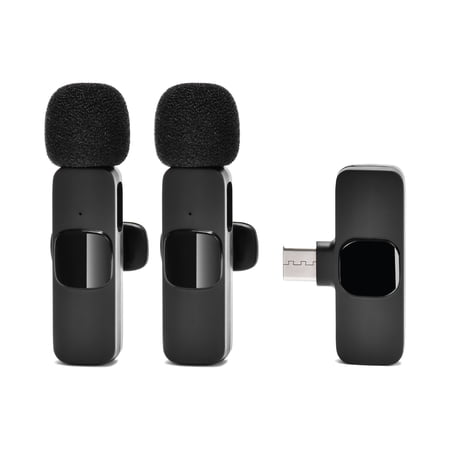
Take your content to the next level with the Core Innovations Wireless Lavalier Microphones (2-Pack)—the perfect plug-and-play wireless mic solution for vloggers, content creators, podcasters, influencers, and professionals. No apps or Bluetooth required—just connect and start recording with...
If you need a wireless option and two mics, the Core Innovations set is hard to beat. It’s a plug-and-play wireless lavalier with noise cancellation, aimed at content creation and podcasts. Because it’s a set, it even works when you have a co-host or an interview guest on location, which makes it a versatile budget grab.
| Type | Wireless lavalier (set) |
| Feature | Noise cancellation |
| Best for | Podcasts, interviews |
| Price | $20.97 |
Pros: Two mics in one set, noise cancellation, plug-and-play simplicity, five-star rating from 88 buyers, crazy cheap for a wireless pair.
Cons: Wireless lavaliers are for movement and interviews, not for sitting studio vocals at a desk. The new-buyer rating base is also small, so treat the five stars with a little caution.
The verdict
For most people starting voice-over work, the ZealSound USB Microphone is the one to buy. It pairs the controls you actually need, mute, gain, and a pop filter, with a solid full-metal build, all for under $40. If you want a touch more brand confidence and a real cardioid pickup and the budget allows, the Logitech Yeti Orb is a very close runner-up at $60. If you’re sure your work is going to be on camera and mobile, skip the desk mics entirely and grab the Bower wireless lavalier.
Buying advice
Figure out where your voice-over actually happens before you spend a dollar. Recording narration at a desk, an audiobook, a scripted YouTube channel, then a USB condenser like the ZealSound or the Yeti Orb is your lane. Recording on camera, walking a show floor, interviewing people, then you want a lavalier like the Bower or the Core Innovations pair.
If your budget tops out around $25 and you mostly need something simple to start, you have more options in that exact range than most people realize. A first mic doesn’t have to be a compromise; it just needs to match the work you’ll actually do.
Whichever you choose, spend a few minutes on your room. A condenser picks up what is around it, so close the window, kill the AC hum if you can, and keep the mic a few inches from your mouth. If you’re on a true entry budget, the Popu Pine gets you recording today, and you can roll that $12 toward the ZealSound later once you know you’ll stick with it. As a fuller guide to the whole field, our best computer microphone roundup covers options at every price.
FAQ
Do I need an audio interface for a voice-over USB mic?
No. Every mic on this list connects over USB and has the interface built in. Just plug it in, select it as your input in whatever you’re recording into, and you’re set. The only reason you would want a separate interface is if you move to an XLR microphone.
Is a $40 microphone good enough for voice-over?
Yes, especially to get started. The ZealSound at about $38 captures clean spoken audio with a pop filter and gain control, which covers the vast majority of beginner and mid-level work. Creators who mostly need a reliable vocal track for video will find the same budget logic in our best cheap microphone for YouTube picks. The biggest difference between a $40 mic and a $400 studio condenser is room treatment and technique, not the microphone itself.
Should I use a condenser or a lavalier for voice-over?
For sitting at a desk and narrating, use a condenser; it captures richer, fuller vocal tone. For on-camera, mobile, or interview work where you move around, use a lavalier clipped to your collar. If you do a mix of both, many people end up with one of each.
Why does my voice-over sound like it is in a tin can?
Usually one of two things: the mic is too far from your mouth, or your room is adding echo. Move the mic within a few inches of your face and add soft surfaces around your desk. If it’s still thin, enable noise suppression in your recording software; it cleans up a lot of background hum on budget mics.
Can I do professional voice-over from home with a USB mic?
You can absolutely build a client-ready setup at home with a quality USB condenser and a quiet room. Many professional narrators and content creators work this way. The chain that matters most is a clean, close-mic recording in a treated space, and none of that requires expensive hardware.