Computer Station Nation is reader-supported.
When you buy through links on our site, we may earn an affiliate commission. Learn more.
Quick Answer
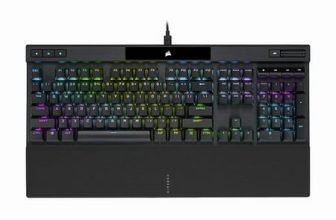
For most buyers, the Corsair K70 CORE RGB Mechanical wins on value and modern features. It ships with pre-lubed MLX Red linears, a detachable USB-C cable, a sound-dampened build, and runs about $50 less. Choose the K70 RGB Full-size if you want genuine Cherry MX switches, an anodized aluminum top plate, and dedicated media keys with a volume wheel.
The K70 line has been Corsair’s flagship full-size for over a decade, and right now there are two very different keyboards both wearing that badge. The original K70 RGB Full-size is the OG aluminum slab — Cherry MX switches, brushed aluminum top plate, dedicated media keys. The newer K70 CORE RGB Mechanical is the modern reboot — pre-lubed Corsair MLX switches, sound dampening, USB-C, and a friendlier price tag.
So which one belongs on your battlestation? They share a name and a brand but they’re aimed at different buyers. Let’s dive in.
Quick Comparison Table
| K70 RGB Full-size | K70 CORE RGB Mechanical | |
| Switches | Cherry MX (Red/Brown/Blue/Speed) | Corsair MLX Red (pre-lubed) |
| Frame | Anodized aluminum top plate | Plastic with sound dampening |
| Cable | Non-detachable, dual USB-A | Detachable USB-C |
| Media Keys | Dedicated set + volume wheel | Multi-function rotary dial |
| USB Passthrough | Yes (USB 2.0) | No |
| Polling Rate | 1000Hz | 8000Hz (axon hyper-processing) |
| Hot-Swap | No | No |
| Software | iCUE | iCUE |
| Typical Price | ~$108 | ~$56–$117 |
| Best For | Battlestation enthusiasts who want Cherry MX feel | Gamers chasing modern features and value |
Switches — K70 RGB vs K70 CORE
This is the biggest split. The K70 RGB Full-size runs genuine Cherry MX switches — the German-made benchmark that every other switch is measured against. You get a real choice of feel: Red linears for gaming, Browns for typing-friendly tactility, Blues for clicky drama, Silver Speed for a 1.2mm short throw. They’re not lubed from the factory but they’re consistent and they last 100 million actuations.
The K70 CORE ships with Corsair’s own MLX Red linears, factory pre-lubed. Pre-lubed means smoother out of the box with no scratchiness — most enthusiasts only get this feel after manually lubing their switches with Krytox. The MLX feel is genuinely good. The catch: only one switch option, and you can’t swap to tactile or clicky later because there’s no hot-swap socket.
Winner: Tie. Cherry MX gives you choice and the gold-standard reputation. MLX gives you a better feel out of the box if you want linears. Pick based on whether switch variety matters to you.
Build Quality — K70 RGB vs K70 CORE
The K70 RGB Full-size is built like a tank. The anodized aluminum top plate is structurally rigid, looks premium, and adds weight that keeps the board planted. It’s the kind of board you could probably swing as a melee weapon and it’d be fine afterward.
The K70 CORE drops the aluminum for a plastic frame, but Corsair did something smart — they added internal sound dampening foam that makes it sound and feel more like a $200 custom keyboard than a $60 one. It’s lighter, but the typing acoustics are arguably better than the RGB Full-size.
Winner: K70 RGB Full-size. If you want a forever board that looks and feels premium for the next decade, aluminum wins.
Connectivity & Cable — K70 RGB vs K70 CORE
The K70 RGB Full-size still uses a non-detachable dual USB-A cable. In 2026 that’s a real bummer. You can’t replace it if it frays, you can’t easily route it through a desk grommet, and if you ever need to throw the board in a backpack the cable is dangling forever.
The K70 CORE has a detachable USB-C cable. Modern, replaceable, swappable for a custom braided cable if that’s your thing.
Winner: K70 CORE RGB Mechanical. Detachable USB-C is the standard now. The K70 RGB is showing its age here.
Media Controls — K70 RGB vs K70 CORE
The K70 RGB Full-size has the legendary dedicated media key cluster — separate mute, stop, previous, play/pause, and next buttons — plus a knurled aluminum volume roller. You can pause Spotify or skip a track without looking. The volume wheel is one of the most satisfying physical inputs in keyboard land.
The K70 CORE consolidates everything into a single multi-function rotary dial in the top-right. Click to switch modes (volume, brightness, lighting, etc.) and twist to adjust. It’s clever and saves desk space but you give up the dedicated buttons.
Winner: K70 RGB Full-size. Dedicated keys are faster and more tactile. If you live in your DAW or music app, this matters.
Polling Rate & Performance — K70 RGB vs K70 CORE
The K70 RGB Full-size polls at 1000Hz (1ms) — totally fine for gaming and indistinguishable from anything faster in real-world play. The K70 CORE uses Corsair’s Axon hyper-processing for an 8000Hz polling rate (0.125ms).
In practice 8000Hz is a number that looks great on a spec sheet. Pro CS2 and Valorant players have been winning tournaments on 1000Hz boards for years. Unless you’re chasing every advantage on a competitive ladder, you will not feel the difference.
Winner: K70 CORE on paper, tie in practice.
Software & Lighting — K70 RGB vs K70 CORE
Both boards run iCUE — Corsair’s per-key RGB and macro software. iCUE is heavy compared to something like VIA, but it’s also one of the most powerful keyboard software stacks out there. Per-key effects, game-linked profiles, cross-device sync if you have other Corsair gear.
Both have per-key RGB, both have 8MB of onboard memory for profiles, both support hardware macros.
Winner: Tie. Same software, same lighting capability.
Price & Value — K70 RGB vs K70 CORE
Pricing moves week to week but typical street prices land around $108 for the K70 RGB Full-size and as low as $56 for the K70 CORE. That’s a massive gap. If you’re picking between them at full price, the CORE is the better value.
If the K70 RGB Full-size goes on sale below $90, the value proposition shifts — you’re getting Cherry MX and aluminum for similar money.
Winner: K70 CORE RGB Mechanical. Better dollar-for-dollar at MSRP.
Use Case Breakdown
Buy the K70 RGB Full-size if…
- You want a forever board with genuine Cherry MX switches
- You need dedicated media keys and a real volume wheel
- Aluminum build quality matters to you
- You want switch options beyond linear (Brown, Blue, Speed)
- USB passthrough for a headset or mouse is useful
Buy the K70 CORE RGB Mechanical if…
- You want pre-lubed linears with no aftermarket work
- USB-C and a detachable cable are non-negotiable
- You care about quiet, dampened acoustics out of the box
- You want to save $40–50 without dropping major features
- An 8000Hz polling rate matters to your peace of mind
Verdict
It depends — and that’s the honest answer. These two boards solve different problems despite sharing a name.
If you’re buying your first serious mechanical, want modern features (USB-C, dampened sound, 8000Hz, pre-lubed switches) and want to spend less, get the K70 CORE RGB Mechanical. It’s the better value buy in 2026.
If you’re a returning enthusiast who knows the Cherry MX feel they want, wants dedicated media keys, and wants a board with an aluminum frame that’ll look right at home on a premium battlestation, get the K70 RGB Full-size. It’s still the OG for a reason.
Where to Buy
Corsair K70 RGB Full-size:
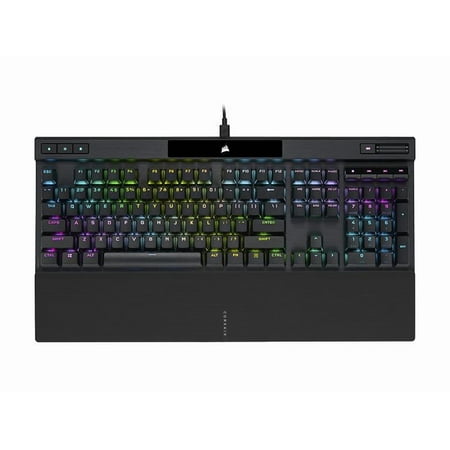
General Information The CORSAIR K70 RGB PRO Mechanical Gaming Keyboard delivers an iconic aluminum frame and even better performance, powered by CORSAIR AXON Hyper-Processing Technology. K70 RGB PRO | MECHANICAL GAMING KEYBOARD | THE LEGEND CONTINUES | AWARD-WINNING K70 | THE LEGEND CONTINUES...
Corsair K70 CORE RGB Mechanical:
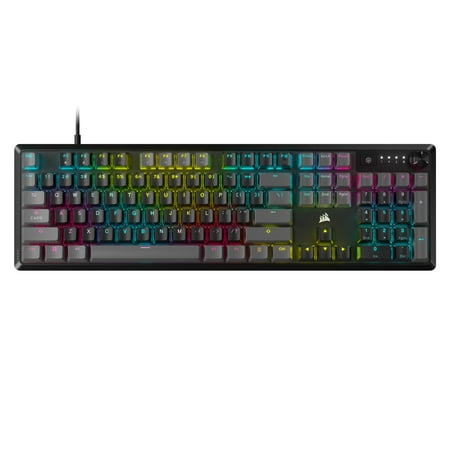
K70 TKL Optical, Wired Ten-key-less RGB Optical-Mechanical Keyboard
FAQ
Are the Corsair MLX switches as good as Cherry MX?
Out of the box the pre-lubed MLX Reds in the K70 CORE feel smoother than stock Cherry MX Reds. Cherry has the longer track record (100 million actuations rated) and more switch variety. For linear lovers, MLX is genuinely competitive.
Can I hot-swap switches on either board?
No. Both boards have soldered switches. If hot-swap is a priority, look at the Corsair K65 Plus Wireless or third-party boards like the Keychron Q-series.
Does the K70 RGB Full-size work on Mac?
Yes. iCUE has a macOS client, and the board’s media keys and volume wheel work natively. You’ll just need to remap the Windows key to Command in system settings.
Which is quieter?
The K70 CORE — it has internal sound dampening foam that the K70 RGB Full-size doesn’t. If silence matters, the CORE is the pick. For dead silence, look at a dedicated quiet board with Silent Red or Topre switches.