Computer Station Nation is reader-supported.
When you buy through links on our site, we may earn an affiliate commission. Learn more.
Gaming mice: quick picks
| Use case | Top pick | Price |
|---|---|---|
| Best wireless | Logitech G305 LIGHTSPEED | $39.99 |
| Best budget wired | Razer DeathAdder Essential | $24.98 |
| Best mid-range | Razer Basilisk V3 X Hyperspeed | $69 |
| Best ultra-budget | TSV Gaming Mouse | $10.98 |
Specs breakdown and grip-style matching guide below.
Most gaming mouse guides spend 3,000 words on specs you’ll never use at settings nobody actually plays at. DPI numbers in the tens of thousands. Polling rates that require a 6-core CPU and a 240 Hz monitor to notice. Stuff that looks great in a comparison chart and means nothing at your desk.
This guide skips that. You get the specs that actually matter, why pros play 400-800 DPI on mice rated for 35,000, how grip style determines shape more than any spec, and which price tier covers most people. Let’s get into it.
What actually makes a gaming mouse good
A mouse rated at 35,000 DPI is not better than one rated at 8,000. The number almost nobody plays at is irrelevant. What separates a great gaming mouse from a mediocre one is harder to see on the spec sheet.
The sensor matters, but not the DPI ceiling. Flagship sensors from PixArt and Logitech apply zero motion averaging across any DPI setting. Budget sensors smooth aggressively at high DPI to hide jitter. That smoothing feels like slight mushiness when you need precision, and you’ll notice it before you ever hit the DPI ceiling.
Click latency is a real differentiator now. Razer’s optical Gen-3 switches clock in at 0.54ms per TechPowerUp’s NVIDIA LDAT benchmark. Standard mechanical switches with debounce delays land at 2-5ms. At high frame rates in FPS games, that gap is perceptible. It matters less in MMO or RTS, and a lot in CS2.
Polling rate stability is worth checking. A mouse rated at 1,000 Hz should actually report at 1,000 Hz during fast movement — not drop to 500 Hz under load. Cheap mice fail this quietly.
Angle snapping is worth knowing about. It’s firmware-level straightening of diagonal movement. Every serious gaming mouse has it disabled now, but it occasionally shows up in budget hardware — and it will ruin precision aim once you notice it.
The feet matter too. Pure PTFE glides evenly on any surface. Mixed-compound feet create drag you feel as hitching, especially on cloth pads. The kind of thing you don’t notice until you upgrade.
Build quality quick test: shake the mouse — no rattle. Press the sides — no flex or creak. Click the side buttons without gripping the body — no false actuations. A lot of $50-60 mice fail at least one of these.
Finally, lift-off distance control. FPS players lift and reposition constantly. A configurable LOD lets you set the cursor to freeze at 1-2mm so it stops the moment the mouse leaves the pad. Budget mice give you no control over this.
Key specs explained
DPI and CPI
DPI (dots per inch) and CPI (counts per inch) measure the same thing: how far the cursor moves per inch of physical travel. Manufacturers use both interchangeably, though CPI is technically correct.
Here’s what marketing skips: most competitive players use 400-800 DPI. Low sensitivity means longer arm sweeps for precise cursor movement, which is why it dominates high-level FPS play. The practical ceiling for real gaming is around 4,000 DPI. Numbers above that exist to win spec-sheet comparisons.
Polling rate
Standard 1,000 Hz sends a position update every 1ms. That’s enough for most setups. High-polling-rate mice go up to 8,000 Hz, and it’s real technology — not a fake spec. But TechPowerUp’s reviewer, testing at 165 Hz with 200+ FPS, said they “struggled to notice a difference” between 1,000 Hz and 8,000 Hz in actual gameplay. The benefit shows up at 240+ Hz with titles that process sub-frame input, like CS2 or Valorant.
Worth knowing: 8,000 Hz polling cuts the Viper V3 Pro’s battery from 95 hours down to 17. Big tradeoff if you’re running wireless.
Switch types and click latency
| Switch type | Click latency | Durability |
|---|---|---|
| Razer Optical Gen-3 | ~0.5 ms | 90M clicks |
| Logitech LIGHTFORCE hybrid | ~0.5-0.7 ms | ~100M clicks |
| Standard Omron mechanical | ~2-5 ms | 20-50M clicks |
Weight
Tom’s Hardware puts the lightweight threshold at 80g. Sub-60g is the competitive tier — the Viper V3 Pro is 54g, the Logitech G Pro X Superlight 2 is 60g. Heavier mice (100-134g) aren’t worse; they suit MMO and MOBA players who want stability and more buttons, not raw speed.
Grip styles and mouse shape
| Grip | Description | Ideal weight |
|---|---|---|
| Palm | Full hand flat, fingers extended | 80-130g |
| Claw | Palm on rear, fingers arched | 60-90g |
| Fingertip | Only fingertips contact mouse | 40-70g |
Not sure which you use? Rest your hand on your current mouse without thinking about it. Flat palm, fingers barely curving: palm grip. Fingers arched and doing most of the work: claw grip. Only fingertips touching, back of mouse barely in contact: fingertip. Most people are palm or claw. Fingertip is more common in competitive FPS than anywhere else.
Best gaming mice by game type
| Genre | Weight target | Buttons | Priority |
|---|---|---|---|
| FPS (CS2, Valorant, Apex) | Under 70g | 5-6 | Low latency, sensor precision |
| MMO / MOBA (WoW, LoL) | 80-130g | 12+ | Button count, comfort |
| Battle Royale (Warzone) | Under 90g | 6-8 | Balance of both |
| RTS (StarCraft, Age of Empires) | 70-100g | 8+ | Precision clicks, scroll wheel |
Top picks at every price
Best wireless under $40 — Logitech G305 LIGHTSPEED
The G305 runs 250 hours on a single AA battery and uses LIGHTSPEED 2.4 GHz wireless — the same low-latency connection Logitech puts in mice costing three times as much. The HERO 12K sensor tracks without smoothing. Hard to beat at $39.99 if you want wireless without a premium price tag.
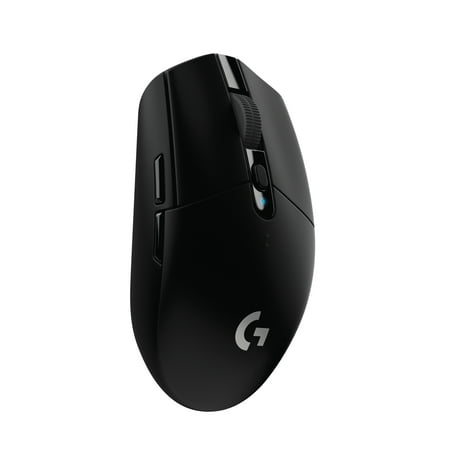
G305 features the next-gen HERO sensor with 12,000 DPI sensitivity and LIGHTSPEED wireless 1 ms performance. It’s long-lasting with 250 gaming hours from one AA battery (an indicator light reminds you before you need a new AA), ultra-portable with built-in nano receiver storage, lightweight...
Best budget wired — Razer DeathAdder Essential
$24.98 for an ergonomic right-handed shape, a 6,400 DPI optical sensor, and a 2.1m braided cable. The DeathAdder shape has been popular for over a decade because it fits palm and claw grippers without asking anything from them. No wireless, no RGB, no complexity. Solid starting point.
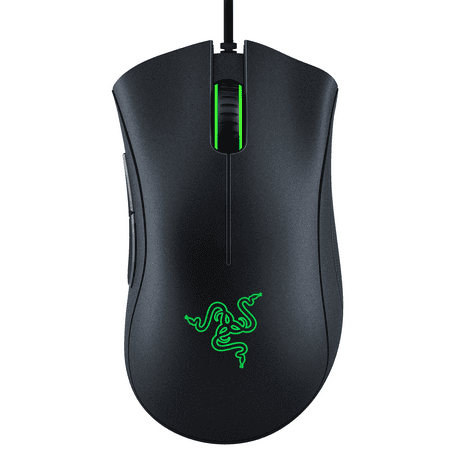
The Razer DeathAdder Essential is the essential gaming mouse to kickstart a proper gaming rig. The 6,400 DPI optical sensor enables fast and precise swipes for great control, while an ergonomic form allows for extended hours of gaming. It’s also built for durability, featuring 5 Hyperesponse...
Best mid-range wireless — Razer Basilisk V3 X Hyperspeed
Dual-mode wireless (2.4 GHz and Bluetooth), a Focus X optical sensor, and a dual-mode scroll wheel that switches between free-spinning and tactile click — all at $69. That scroll wheel is normally a $150+ feature. The ergonomic shape with thumb rest works great for palm grippers. A solid step up from AA-battery budget wireless.
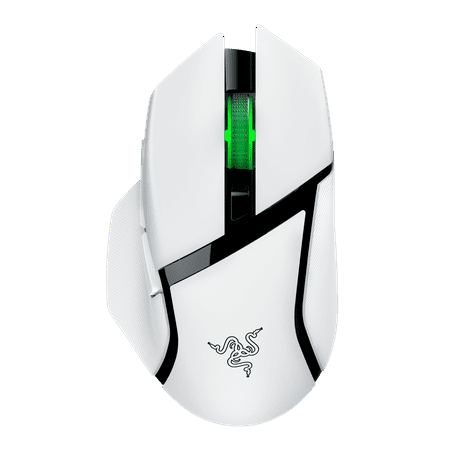
Razer RZ01-04870300-R3U1 Basilisk V3 X Hyperspeed Wireless Gaming Mouse for PC, RGB Chroma, White
Best tri-mode wireless — ATTACK SHARK R1
Bluetooth 5.0, 2.4 GHz, and USB-C wired in a 55g body at $28. The PixArt PAW3311 sensor goes up to 18,000 DPI. If you split time between a desktop and a laptop and want one mouse to handle both without spending much, this covers it.
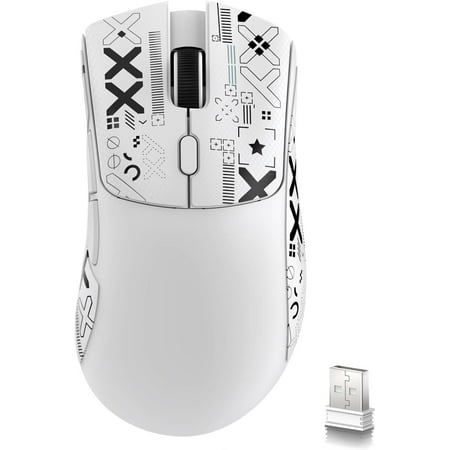
About this item 【59g Ultra-Light】The R1 ultra-light mouse is designed for players who pursue the ultimate in weight. Through innovative liquid nitrogen cooling injection molding, the weight of the mouse is reduced to 59g. This is a comfortable weight for gamers, allowing you to move the mouse...
Best ultra-budget — TSV Gaming Mouse
$10.98. Four DPI settings, RGB, side buttons, ergonomic wired shape. The sensor won’t compete with anything above this tier, but for a first mouse or a backup desk setup, it does what it says.
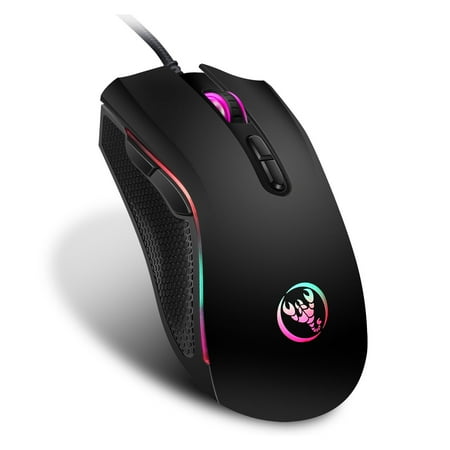
TSV RGB wired gaming mouse with 7 bright colors LED-backlit and ergonomics design for comfortable touch, long-term use without fatigue. This RGB Backlit Gaming Mouse adopts the 603EP high-end optical engine chipset, and precise positioning, including 7 silent buttons: Left, Right, Scroll Wheel,...
Best budget wireless with USB-C — FFN Wireless Gaming Mouse
Three connectivity modes including Bluetooth 5.3, 24,000 DPI, 75-hour battery life, and USB-C charging at $15.79. USB-C at this price is genuinely rare. Sensor accuracy won’t hold up in competitive play, but for casual gaming and productivity it over-delivers for the money.
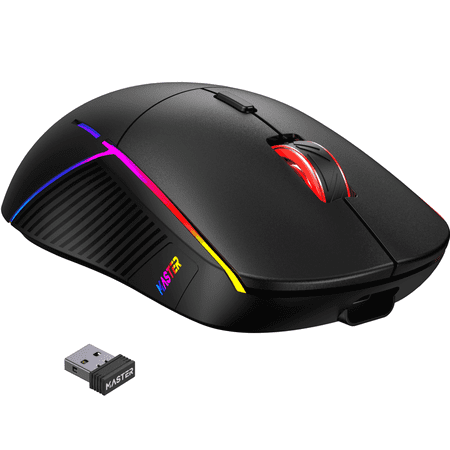
Upgrade your setup with the FFN 3-Mode Wireless Gaming Mouse — a precision tool designed for gamers and creators who need flexible connectivity and customizable control. This lightweight mouse supports 2.4GHz wireless, Bluetooth 5.3, and USB-C wired modes, and features an adjustable DPI range up...
Wireless vs wired
This argument mostly ended around 2020. Logitech LIGHTSPEED and Razer HyperSpeed 2.4 GHz connections are measured as latency-equivalent to wired in controlled testing. The Viper V3 Pro benchmarks at 0.54ms wired and 0.83ms wireless at 1,000 Hz. That 0.29ms gap is below what humans can perceive.
Go wired if you want no battery to think about, a fixed desk setup, or a lower price floor. Go 2.4 GHz wireless if cable drag annoys you, you move between setups, or you want a cleaner battlestation. Don’t use Bluetooth for gaming — it adds 8-15ms of latency, which is noticeable in fast games.
Price tiers
| Tier | Price | What you get | What you give up |
|---|---|---|---|
| Ultra-budget | $10-25 | Basic optical sensor, RGB, wired | Sensor smoothing, build quality |
| Budget wireless | $25-50 | AA battery wireless, better sensor | Rechargeable, premium feet |
| Mid-range | $50-100 | Dual-mode wireless, flagship sensor | Optical switches, sub-70g weight |
| Premium | $100-160 | Optical switches, sub-60g, 8K Hz | Nothing meaningful |
Most people land in the $50-100 tier and stay there. You get a sensor that won’t hold you back, dependable wireless, and build quality that lasts. Going premium gets you optical switches and a few grams off the weight. Worth it if you play competitively. Marginal for everyone else.
What the gaming community says
“DPI is a marketing number. 400-800 is what you actually use. A 35,000 DPI spec means nothing in real play.”
Reflected across gaming communities and review sites; pro player sensitivity databases consistently show 90%+ of respondents under 1,600 DPI.
“Wireless has caught up. LIGHTSPEED and HyperSpeed 2.4 GHz are indistinguishable from wired in blind tests.”
The community settled this around 2020. Every major hardware review site’s latency testing backs it up.
“Going from a 100g mouse to a 60g mouse is like taking the parking brake off. Weight matters more than sensor tier once you’re past the baseline.”
Tom’s Hardware weight-testing methodology; a widely repeated sentiment in mouse communities.
“Razer Synapse is the biggest complaint about Razer mice. 485MB RAM footprint, background processes that keep running after you close it.”
Top recurring complaint in TechPowerUp and Tom’s Hardware review comment sections for Razer products.
“8,000 Hz polling is real. It’s also irrelevant on most setups. At 165 Hz you can’t detect it.”
TechPowerUp’s reviewer on the Viper V3 Pro, testing at 165 Hz / 200+ FPS.
Frequently asked questions
What DPI should I use for gaming?
Most competitive players use 400-800 DPI. Low sensitivity means longer, controlled arm sweeps — which is how precise aiming actually works. Numbers above 4,000 DPI are basically marketing. Start at 800 DPI and go lower if your aim feels rushed, not higher.
Is wireless as good as wired for gaming?
Yes, if it’s 2.4 GHz. Logitech LIGHTSPEED and Razer HyperSpeed connections are latency-equivalent to wired in controlled testing. The Viper V3 Pro measures 0.54ms wired and 0.83ms wireless — a 0.29ms gap you can’t perceive. Bluetooth is a different story. It adds 8-15ms, which you can feel in fast games.
What polling rate do I need?
1,000 Hz covers almost every real-world setup. 8,000 Hz requires a 6-core CPU, a 240+ Hz monitor, and competitive titles that process sub-frame input before it makes any difference you’d feel. At 165 Hz, TechPowerUp’s own reviewer couldn’t detect it. Skip the upgrade unless your whole setup is already at that level.
How do I find my grip style?
Put your hand on your current mouse without thinking about it. Flat palm, fingers barely curved: palm grip. Fingers arched, doing most of the movement: claw grip. Only fingertips touching, back of mouse barely in contact: fingertip. Most people are palm or claw. Don’t force it.
What’s the minimum budget for a decent gaming mouse?
Around $25-40. The Razer DeathAdder Essential at $24.98 and the Logitech G305 at $39.99 are both reliable at this tier. Below $20 you’ll hit sensor smoothing and weaker build quality. Fine for casual play. Not for competitive.
Do I need a gaming mouse for MMO?
Yes, but for different reasons than FPS. MMO mice are about button count, not latency. Razer’s Naga lineup and Logitech’s G600 exist specifically for 12+ programmable side buttons. Sensor precision barely matters. Comfort over a 4-hour session matters a lot.
Related reading
- Best Gaming Mice
- Gaming Mouse Buying Guide
- How to Choose a Gaming Mouse
- Gaming Mouse DPI Settings Explained
- Wireless vs Wired Gaming Mouse
- How to Fix a Gaming Mouse Not Working