Computer Station Nation is reader-supported.
When you buy through links on our site, we may earn an affiliate commission. Learn more.
Quick answer
The Razer BlackWidow V3 wins on build, switch consistency, software, and out-of-the-box experience. The MageGee Mini 60% wins on price by a country mile and is the right pick if you want a real mechanical for under twenty bucks or you specifically want a 60% layout.
Why this comparison
Two keyboards aimed at completely different buyers. The Razer BlackWidow V3 is the $99 mid-tier mechanical for someone who wants a quality board they don’t have to think about. The MageGee Mini 60% is the $18 starter mechanical for someone who wants to test the waters or buy a kid’s first real keyboard. They keep showing up as alternatives anyway because they cover the two opposite ends of the budget spectrum that most buyers consider before settling on a pick.
Bottom line: if you can afford the Razer, buy it. If you can’t, the MageGee is a real mechanical that won’t punish you for the price. The gap between them is huge, and so is the gap in price.
Quick comparison table
| Razer BlackWidow V3 | MageGee Mini 60% | |
|---|---|---|
| Layout | Full-size (104 keys) | 60% (61 keys) |
| Switches | Razer Green clicky | Outemu Blue clone clicky |
| Keycaps | Doubleshot ABS | ABS |
| RGB | Per-key Razer Chroma | Multi-color hardware modes |
| Wrist rest | Included | Not included |
| USB passthrough | Yes | No |
| Cable | Braided, fixed | Detachable USB-C |
| Switch lifespan | 80M keystrokes | ~50M (claimed) |
| Software | Razer Synapse | None |
| Price | ~$99 | ~$18 |
| Rating | 9.3 / 10 | 8.0 / 10 |
Build quality — Razer wins big
The BlackWidow V3 has a matte aluminum top plate over a plastic base. Heavy. Rigid under typing. The kind of board that feels solid even before you start using it. Reddit owners on r/MechanicalKeyboards consistently call out the V3 as one of the best-built mid-tier mechanicals.
The MageGee Mini is all plastic. Light enough to throw in a backpack and rigid enough that it doesn’t flex visibly under heavy typing, but it doesn’t feel premium. The plastic construction also means the keycaps will yellow and shine within six months of heavy use, while the Razer’s doubleshot ABS holds up much longer.
Winner: Razer BlackWidow V3 by a wide margin.
Switch quality — Razer wins on consistency
Both boards ship with clicky switches: Razer Green on the BlackWidow V3 and Outemu Blue clones on the MageGee. Both are loud. Both have a tactile bump and an audible click around the actuation point.
The difference is in factory consistency. Razer Greens actuate at the same point on every key with the same force, every time. The MageGee’s mechanical-feel switches vary noticeably between keys; some feel slightly heavier or scratchier than others. The Razer’s stabilizers are also factory-lubed which makes the spacebar, shift, and enter sound far less rattly than the unlubed stabs on the MageGee.
If you can hear the difference between a $99 keyboard and an $18 keyboard, switch quality is where you’d hear it. Winner: Razer BlackWidow V3.
Layout — depends on your use case
Full-size vs 60% is the biggest split here. The Razer gives you a numpad, function row, and dedicated arrows. The MageGee gives you 61 keys and acres of mouse swing room.
If you do data entry or use a numpad regularly, full-size wins by default. If you play FPS games or have a small desk, the 60% wins. If you’re a programmer or writer, you can adapt to either; the 60% Fn-layer arrows take about a week to feel natural.
For more on the form factor decision, see our best 60% picks and the main mechanical keyboard guide. Tie. Pick by use case.
Features and extras — Razer wins decisively
The Razer ships with a leatherette wrist rest, dedicated media keys, a digital roller, USB passthrough, and Razer Synapse RGB control with macro support. The MageGee ships with the keyboard, a USB-C cable, and that’s it.
For some buyers, the lack of software on the MageGee is actually a plus. No driver download, no background process, no account creation. For everyone else, the BlackWidow V3’s feature set is a clear advantage.
Winner: Razer BlackWidow V3.
Longevity — Razer wins
Razer rates the V3’s Greens at 80 million keystrokes. The MageGee’s Blue clones are claimed at around 50 million, which matches the industry baseline. The keycap material also matters: Razer’s doubleshot ABS holds up to a year of heavy use without shining, while the MageGee’s standard ABS will visibly polish within six months.
If you type for a living and you’d otherwise replace a keyboard every two years, the Razer’s longer life cycle and shine-resistant keycaps make the price gap easier to swallow. Winner: Razer BlackWidow V3.
Price-to-value — MageGee wins
$18 for a real mechanical keyboard with RGB and USB-C is unbelievable. Five years ago this didn’t exist at this price. The MageGee delivers more keyboard for the dollar than anything else on the Walmart site.
The Razer at $99 isn’t a rip-off but it’s not a steal either. You pay for what you get: better switches, better build, better keycaps, better extras. Both prices are fair for what each board delivers; just don’t pretend they’re competing in the same tier.
Winner: MageGee Mini 60%.
Who should buy which?
Buy the Razer BlackWidow V3 if:
- You have $99 to spend and want a board that lasts
- You want a numpad and dedicated function row
- You want a wrist rest and don’t want to buy one separately
- You like loud clicky switches with consistent quality
- You want USB passthrough for charging or accessory ports
Buy the MageGee Mini 60% if:
- You want a real mechanical for under $20
- You’re new to mechanical and want to test 60% before committing
- You’re buying a kid’s first mechanical keyboard
- You want a travel or backup board
- You don’t care about software customization or extras
The verdict
The Razer BlackWidow V3 is a better keyboard in every objective measure: build, switch consistency, software, longevity, and out-of-the-box experience. If $99 is in your budget, it’s the easy pick.
The MageGee Mini 60% is a real mechanical keyboard for less than the cost of a pizza. It won’t last forever, the switches aren’t refined, and the keycaps will shine. But it’s good enough to teach you whether you like 60% layouts and clicky switches before you commit to a $200 custom build. As a starter or a kid’s first mechanical, it’s exactly the right answer.
The mistake is comparing them on price and missing that they’re for different buyers entirely.
Where to buy
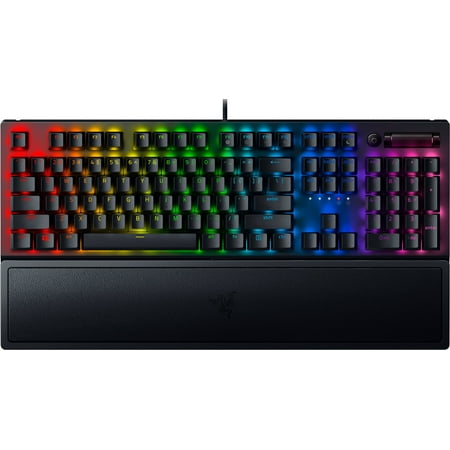
Razer BlackWidow V3 Mechanical Gaming Keyboard: Green Mechanical Switches, Tactile & Clicky, Chroma RGB Lighting, Compact Form Factor, Programmable Macro Functionality, Classic Black. The name that started it all returns to reassert its dominance. Feel the difference with the Razer BlackWidow...
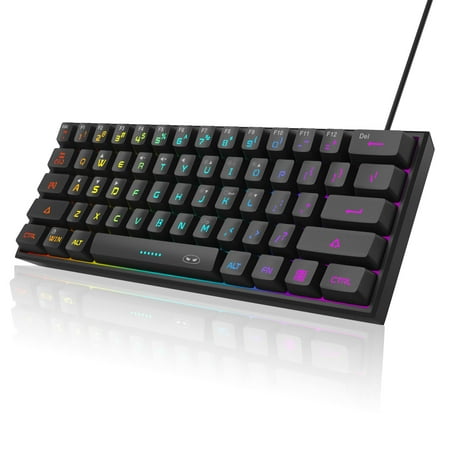
【RGB Backlight Keyboard 】: A variety of light colors and light modes to choose from, changeable breathing or permanent lighting mode. It can be great for playing the game at night even without light. You can also adjust the brightness and breathing speed of the backlit according to your...
FAQ
Is the MageGee Mini actually mechanical?
Yes. MageGee labels them “mechanical-feel” but they’re real mechanical switches: Outemu Blue clones with a stem, spring, and contact leaf. They actuate consistently and the click is the same one you’d get on a Cherry MX Blue. Don’t confuse this with rubber-dome boards that also use the “mechanical-feel” label.
Will the MageGee last as long as the Razer?
No. The Razer’s Greens are rated for 80 million keystrokes vs about 50 million on the MageGee’s switches. The doubleshot ABS keycaps on the Razer also hold up better against shine. Realistic life expectancy: 5+ years on the Razer with daily use, 2-3 years on the MageGee before keycaps shine and stabilizers get worse.
Can I get a wireless version of either?
The standard BlackWidow V3 is wired only. For wireless Razer in this family, look at the BlackWidow V3 Pro or BlackWidow V4 75%. MageGee makes a wireless 98-key tri-mode model but not a wireless version of the Mini 60%.
Which is louder?
Roughly equally loud. Both ship with clicky switches that fire an audible click on actuation. The MageGee actually sounds slightly more rattly because of the unlubed stabilizers, but the Razer’s louder bottom-out evens it out. Neither is suitable for shared office space without permission from everyone in earshot.