
Logitech MX Mechanical Review — The Best Wireless Productivity Keyboard
| Build Quality | 9.5 |
|---|---|
| Typing Feel | 9.2 |
| Value | 8.5 |
Premium wireless mechanical keyboard with quiet tactile switches and flawless multi-device pairing — built for cross-device productivity work.

$159.99
Description
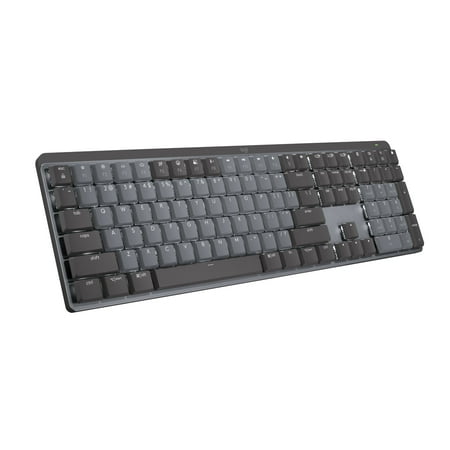
The Logitech MX Mechanical is what happens when Logitech finally takes the productivity keyboard crown seriously. It’s a full-size wireless mechanical built around their MX productivity ethos — multi-device, quiet, smart backlight, premium feel — but with real switches under the keycaps instead of the scissor mechs they’ve been pushing for years on the MX Keys.
I’ve been daily-driving this thing across a Windows desktop, a MacBook, and an iPad. The multi-device pairing is the headline feature for a reason. Three slots, instant swap via Fn keys, and it never forgets a device. That alone makes it worth the price if you split your day between machines.
Build quality is exactly what you’d expect from Logitech’s premium line. Brushed aluminum top plate, weighty in the hand, no flex anywhere on the deck. The tactile quiet switches are the variant I’d recommend — they have a real bump, real feedback, but they’re hushed enough to use in a meeting without anyone glaring at you. There are linear and clicky options too, but the quiet tactile is the sweet spot.
Battery life is genuinely incredible thanks to the proximity-sensing backlight. It ramps up when your hands approach the keys and dims when you walk away, which sounds gimmicky until you realize you’re getting two weeks per charge with backlight on. With it off, Logitech rates it at ten months. I haven’t tested that but I believe it.
The honest weaknesses: switches are not hot-swappable, so you’re locked into whatever variant you bought. There’s no 2.4GHz dongle option — just Bluetooth and the Logi Bolt receiver — so for competitive gaming you’d want something else. And $160 is real money. If you don’t actually use the multi-device feature, you’re overpaying.
Verdict
If your work happens across multiple computers and you want a wireless mech that just works, this is the one to buy. The build quality, switch feel, and battery life justify the price for anyone who spends their day typing. Skip it if you’re a gamer first or if you only use one machine — for those buyers there are better picks.
Reviews (0)
User Reviews
Be the first to review “Logitech MX Mechanical Review — The Best Wireless Productivity Keyboard”
Related Products


There are no reviews yet.