
MageGee Mini 60% Review — Real Mechanical Under $20
| Build Quality | 7.5 |
|---|---|
| Switch Feel | 7.8 |
| Value | 9.5 |
60% mechanical keyboard with RGB backlight, USB-C, and clicky Blue clone switches. The cheapest legitimate entry to the mechanical world.

Description
Quick Specs
| Layout | 60% (61 keys) |
| Switches | Mechanical-feel Blue clones (clicky) |
| Actuation force | ~50 g |
| Travel | ~4.0 mm |
| Keycaps | ABS |
| RGB | Multi-color backlit, multiple modes |
| Anti-ghosting | Yes (claimed N-key) |
| Connectivity | Wired USB-C |
| Compatibility | Windows, Mac, Linux (plug-and-play) |
| Hot-swap | No |
| Software | None (hardware controls only) |
| Color options | Black, White, Pink (varies by SKU) |
Source: MageGee official product page
The MageGee Mini 60% is the bad boy that proves you can buy a real mechanical keyboard for under twenty bucks. With 129 reviews and a 5-star average on Walmart, it’s quietly built a following at the bottom of the price ladder where most “gaming keyboards” are still rubber dome.
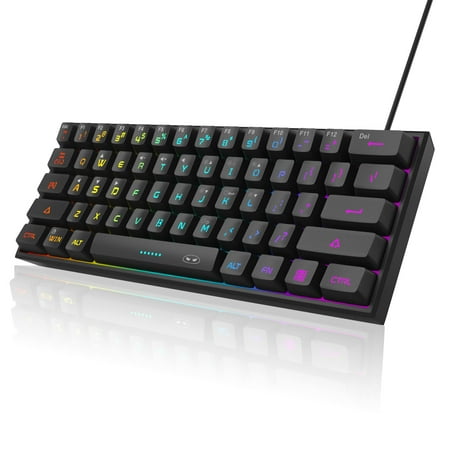
You get 61 keys in a true 60% layout, RGB backlighting with multiple modes and brightness control, USB-C connectivity (still rare at this price), and switches MageGee describes as “mechanical feel.” Translation: budget Outemu Blue clones with a clicky bump and audible click. They’re not Cherry-tier and switch consistency varies, but they actuate at roughly the same point on every key and feel miles ahead of any membrane keyboard at the same price.
The chassis is plastic. The case is light enough to throw in a bag and rigid enough that it doesn’t flex under heavy typing. According to user reports on Walmart and the wider community, the build holds up for at least a year of regular use. The keycaps are ABS and will shine within six months if you type for a living, but at this price tier nobody expects PBT.
RGB is the surprise. For a sub-$20 keyboard the lighting modes are bright, the per-key control is functional via a Fn+key combo, and the colors don’t bleed badly. There’s no software; everything is controlled with hardware shortcuts. For some buyers that’s a downside; for others it’s a relief that they don’t need to install anything to make the lights work.
The downsides are exactly what you’d expect at this price. The keycaps will yellow and shine. The switches are loud Blue clones. The stabilizers rattle. There’s no software customization, no hot-swap, and no detachable cable. The “mechanical-feel” branding can be confusing because they actually are real switches, just budget Outemu Blue clones.
Best for: kids’ first mechanical, dorm room battlestations, travel boards, or anyone who wants to test if 60% is right for them before dropping money on a Keychron or HyperX. The MK-Box from MageGee is the same chassis with a slightly different colorway and is often cheaper still during sales.
Verdict
The MageGee Mini 60% is the cheapest entry to the mechanical world that doesn’t feel like a punishment. It won’t last forever, the switches aren’t refined, and the keycaps will shine. But for the price of two large pizzas you get a real mechanical board that’s good enough to teach you whether 60% and clicky switches are right for you. If you graduate to a $200 custom board next year, you didn’t waste money on this one. And if you don’t graduate? It’ll keep clacking for years.
Reviews (0)
User Reviews
Be the first to review “MageGee Mini 60% Review — Real Mechanical Under $20”
Related Products


There are no reviews yet.