
RK68 Dual Mode Wireless Keyboard Review — 68-Key Hot-Swap Compact
| Layout Design | 8.5 |
|---|---|
| Wireless Connectivity | 8.0 |
| Value for Money | 8.5 |
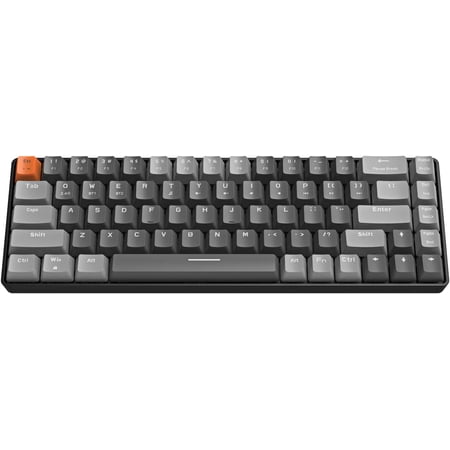
The RK68 fits 68 keys into a compact frame — keeping dedicated arrow keys while cutting most of the keyboard footprint. Hot-swappable switches and dual wireless (Bluetooth 5.0 + 2.4GHz with a 2-in-1 receiver) make it the best transitional compact keyboard under $50.

Description
Quick Specs
| Form factor | 68 keys (compact 65%) |
| Switches | Mechanical, hot-swappable |
| Connectivity | Bluetooth 5.0 + 2.4GHz (2-in-1 receiver) |
| Hot-swap | Yes |
| Backlighting | RGB |
| Keycaps | ABS |
| Frame | Plastic |
| Color | Blue |
| Compatibility | Windows, macOS |
Source: Walmart product listing
The RK68 makes one smart decision that most budget compact keyboards get wrong: it keeps arrow keys. Sixty-eight keys instead of sixty-one means there’s a dedicated arrow cluster in the lower-right corner, which turns out to matter a lot for anyone coming from a full-size keyboard. You lose the number pad and the function row, same as any 60-65% board — but you keep the arrows. For text editing, spreadsheet work, and gaming that uses arrow key navigation, that’s a meaningful trade-off.
The wireless setup uses a 2-in-1 receiver that handles both Bluetooth 5.0 and 2.4GHz from a single USB dongle. Less dongle management, cleaner desk. 2.4GHz covers gaming with low latency, Bluetooth covers pairing to a laptop or tablet without the dongle. The switches are hot-swappable, which is genuinely useful at this price — if you dislike the stock blue switches, pull them and drop in something different without soldering anything.
Build quality is what you’d expect at this price. The chassis is plastic, stable enough for normal use. Keycaps are ABS — they’ll work fine but will develop shine with heavy daily use. RGB covers the standard effect modes. Nothing here is going to make a $200 keyboard owner jealous, but the keyboard does its job without obvious shortcuts or failures.
The 68-key layout positions this at a useful middle ground. Strict 60% boards (like the SteelSeries Apex Pro Mini or the Redragon K677) require learning layer shortcuts for arrow navigation. The RK68 skips that adjustment period. If you’re curious about compact keyboards but want to keep something familiar, this is the smoother on-ramp.
At $47.50, the RK68 is a reasonable compact wireless keyboard for general gaming and daily use. It won’t compete with premium switches, aluminum frames, or Hall Effect actuation — but it delivers hot-swap, dual wireless, and arrow keys in a genuinely compact footprint for under $50.
Verdict
The RK68 is the right choice for keyboard users who want to try compact layouts without giving up arrow keys. Hot-swappable switches, dual wireless with a 2-in-1 receiver, and a 68-key layout that includes arrows — solid feature set under $50.
Reviews (0)
User Reviews
Be the first to review “RK68 Dual Mode Wireless Keyboard Review — 68-Key Hot-Swap Compact”
Related Products


There are no reviews yet.