Computer Station Nation is reader-supported.
When you buy through links on our site, we may earn an affiliate commission. Learn more.
Quick answer
For most gamers and typists, the Razer BlackWidow V3 wins on build quality, switch consistency, and out-of-the-box experience. Choose the Geeky GK61 SE if you want a real mechanical for under $25 or you specifically want a 60% layout for desk space and FPS gaming.
Why this comparison
Two different tiers, two different audiences, but they keep showing up as alternatives in the same shopping carts. The Razer BlackWidow V3 sits at the $99 mid-tier as the broadly applicable mechanical pick. The Geeky GK61 SE sits at $23 as the cheapest “actually good” 60% mechanical you can buy on Walmart. If you’re staring at your cart wondering which one to pull the trigger on, this comparison is for you.
Bottom line up front: the Razer is genuinely better at typing, gaming, and longevity. It also costs four times as much. Whether that gap is worth it depends on three factors we’ll dig into below: how much desk space you have, whether you want a numpad, and how rough you are on keyboards.
Quick comparison table
| Razer BlackWidow V3 | Geeky GK61 SE | |
|---|---|---|
| Layout | Full-size (104 keys) | 60% (61 keys) |
| Switches | Razer Green clicky | Outemu Brown tactile |
| Keycaps | Doubleshot ABS | ABS double-shot |
| Hot-swap | No | Yes |
| RGB | Per-key Razer Chroma | Per-key with software |
| Wrist rest | Included | Not included |
| USB passthrough | Yes | No |
| Cable | Braided, fixed | Detachable USB-C |
| Switch lifespan | 80M keystrokes | 50M keystrokes |
| Software | Razer Synapse | Bundled (basic) |
| Price | ~$99 | ~$23 |
| Rating | 9.3 / 10 | 8.0 / 10 |
Build quality — Razer wins
The BlackWidow V3 has a matte aluminum top plate over a plastic base, which keeps the chassis rigid under heavy typing. Reddit owners on r/MechanicalKeyboards consistently call out the V3 as one of the best-built mid-tier mechanicals at this price.
The GK61 SE is all plastic. The case is rigid enough for the price, but you can feel the difference if you put the two boards back to back. The Geeky also has more obvious flex when you press hard near the edges. None of this matters if the board sits on your desk and never moves; if you carry your keyboard in a bag or shove it around, the Razer holds up better.
Winner: Razer BlackWidow V3.
Switch feel — depends on what you want
This one comes down to switch type, not switch quality. The Razer ships with Greens (clicky, 50g actuation, 4mm travel, sharp click) which feel close to a Cherry MX Blue. The Geeky ships with Outemu Browns (tactile, 45g actuation, 4mm travel, light bump, no click).
If you want loud and clicky for the satisfaction of it, Razer Greens are excellent. If you want a quieter typing experience without the click but with a tactile bump, the GK61 SE’s Browns are the right answer. The factory consistency is closer than you’d expect; the Razer’s stabilizers are factory-lubed which makes long keys (spacebar, shift) sound noticeably better than the GK61’s untouched stabs.
For pure typing comfort over an 8-hour workday, the GK61’s Browns win. For gaming and the satisfaction of clack, the Razer’s Greens win. Tie.
Hot-swap — Geeky wins
The GK61 SE has hot-swap sockets. You can pull the Outemu Browns and drop in any 3-pin or 5-pin MX-style switch (Cherry Reds, Gateron Yellows, Holy Pandas, whatever) without soldering. This is the entry point to the custom keyboard rabbit hole and it’s an underrated feature at the $23 price.
The BlackWidow V3 is soldered. You’re stuck with whatever switch the board ships with for the life of the keyboard. If you suspect you might want to experiment with switches later, this is a real strike against the Razer.
Winner: Geeky GK61 SE.
Layout and use case — depends
Full-size vs 60% is the biggest decision in this comparison. The Razer gives you a numpad, function row, and dedicated arrow cluster. The Geeky gives you 61 keys and a desk full of activities for your mouse.
If you do data entry, accounting, spreadsheets, or anything with heavy numpad use, the Razer wins by default. If you’re a competitive FPS gamer or you just want maximum desk space, the GK61 SE is the layout most pros run anyway. For programmers and writers, either works; the 60% requires you to learn the Fn-layer arrow keys (about a week of pain, then permanent muscle memory).
If you’re not sure which layout suits you, our main mechanical keyboard guide walks through the form factor decision in detail. Tie. Pick by use case.
Software and customization — Razer wins (with a caveat)
Razer Synapse 3 is the most polished gaming keyboard software in the market, with deep RGB customization, macro recording, and Chroma integrations with hundreds of games. The caveat: it’s heavyweight, runs in the background, and is required for full feature access.
The GK61 SE ships with bundled software that handles RGB modes and basic key remapping. It’s functional but ugly, and the macro engine is rudimentary compared to Synapse. On the upside, the GK61 has more onboard memory than you’d expect at this price and saves your RGB profile to the board itself.
Winner: Razer BlackWidow V3 — if you tolerate heavyweight software.
Out-of-the-box experience — Razer wins decisively
This is where the price gap shows up most. The Razer comes with a leatherette wrist rest, factory-lubed stabilizers, dedicated media keys, and a digital roller. The GK61 SE comes with the keyboard, a USB-C cable, and a keycap puller.
If you want a board you plug in once and never think about again, the Razer is set up to feel premium from minute one. The GK61 SE feels like the starting point of a hobby project; it’s good out of the box but it’s begging you to lube the stabs and swap the switches.
Winner: Razer BlackWidow V3.
Value — Geeky wins on price-per-feature, but…
The GK61 SE delivers real Outemu switches, hot-swap, RGB per-key, and a detachable USB-C cable for $23. Per-feature, that’s an absurd value. Five years ago you couldn’t get a real mechanical keyboard for under $80.
But the BlackWidow V3 at $99 isn’t a rip-off either. You’re paying for build quality, switch consistency, the wrist rest, USB passthrough, and the polished software stack. If you typed on both for a year, the Razer would feel new and the Geeky would have shiny keycaps and rattly stabilizers.
Winner: depends on budget. $25 is a stunning entry. $99 is a fair price for the Razer.
Who should buy which?
Buy the Razer BlackWidow V3 if:
- You want a numpad and you’ll actually use it
- You want a board that feels premium without going custom
- You like clicky switches and don’t share a quiet office
- You’d rather pay once than tinker for a year
- You game and type roughly equally
Buy the Geeky GK61 SE if:
- You’re new to mechanical and want to test 60% before committing
- You’re an FPS gamer who needs maximum mouse swing room
- You’re curious about hot-swap and want to experiment with switches
- You can’t justify $99 for a first mechanical keyboard
- You want quiet tactile switches for typing-heavy work
The verdict
The Razer BlackWidow V3 is the better keyboard. Better build, better switch consistency, better stabilizers, and a complete out-of-the-box package. If you have $99 to spend, this is the broadly-applicable mid-tier mechanical pick.
The Geeky GK61 SE is the better deal. For a quarter of the Razer’s price you get a real mechanical, hot-swap sockets, ANSI US layout, and a detachable USB-C cable. If you’re new to mechanical, on a tight budget, or specifically want a 60% form factor, this is the smart starter.
Most people will be happy with either. The mistake is comparing them on price and missing that they’re aimed at different buyers.
Where to buy
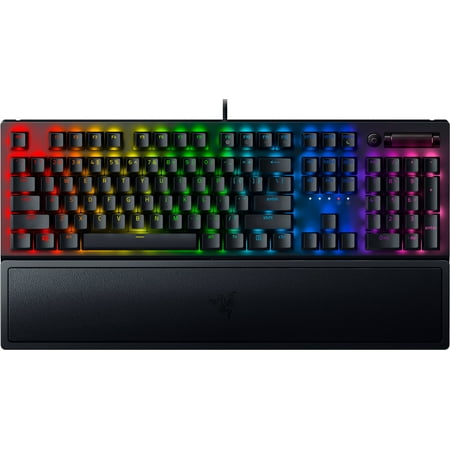
Razer BlackWidow V3 Mechanical Gaming Keyboard: Green Mechanical Switches, Tactile & Clicky, Chroma RGB Lighting, Compact Form Factor, Programmable Macro Functionality, Classic Black. The name that started it all returns to reassert its dominance. Feel the difference with the Razer BlackWidow...
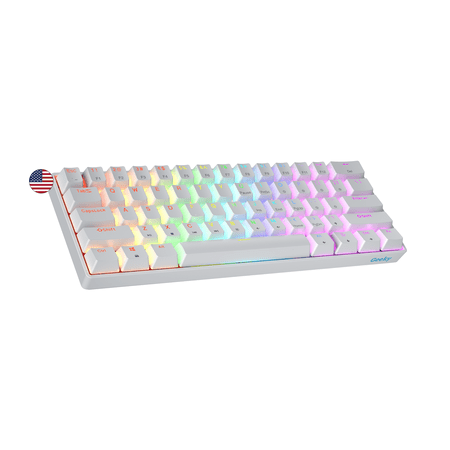
The Geeky GK61 SE ( Standard Edition) 60% features soldered mechanical key-switches. (Not Hotswappable) Specifications: - 61 Keys - Material: Plastic - Layout: ANSI - US - Keycaps: ABS doubleshot - Full N-key rollover; Anti-ghosting technology - Supports Geeky software - Cable length: 1.5 m (5.9...
FAQ
Are Razer Greens louder than Outemu Browns?
Yes, significantly. Razer Greens are clicky tactile switches with a sharp audible click on every keypress. Outemu Browns are tactile but not clicky; they have a bump but no click sound. If you share a room with anyone who can hear, Browns are the safer pick.
Can I use the GK61 SE on a Mac?
Yes, with a small caveat. The GK61 SE is plug-and-play on macOS. You’ll want to swap the Cmd and Option positions in System Settings to match the Mac convention since the keyboard ships with a Windows layout.
Is the BlackWidow V3 wireless?
The standard V3 is wired only. If you want wireless in the BlackWidow line, the BlackWidow V3 Pro and BlackWidow V4 75% offer Razer HyperSpeed wireless and Bluetooth multi-device. Expect a $50-100 premium.
Will I miss having arrow keys on a 60%?
For about a week, yes. After that, the Fn-layer arrows become muscle memory and the desk space recovered for mouse swing is the bigger gain. If you give up after two weeks, step up to a 65% (68 keys with a dedicated arrow cluster) instead of returning to a full-size.