
Computer Station Nation is reader-supported.
When you buy through links on our site, we may earn an affiliate commission. Learn more.
Quick Answer
For most buyers, the Aula F75 wins on value — it costs about a third of the Razer and adds tri-mode wireless. Choose the Razer BlackWidow V4 75% if sound profile, build quality, and 8,000 Hz polling matter more than the wireless mode and the price gap.
Introduction
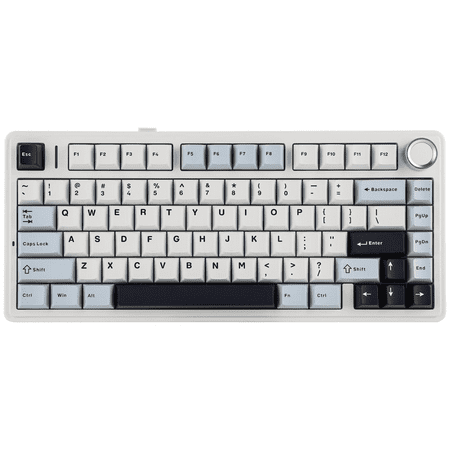
Two of the best 75% mechanical keyboards available right now sit on opposite ends of the price spectrum. The Razer BlackWidow V4 75% is Razer’s first real swing at the enthusiast crowd — gasket-mount, FR4 plate, foam stack, hot-swap PCB, $189.99. The Aula F75 is the value pick that keeps showing up in every Reddit recommendation thread — tri-mode wireless, hot-swap, RGB, knob, $65.99. Both target the same buyer: someone who wants a compact 75% layout with arrows and a function row, hot-swap upgradeability, and decent sound out of the box.
This is not a fair fight on price, and it should not be. The real question is whether the Razer’s premium materials and tuning are worth roughly 3x the spend, or whether the Aula F75 closes enough of the gap to make it the smarter buy. We bought both, lived with them for several weeks, and broke down where each one earns its keep.
Quick Comparison
| Razer BlackWidow V4 75% | Aula F75 | |
|---|---|---|
| Price | $189.99 | $65.99 |
| Connection | Wired USB-C only | Tri-mode (BT / 2.4 GHz / USB-C) |
| Hot-swap | Yes (3-pin and 5-pin) | Yes (5-pin) |
| Mount | Gasket mount + FR4 plate | Gasket mount |
| Sound dampening | EVA + Poron + silicone | Multi-layer foam (5-layer) |
| Switches | Razer Yellow (linear, pre-lubed) | Aula brand linear, pre-lubed |
| Keycaps | Doubleshot ABS | Doubleshot PBT |
| Polling rate | Up to 8,000 Hz | 1,000 Hz wired / 1,000 Hz 2.4 GHz |
| Battery | N/A | 4,000 mAh |
| Knob | Yes (multi-function) | Yes (volume) |
| Software | Razer Synapse 4 | Aula driver (basic) |
Price and Value — Aula F75 wins
At $65.99 versus $189.99, the F75 buys you a complete 75% experience for a third of the cost. It is one of the most-recommended budget gasket boards on r/MechanicalKeyboards for good reason. Razer’s price tag is justifiable for what you get, but “justifiable” and “smart purchase” are different things. Winner: Aula F75.
Build Quality and Materials — Razer wins
The Razer wins on raw materials. Aluminum top case, FR4 plate, factory-tuned and lubed stabs. The F75 has a plastic chassis with a CNC-style finish — looks great, but flexes more under typing pressure. Both use gasket mounts. Both ship with foam between the PCB and plate. The Razer’s stack is thicker and more deliberately tuned, and it shows in the sound. Winner: Razer.
Sound Profile — Razer wins
The Razer’s foam stack and FR4 plate produce a deeper, lower-pitched thock than the F75. The Aula sounds good for the price — better than most $150 prebuilts from a couple years ago — but it lands closer to a marbley clack than a deep custom thock. If acoustics are your top priority, the Razer wins clearly. Winner: Razer.
Connectivity and Battery — Aula F75 wins
The Razer is wired only. The F75 supports Bluetooth 5.0 (up to 3 devices), 2.4 GHz dongle, and USB-C. The 4,000 mAh battery lasts roughly 80 hours with RGB off and 25–30 hours with RGB on. For anyone using a tablet, second machine, or who hates cable clutter, this is a real swing factor. Razer offers a wireless V4 Pro 75% but it costs $299. Winner: Aula F75.
Keycaps — Aula F75 wins
The F75 ships with doubleshot PBT keycaps — durable, no shine over time, slightly textured surface. The Razer ships with doubleshot ABS, which will develop shine within 12–18 months of heavy use. The Razer’s keycaps look sharper out of the box and the legends are precise, but PBT is the long-term choice. Winner: Aula F75.
Gaming Performance — Razer wins
The Razer’s 8,000 Hz polling rate is pure overkill for most users, but if you play competitive shooters at high framerates, the input latency is genuinely lower than the F75’s 1,000 Hz. Razer also has the Synapse macro and per-key remapping ecosystem, which is more mature than Aula’s basic driver. Winner: Razer.
Who Should Buy Each
Buy the Aula F75 if:
- You want wireless and 75% in the same package
- You are on a $100 or under budget
- You want PBT keycaps without paying extra
- You are buying your first hot-swap keyboard and want room to experiment
Buy the Razer BlackWidow V4 75% if:
- Sound profile matters more than wireless
- You play competitive shooters and want 8,000 Hz polling
- You want a metal chassis with enthusiast-tier construction
- You plan to mod heavily and want a quality starting platform
Verdict
It depends — but for most readers, the Aula F75 is the smarter buy. It nails the 75% experience, adds wireless, ships with PBT keycaps, and comes in at a price that lets you put the saved $124 toward better switches, keycaps, or a desk mat. The Razer is a better-engineered keyboard and a better long-term mod platform, but you are paying for refinement, not function. If you have the budget and you care about sound and build quality more than the price gap, the Razer is genuinely worth the spend.
Where to Buy
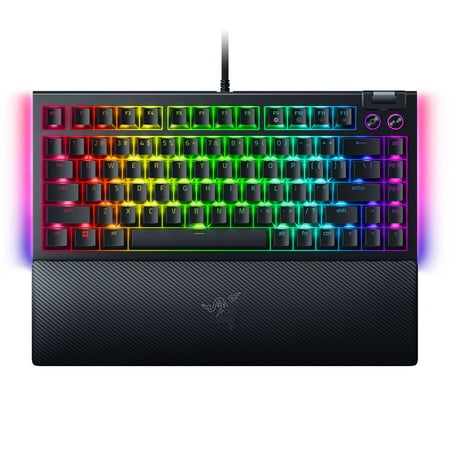
SWAP OUT. SWAP IN. GAME ON. For those who crave greater customization and immersion, satisfy your enthusiast needs with the Razer BlackWidow V4 75%—a compact, hot-swappable mechanical keyboard powered by Razer Chroma RGB. From installing new switches to creating unique lighting effects, shape it...
short description is not available
FAQ
Is the Razer BlackWidow V4 75% worth $190?
If you value sound profile, build quality, and 8,000 Hz polling, yes. If your top priorities are wireless and value, the Aula F75 covers most of what matters for $124 less.
Is the Aula F75 actually good or just cheap?
It is genuinely good. PBT keycaps, gasket mount, hot-swap, tri-mode wireless, and 4,000 mAh battery for $66 is one of the best keyboard deals on the market in 2026.
Can I make the Aula F75 sound like the Razer?
Partly. Adding a tape mod, swapping in a thicker PE foam layer, and using heavier linear switches gets the F75 close to the Razer’s depth, but the FR4 plate and aluminum case still give the Razer an edge.
Which one is better for gaming?
The Razer — 8,000 Hz polling, lower input latency, more polished software. For casual or single-player gaming, the F75 is fine.

