Computer Station Nation is reader-supported.
When you buy through links on our site, we may earn an affiliate commission. Learn more.
Your battlestation is only as good as the network feeding it. You can have the fastest gaming PC on the block, but if your router is throttling your connection or dropping packets mid-match, none of that hardware matters. Let’s talk routers.
Whether you’re gaming, streaming, or running a WFH setup that needs to handle everything at once, this guide covers every type of router — from ultra-budget picks to Wi-Fi 7 beasts — so you can find the right one for your setup. Let’s dive in.
Quick Picks — Best Routers at a Glance
- Best overall (Wi-Fi 7): NETGEAR Nighthawk RS180 — Wi-Fi 7, covers 2,500 sq ft, handles 80 devices
- Best mid-range: TP-Link Archer AX4400 — Wi-Fi 6, 6-stream, 4.4 Gbps, solid value at $114
- Best budget Wi-Fi 6: TP-Link Archer AX1500 — Wi-Fi 6 for $54, hard to beat
- Best compact option: NETGEAR WiFi 6 RAX5 — AX1600, great for apartments and smaller spaces
- Best ultra-budget: TP-Link Archer C54 — AC1200 for $25, gets the job done for basic use
Why Your Router Actually Matters for Gaming
Speed numbers on the box are mostly marketing. What actually affects your gaming experience is latency (ping), jitter (consistency), and packet loss. A cheap router that’s congested on your network can spike your ping mid-game even on a 1 Gbps connection.
A good router handles multiple devices gracefully. When your roommate starts streaming 4K while you’re mid-ranked match, a router with proper QoS (Quality of Service) keeps your gaming packets moving to the front of the line. A bad router treats everything equally — meaning your game traffic competes with Netflix for bandwidth.
Router Standards Explained
Here’s the quick version of what all those Wi-Fi numbers mean:
- Wi-Fi 5 (802.11ac) — Still works fine for basic use. AC1200 class covers most apartments. Getting long in the tooth for a serious battlestation.
- Wi-Fi 6 (802.11ax) — The current sweet spot. Better efficiency, lower latency, handles many devices simultaneously via OFDMA. This is the minimum you should buy in 2026.
- Wi-Fi 6E — Adds the 6 GHz band. Less congestion, even lower latency if your devices support it. Good bridge to Wi-Fi 7.
- Wi-Fi 7 (802.11be) — The new king. 320 MHz channels, Multi-Link Operation (MLO) for bonding bands simultaneously, dramatically lower latency. Future-proof but pricier.
Best Overall: NETGEAR Nighthawk RS180 (Wi-Fi 7)
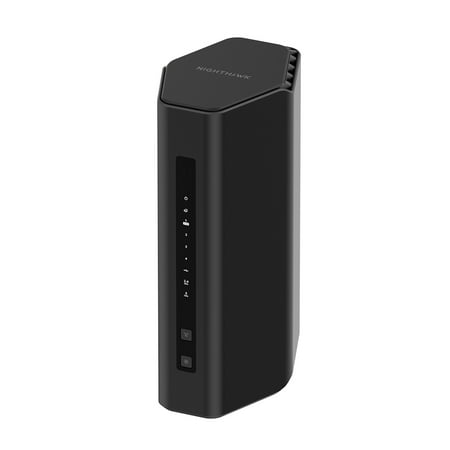
Leverage the power of WiFi 7 for speeds up to 5.5 Gbps at 1.2x faster than WiFi 6. The Nighthawk® RS180 WiFi 7 Dual-band Router provides up to 2,500 sq. ft. WiFi coverage and capacity for up to 80 devices. Experience stunning 4K streaming, video conferencing and reliably connect smart home...
The NETGEAR Nighthawk RS180 is the best all-around router for a serious battlestation setup. It’s a Wi-Fi 7 router running the BE5500 spec — that’s up to 5.5 Gbps of wireless throughput across dual bands. The 2.5 Gig Internet port means it can actually take advantage of multi-gig ISP plans when those roll out to your neighborhood.
It covers up to 2,500 square feet and handles 80 simultaneous devices without breaking a sweat. Wi-Fi 7’s Multi-Link Operation (MLO) lets devices connect across multiple bands at the same time — lower latency, better reliability. For a gaming rig plus a few streaming devices and phones on the network, this is the setup you want.
| Spec | Detail |
|---|---|
| Wi-Fi Standard | Wi-Fi 7 (BE5500) |
| Max Speed | Up to 5.5 Gbps |
| Coverage | 2,500 sq ft |
| Device Capacity | 80 devices |
| WAN Port | 2.5 Gbps |
| Price | ~$179 |
Best Mid-Range: TP-Link Archer AX4400
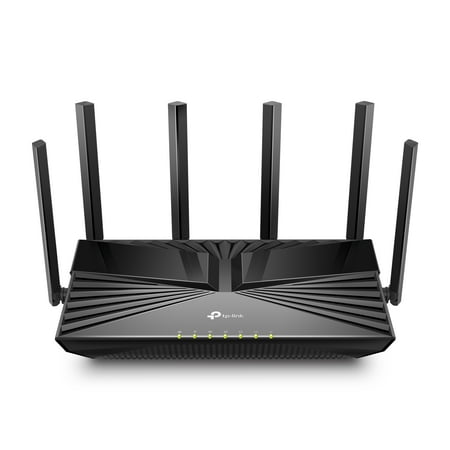
Reaching dual-band speeds up to 4400 Mbps, AX4400 is perfect for buffer-free 4K/8K streaming and gaming experiences.[3] Connect more devices using OFDMA and MU-MIMO technology while simultaneously eliminating lag, keeping your devices running at top speed.[4] Beamforming technology and six...
The TP-Link Archer AX4400 hits the Wi-Fi 6 sweet spot hard. Six spatial streams across dual bands means it can push significantly more data than a typical 4-stream AX1800 or AX3000 router. Up to 4.4 Gbps combined throughput is the headline number — real-world performance puts it well ahead of budget routers on congested networks.
At $114, this is where most battlestation builders should land. It’s Wi-Fi 6, it handles a houseful of devices, and TP-Link’s Tether app makes setup and network management surprisingly painless. Solid pick.
| Spec | Detail |
|---|---|
| Wi-Fi Standard | Wi-Fi 6 (AX4400) |
| Streams | 6-stream |
| Max Speed | Up to 4.4 Gbps |
| Price | ~$114 |
Best Budget Wi-Fi 6: TP-Link Archer AX1500
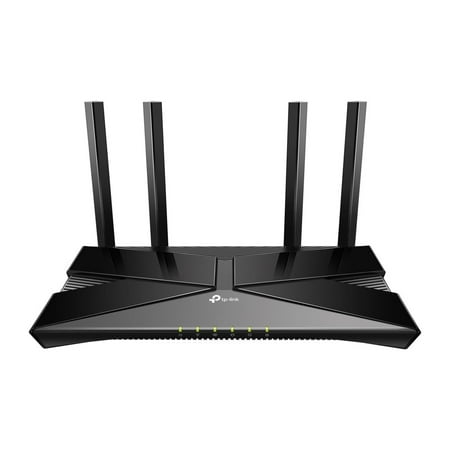
The Archer AX1500 is equipped with the latest Wi-Fi 6 for faster speeds, increased capacity and reduced network congestion. Dual-Band speeds of up to 1.5 Gbps for a buffer-free 4K/HD streaming and gaming experience. Connect more devices via OFDMA and MU-MIMO technology while eliminating network...
At $54, the TP-Link Archer AX1500 is the easiest recommendation on this list. It’s Wi-Fi 6 — meaning OFDMA, better device handling, and lower overhead than Wi-Fi 5 — for a budget that used to only get you AC routers. Four spatial streams, dual-band, up to 1.5 Gbps combined.
For apartments, studio setups, or anyone upgrading from an ancient ISP-supplied router, this is the move. Over 2,000 reviews and a solid 4-star rating back it up. Not flashy. Just works.
Best Compact: NETGEAR WiFi 6 RAX5
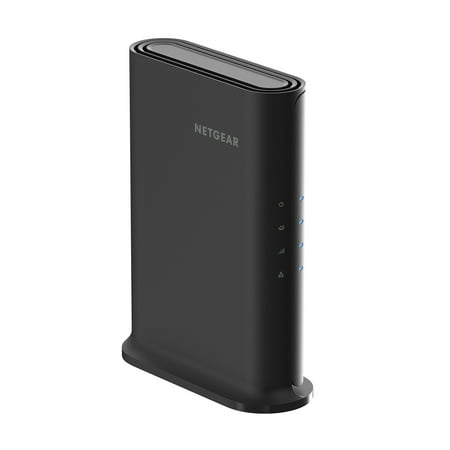
The NETGEAR® 4-Stream AX1600 WiFi 6 Router upgrades your network to provide greater capacity with consistent and powerful signal strength to all your connected devices. With speeds up to 1.6Gbps, this next-gen router is recommended for a small to medium home, up to 1,500 sq. ft., with up to 20...
The NETGEAR RAX5 is the compact alternative if you’re in a smaller space or just want a no-drama Wi-Fi 6 router from a trusted brand. AX1600 spec, covers up to 1,500 square feet, handles 20 devices. NETGEAR’s Armor security suite is baked in — a nice bonus for keeping your home network locked down.
At $59 with over 1,000 reviews, it sits right between the AX1500 and the AX4400 on the value ladder. Good pick for dorm rooms, smaller apartments, or as a secondary router for a specific area of your place.
Best Ultra-Budget: TP-Link Archer C54
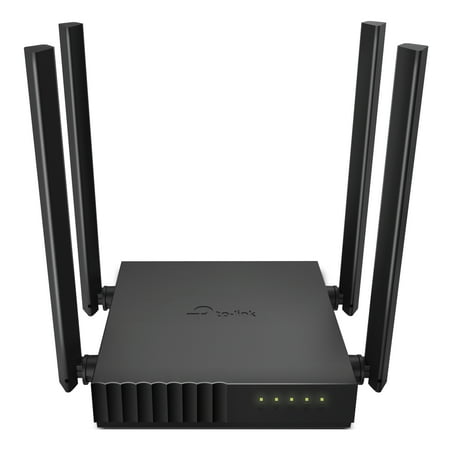
Palm-sized Archer C54 AC1200 dual-band router is ideal for video streaming and high-speed downloading.[1] Four antennas and beamforming focus stronger, more reliable WiFi signal towards your devices. MU-MIMO technology lets the router talk to several devices at once.[2] For added flexibility,...
Twenty-five bucks. That’s it. The TP-Link Archer C54 is an AC1200 MU-MIMO dual-band router that does the basics without drama. It supports multiple devices simultaneously and works with every home internet provider out there.
Is it as capable as a Wi-Fi 6 router? No. But if you’re on a tight budget or just need a backup router, this bad boy does the job. Nearly 2,000 reviews at 4 stars. Hard to argue with $25.
What to Look For: Buying Criteria
1. Wi-Fi Standard
Get Wi-Fi 6 at minimum in 2026. Wi-Fi 5 routers are fine if you already own one, but don’t buy new Wi-Fi 5 hardware. Wi-Fi 7 is worth it if you have a lot of Wi-Fi 7 devices or want to be future-proof.
2. Coverage Area
Router coverage specs are measured in ideal conditions (open air, no walls). Cut manufacturer claims roughly in half for realistic real-home performance. For a 2,000+ sq ft home with multiple floors, consider a mesh system instead of a single router.
3. Device Count
Count everything on your network: gaming PC, consoles, phones, smart TVs, tablets, smart home devices. Modern homes regularly hit 20-30 connected devices. A router with OFDMA (Wi-Fi 6 and up) handles this much better than older designs.
4. QoS Support
Quality of Service lets you prioritize traffic types. Gaming routers often have dedicated QoS modes for gaming. Even basic routers with QoS can make a real difference when multiple people share a connection.
5. WAN Port Speed
Most routers have a 1 Gbps WAN port. If your ISP delivers more than 1 Gbps, look for a 2.5 Gbps or higher WAN port (like the Nighthawk RS180). Otherwise it’s a non-issue.
Router Types: Which Setup Is Right for You?
A single router works great for apartments and smaller homes. If you’re dealing with dead spots, multiple floors, or a large house, a mesh system distributes the signal across multiple nodes. For hardcore battlestation setups in large spaces, mesh is often the smarter play over a single high-power router.
| Setup | Best For | Typical Cost |
|---|---|---|
| Single router | Apartments, small homes, focused setups | $25–$300 |
| Mesh system | Large homes, multiple floors, dead spot elimination | $100–$600+ |
| Gaming router | Competitive gamers who want QoS + gaming acceleration | $100–$900+ |
| Budget router | Basic internet, single user, tight budget | $20–$60 |
Community Verdict
Router communities on Reddit (r/HomeNetworking, r/techsupport) consistently point to a few truths:
- ISP-supplied routers are almost universally worth replacing. They’re designed to be cheap, not good.
- Wi-Fi 6 is the consensus minimum for new purchases in 2026. The OFDMA efficiency improvements matter on congested networks.
- TP-Link and NETGEAR dominate the value tiers. ASUS ROG rules the gaming-focused premium segment.
- Most people don’t need a “gaming router” specifically — a good Wi-Fi 6 router with basic QoS is plenty for the vast majority of gamers.
- Wired connections still beat wireless for competitive gaming, full stop. If you can run an Ethernet cable to your gaming rig, do it.
Router vs. Router: Quick Comparison
| Router | Wi-Fi Gen | Speed | Coverage | Price | Best For |
|---|---|---|---|---|---|
| NETGEAR Nighthawk RS180 | Wi-Fi 7 | BE5500 | 2,500 sq ft | $179 | Premium, future-proof |
| TP-Link Archer AX4400 | Wi-Fi 6 | AX4400 | ~2,000 sq ft | $114 | Mid-range sweet spot |
| NETGEAR RAX5 | Wi-Fi 6 | AX1600 | 1,500 sq ft | $59 | Compact, apartments |
| TP-Link Archer AX1500 | Wi-Fi 6 | AX1500 | ~1,500 sq ft | $54 | Budget Wi-Fi 6 |
| TP-Link Archer C54 | Wi-Fi 5 | AC1200 | ~1,200 sq ft | $25 | Ultra-budget basics |
Is It Worth Upgrading Your Router?
Yes, if you’re still on the router your ISP gave you or something older than 5 years. Even a $54 Wi-Fi 6 router will make a noticeable difference in network stability if you have multiple devices on your network.
You probably don’t need the $900 gaming router if you’re a casual gamer. But you should at least be on Wi-Fi 6 hardware. The jump from Wi-Fi 5 to Wi-Fi 6 in real-world multi-device scenarios is real.
FAQ
Do I need a gaming router for online gaming?
Not necessarily. Any modern Wi-Fi 6 router with decent QoS will serve most gamers well. Gaming routers add software features like traffic prioritization and game accelerators — useful for competitive players, overkill for casual ones. What matters more: a wired connection if possible, and a router that isn’t congested.
What’s the difference between Wi-Fi 6 and Wi-Fi 7?
Wi-Fi 7 adds Multi-Link Operation (MLO) which lets devices use multiple bands simultaneously, 320 MHz channel width (double Wi-Fi 6’s max), and better handling of congestion. For gaming, MLO is the standout feature — it directly reduces latency. In practice, the difference is most notable on very congested networks or with many Wi-Fi 7 devices.
Should I get a mesh router or a single router?
Single router for apartments and smaller homes under ~1,500 sq ft. Mesh system for larger homes, multiple floors, or anywhere you have dead spots. A mesh system with two or three nodes will outperform a single high-power router in a large space every time.
Is a wired connection always better than Wi-Fi for gaming?
Yes. Ethernet eliminates wireless interference, delivers lower and more consistent latency, and doesn’t suffer from congestion issues. If you can run a cable to your gaming rig, do it — no router upgrade beats a wired connection for competitive gaming.
What router specs actually matter for streaming?
Coverage range and device capacity. 4K streaming needs about 25 Mbps per stream — bandwidth isn’t usually the issue. Dead zones and too many devices fighting for airtime are the real problems. Look for MU-MIMO support and, ideally, OFDMA (Wi-Fi 6+) if you have multiple streaming devices running simultaneously.