Computer Station Nation is reader-supported.
When you buy through links on our site, we may earn an affiliate commission. Learn more.
Both of these keyboards finished in the top three of our best RGB mechanical keyboard roundup, and both cost less than $50. But picking between them is not about price — it is about what kind of keyboard you actually want. One is a full-size workstation board with brand-name polish. The other is a compact, hot-swappable mechanical you can mod for years. Here is how they line up.
Quick Verdict
If you want the easier daily-driver keyboard with a number pad, real media controls, and ecosystem software, the Corsair K55 CORE RGB wins. If you want a real mechanical switch, hot-swap capability, and a compact 60% layout you can throw in a backpack, the Geeky GK61 SE is the answer. They are not really competing for the same person.
Both Keyboards at a Glance
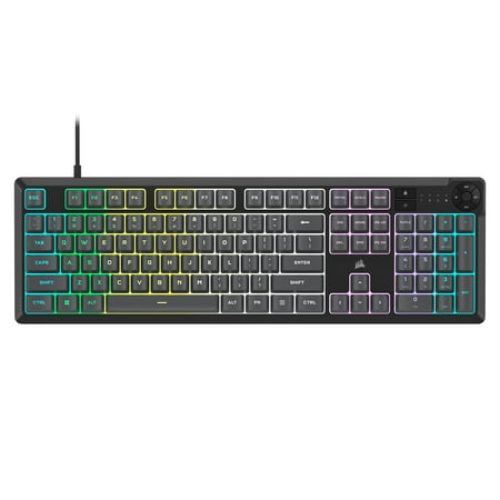
Corsair K55 CORE RGB Full Size USB Gaming Keyboard with Safety Leaflet, Black & Gray
 Walmart.com
The CORSAIR K55 CORE gaming keyboard puts you on the winning path. Brighten your gaming sessions with fully customizable ten-zone RGB backlighting, programmable in CORSAIR iCUE, to create your own personal light show as you rack up a string of wins. Quiet, responsive membrane switches mean you...
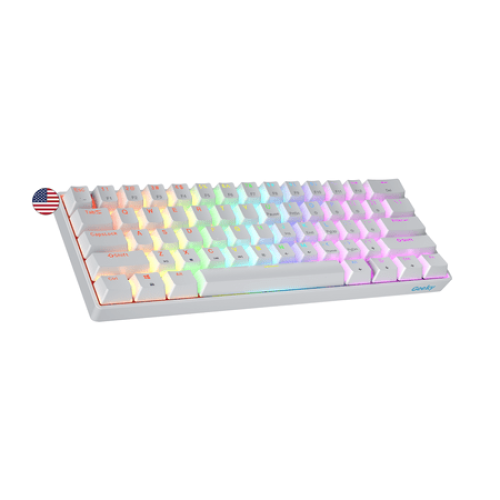
Geeky GK61 SE 60% | Mechanical Gaming Keyboard | 61 Keys Multi Color RGB LED Backlit for PC / Mac...
Walmart.com
The Geeky GK61 SE ( Standard Edition) 60% features soldered mechanical key-switches. (Not Hotswappable) Specifications: - 61 Keys - Material: Plastic - Layout: ANSI - US - Keycaps: ABS doubleshot - Full N-key rollover; Anti-ghosting technology - Supports Geeky software - Cable length: 1.5 m (5.9...
Spec Comparison
| Spec | Corsair K55 CORE RGB | Geeky GK61 SE |
|---|---|---|
| Price | $40 | $23 |
| Layout | Full-size, 104 keys | 60%, 61 keys |
| Switch type | Rubber dome (mechanical feel) | Outemu Brown (true mechanical) |
| Hot-swap | No | Yes |
| RGB zones | 10-zone | Per-key |
| Software | Corsair iCUE | None (onboard only) |
| Dedicated media keys | Yes | No (Fn layer) |
| Number pad | Yes | No |
| Cable | Braided, fixed | USB-C detachable |
| Keystroke rating | 75 million | 50 million (Outemu spec) |
| Weight | 765 g | ~530 g |
| Wrist rest included | Yes (plastic) | No |
RGB Lighting
Both keyboards have great RGB for their price tier, but they execute differently. The K55 uses ten-zone backlighting controlled through Corsair’s iCUE software — you can run sweeping wave effects across the board, sync to other Corsair gear, and save profiles. The lighting is bright and the colors are accurate, but you do not get individual key control. If you want “K” lit red and “Esc” lit cyan while everything else cycles, that is not happening on the K55.
The GK61 SE has per-key RGB, which is the high-end feature here. Every single switch has its own LED you can light independently — in theory. The catch is the GK61 has no software. All customization happens through Fn-layer key combinations, which are powerful but tedious for granular tweaks. Onboard, you get about 19 preset effects (reactive, ripple, wave, breathing, static, etc.) and you can edit color layouts via a clunky keyboard-shortcut method.
Practically speaking: the K55 looks better right out of the box because of iCUE’s polished presets. The GK61 is more capable on paper but harder to get the most out of. If you have other Corsair gear and want ecosystem sync, K55. If you want raw per-key control and do not mind tinkering, GK61 SE.
Switch Feel and Typing
This is where the two part ways the hardest. The K55 uses rubber-dome switches that Corsair markets as “mechanical feel”. They have a noticeable tactile bump and feel firmer than a typical office board, but they are still rubber-dome at the end of the day. Travel is shorter than a true mech, bottoming-out has a soft floor, and the typing sound is muted — closer to a laptop than a clack-y keyboard.
The GK61 SE uses Outemu Brown switches. These are real mechanical switches with a metal spring, a stem, and a tactile bump near the top of the keypress. The feel is closer to a Cherry MX Brown than to anything membrane-based. Bottoming-out is firm, the sound is mid-loud (less clicky than blues, less silent than reds), and the actuation is consistent.
If you have ever typed on a mechanical keyboard and gone back to a membrane, you know the difference. The GK61 SE feels better under your fingers, full stop. The K55 is not bad — it is firmly above-average for a rubber-dome board — but it is not in the same league. And because the GK61 is hot-swappable, you can upgrade those Outemus to Gateron, Kailh, or anything else later without any soldering.
Layout and Daily Use
The K55 is full-size: dedicated arrow keys, full number pad, top-row function keys, plus six dedicated macro G keys on the left and dedicated media controls (with a volume roller) on the top-right. If you do spreadsheet work, accounting, or anything number-heavy, the num pad alone justifies the choice. The trade is desk space — this thing is 478 mm wide. It takes up real estate.
The GK61 SE is 60% — no number pad, no function row, no dedicated arrows. Everything past the alphanumeric keys lives on a Fn layer. The first week is awkward. You will reach for keys that are not there. By week three, your hand never leaves home position, your wrist hurts less, and you start to like it. The compact footprint also frees up mouse space, which is a real win for FPS gamers who play at low DPI.
Verdict here: pick by your workflow. Spreadsheets, video editing scrubbing with arrows, anything number-intensive — the K55. FPS gaming, programming, writing, travel, or just minimalism — the GK61 SE.
Build Quality
Both keyboards are plastic chassis with reasonable rigidity. The K55 has some flex if you press hard on the corners, which is normal for a $40 board. The keycaps are ABS plastic and the legends are pad-printed — they will wear over time, though not quickly. The braided cable is fixed (non-detachable), which is a minor durability concern if you travel with the keyboard.
The GK61 SE feels surprisingly solid for the price. The chassis is plastic but the metal backplate gives the typing a denser, less hollow sound. The keycaps are double-shot ABS, which means the legends are molded as part of the cap and never wear off. The USB-C cable is detachable, which is a small thing that turns out to matter a lot — cables fail, and replacing a $5 cable beats replacing a $25 keyboard.
Pros & Cons Summary
Corsair K55 CORE RGB
Pros: Full-size layout with num pad, dedicated media controls with volume roller, polished iCUE software, ecosystem sync with other Corsair gear, included wrist rest, trusted brand and warranty.
Cons: Not a true mechanical, larger footprint, fixed cable, ABS keycaps wear over time, no per-key RGB.
Geeky GK61 SE
Pros: Real Outemu Brown mechanical switches, hot-swappable PCB, per-key RGB, USB-C detachable cable, double-shot keycaps, compact and portable, cheaper.
Cons: No software for fine-tuned RGB, 60% layout has a learning curve, no number pad, no dedicated media keys, no included wrist rest.
Final Recommendation
The Corsair K55 CORE RGB is the better keyboard for most people. Full stop. The full-size layout, the dedicated media controls, the iCUE software, and the brand warranty all matter for daily-driver use. If you only buy one keyboard and you want it to handle gaming, work, and Discord without compromise, this is it.
The Geeky GK61 SE is the better keyboard if you are a mechanical keyboard person. If you have ever bought premium keycaps or watched a YouTube video about lubed switches, you already know which one you want. The hot-swap PCB alone is worth the price — you can spend $20 on a switch upgrade later and have a $50 board that punches up to $150 territory.
Want the full breakdowns? Read the full Corsair K55 CORE RGB review or check the best 60% mechanical keyboard guide for more compact options.