Best Affordable Webcams Under $50 (2026 Buyer’s Guide)

Computer Station Nation is reader-supported.
When you buy through links on our site, we may earn an affiliate commission. Learn more.
Affordable Webcams Under $50 — Quick Overview
You don’t need to spend a fortune to get a decent webcam in 2026. Whether you’re setting up for work-from-home video calls, streaming on Twitch, or keeping in touch with family, the Affordable Webcams Under $50 market is stacked with solid options. We’ve rounded up six of the best currently available, priced from under $15 all the way to $37, so you can find the right fit for your setup and your budget.
Below you’ll find our top picks at a glance, a detailed breakdown of each model, and how to choose a budget webcam that fits your needs.
At a Glance — Top Picks Under $50
Best Ultra-Budget Pick: Mata1-USA 1080p Full HD Webcam — $14.99
Best 4K Under $50: onn 4K Webcam with Autofocus — $36.58
Best for Streaming: M Buder 2K Wide Angle Auto Focus — $37.43
Best Brand-Name 4K: AOC 4K Webcam — $35.99
What to Look For in a Budget Webcam
Here’s what matters when you’re shopping under $50:
- Resolution: 1080p Full HD is the sweet spot at this price. A few models push 4K or 2K, which gives you extra cropping room and sharper detail if your lighting is good.
- Frame Rate: 30fps is standard at this price. You’ll need to spend more for 60fps, but for video calls and casual streaming, 30fps is perfectly usable.
- Microphone: Every webcam under $50 includes a built-in mic, but quality varies. Dual-mic setups (like the onn 4K) tend to sound clearer than single-mic designs.
- Field of View: Wider is better for group calls or showing your setup. A 120° FOV (like the Mata1-USA model) captures more of your background than a standard 70–80° lens.
- Auto Focus vs. Fixed Focus: Auto focus is rare under $50 but the M Buder and onn models include it. Fixed focus is fine if you sit at a consistent distance from the camera.
- Privacy Cover: A physical shutter is a nice bonus at any price. The onn 4K includes one built in.
Product Comparison — Best Affordable Webcams Under $50
Here’s a side-by-side look at all six models:
| Model | Price | Resolution | Rating | Reviews | Key Feature |
|---|---|---|---|---|---|
| Mata1-USA 1080p Webcam | $14.99 | 1080p | 5★ | 1,834 | 120° FOV, best value |
| Webcam HD Web Camera (Unbranded) | $14.78 | HD | — | — | Lowest price |
| Rupoun 1080P HD Webcam | $22.97 | 1080p | — | — | Flexible rotation |
| AOC 4K Webcam | $35.99 | 4K | 5★ | 49 | 4K CMOS sensor |
| onn 4K Webcam | $36.58 | 4K | 4★ | 225 | Autofocus, dual mics, privacy cover |
| M Buder 2K Wide Angle | $37.43 | 2K | — | — | Auto focus, noise reduction mic |
Detailed Product Breakdown
1. Mata1-USA 1080p Full HD Webcam — $14.99
The Mata1-USA 1080p webcam is the best value in this list. At $14.99, you get 1080p Full HD video at 30fps over USB 2.0 with a wide 120° field of view. The built-in microphone handles calls fine in a quiet room. With 1,834 reviews averaging a perfect 5-star rating, people are clearly happy with it.
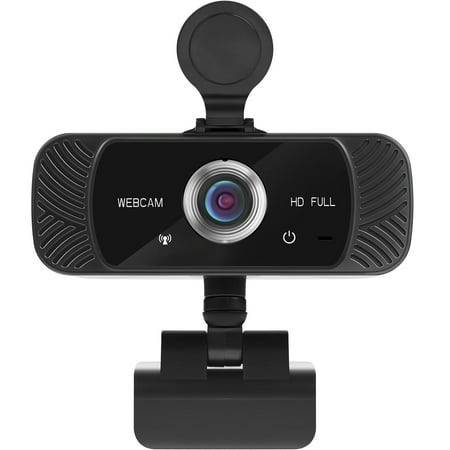
The Mata1 webcam is driverless for plug-and-play (PnP) streaming. The camera can rotate horizontally, 360 degrees, and vertically 180 degrees. The base conveniently has a tapped hole to connect a tripod (not included). The CMOS image sensor allows for a high frame rate and resolution, thus...
Buy this one if you want the most bang for your buck. The wide FOV works well for group calls or showing your setup, and at this price you can grab two — one for your desk, one for travel.
2. AOC 4K Webcam — $35.99
AOC is known for monitors, but their 4K webcam brings 4K resolution to the sub-$50 price point. It uses a high-resolution CMOS color sensor and connects via USB. With 49 reviews averaging 5 stars, early buyers are happy with the image quality. The 4K resolution gives you cropping flexibility in OBS, and it works with Zoom and Teams without any driver hassle.
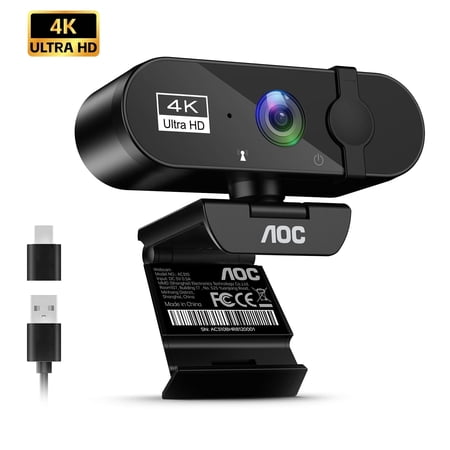
Thank you for choosing our next-generation digital IP camera! This high-performance digital IP camera utilizes our advanced technology and guaranteed quality. It transmits data to your computer in real time via a USB port. With its high resolution, high-speed transmission rate, stylish design,...
The AOC is for you if 4K matters and you want a recognizable brand. It splits the difference between ultra-budget picks and pricier studio webcams.
3. onn 4K Webcam with Autofocus — $36.58
Walmart’s onn brand delivers at $36.58 with features usually found on pricier models: autofocus, a swivel head, dual microphones, and a physical privacy cover. With 225 reviews averaging 4 stars, it’s the most-reviewed 4K option here. The autofocus keeps you sharp when you lean back, and the dual mics pick up conversation more naturally than single-mic alternatives.
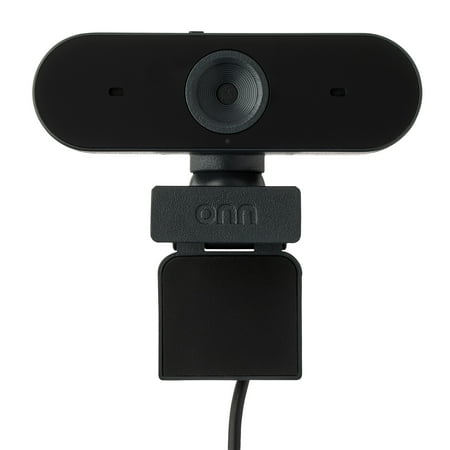
The onn 4K Webcam is a high-quality device designed to deliver superior video clarity and audio performance. With its ability to support up to 2160p resolution at a maximum of 25 fps, and 1080p resolution at 30 fps max, you can expect crystal clear images in every interaction. The webcam also...
The onn 4K is the best all-around webcam under $50. It has 4K, autofocus, dual mics, a privacy cover, and costs under $37. Hard to beat.
4. M Buder 2K Wide Angle Auto Focus — $37.43
The M Buder costs $37.43 and brings 2K resolution, a wide-angle lens, auto focus, and a noise reduction microphone. The noise reduction matters if you take calls in a busy room — it filters out background hum and keyboard noise. The 2K resolution sits between 1080p and 4K: sharper than 1080p without the file size overhead of 4K.
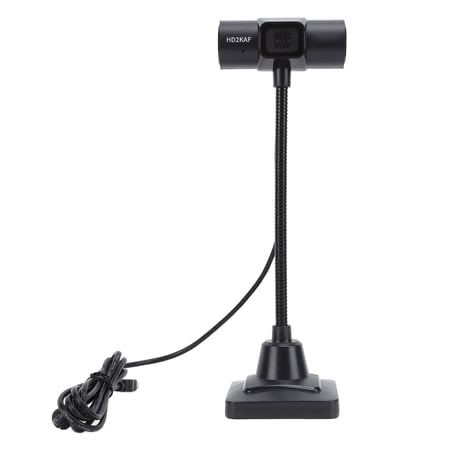
Step into a world of vibrant clarity with the M Buder USB Computer Web Camera. This state-of-the-art laptop webcam offers an impressive 2K Wide Angle resolution, ensuring every video call, webinar, and streaming session looks incredibly professional. Engineered with intelligent Auto Focus...
If you take calls in a noisy space, the M Buder’s noise reduction mic is worth the price. The auto focus means one less thing to fiddle with.
5. Rupoun 1080P HD Webcam — $22.97
At $22.97, the Rupoun 1080P HD Webcam sits in the middle of this price range. It does 1080p at 30fps with a built-in microphone, and the head rotates so you can angle it wherever you need. The 11 cm cable reaches most monitor placements, and the USB connection is plug-and-play with Windows, macOS, and Chrome OS.
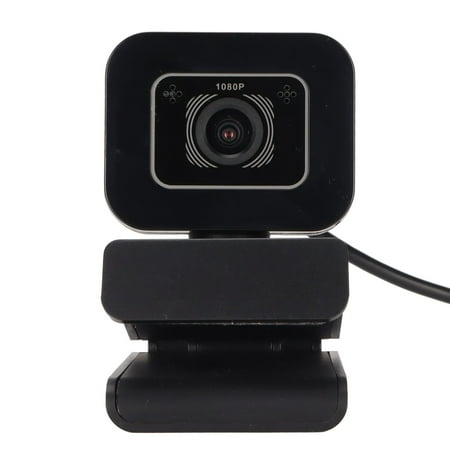
Elevate your online communication with the Rupoun 1080P HD Webcam. Designed for seamless video conferencing, live streaming, and virtual learning, this computer camera delivers crystal-clear 1920x1080 resolution at a smooth 30 frames per second. The built-in microphone ensures your voice is...
The Rupoun works well for students and remote workers who want better than a laptop camera but don’t want to spend over $25.
6. Webcam HD Web Camera — $14.78
At $14.78, this is the cheapest webcam here. It’s a straightforward HD webcam with a built-in microphone and USB connectivity. No 4K, no autofocus, no wide-angle. But if you just need something for a video call with family or a quick Zoom check-in on a tight budget, it works.
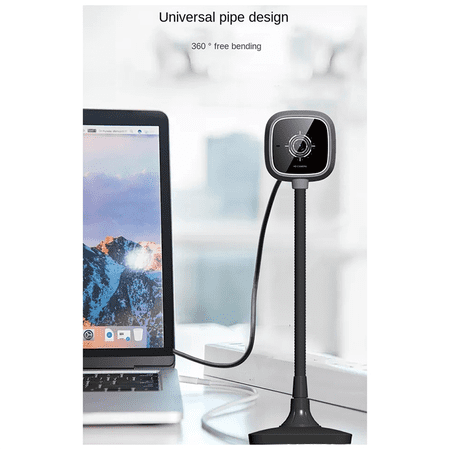
Built-in noise reduction microphone chip Built-in microphone chip with AI noise reduction technology Intelligently identifies and reduces background and noise interference HD coated lens HD coated lens brings you HD video Makes the video more transparent Universal tube design can be bent 360°...
Skip this one if you need good low-light performance or plan to stream regularly. For travel or as a spare at $14.78, it’s fine.
Video Review
YouTube has plenty of video comparisons for budget webcams. Search for head-to-head comparisons of the onn 4K and AOC 4K — they’re the most interesting contenders in this bracket. Short version: 4K under $50 looks noticeably sharper in good lighting, while 1080p models hold up fine for standard video calls.
Performance & Benchmarks
At this price, performance comes down to lighting, microphone quality, and connection reliability.
- Lighting: Every webcam under $50 struggles in low light. The 4K and 2K options (AOC, onn, M Buder) handle moderate indoor lighting better than 1080p models because their higher resolution sensors capture more detail. If your room is dim, point a desk lamp at a white wall for bounce lighting.
- Microphone: The onn 4K’s dual mics give the best audio pickup here. The M Buder’s noise reduction is useful for noisy rooms. Single-mic models (Mata1-USA, Rupoun, unbranded HD) work fine in quiet spaces.
- Connection: All six use USB. No drivers needed — they’re all UVC, which means plug-and-play on Windows, macOS, Linux, and Chrome OS.
Wondering how a dedicated webcam compares to your phone’s camera? Check our Budget Webcam vs Smartphone Camera comparison for the full breakdown.
Software & Updates
None of these webcams need special software. They use the UVC standard, so your OS handles them directly:
- Windows 10/11: Open the Camera app or any video software — no drivers needed.
- macOS: Works in FaceTime, Zoom, Photo Booth, and OBS immediately.
- Chrome OS: Works with any webcam-compatible app.
- Linux: Supported via the built-in UVC kernel driver.
For manual exposure, white balance, or zoom, use OBS Studio (free) or your video app’s camera settings. Neither the Mata1-USA nor onn models ship tuning software, but OBS covers that.
Accessories & Ecosystem
These webcams work with common accessories:
- Ring Lights: A USB ring light ($15–$25) is the single best upgrade for any budget webcam. Makes a bigger difference than the camera itself.
- Microphone Arms: Pairing a budget webcam with a separate USB mic (even $20) beats spending all your money on one premium webcam.
- Monitor Mounts: Most clip onto monitors natively, but a tripod or boom arm gives you more positioning freedom.
- Privacy Covers: The onn 4K includes one. For the others, adhesive slide covers cost under $5 for a pack.
FAQ
Do I really need 4K in a webcam under $50?
Not strictly. 1080p works fine for video calls and most streaming. But 4K gives you cropping room in OBS and looks sharper in good light. If your budget reaches the onn 4K at $36.58, it’s a worthwhile step up.
Are these webcams compatible with OBS Studio?
Yes. All six use standard UVC drivers and show up as a video source in OBS, Streamlabs, vMix, and similar software.
Which webcam under $50 has the best microphone?
The onn 4K with its dual mics. For noisy environments, the M Buder’s noise reduction is the better pick.
Will these work with a PS5 or Xbox for streaming?
They’re not designed for consoles. You’d need a capture card to route console HDMI to your PC, then use one of these as your face camera.
Can I use these for Zoom, Teams, and Google Meet?
Yes. Plug-and-play on all three, on Windows, macOS, and Chrome OS.
Do any of these have built-in lighting?
No. If you take calls in low light, get a separate ring light or desk lamp. See our common questions about cheap webcams guide for more tips.
Is It Worth It?
Who should buy a webcam under $50:
- Remote workers who want a visible upgrade from their laptop’s 720p camera
- Casual streamers just starting out
- Students who need reliable video for online classes
- Anyone building a second workstation or travel kit on a budget
Who should skip these and spend more:
- Professional streamers who need 60fps
- Anyone who streams in low-light conditions regularly (spend $100+ for a better sensor)
- Creators who need manual exposure and interchangeable lenses
Bottom line: The onn 4K Webcam at $36.58 is the pick of this bunch — 4K, autofocus, dual mics, privacy cover, under $37. If your budget is tighter, the Mata1-USA at $14.99 delivers with 1,834 positive reviews backing it. Either way, you can upgrade your video setup without spending more than $40.
Where to Buy
All six webcams are on Walmart at the prices listed above. Check our deals on webcams under $50 for any current discounts before you buy.
Click any product link below to check current pricing and availability: