Best Budget Computer Speakers: Honest Guide to Great Sound Without Breaking the Bank
Computer Station Nation is reader-supported.
When you buy through links on our site, we may earn an affiliate commission. Learn more.
Best Budget Computer Speakers: Honest Guide to Great Sound Without Breaking the Bank
Most built-in monitor speakers are terrible — tinny, quiet, and completely lifeless. The good news is you don’t need to spend $100+ to fix it. The budget speaker market has improved a ton in recent years, and you can get genuinely good sound for as little as $13. Whether you game, watch YouTube, take calls, or just want your music to actually sound like music, there’s a budget option that’ll do it well.
This guide covers everything you need to know about buying budget computer speakers: what types exist, how much you should spend, which features actually matter, and the best picks at every price point. If you’re looking for the absolute cheapest options, check our Best Budget Computer Speakers Under $30 list — this page is the full landscape view.
At a Glance: Budget Computer Speakers TL;DR
Bottom line: Budget computer speakers range from $13 to $100. At the low end ($13–$25), USB-powered 2.0 speakers give you clean, functional audio — perfect for calls, YouTube, and casual use. At the mid-budget range ($25–$60), you start finding AC-powered speakers with actual bass control, and sometimes even a subwoofer. At the upper budget tier ($60–$100), you can get proper 2.1 systems or powered bookshelf speakers that rival setups costing twice as much.
Who should buy budget speakers: Anyone who wants better-than-monitor audio without spending hundreds. Students, remote workers, casual gamers, and battlestation builders on a tight budget.
Who should skip them: Audiophiles, competitive gamers who need positional audio precision, or anyone with a dedicated sound system budget. If you’ve got $200+ to spend, you’re in a different category.
How Much Should You Spend on Budget Speakers?
The budget speaker market breaks into three clear tiers, and the right one depends entirely on what you’re doing:
Tier 1: $10–$25 — The Entry Level
These are almost all USB-powered 2.0 speakers. They’re simple: plug into USB for power, plug into your headphone jack for audio, and you’re done. No wall wart, no subwoofer, no setup fuss.
Best for: Office work, video calls, background music, kids’ setups. They won’t shake the room, but they’ll sound way better than your monitor’s built-in speakers.
What you sacrifice: Volume ceiling, bass response, and any pretense of audiophile quality. You’re paying for convenience and a massive upgrade over built-in audio.
Tier 2: $25–$60 — The Sweet Spot
This is where budget speakers start sounding good. You’ll find AC-powered speakers (which means more power headroom), actual bass controls, larger drivers, and the occasional 2.1 system with a subwoofer. This is also where brands like Creative, Logitech, and Edifier start competing.
Best for: Gamers, music listeners, anyone who wants real audio presence without subwoofer neighbor-anger. This is the tier most people should target.
What you get: Better clarity, actual low-end, volume you can feel. A pair of $40 speakers can sound just as good as a $100 set from five years ago.
Tier 3: $60–$100 — The Upper Budget
Budget ends and mid-range begins somewhere around $100. At this level you’re getting powered bookshelf speakers (like Edifier models), proper 2.1 systems, Bluetooth connectivity, optical inputs, and build quality that’ll last for years.
Best for: Enthusiasts on a budget, small apartment setups, anyone who wants to buy once and not think about speakers for the next five years.
USB vs AC Powered: What’s the Difference and Does It Matter?
This is the most important thing to understand when shopping for budget speakers. It affects everything about your sound and setup.
USB-Powered Speakers
USB speakers draw power from your computer’s USB port. The USB 2.0 spec provides a maximum of 2.5 watts per port — that’s your speaker’s total power budget. USB-C can deliver more, but most budget USB speakers are still USB-A.
Pros: No wall adapter needed, clean desk setup, auto power-on with your computer. Cons: Limited power output, no deep bass, volume tops out earlier. These are the $13–$25 options, and they’re perfect for their intended use.
AC-Powered Speakers
AC-powered speakers plug into a wall outlet for power. This gives them access to much more wattage, which translates to cleaner sound at higher volumes and the ability to drive larger speakers and subwoofers.
Pros: Better volume, deeper bass, more detail, subwoofer support. Cons: Extra cable management, needs an available outlet, can’t auto-power with your PC (some have signal sensing).
The bottom line: Doing more than background listening or calls? Go AC-powered. The $10–$15 price jump from entry USB to entry AC is the best value upgrade in the entire budget speaker market.
2.0 vs 2.1: Do You Need a Subwoofer?
2.0 = two speakers (left and right stereo). 2.1 = two speakers plus a subwoofer for bass. Here’s when each makes sense:
- 2.0 is fine for: Office work, YouTube, podcast listening, casual music, video calls. Saves desk space and cable hassle.
- 2.1 is worth it for: Gaming (explosions feel real), movies, bass-heavy music (EDM, hip-hop, rock), or anyone who’s ever said “these speakers sound thin.”
In the budget category, 2.1 systems start around $50–$60. If your budget is under $50, stick with a good 2.0 set — a cheap subwoofer is worse than no subwoofer. If you can stretch to $55 for something like the Logitech Z313, the subwoofer experience is genuinely addictive.
The Best Budget Computer Speakers — Picked for You
Here are the budget computer speakers worth your money right now, organized by what they’re best for. All prices and availability are current as of publication.
Best Entry-Level Pick: onn. Stereo USB Speakers — $13.13
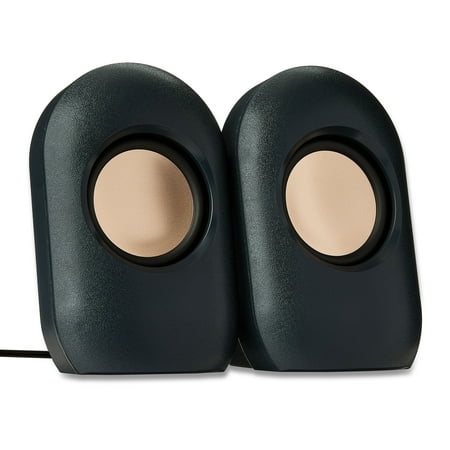
The onn USB Powered 3.5mm Stereo Speakers are a convenient and compact audio solution for computers with a 3.5mm AUX output port. These speakers feature 2.5-inch copper-tinted drivers and come with a 3.6-foot speaker wire attached for easy connection. The speakers also have an integrated volume...
The onn. Stereo USB Speakers are about as cheap as you can go while still getting something that sounds decent. Walmart’s house brand delivers a simple USB-powered 2.0 setup with a volume control wheel on the cable. With 4 out of 5 stars from over 1,100 reviews, they’re the definition of “good enough” — and for thirteen bucks, that’s a steal. If all you need is something louder and clearer than your monitor speakers, this is it.
Best RGB Budget Pick: TSV 2.0 Stereo RGB Gaming Speakers — $13.98
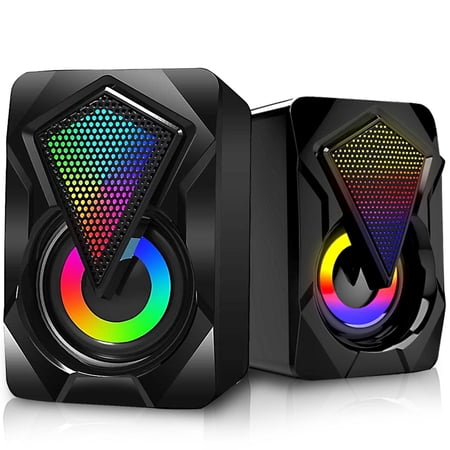
TSV provides three types of USB Powered RGB PC Gaming Speakers, which can deliver you with full-range 2.0 channel enhanced stereo and high-quality auditory feast, turning your desktop computer or laptop into a fantastic sound system. In terms of details, those three Desktop speakers are equipped...
If your battlestation has RGB and you need speakers to match, the TSV 2.0 Stereo speakers are the cheapest way to add both sound and lights to your desk. Seven-color LED modes cycle automatically or can be set to a static color. They’re USB-powered with a 3.5mm input, so they work with PCs, laptops, phones, and even some TVs. The sound quality is entry-level — fine for YouTube and calls, not for critical listening — but at this price with RGB, they’re a no-brainer for a themed setup.
Best USB-C / Modern Pick: LENRUE USB Computer Speakers — $22.99–$23.74
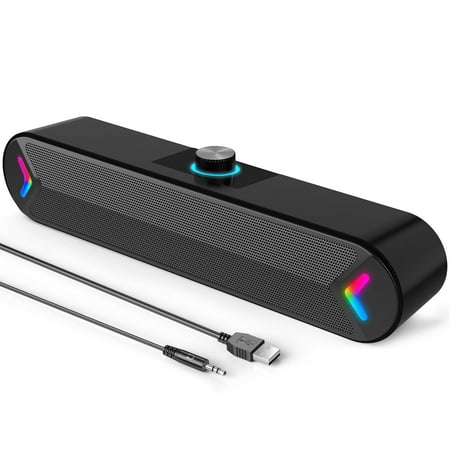
LENRUE, A professional consumer electronic products manufacturer,committed to research and produce excellent product for 10 years. Found in 2010, LENRUE is a professional supplier of consumer electronic products , especially specialized in Bluetooth speakers. As the consumer electronics...
The LENRUE brand dominates the budget USB speaker category for good reason. These speakers come in two variations — a standard USB-A version ($22.99) and a newer USB-C version ($23.74) that’s compatible with modern laptops and MacBooks. Both deliver 10W stereo sound with a built-in headphone jack on the front of the right speaker, and the USB-C variant is one of the few budget options that works seamlessly with USB-C-only devices. With ratings of 4 stars across hundreds of reviews, these are a reliable pick for anyone who wants clean, functional desktop audio.
Best Touch Control Pick: Touch-Light USB-C Speakers — $23.51
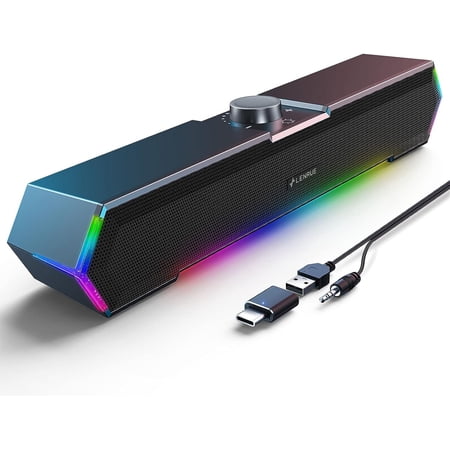
Power Crisp Clear Sound: High-quality multiple horns for increased volume without distortion. No Current Sound: Increase the shock absorber, even if the standby does not have any noise. Top Knob: Designed to be on top, easy to adjust the volume. Turn on/off the computer speaker. Touch Lights:...
These USB-C powered speakers stand out with touch-sensitive controls and a clean, modern design. With a perfect 5-star rating from over 300 reviews, they’re the highest-rated budget option on our list. The touch controls let you adjust volume and toggle lighting with a tap, and the USB-C connection means they work with the latest laptops and desktop motherboards without adapters. The sound is described as “surge clear” — punchy and detailed for a USB-powered set. If clean aesthetics matter, these are worth a look.
Best Under $25: onn. AC Powered Speakers — $24.36
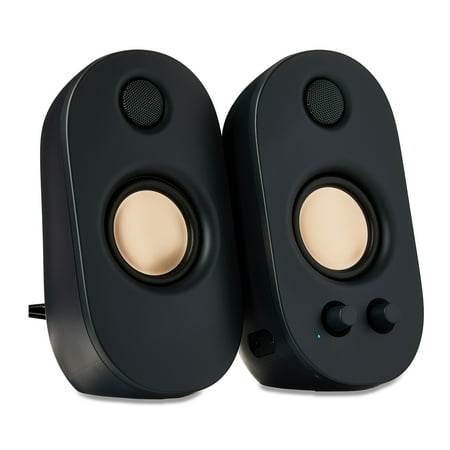
The onn Powered Stereo Speakers are a great option for anyone looking to enhance their audio experience. These speakers feature a 3.5mm AUX input, allowing you to connect your devices and enjoy high-quality sound. You can customize your listening experience with the volume and bass controls, and...
This is where budget speakers start sounding good. The onn. AC Powered Speakers plug into a wall outlet, giving them real power headroom that USB can’t match. They have dedicated volume and bass controls, meaning you can actually adjust the low-end to your preference. With over 1,200 reviews averaging 4 stars, they’re the most popular budget AC-powered option for good reason. The $11 jump from the USB onn. model to this AC version is the best $11 you can spend on desktop audio.
For an even deeper look at the under-$30 category — including picks like the Bluetooth Sound Bar and the LENRUE White USB speakers — browse the full under-$30 roundup.
What to Look for When Buying Budget Computer Speakers
Not all budget speakers are created equal. Here’s what actually matters when you’re shopping with a limited budget:
Power Source (USB vs AC)
As discussed above, this is the #1 performance differentiator. Unless you absolutely cannot spare an outlet, spend the extra few dollars for AC-powered speakers. The volume ceiling and bass response difference is dramatic.
Driver Size
Larger drivers generally produce better sound. Most budget speakers use 2-inch to 3-inch drivers. At the same price point, speakers with physically larger drivers tend to sound fuller. Look for specs that mention driver size — if it’s not listed, it’s probably tiny.
Wattage Rating
Don’t get too hung up on wattage numbers — budget speaker wattage claims are often inflated. What matters more is whether the speaker is AC or USB-powered and how many drivers it has. A USB speaker claiming “20W” is likely peak power, not RMS. Focus on AC power and known brands for honest specs.
Controls and Connectivity
Look for physical volume knobs (not just buttons), headphone jacks on the speakers (so you can plug in without reaching your PC), and enough cable length to route cleanly on your desk. In the budget category, convenience features are what separate great picks from frustrating ones.
Build Quality
At these prices, everything is plastic. But not all plastic is the same. Speakers with some heft, rubber feet, and minimal rattling at high volume are the keepers. Read the review counts — anything with 500+ reviews and 4 stars or better is generally a safe bet.
Budget Computer Speakers FAQ
Are $20 computer speakers worth buying?
Yeah, with the right expectations. A $20 USB-powered speaker set will sound significantly better than your monitor’s built-in speakers, but it won’t compete with a $100 system. They’re perfect for office work, video calls, and casual YouTube browsing. For gaming, we recommend stretching to at least the $25 tier for AC-powered options.
Can I connect budget speakers to a TV?
Yes, if the TV has a 3.5mm headphone jack or audio output, most budget computer speakers will work. Some budget speakers also include RCA inputs. Check your TV’s audio output options before buying.
Are USB speakers loud enough for gaming?
For casual gaming, sure. For competitive play where you need to hear footsteps, USB speakers won’t cut it. AC-powered speakers (starting around $25) are much better for gaming. For dedicated gaming audio, check our guide to gaming headphones if you want positional audio.
Do I need a subwoofer for computer speakers?
Not at the entry level. A subwoofer makes a dramatic difference, but a cheap subwoofer sounds worse than no subwoofer. If your budget is under $50, skip the sub and get the best 2.0 speakers you can. At $55+, 2.1 systems like the Logitech Z313 start becoming worth it. See our complete guide to computer speakers for more details on subwoofer setups.
How long do budget computer speakers last?
With reasonable care, USB-powered budget speakers typically last 2–4 years. AC-powered speakers tend to last longer (3–6 years) because they aren’t stressing the USB port and typically have better build quality. The most common failure point on budget speakers is the volume knob or power switch, not the drivers themselves.
Can I use Bluetooth budget speakers with my PC?
Some budget speakers include Bluetooth. The Bluetooth Sound Bar in our under-$30 list is one example. Bluetooth adds convenience but typically introduces a slight audio delay — not ideal for gaming, but fine for music and videos. For the full picture on wired vs wireless, check our wireless vs wired comparison.
Final Verdict: Which Budget Speakers Should You Buy?
Here’s the short version:
- Only have $13–$15? Get the onn. USB Stereo Speakers or the TSV RGB speakers. Both are fine for basic use.
- Can spend $24? Get the onn. AC Powered Speakers. The AC power makes a real difference.
- Want the most value for the money? Spend $23 on the LENRUE USB-C speakers — modern connectivity, good sound, headphone jack.
- Building a battlestation on a strict budget? Start with the under-$30 picks, then add a proper AC-powered or 2.1 system when you can.
For a more comprehensive guide covering all budgets — including premium and audiophile options — check The Best Computer Speakers for Your Battlestation, which covers everything from entry-level to high-end systems.
If you’re torn between manufacturers, our brand comparisons break down the differences between Logitech, Creative, Edifier, and others to help you make the right call.
Bottom line: Spending $20–$30 on speakers might be the cheapest upgrade you can make to your desk. Your monitor speakers are the weakest link on your desk. Fix ’em for the price of lunch.