Computer Station Nation is reader-supported.
When you buy through links on our site, we may earn an affiliate commission. Learn more.
Quick Answer: For people with hand tremor, a trackball mouse is almost always the better choice. It keeps your hand stationary while your thumb rolls the ball, so involuntary shaking never reaches the cursor. Stick with a standard mouse only if your tremor is very mild, you need flick-speed aiming for gaming, or you cannot afford the adaptation period.
Introduction
The cursor jumps. You click the wrong tab. Selecting text turns into a small ordeal. When your hands shake from essential tremor, Parkinson’s, or medication side effects, a standard mouse turns every task into a fight.
You are not alone in this. Essential tremor alone affects an estimated 7 million people in the United States (Tremor and Other Hyperkinetic Movements, 2021), and it is one of the most common movement disorders. Millions of those people use a computer daily for work, school, or staying in touch with family.
This comparison puts the Logitech Ergo M575 trackball up against the Logitech M720 Triathlon standard mouse — two popular, similarly priced wireless options, and looks at what each one does for tremor sufferers. The short version: a trackball keeps your hand planted and moves the cursor with your thumb, which sidesteps most tremor problems. A standard mouse translates every hand movement, including the shaky ones, straight to the screen.
For the rest of your accessible setup, our Best Computer Monitor For Low Vision guide covers the display side of the equation.
Quick Comparison Table
| Feature | Logitech Ergo M575 (Trackball) | Logitech M720 Triathlon (Standard Mouse) |
|---|---|---|
| Price | $41.95 | $39.99 |
| Cursor movement | Thumb rolls a stationary ball | Whole hand slides the device |
| Tremor impact | ✅ Hand stays still — tremor rarely reaches cursor | ❌ Hand movement, including tremor, goes straight to cursor |
| Wrist/forearm strain | ✅ Neutral handshake posture, arm stays put | ⚠️ Pronated grip, repeated arm travel |
| Learning curve | ⚠️ A few days to a couple of weeks | ✅ None — feels familiar immediately |
| DPI | 400–2,000, adjustable in Logitech Options+ | 1,000 |
| Battery | Up to 24 months on one AA | Up to 24 months on one AA |
| Connectivity | Bluetooth LE or Logi Bolt USB receiver | Bluetooth or Unifying receiver, 3-device switching |
| Desktop space | Minimal — never moves | Needs room to slide |
| Rating | 5 stars from 159 reviews | 5 stars from 262 reviews |
Winner for tremor: Trackball. The M575 decouples hand stability from cursor control, which is exactly what a tremor makes hard.
Precision and Cursor Control — Trackball vs Standard Mouse
This is the dimension that matters most when your hand shakes. A standard mouse turns every hand movement into cursor movement. When the hand trembles, the cursor trembles with it, and fine targets like dropdown menus or close buttons bounce out of reach right as you go to click.
A trackball breaks that connection. Your palm rests on the shell and your thumb rotates the ball, so the larger muscle groups that carry most tremor are not moving at all. People with essential tremor consistently report far fewer missed clicks and accidental drags after switching. People with intention tremor, where the shaking gets worse as you near a target, benefit most because the cursor no longer amplifies that end-point jitter. If screen glare makes the cursor hard to track on bright days, a bias light behind the monitor helps more than you would think. Our Best Monitor Backlight guide covers the top picks..
Winner: Trackball. The stationary hand makes it fundamentally better for tremor, full stop.
Ergonomics and Hand Strain
A standard mouse forces your forearm into a pronated position, palm facing down, which twists the radius and ulna bones. Over an eight-hour workday that sustained twist builds tension all the way up to your shoulder. Add tremor fatigue, where your muscles work harder just to hold the mouse still, and you have a recipe for repetitive strain injury. The full ergonomics picture includes keyboard angle, monitor height, and seat position on top of the mouse, and each one deserves its own look.
The Logitech Ergo M575 lets your hand rest in a more neutral, handshake-like posture. The sculpted right-handed shell supports your palm, the thumb-operated ball sits at a natural angle, and your forearm stays relaxed because you are not gripping or moving anything. Users report less shoulder and forearm fatigue over long sessions, which is a big deal if you already fight tremor-related tension. The M575 stays put, so your shoulder does not spend the day chasing the cursor across the desk.
The trade-off: a thumb trackball puts more work on the thumb. If you have thumb arthritis or basal joint pain, that can be uncomfortable. A finger-operated trackball like the Kensington Orbit spreads the load across several fingers instead. And if your main complaint is wrist angle rather than tremor, a vertical mouse is the other major ergonomic option, though it still moves the whole device.
Winner: Trackball for wrist and forearm relief. Consider a finger-ball model if your thumb is the problem.
Learning Curve and Daily Usability
The M720 wins this round without trying. You have used a standard mouse for years, so it works from minute one. A trackball asks you to rebuild muscle memory: your brain has to learn that rolling the ball left moves the cursor left, and that small thumb movements translate to large cursor sweeps.
Plan on a few days of clumsy cursor work and a week or two before it feels natural. That sounds rough, but the payoff shows up fast. Even during the learning period, tremor users report less frustration, because the cursor stops jumping around on its own. Daily tasks like clicking links, closing tabs, and selecting text get easier long before you reach full speed.
Both mice let you tune sensitivity in software. The M575’s DPI runs 400 to 2,000 and is adjustable in Logitech Options+, so you can slow the cursor down for fine control or speed it up for a large monitor. The two programmable thumb buttons on the M575 can map to undo, back, or copy-paste, cutting the number of motions you need per task.
Winner: Standard mouse on familiarity. Trackball on daily quality of life once you adapt.
Desktop Space and Portability
A standard mouse needs room to roam. If your desk is cluttered, you bump into things, and tracking suffers when you run out of mouse pad. A trackball never moves, so it occupies a fixed spot about the size of your hand. That makes it a natural fit for small desks, shared workspaces, and shallow keyboard trays. If your monitor sits on a recessed shelf, our Computer Desks With Recessed Monitors guide shows how much surface that layout frees up.
For travel, both work. The M575 is compact enough for a laptop bag and, since it needs no mouse pad, it works on a train tray table or a café counter. The M720 packs a little smaller, but you still need a flat surface to slide it on.
Winner: Trackball on space efficiency.
Gaming and Precision Work
This is where the standard mouse still holds an edge for most people. Competitive gaming wants fast, repeated flick movements and pixel-perfect aiming, and trackballs simply cannot match a good gaming mouse there, even with a steady hand. The M720 is not a gaming mouse, but the standard form factor keeps you compatible with the aiming style you already know.
For tremor sufferers, the calculus flips. A steady cursor from a trackball can be a revelation in slower-paced games like strategy, RPGs, and simulation, because you can finally aim and click deliberately without the crosshair vibrating. Fast-twitch shooters stay hard regardless of input device.
Creative work is where the trackball genuinely shines. Photo editing, CAD, and video editing reward fine motor control and long sessions, and the lack of arm movement cuts fatigue while the thumb’s precision does the fine work. Designers with tremor frequently end up preferring a trackball for exactly this reason.
Winner: Standard mouse for competitive gaming. Trackball for creative professional work and casual gaming.
Battery Life and Connectivity
Both mice run up to 24 months on a single AA battery, so this is effectively a tie. Neither uses a rechargeable pack, which is actually a small win for reliability: when a battery dies, you swap in a fresh AA in seconds instead of waiting for a recharge.
On connectivity, the M575 offers Bluetooth Low Energy or the included Logi Bolt USB receiver. That covers a desktop and a laptop, which is enough for most people. The M720 goes one step further with its 3-device Easy-Switch button: pair it with a desktop, a laptop, and a tablet, then hop between them instantly. It connects over Bluetooth or the Logitech Unifying receiver.
Winner: Tie on battery. M720 edges ahead on multi-device switching.
Cost and Value
At $41.95, the Logitech Ergo M575 is priced right alongside the $39.99 M720 Triathlon. You are not paying a big premium for the trackball, which matters because the M575 solves a real problem: tremor-driven cursor instability. A cheap standard mouse actively makes that problem worse, so the value math favors the trackball for anyone with moderate tremor.
The value story is simple. Fewer mistakes, less frustration, no cursor drift, for about the same money as a mid-range standard mouse. If your tremor is mild, the M720 is still a fine everyday mouse with better multi-device support. If your tremor costs you minutes every day, the M575 is the better spend.
Winner: Trackball provides more value per dollar for tremor users at a nearly identical price.
Settings and Sensitivity for Tremor
Before you buy anything, spend ten minutes in your operating system’s pointer settings. Lowering pointer speed is the cheapest tremor fix there is, and it works on both mice and trackballs. Windows calls it pointer speed under Mouse settings; macOS has a similar tracking slider. A notch or two slower and the cursor stops feeling like it is on ice.
On the trackball side, Logitech Options+ gives you fine-grained pointer speed control, and slowing the cursor down a notch or two directly helps with end-point jitter. Enable click lock on either platform so you do not have to hold the button while dragging, and slow down the double-click speed so tremor-related double taps do not register as two clicks. These tweaks apply no matter which device you choose.
Use Case Breakdown
Choose the Trackball Mouse If:
Planning a bigger workspace overhaul at the same time? Our Computers Built Into Desks guide covers desk-PC setups that open up surface space.
- You have moderate to severe hand tremor from essential tremor, Parkinson’s, or medication
- You want to cut down on cursor jumpiness and accidental clicks
- You get wrist or forearm fatigue from pushing a mouse around
- Your desk is small, cluttered, or has a shallow keyboard tray
- You do creative work where a steady cursor matters more than flick speed
- You are willing to spend a week or two adapting to a new input method
Choose the Standard Mouse If:
- Your tremor is very mild and well-controlled
- You need zero learning curve and cannot spare adaptation time
- You are a competitive gamer who needs flick-speed aiming
- You have thumb arthritis or basal joint pain (or pick a finger-operated trackball instead)
- You share the computer with someone who will not switch
If gripping any mouse is hard even after the switch to a trackball, our One-Handed Mouse Alternatives for Disability roundup covers devices built for limited hand mobility.
Verdict
If you have hand tremor, even mild tremor, the Logitech Ergo M575 trackball is the better choice for most people. The fundamental design difference, a stationary hand instead of a sliding device, directly addresses the core problem: cursor instability caused by involuntary movement. It costs about the same as a mid-range standard mouse, and for tremor users it delivers dramatically more value.
That said, this is not a universal recommendation. If your tremor is barely noticeable, you are a competitive gamer, or you simply cannot tolerate the learning curve, a well-designed standard mouse like the M720 Triathlon still serves you fine, especially with its 3-device switching. And if a thumb-operated trackball bothers your thumb joint, try a finger-operated model before abandoning trackballs entirely.
The bottom line: For most people with hand tremor, a trackball turns a daily frustration into a non-issue. The adaptation period is temporary; the reduction in cursor struggle is permanent.
Where to Buy
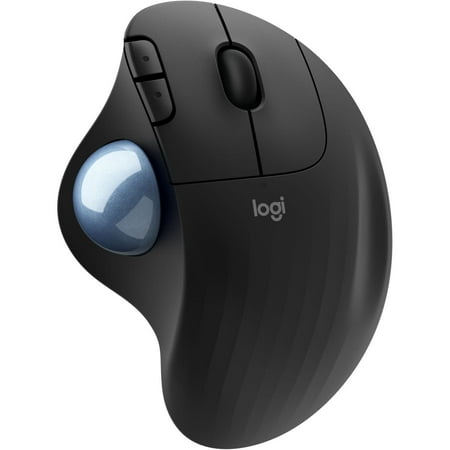
Relax your arms and hand with the ergonomic design of the Ergo M575 Wireless Trackball Mouse from Logitech. Experience optimal control with the integrated trackball, allowing you to control the cursor with just your thumb, alleviating the need to move the mouse around your desktop.
Frequently Asked Questions
Will a trackball mouse cure my hand tremor?
No. A trackball is an accommodation, not a treatment. It does not reduce your tremor, but it stops your tremor from moving the cursor by decoupling hand stability from cursor control.
How long does it take to get used to a trackball?
Most people feel comfortable with basic navigation within a few days and reach their old speed in a week or two. Start with a lower DPI and raise it as your thumb control improves.
Can I use a trackball if I am left-handed?
The Logitech Ergo M575 is right-handed only, with the thumb ball on the left side. Left-handed users should look at ambidextrous finger-operated models like the Kensington Orbit, or dedicated left-handed trackballs. If low vision makes the keyboard hard to read too, our Best Large Print Keyboards for Visually Impaired Users guide pairs high-contrast keys with the rest of your accessible setup.
Are trackballs better than vertical mice for tremor?
Yes, for tremor specifically. Vertical mice improve wrist posture but still require you to move the whole device, so tremor still shakes the cursor. The difference in design is the same one that separates a trackball from a standard mouse: your hand stays put.
Does the Logitech Ergo M575 work with Mac and Windows?
Yes. It connects over Bluetooth Low Energy or the Logi Bolt USB receiver and works with Windows, macOS, ChromeOS, and Linux without extra software. Logitech Options+ adds button mapping and pointer speed tuning on Windows and macOS.
Do trackballs reduce wrist pain compared to standard mice?
For most people, yes. Keeping your hand stationary in a neutral handshake position eliminates the repetitive wrist twisting a standard mouse requires. That makes a trackball a strong choice if you have both tremor and RSI symptoms, which often show up together.
What if my hands get tired from typing too?
Then speech input is worth adding to the setup, and pairing a trackball with dictation covers most of a workday without your hands carrying the whole load.