Computer Station Nation is reader-supported.
When you buy through links on our site, we may earn an affiliate commission. Learn more.
If your wrists ache after a day at the keyboard or your hand goes numb halfway through a mouse session, you’re not imagining it. Repetitive strain injuries aren’t rare — the Bureau of Labor Statistics consistently ranks musculoskeletal disorders among the most common workplace illnesses, and carpal tunnel syndrome alone takes people off the job for days at a time. If you spend 6+ hours a day on a computer, the odds of developing some form of RSI at some point are uncomfortably high.
The good news is that the right keyboard and mouse genuinely help. Study after study on workplace ergonomics shows that switching to properly designed input devices cuts wrist pain, makes typing less tiring, and can slow down early-stage nerve compression. It’s not a cure — but for a lot of people, it’s the difference between dreading your desk and getting through the day without wincing.
The hard part is figuring out which combo actually helps. Walk into the ergonomic aisle and you’ll find wave-shaped keyboards next to split designs, vertical mice alongside trackballs, and price tags from $25 up to $400. Not every “ergonomic” product is built for your specific pain pattern, and some can even make things worse if they don’t match how you work.
This guide breaks down what actually matters for RSI and carpal tunnel relief, who needs what, and which combos deliver real value at each budget level. For the broader context on adaptive computing, read our Why Accessible Computing Benefits Everyone: The Curb-Cut Effect in Tech.
Table of Contents
- What to Look For in Ergonomic Keyboards and Mice
- Key Specs Explained
- Who It’s For — Buyer Personas
- Top Ergonomic Keyboard and Mouse Picks
- Red Flags to Avoid
- FAQ
What to Look For in Ergonomic Keyboards and Mice
The primary goal of an ergonomic setup is to keep your wrists, arms, and shoulders in a neutral position — the same posture they’d be in if your arms hung relaxed at your sides. Anything that forces you to bend, twist, or reach creates cumulative strain.
Keyboard Layout: Split vs. Wave vs. Flat
Split keyboards let you position each half at shoulder width, which keeps your wrists straight instead of angled inward (ulnar deviation). This is the most effective layout for carpal tunnel because it directly addresses wrist angle. The MEETION split designs in the picks below use this approach with tenting adjustment, letting you tilt the inner edges up for a more natural forearm position. Our companion guide — Ergonomic Keyboard and Mouse Buying Guide for RSI and Carpal Tunnel (2026) — covers additional models worth considering.
Wave/contoured keyboards (like the Logitech Wave Keys style) curve the key rows to match the natural fan of your fingers. They’re less aggressive than a full split — easier to adapt to, but they still keep your wrists straighter than a flat keyboard. Wave designs are a solid middle ground if you’re not ready for a split.
Flat keyboards with a wrist rest are the bare minimum. The wrist rest keeps your palms elevated, but your wrists still bend inward. If you already have pain, this is rarely enough.
Mouse Shape: Vertical vs. Standard Ergo
Vertical mice rotate your hand into a handshake position (around 57-60 degrees), which reduces forearm pronation — the twisting motion that compresses the carpal tunnel. The Logitech MX Vertical-style designs are the most common approach here. Users with existing carpal tunnel consistently report less wrist pressure after switching. For users with specific hand-mobility needs, our Best Computer Mouse for Parkinson’s guide covers additional ergonomic options.
Standard ergonomic mice are sculpted to support your palm and fingers but keep your hand in a more traditional flat position. They’re better than a cheap flat mouse but don’t address pronation as effectively. Good for mild RSI, less useful for diagnosed carpal tunnel.
Wrist Rests and Palm Supports
A cushioned wrist rest keeps your palms elevated to match the keyboard height, preventing the sharp downward bend (extension) that aggravates the median nerve. Many ergonomic combos include them, but standalone gel or memory foam rests are easy to add to any setup. Key point: the rest supports your palm, not your wrist — resting directly on the carpal tunnel area can actually worsen compression.
Tenting and Negative Tilt
Tenting means raising the inner edge of the keyboard so the keys slope upward toward the center. This reduces forearm pronation, the same problem a vertical mouse solves. Some split keyboards offer adjustable tenting legs. Negative tilt (raising the front edge slightly higher than the back) keeps your wrists straight rather than bent back. Most premium ergonomic keyboards include adjustable feet for this.
Key Switch Type and Actuation Force
The force required to press a key matters more than most buyers realize. Heavy switches (60g+ actuation) require more finger effort, which compounds fatigue over long sessions. For RSI prevention, look for low-actuation-force switches — around 45g or less. Membrane keyboards typically fall in the 55-70g range. Some ergonomic keyboards use scissor-switch mechanisms (like laptop keys) that require only 35-40g, which reduces finger strain significantly. If you already have hand or finger pain, lighter switches are worth prioritizing over switch type.
Mouse DPI and Cursor Speed
DPI (dots per inch) determines how far the cursor moves per inch of physical mouse movement. Higher DPI means less wrist travel to cross the screen, which reduces repetitive wrist extension. For ergonomic use, a mouse with 1600-4000 DPI range lets you find the sweet spot between precision and minimal arm movement. Adjustable DPI — where you can switch between settings on the fly — is a genuinely useful ergonomic feature that most budget mice lack.
Tenting means raising the inner edge of the keyboard so the keys slope upward toward the center. This reduces forearm pronation, the same problem a vertical mouse solves. Some split keyboards offer adjustable tenting legs. Negative tilt (raising the front edge slightly higher than the back) keeps your wrists straight rather than bent back. Most premium ergonomic keyboards include adjustable feet for this.
Key Specs Explained
Not all ergonomic peripherals are created equal. Here’s how the specs break down across budget levels.
| Feature | Budget ($20-35) | Mid-Range ($35-55) | Premium ($55+) |
|---|---|---|---|
| Keyboard layout | Wave or flat with wrist rest | Split or contoured wave | Fully split with tenting |
| Wrist support | Fixed foam rest | Cushioned detachable rest | Adjustable palm support |
| Mouse style | Sculpted ergonomic | Vertical (handshake position) | Vertical with adjustable DPI |
| Connectivity | 2.4G wireless | 2.4G + Bluetooth | Bluetooth multi-device |
| Key rollover | Basic (6-key) | N-key rollover | N-key rollover |
| Mouse DPI range | Fixed or 800/1200/1600 | 4-level adjustable | 400-4000 programmable |
| Battery life | 6-12 months (AA/AAA) | Rechargeable (Type-C) | Rechargeable, multi-month |
Who It’s For — Buyer Personas
Your perfect setup depends on your specific pain pattern, not your budget. Here are the four profiles I see most often.
The Early-Warning Office Worker
You get mild wrist fatigue after 4+ hours. No numbness, no tingling yet — your hands just feel tired at the end of the day. A wave-style keyboard with cushioned wrist rest and a sculpted ergonomic mouse is plenty at this stage. You don’t need a full split or vertical mouse yet. A $30-35 combo like the basic wireless ergonomic set with wrist rest will improve your posture enough to stop things from getting worse. For a deeper look at what works for similar conditions, see Ergonomic Keyboard and Mouse Buying Guide for RSI and Carpal Tunnel Relief (2026).
The Developer or Writer (Heavy Typer)
Wrist pain kicks in within 1-2 hours of heavy typing. You feel it in the top of your wrist or the base of your thumb. A split or contoured keyboard with tenting and a vertical mouse makes the biggest difference here. The MEETION Ergonomic Split Keyboard with Bluetooth ($49.99) or the Meetion Wave Keys set ($34.99) gives you the wrist-angle correction you need without the premium price tag.
The Diagnosed Carpal Tunnel User
You’ve got a confirmed diagnosis — numbness and tingling in your thumb, index, and middle fingers. You may already be splinting at night or weighing treatment options. Go for a full split keyboard with adjustable tenting, a vertical mouse with maximum angle (57°+), and a separate ergonomic wrist rest. This is where you want the Ergonomic Wireless Rechargeable Combo ($41.99) for its Type-C rechargeability and cushioned rest, or the MEETION split for the full split layout.
The Budget-Conscious Preventer
No current pain, but the hours are long and you’d rather not find out the hard way. Grab any of the budget options with a wrist rest ($25-35). The Wireless Keyboard and Mouse Combo with Phone Holder ($29.89) or the Meetion Wave Keys in Pink ($34.99) are both under $35 and include the wrist support that flat keyboards lack.
Top Ergonomic Keyboard and Mouse Picks
These are brief picks — this is a buying guide, not a full review. Every product shown here passed our prefetch data check and has confirmed current pricing and availability. Prices are as of July 2026.
Best Budget Combo: Wireless Keyboard and Mouse Set with Wrist Rest
Wireless Keyboard and Mouse Combo, Full-Size Ergonomic Set with Wrist Rest — $29.89. A complete ergonomic starter set with cushioned wrist rest, full-size layout, and a built-in phone holder. The mouse is sculpted but not vertical, making this best for early-warning users. Includes 2.4G lag-free connectivity and plug-and-play setup.
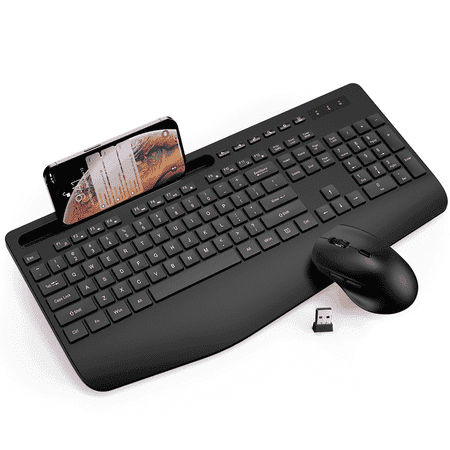
Description: This 2.4G wireless keyboard and mouse combo delivers ergonomic comfort and high efficiency for home, office and study use. Designed with a built-in wrist rest and adjustable tilt legs, it supports natural typing postures and effectively reduces hand and wrist fatigue during...
Best Wave Keyboard Value: Meetion Ergonomic Wave Keys Set
Meetion Ergonomic Keyboard and Mouse, Wave Keys with Wrist Rest — $34.99. The wave-shaped keywell reduces finger reach and keeps wrists straighter than flat keyboards. Comes with a matching cushioned palm rest in pink. 2.4G wireless, full-size layout. Perfect for light-to-moderate typists who want ergonomics without the adjustment curve of a split board.
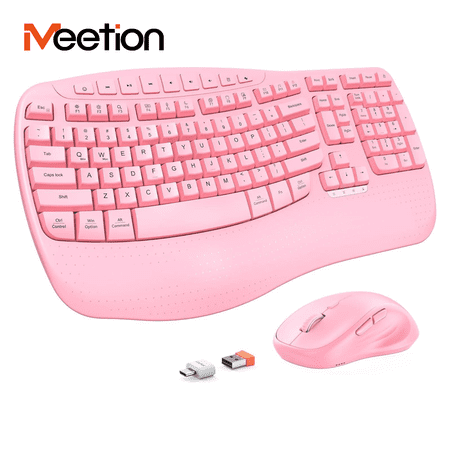
Type naturally and comfortably with the Meetion Ergonomic Wireless Keyboard and Mouse Combo in Pink. The wave-shaped keys follow your finger movement, while the contoured hard plastic wrist rest provides stable support – helping reduce finger fatigue and wrist strain during long work sessions....
Best Mid-Range Value: Ergonomic Wireless Rechargeable Combo
Ergonomic Wireless Keyboard & Mouse Combo, Rechargeable Type-C — $41.99. Type-C rechargeable eliminates battery swaps. Cushioned wrist rest, built-in 7.28″ phone holder, and a silent-click vertical-style mouse. This is the best middle ground for users with active wrist pain who want vertical mouse benefits in one boxed set.
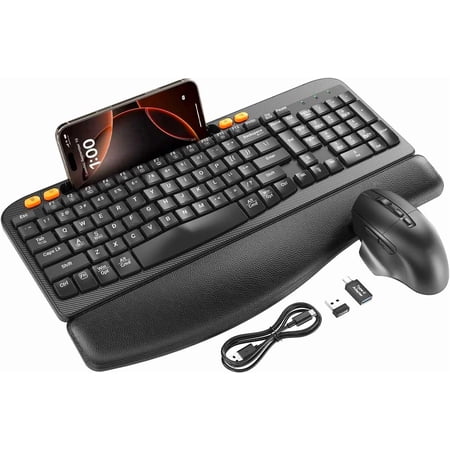
Ergonomic Wireless Keyboard & Mouse Combo - Rechargeable Type-C, Cushioned Wrist Rest, 7.28” Phone Holder, Silent Mouse for Windows/MacUpgrade your workspace with a combo that blends comfort, convenience, and functionality—perfect for home offices, student desks, or professional use! This...
Best Split Design: MEETION Ergonomic Split Keyboard with Bluetooth
MEETION Ergonomic Keyboard and Mouse, 2.4G Wireless/Bluetooth Split Keyboard with Cushioned Palm Rest — $49.99. True split layout lets you position each half independently. Includes cushioned palm rest, 4-level DPI-adjustable mouse (with vertical-style sculpting), and dual-mode wireless (2.4G + Bluetooth). This is the best option for diagnosed carpal tunnel or advanced RSI where wrist angle is the primary trigger.
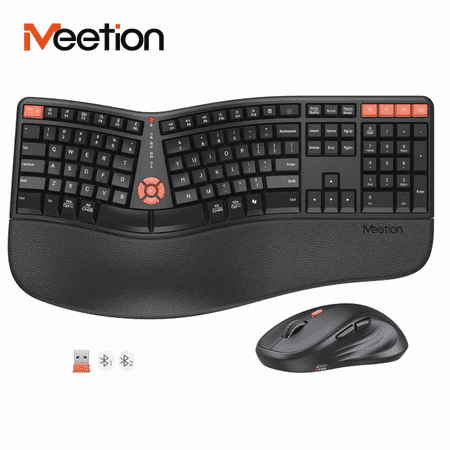
The Meetion Ergonomic Split Keyboard and Mouse (Director-C3) features a curved split layout that aligns with natural hand position, helping reduce wrist strain during long typing sessions. A soft cushioned palm rest is included. Connect via 2.4G wireless or Bluetooth – pair with up to 3 devices...
Best Premium Wave: Wireless Ergonomic Wave Keyboard with RGB
Wireless Keyboard and Mouse Combo, Ergonomic Wave Keyboard with Wrist Rest, RGB Backlit — $54.99. Wave layout with RGB backlighting and rechargeable battery. Dual-system compatible (Windows/Mac). The mouse is sculpted for palm support. Good for users who work in low-light conditions and want ergonomic features without sacrificing aesthetics.
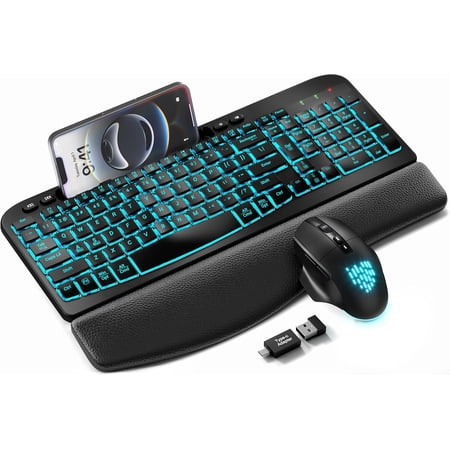
Upgrade your home and office workspace with this full-size wireless keyboard and mouse combo, designed to balance ergonomic comfort, practical functionality and stylish aesthetics. Adopting a humanized wave-shaped key layout, the keyboard perfectly fits the natural bending curve of human hands,...
Best Budget Split: MEETION Ergonomic Split Wired Combo
Meetion Ergonomic Split Keyboard & Mouse, S-Curve, 2.4G Bluetooth — $29.99. A true split keyboard at nearly the same price as a basic wave combo. The S-curve layout separates the two halves naturally, and the included mouse is sculpted for ergonomic grip. Dual-mode 2.4G and Bluetooth means you can connect to two devices and switch between them. The best value pick if you want split-layout benefits without the split-layout price.
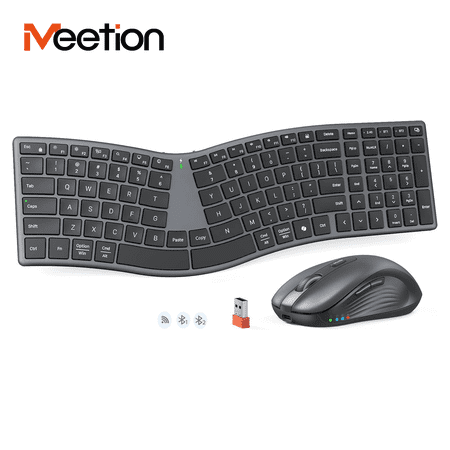
Work comfortably with the Meetion Ergonomic Split Keyboard and Mouse. The S-curve split design guides your wrists into a natural position, helping reduce strain during long typing sessions. It's a full-size keyboard with scissor-switch keys for crisp, responsive feedback. Connect wirelessly via...
Red Flags to Avoid
Not every ergonomic product helps, and some common beliefs can make things worse.
Buying only a wrist rest without changing your keyboard
A wrist rest supports better posture, but it doesn’t fix ulnar deviation. If your keyboard forces your wrists inward, the rest just makes that bad angle more comfortable — it doesn’t fix it. Upgrade the input device first, add the rest as a secondary support.
Picking a “gaming” ergonomic mouse for RSI relief
Gaming mice are shaped for performance and grip, not wrist health. A claw-grip gaming mouse forces your wrist into extension. If you have carpal tunnel, a vertical or sculpted ergonomic mouse beats any gaming mouse for symptom relief.
Ignoring your mouse hand
Many buyers upgrade their keyboard first and assume the mouse is fine. But your mouse hand performs thousands of micro-movements per hour — clicking, dragging, scrolling. If you already have wrist pain, a vertical or sculpted ergonomic mouse matters just as much as the keyboard. Replace both, not just one.
Assuming “expensive” means “better for your injury”
A $300 split mechanical keyboard is excellent, but a $35 wave keyboard with wrist rest will help more if your pain comes from wrist extension. Match the product type to your specific symptom, not your budget ceiling.
Forgetting about desk height and chair position
Even the best ergonomic keyboard won’t fix wrist pain if your desk is too high or your chair is too low. Your elbows should rest at roughly 90 degrees when your hands are on the keyboard, and your forearms should be parallel to the floor. If your desk height forces you to reach upward, no keyboard can correct for that posture. Add an adjustable keyboard tray or adjust your chair height first. For creative desk ideas that prioritize ergonomic access, check out our roundup of Computer Desks With Recessed Monitors.
Switching everything at once
Replacing your keyboard, mouse, chair, and monitor arms on the same day creates too many variables. If your pain gets worse (or better), you won’t know which change helped or hurt. Change one input device at a time. Use it for a week. Then change the next. This way you isolate what works for your specific pain pattern.
Skipping the adjustment period
Switching to a split keyboard or vertical mouse feels awkward for 3-7 days. Your fingers will miss keys, and the mouse will feel clumsy. That’s normal. Many users give up before their muscles adapt. Stick with it for at least a week before deciding if it’s working.
FAQ
Can an ergonomic keyboard cure carpal tunnel syndrome?
No — but they help more than you’d think. Ergonomic peripherals reduce the mechanical compression on your median nerve, which relieves symptoms and can slow progression. But carpal tunnel syndrome is a medical diagnosis. It may require splinting, physical therapy, or surgery depending on severity. Think of an ergonomic setup as prevention and symptom management, not a cure.
Should I get a split keyboard or a wave keyboard?
Split keyboards are better for carpal tunnel because they directly eliminate ulnar deviation. Wave keyboards are easier to adapt to and still better than flat boards. If you have diagnosed CTS or significant wrist pain, go split. If you’re in the prevention stage or have mild fatigue, a wave board is sufficient.
How long does it take to adjust to a vertical mouse?
Most users adjust within 3-5 days of regular use. The first day feels clumsy because your wrist isn’t used to the handshake position. By day five, the movement pattern feels natural, and going back to a flat mouse feels wrong — which is a good sign your wrist was over-pronating before.
Do I need a wireless or wired ergonomic setup?
Wireless (2.4G or Bluetooth) is fine for ergonomic use. Input lag isn’t a concern for typing or productivity tasks — only competitive gaming needs wired latency. Wireless gives you freedom to reposition the split keyboard halves for maximum comfort.
Can I use an ergonomic keyboard with a Mac?
Most modern ergonomic keyboards support both Windows and Mac. The wireless wave keyboard with RGB ($54.99) and the MEETION split Bluetooth model ($49.99) both explicitly support dual systems. If you’re on a Mac, check for dedicated Command/Option key legends or reprogrammable keys.
Should I use a trackball instead of a mouse for RSI?
Trackballs eliminate arm and wrist movement entirely since you operate them with your thumb or fingers while the hand stays still. For some users with severe wrist pain, this is a game-changer. But trackballs engage different muscle groups — they can cause thumb strain if you’re not used to them. If you have thumb arthritis or De Quervain’s tenosynovitis, a vertical mouse is usually a better fit than a thumb-ball.
How often should I take breaks when using an ergonomic setup?
Every 25-30 minutes. Even the most ergonomic input devices don’t eliminate the need for movement breaks. Stand up, shake out your hands, stretch your wrists in the opposite direction from your typing position. The Pomodoro method (25 minutes work, 5 minutes break) maps naturally to this schedule. Set a timer — you will forget.
Key takeaway: Match your gear to your specific pain pattern. Wave keyboards and wrist rests are fine for early-stage prevention. Split keyboards with vertical mice are the standard for diagnosed carpal tunnel. Don’t overbuy for mild symptoms, and don’t underbuy if you’re already hurting. For the full picture on adaptive computing, start with our Best Computer Monitor For Low Vision guide — the pillar piece for this cluster — to see how accessible hardware fits together.