
Computer Station Nation is reader-supported.
When you buy through links on our site, we may earn an affiliate commission. Learn more.
Two of the best low-vision keyboards you can buy: the Big Bright Easy-See Yellow and the Perixx PERIBOARD-317. Both ranked in the top of our best keyboards for the visually impaired roundup, but they solve the same problem from opposite directions.
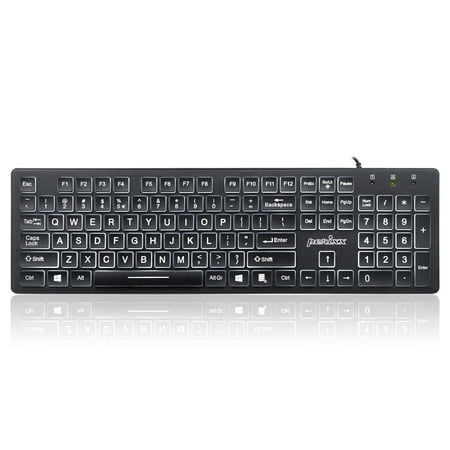
The PERIBOARD-317 has a big print letter together with a backlit feature, and it helps the user to use the keyboard at night or in a dark environment without any problem.
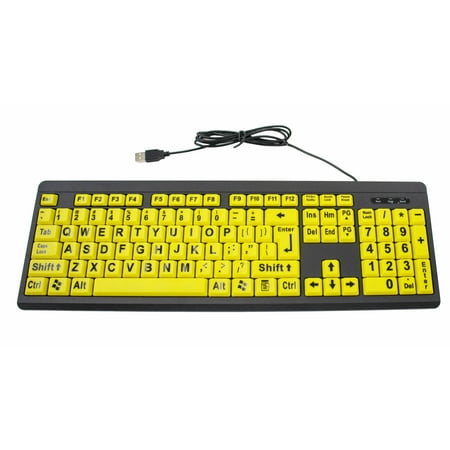
Prominent High-Contrast Keys for Optimal Visibility We've carefully engineered our keyboard with large, striking black letters on high-contrast yellow keys to accommodate those suffering from visual impairments or low vision. Traditional keyboards can have small white letters on dark black keys...
Quick Take
The Big Bright is the specialist — extreme high-contrast color pairing, no backlight, designed for users with severe contrast sensitivity. The Perixx is the generalist — calm white-on-black design with a backlight, designed to work in any lighting and look like a normal keyboard.
Spec Comparison
| Spec | Big Bright Easy-See | Perixx PERIBOARD-317 |
|---|---|---|
| Color Scheme | Black on yellow | White on black |
| Contrast Ratio | Maximum (yellow-black) | High (white-black) |
| Backlight | None | White LED, 3 levels |
| Layout | 104 keys full size | 104 keys full size |
| Switch Type | Membrane | Low-profile membrane |
| Noise | Moderate click | Quiet |
| Connection | USB-A wired | USB-A wired |
| Price | ~$14 | ~$17 |
Contrast Sensitivity — Big Bright Wins
For users with significant contrast sensitivity loss — which is the dominant vision symptom in macular degeneration, cataracts, and diabetic retinopathy — the Big Bright wins outright. The yellow-black combo is the highest-contrast pairing the human eye can register. It’s the difference between “I can read this” and “I’m guessing where the letters are.”
Low-Light Usability — Perixx Wins
The Perixx’s backlight is the deciding factor for anyone whose workspace isn’t always brightly lit. Late-night computing, bedroom setup, basement office — the Big Bright’s yellow keys go gray without ambient light, while the Perixx’s backlit white legends stay readable. If you can’t guarantee good lighting, get the Perixx.
Typing Feel
The Perixx is quieter and feels softer under the fingers. The Big Bright has a slightly punchier click. Neither is bad — preference here is personal. Both have F/J tactile bumps. The Perixx adds a bump to the numpad 5, which gives it a small edge for data-entry users.
Aesthetics
This matters more than you’d think. The Big Bright looks unmistakably like a medical aid — bright yellow, oversized lettering, clearly designed for accessibility. Some users want that. Others don’t. The Perixx looks like a normal slightly-larger-than-usual keyboard. If the user is self-conscious about looking “different” at their desk, the Perixx blends in better.
Setup & Compatibility
Tied. Both are plug-and-play USB. Both register as standard HID keyboards. Both work with JAWS, NVDA, VoiceOver, and Narrator without configuration. Both work on Windows, Mac, Chrome OS, and Linux.
Verdict
Get the Big Bright Easy-See if: the user has significant contrast sensitivity loss (macular degeneration, advanced cataracts, diabetic retinopathy) and the workspace is reliably well-lit. It will be readable when nothing else is.
Get the Perixx PERIBOARD-317 if: the user has moderate vision loss, wants something that works in any lighting, prefers a quieter typing feel, or wants a keyboard that doesn’t scream “accessibility device” from across the room.
Bottom Line
Big Bright = specialist for severe contrast cases. Perixx = best all-rounder. Both are excellent — the right choice depends entirely on the specific vision profile and workspace setup. See the full low-vision keyboard guide for the rest of our picks.

