Mechanical Keyboard Guide: Switches, Form Factors, and Buying Tips (2026)
Computer Station Nation is reader-supported.
When you buy through links on our site, we may earn an affiliate commission. Learn more.
Mechanical Keyboards at a Glance
What You Need to Know: Mechanical keyboards use individual mechanical switches under each key instead of rubber dome membranes. They offer superior durability (50–100 million keystrokes vs. 5–10 million for membranes), better tactile feedback, and full customization — from switch type and keycaps to case materials and programming. The trade-off is higher cost and noise, but for anyone spending hours at a keyboard — gamers, writers, developers — the upgrade is transformative.
Introduction
If you’re reading this, you’ve probably heard that mechanical keyboards are “better” — but nobody tells you why, or how to pick the right one from the hundreds of options. The mechanical keyboard market in 2026 is bigger than ever, with options from $10 budget boards to $500+ custom builds. Whether you’re a competitive gamer chasing faster response times, a developer typing 8 hours a day, or just tired of mushy office keyboards, this guide covers everything you need to know to make the right choice.
We’ll walk through switch types (linear, tactile, clicky — and what they actually feel like), form factors from full-size down to 40%, build materials that affect both feel and sound, and the software ecosystem that lets you program every key. By the end, you’ll know exactly what to look for and which keyboards belong on your shortlist.
Understanding Mechanical Keyboard Switches
The switch is the heart of any mechanical keyboard — literally. It’s the mechanism under each keycap that registers your press, and the type you pick decides how the whole keyboard feels, sounds, and performs. Every switch falls into one of three families:
Linear Switches
Linear switches move straight up and down with no tactile bump or audible click. They’re smooth all the way through the keystroke, which makes them popular with gamers who need rapid, repetitive presses. Cherry MX Red, Gateron Red, and Kailh Box Red are the most common examples. Linear switches are also the quietest mechanical option — though they’re still not silent. Best for: gaming, especially fast-paced titles where you’re mashing the same key repeatedly.
Tactile Switches
Tactile switches have a small bump partway through the keystroke that tells your finger the press registered. You can feel it but not hear it (the bump is mechanical, not audible). This feedback helps typists avoid bottoming out and reduces finger fatigue over long sessions. Cherry MX Brown, Gateron Brown, and the beloved Holy Panda are tactile. Best for: typing, programming, and office work where precision matters more than speed.
Clicky Switches
Clicky switches combine a tactile bump with an audible click sound — the switch literally makes a noise when it actuates. Cherry MX Blue is the classic example. These are polarizing: some people love the typewriter-like feedback, while others find them too loud for shared spaces. Best for: heavy typists who want maximum audible confirmation, solo offices, or anyone who just loves the sound.
Beyond these three core types, there are also optical switches (use light beams instead of metal contacts, faster actuation), magnetic/Hall Effect switches (adjustable actuation point, used in high-end gaming keyboards), and low-profile switches (shorter travel distance, like laptop keys but with mechanical feel).
Keyboard Form Factors: Which Size Is Right for You?
Mechanical keyboards come in several sizes, and choosing the right form factor is just as important as picking the right switch:
- Full-size (100%): Includes the main typing area, navigation cluster (Home/End/PgUp/PgDn), arrow keys, and a number pad. Best for data entry, accounting, and anyone who uses the numpad daily. Takes up the most desk space.
- Tenkeyless / TKL (80%): Everything a full-size has except the number pad. More desk space for mouse movement, still has arrow keys and nav cluster. The most popular size for gamers and general use.
- 75%: TKL layout but more compact — all keys squeezed together with no gaps. Popular in enthusiast communities. The AK820 and Keychron K2 Pro are examples.
- 65%: Arrow keys and a few nav keys (Page Up/Down) but no function row. Ultra-compact without losing arrow keys.
- 60%: No arrow keys, no function row, no nav cluster. Everything is accessed via layers (Fn+key combos). The smallest standard form factor. Popular with minimalists and custom builders. Examples include the Geeky GK61 SE and the WIN68 HE.
Build Quality: Keycaps, Cases, and Mounting Styles
The switch determines the feel, but the build quality determines the longevity. Keycaps are the first thing you touch, and they come in two main materials: ABS (softer, develops a shiny “grease” over months of use) and PBT (harder, textured, resists shine for years). Most budget keyboards come with ABS; enthusiast boards use PBT or high-end options like double-shot PBT or SA-profile keycaps.
Case materials matter too. Plastic cases are lightweight and affordable but can flex and ping. Aluminum cases add heft and dampen vibration — the Keychron Q series is known for its heavy aluminum build. Gasket mounting (where the plate floats on rubber gaskets instead of screwing directly into the case) has become popular in 2025–2026 because it produces a softer, deeper typing sound.
Software & Programmability
Modern mechanical keyboards offer varying levels of software control. Basic boards use manufacturer software (Razer Synapse, Corsair iCUE) for RGB and macro programming. Higher-end enthusiast boards run QMK or VIA, open-source firmware that lets you remap every key, create multi-layer layouts, and program complex macros without any proprietary software. VIA adds a web-based GUI so you don’t need to compile firmware to change your layout.
Hot-swap sockets have also become standard on most mid-range and higher boards. Instead of desoldering switches to swap them, you can pull a switch out and push a new one in — no soldering iron required. This makes it easy to try different switch types without buying a whole new keyboard.
Performance: Gaming vs. Typing
For gaming, polling rate and response time matter more than switch type (though linear switches are preferred). Most gaming keyboards now offer 1000Hz polling (1ms response), and high-end models like the SteelSeries Apex Pro series push 4000Hz or even 8000Hz. Hall Effect switches with adjustable actuation let gamers set a very light actuation point (1.0mm vs. the standard 2.0mm) for faster key registration.
For typing, tactile switches with a sharp bump at 2.0mm give the best feedback. Studies show typists average 5–15 more WPM on tactile switches compared to linear or membrane keyboards because the tactile feedback reduces bottoming-out force and allows faster recovery between keystrokes.
Video Review
Prefer watching? We’re building out our video review library — stay tuned for hands-on mechanical keyboard comparisons covering budget, mid-range, and enthusiast builds.
What the Community Says
Reddit’s r/MechanicalKeyboards community is the largest gathering of keyboard enthusiasts online. Common themes from long-term owners:
“I bought a $30 Redragon as my first mech and it was fine. Then I tried a friend’s keyboard with Gateron Browns in an aluminum case and I understood what the fuss was about. Two years later I have three keyboards and I’m building my fourth.” — r/MechanicalKeyboards
“Don’t sleep on hot-swap for your first board. I thought I wanted clicky switches, hated them after a week, and swapped to tactile in 10 minutes. If I’d bought a soldered board I’d have been stuck.” — r/BudgetKeebs
“The biggest upgrade you can make isn’t the keyboard itself — it’s the keycaps. Cheap ABS keycaps feel terrible after six months. Spend the extra $20 on PBT doubleshots.” — r/MechanicalKeyboards
Accessories & Ecosystem
Once you have a mechanical keyboard, a few accessories make the experience better:
- Wrist rests: Mechanical keyboards are taller than membrane boards, so a wrist rest helps maintain neutral wrist posture. Options range from basic foam to wooden or resin artisan rests.
- Custom keycap sets: The keycap aftermarket is huge — GMK, Drop, and domestic brands like YMDK offer thousands of colorways and profiles.
- Coiled cables: Aesthetic USB-C coiled cables (aviator-style) are popular in the enthusiast community for the retro look.
- Switch lubricants and tools: Krytox 205g0 is the standard lube for linear switches; Tribosys 3204 for tactiles. A switch opener, keycap puller, and brush set are essential for maintenance.
- Desk mats: A large desk mat (900x400mm) protects your desk and dampens keyboard noise — plus it ties the setup together aesthetically.
Is a Mechanical Keyboard Worth It?
Yes, for almost everyone. Even a $20–$30 budget mechanical keyboard (like the MageGee or AuroraX) is a noticeable upgrade over a membrane or laptop keyboard. The key question is how much you want to spend and whether you want to treat it as a tool or a hobby.
Buy a mechanical keyboard if: You type more than 2 hours a day, you game competitively, you’ve tried membrane keyboards and want more feedback, or you enjoy customizing your workspace.
Skip it if: You absolutely need silent typing (even linear switches make some noise), your budget is under $15, or you share a very quiet office with colleagues who’d be disturbed by clicking.
Where to Buy — Starter Picks
These are real products available now, sourced from our affiliate network. Prices and availability may vary.
Best Budget Starter: Geeky GK61 SE
A 60% board with RGB backlighting and a standard ANSI layout. At $23 with a 4-star rating from 171 reviews, it’s the lowest-risk entry point to mechanical keyboards.
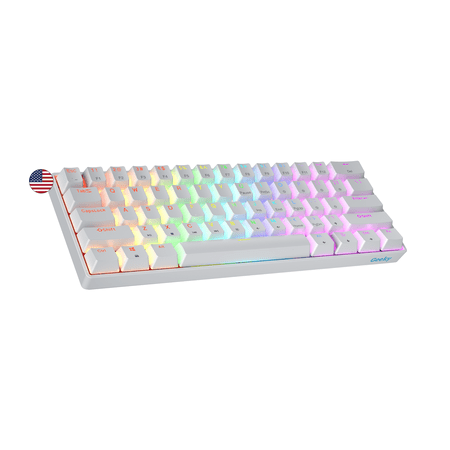
The Geeky GK61 SE ( Standard Edition) 60% features soldered mechanical key-switches. (Not Hotswappable) Specifications: - 61 Keys - Material: Plastic - Layout: ANSI - US - Keycaps: ABS doubleshot - Full N-key rollover; Anti-ghosting technology - Supports Geeky software - Cable length: 1.5 m (5.9...
Full-Size Value: onn Gaming Keyboard
Full 104-key layout with blue clicky switches and 16.8 million color LED lighting. $46 with a 4-star rating from 388 reviews — a solid full-size pick for people who need a number pad.
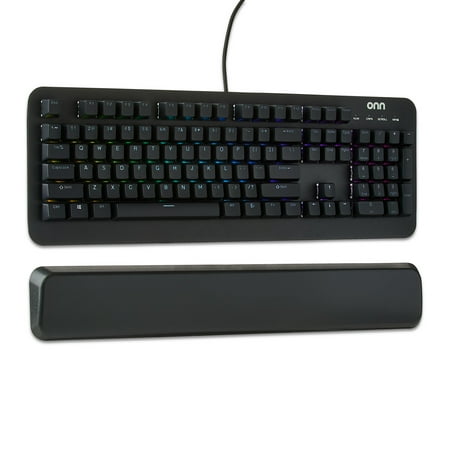
The onn Mechanical Gaming Keyboard is designed for gamers seeking precision and durability. Featuring 104 mechanical blue switches, this keyboard ensures up to 50 million keystrokes. Its adjustable RGB lighting with 16.8 million colors lets you personalize your setup. The magnetic wrist rest...
Premium Quiet Option: SteelSeries Apex 3
IP32 water-resistant with whisper-quiet gaming switches and a magnetic wrist rest. $55.96 with a 5-star rating from 394 reviews — the best entry-level premium pick.
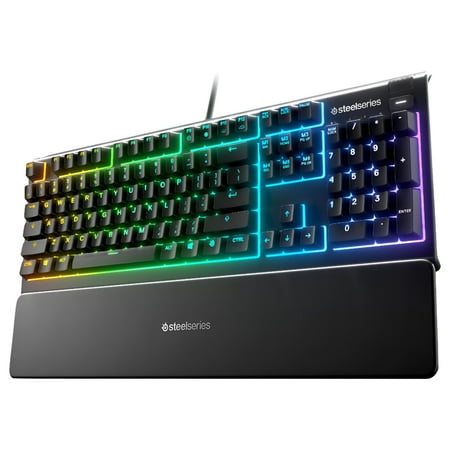
The Apex 3 gaming keyboard was built for the needs of gamers, with IP32 water resistance for protection against spills and accidents. Its whisper quiet gaming switches provide comfortable low friction performance for over 20 million keypresses. The keyboard includes 10-zone RGB customization, a...
FAQ
What’s the difference between mechanical and membrane keyboards?
Mechanical keyboards use individual mechanical switches under each key, offering greater durability (50–100M presses vs. 5–10M), better tactile feedback, and full customization. Membrane keyboards use a single rubber sheet — cheaper to make but mushier to type on.
Which switch type should a beginner choose?
Start with tactile (Cherry MX Brown or equivalent). They offer feedback without being annoyingly loud. If you want quiet smoothness for gaming, go linear. If you love the retro typewriter sound, go clicky — but test one first.
Are wireless mechanical keyboards good for gaming?
Yes, in 2026. Modern wireless mechanical keyboards use 2.4GHz RF (not Bluetooth) for gaming, with latency as low as wired connections — typically under 1ms. Bluetooth is fine for typing but adds 5–15ms of latency that competitive gamers will notice.
How long do mechanical keyboards last?
Quality mechanical keyboards last 10–20 years with proper care. The switches themselves are rated for 50–100 million keystrokes, and with hot-swap boards you can replace individual switches if one fails. Keycaps wear out faster (2–5 years depending on material) but are replaceable.
Do I need a hot-swap keyboard?
Not strictly, but it’s strongly recommended for your first keyboard. Hot-swap lets you change switches without soldering, so you can experiment with different types (linear, tactile, clicky) without buying a whole new board.
What does “NKRO” mean?
N-Key Rollover — the ability to register every key pressed simultaneously, no matter how many. Most mechanical keyboards support NKRO over USB. Membrane keyboards often limit you to 2–6 simultaneous presses.