Computer Station Nation is reader-supported.
When you buy through links on our site, we may earn an affiliate commission. Learn more.
Quick Answer: For most people dealing with wrist pain, a vertical mouse (like the Logitech MX Vertical) is the safer first choice. It keeps your forearm in a natural handshake position and requires almost no adjustment period. A trackball mouse (like the Logitech ERGO M575) is better if you have limited desk space or your pain flares up specifically from moving your arm rather than wrist angle. If you are not sure, start with a vertical mouse. It is the lower-risk upgrade that addresses the most common ergonomic mistake.
If you’re reading this, you are probably dealing with that familiar ache in your wrist, forearm, or thumb after a day at the keyboard. You have heard that switching to an ergonomic mouse can help, but now you are staring at two completely different designs — the pistol-grip vertical mouse and the stationary trackball — wondering which one actually works. Just like picking the right Best Computer Monitor For Low Vision depends on your specific needs, the right ergonomic mouse depends on your pain pattern. Here is what you need to know before spending your money.
Quick Comparison Table
| Feature | Logitech MX Vertical (Vertical) | Logitech ERGO M575 (Trackball) |
|---|---|---|
| Price | $69.99 | $39.32 |
| Hand Position | 57° vertical (handshake) | Flat, thumb controls ball |
| Arm Movement | Full arm moves cursor | Stationary, thumb moves cursor |
| Learning Curve | Low (hours) | Medium (days to weeks) |
| Desk Space Needed | Normal mouse pad area | Very little — doesn’t move |
| Best For | Forearm/wrist strain, pronation pain | Thumb/joint pain, limited space, travel |
| Buttons | 6 programmable | 5 programmable |
| Connection | Bluetooth + USB dongle | Bluetooth + USB dongle |
| Battery | Rechargeable (USB-C), 4 months | AA battery, 24 months |
Design & Ergonomics: Two Completely Different Approaches
The biggest difference between a vertical and trackball mouse is how you hold them. And that difference determines everything about which type of pain they address.
Vertical Mouse Design
A vertical mouse rotates your hand into a neutral handshake position — typically 57 to 60 degrees from flat. This eliminates forearm pronation (the palm-down position that compresses the carpal tunnel and strains the forearm muscles). The Logitech MX Vertical, for example, uses a 57° angle combined with a textured rubber grip that lets you pick it up without squeezing. Your arm moves the cursor the same way it does with a regular mouse, just with your hand rotated to a healthier angle.
The key insight here is that a vertical mouse doesn’t eliminate movement — it changes how you move. Instead of twisting your forearm to pivot your wrist side to side, you move your whole arm from the shoulder. This shifts the load from small wrist tendons to larger shoulder and back muscles that are better built for sustained work.
Trackball Mouse Design
A trackball mouse takes the opposite approach: instead of changing your hand’s angle, it eliminates the need to move anything. Your hand rests flat or slightly angled while your thumb (or fingers, depending on the model) rolls a ball to move the cursor. The Logitech ERGO M575 is a thumb-operated trackball — your hand stays completely still, and a recessed ball under your thumb does all the pointing work.
This is key for certain pain conditions because it completely isolates cursor movement to your thumb. Your wrist, forearm, and shoulder never have to move. But that isolation comes with a trade-off: your thumb now does work that your whole arm used to do, which can create new problems if you already have thumb joint issues.
Learning Curve: How Long Until You’re Productive Again?
This is the make-or-break factor that determines whether an ergonomic mouse ends up in a drawer after three days. The learning curves are very different. If you’re exploring ergonomic options for conditions like hand tremors, our guide to the Best Computer Mouse for Parkinson’s covers specialized alternatives that may work better than standard ergonomic designs.
Vertical mouse: The adjustment is surprisingly fast. Because you’re still moving the mouse to move the cursor — just with your hand in a different position — most people feel reasonably competent within a few hours and fully productive within a day or two. Precision tasks like photo editing or CAD work may take a bit longer, but basic pointing and clicking transfers almost immediately. Reddit users consistently report that the vertical mouse adjustment is “barely noticeable” compared to the trackball transition.
Trackball mouse: The adjustment period is significantly longer. Your thumb has never done fine-grained cursor control before, and it shows. The first few days involve overshooting targets, accidentally clicking when you meant to roll, and general frustration. Most users report 1-2 weeks before they feel competent, and some never fully adapt — especially for gaming or design work that requires rapid, precise aiming. The r/Trackballs subreddit is full of posts from people who gave up after a week and switched back.
If you cannot afford a week of reduced productivity, the vertical mouse is the better bet here. The adjustment is minimal.
Wrist Movement & Pain Relief: Matching the Mouse to Your Condition
This is where knowing what kind of pain you have matters. Vertical and trackball mice treat different root causes.
When a Vertical Mouse Helps
A vertical mouse is ideal if your pain comes from forearm pronation — that twisting motion of the radius bone over the ulna when you flatten your hand. This is the most common ergonomic issue with standard mice. Symptoms include aching in the forearm muscles, pain on top of the wrist, and elbow discomfort. The vertical position relieves this immediately by keeping the radius and ulna parallel rather than crossed. For step-by-step guidance on tailoring your computer for specific needs, see How to Set Up Built-In Accessibility Features in Windows and macOS for Adaptive Computing.
The vertical mouse also helps with carpal tunnel syndrome in its early stages. By reducing pressure on the median nerve (which runs through the carpal tunnel in your wrist), it can prevent the condition from worsening. However, if you already have advanced carpal tunnel with numbness and tingling, you may need a more aggressive solution.
When a Trackball Mouse Helps
A trackball mouse is the better choice if your pain is specifically triggered by arm movement rather than wrist angle. Conditions like tennis elbow (lateral epicondylitis), shoulder impingement, or repetitive strain injuries from constant mousing motion benefit from eliminating arm movement entirely.
The trade-off — and it’s an important one — is that trackballs load all cursor work onto your thumb. If you already have thumb arthritis, De Quervain’s tenosynovitis, or thumb base joint pain, a thumb-operated trackball will likely make things worse. In that case, consider a finger-operated trackball (like the Kensington Expert Mouse) which distributes the work across multiple fingers instead of overloading a single digit.
Honestly, this one depends entirely on what kind of pain you have. Vertical wins for pronation and carpal tunnel; trackball wins when arm movement is the trigger.
Precision & Control: Which One Is More Accurate?
For general productivity (web browsing, email, document editing), both are perfectly adequate. The differences show up in precision work.
Vertical mouse: Because you’re moving the mouse physically, muscle memory from your standard mouse days transfers almost completely. Pixel-level precision in photo editing, video timelines, and spreadsheets is identical to what you’re used to — your brain already knows how to do this. The MX Vertical’s 4000 DPI sensor is more than enough for any productivity task and most creative work.
Trackball mouse: Precision depends entirely on how well you’ve adapted to thumb control. Power users who have made the full transition often report better precision than with a standard mouse because the thumb has finer motor control than the whole arm for small adjustments. But reaching that level takes weeks of practice. For gaming specifically, especially FPS titles, most users find trackballs inadequate — the rapid aiming movements that competitive shooters demand are difficult to execute with thumb control alone.
If you need pixel precision right out of the box, the vertical mouse wins. It works the way your hand already knows how to work. A trackball can match it after weeks of practice, but that is a real time commitment, not a weekend project.
Space Requirements & Portability
This category has a clear winner. A trackball mouse sits in one spot and never moves. You can use it on a cluttered desk, on your knee on a plane, or in a coffee shop with no mouse pad. The ERGO M575 takes up about the same footprint as a standard mouse, but it doesn’t need any room to roam.
A vertical mouse, by contrast, needs the same mousing area as any other mouse — about 8-10 inches of horizontal space. The Logitech MX Vertical is slightly bulkier than a standard mouse due to its upright design, so it actually needs a bit more vertical clearance in your bag for travel.
There is no real competition here. If you work in tight spaces or travel, get the trackball.
Price & Value: What You Get for Your Money
Vertical mice span a wider price range because the design is simpler to manufacture. You can find decent vertical mice for $20-30 (the Meetion or Anker options), while premium models like the Logitech MX Vertical and Lift run $60-80. Trackball mice cluster in a narrower band: quality options like the Logitech ERGO M575 cost around $40, while finger-operated models like the Kensington ExpertMouse run $80-100. For a broader overview of accessible input devices, check out our Adaptive & Accessible Computing Equipment: The Complete Buying Guide (2026).
The value calculation depends on your pain level. If a $70 mouse saves you from a $300 ergonomics consultation or a $5000 carpal tunnel surgery, it’s the cheapest investment you’ll make this year. The Logitech MX Vertical’s rechargeable battery and premium build justify its price for full-time users. The ERGO M575 is exceptional value at $40 — it’s Logitech’s best-selling trackball for a reason.
The ERGO M575 delivers premium ergonomics at a mid-range price, which makes it the better value of the two.
Durability & Build Quality
Both Logitech models are well-built, but they age differently. The MX Vertical’s rubberized grip and USB-C rechargeable battery are premium touches — it feels solid in the hand, and the battery lasts about four months per charge. The main wear point is the rubber coating, which can get tacky after 2-3 years of heavy use.
The ERGO M575 uses a simple AA battery that lasts up to 24 months — no charging cable to lose, no battery degradation over time. The trackball mechanism (the ball rides on three tiny ceramic bearings) is the primary wear point. Logitech rates it for millions of rotations, and replacement bearings are cheap and user-serviceable. Several Reddit users with 5+ year old M575s report they’re still going strong after a simple bearing cleaning.
On durability, the trackball pulls ahead. The AA battery and repairable bearings give it a longer usable life than the MX Vertical’s sealed rechargeable battery.
Use Case Breakdown: Who Should Buy Which
Buy the Vertical Mouse If:
- You have forearm or wrist pain from pronation (palm-down position)
- You need to be productive immediately with minimal learning curve
- You do precision work (photo editing, CAD, video editing) that requires fine cursor control
- You play games and don’t want to compromise on aiming speed
- You have desk space for normal mouse movement
- You want to try ergonomic without a big commitment
Buy the Trackball Mouse If:
- Your pain comes specifically from moving your arm, not wrist angle
- You have limited desk space or work in tight quarters
- You travel frequently and want a mouse that works anywhere
- You have tennis elbow, shoulder issues, or conditions that make arm movement painful
- You’re willing to invest 1-2 weeks in the learning curve
- You don’t play fast-paced competitive shooters
Verdict: Which Ergonomic Mouse Should You Buy?
After comparing these two approaches across every meaningful dimension, here’s the bottom line: if you’re not sure, start with a vertical mouse.
The vertical mouse addresses the most common ergonomic problem — forearm pronation — with the least disruption to your workflow. The Logitech MX Vertical costs more than the ERGO M575, but it delivers immediate relief for the majority of users without requiring days of frustrating adjustment. It’s the path of least resistance to better ergonomics. For users who also need keyboard-based adaptive solutions, there are dedicated options available that pair well with an ergonomic pointing device.
The trackball mouse is the specialist’s choice. It’s better for specific pain conditions (arm movement issues, tennis elbow, limited mobility) and specific work environments (tight spaces, travel). But the learning curve is real, and if your pain comes from pronation rather than movement, a trackball won’t fix it. Buy a trackball only if you’ve identified that your specific pain pattern matches what it treats.
One more thing: neither of these is a magic bullet. An ergonomic mouse is one piece of a complete desk setup. Pair it with a proper chair at the right height, a desk that allows 90-degree elbows, and regular stretching breaks. Your desk height and monitor position matter just as much as your mouse choice. For desk ergonomics, check out How Thick Should a Computer Desk Be? and Computer Desks With Recessed Monitors: The Weird, Wonderful Setup You Didn’t Know You Wanted.
Where to Buy
Both products are widely available through major retailers. Prices fluctuate, so here are current direct links:
Logitech MX Vertical (Vertical Mouse):
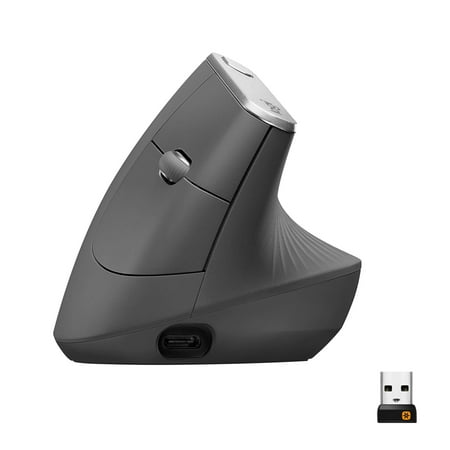
MX Vertical is an advanced ergonomic mouse that combines science-driven design with the elevated performance of Logitech’s MX series. The natural handshake position of MX Vertical reduces wrist pressure and forearm strain. The unique 57° vertical angle has been optimized for an ergonomic posture...
Logitech ERGO M575 (Trackball Mouse):
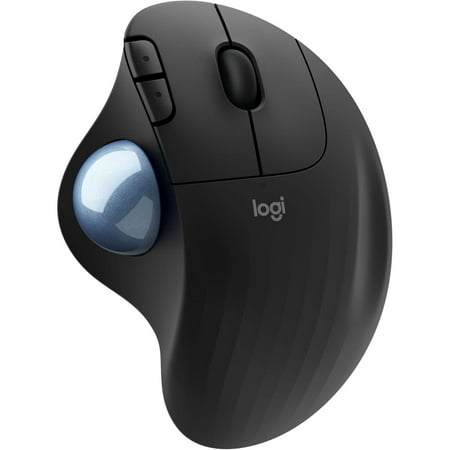
Relax your arms and hand with the ergonomic design of the Ergo M575 Wireless Trackball Mouse from Logitech. Experience optimal control with the integrated trackball, allowing you to control the cursor with just your thumb, alleviating the need to move the mouse around your desktop.
Frequently Asked Questions
Can a vertical mouse cure carpal tunnel?
A vertical mouse can alleviate symptoms and prevent worsening by reducing pressure on the median nerve, but it’s not a cure. Advanced carpal tunnel syndrome often requires medical treatment, including physical therapy, splinting, or surgery. Consider a vertical mouse a preventive measure and symptom management tool, not a treatment.
Do trackball mice cause thumb pain?
They can. Thumb-operated trackballs like the Logitech ERGO M575 concentrate all cursor movement on your thumb, which can aggravate pre-existing thumb arthritis or cause new strain. If you have thumb joint issues, look for a finger-operated trackball (like the Kensington Expert Mouse or SlimBlade) that distributes the work across multiple fingers.
How long does it take to get used to a vertical mouse?
Most users feel comfortable within a few hours and are fully productive within 1-2 days. The handshake grip is intuitive because it’s a more natural arm position — you’re not learning new motor skills, just applying existing ones with a different hand angle. This is significantly faster than the trackball adjustment period.
Can I use a trackball mouse for gaming?
It depends on the genre. Trackballs work well for strategy games, MMOs, and slower-paced titles where precision matters more than speed. They struggle with competitive shooters (FPS) and fast-paced action games where you need to make rapid, large cursor movements. If gaming is a priority and you play shooters, a vertical mouse is the better choice.