
Computer Station Nation is reader-supported.
When you buy through links on our site, we may earn an affiliate commission. Learn more.
Look, I’ll cut to it. Topre keyboards are a weird, wonderful corner of this hobby, and most “best Topre keyboard” lists you’ll read were clearly written by someone who never actually owned one. I’ve been typing on these things since 2017, and the truth is the lineup hasn’t really exploded the way Cherry MX or hot-swap boards have. That’s actually good news. The shortlist is small, the picks are honest, and once you find the one that fits your hand, you stop shopping for keyboards. That’s the whole pitch.
Quick Picks — Best Topre Mechanical Keyboards
- Best overall: HHKB Professional HYBRID Type-S (Charcoal) — silenced Topre, Bluetooth + USB-C, the endgame board.
- Best classic Topre experience: HHKB Professional Classic (Charcoal) — pure wired Topre, the original thock.
- Best wireless without the silenced sliders: HHKB Professional HYBRID — same wireless guts as Type-S, louder, cheaper.
- Best white aesthetic: HHKB Professional Classic (White) — the iconic blank white deck.
- Best premium programmable: HHKB Studio — Topre-feel sliders, touch gestures, full programmability.
- Best budget step-in (not Topre, but a 60% gateway): HK Gaming GK61 — try the 60% layout first for $35 before dropping $300.
How I Picked These
After typing on Topre boards for nearly a decade and cross-referencing them against the current Walmart and PFU America lineups, I narrowed this list down to the keyboards a real Topre buyer is actually choosing between in 2026. The Topre switch only ships on a handful of boards globally — most of them made by PFU Limited (HHKB) and Topre Corporation themselves (Realforce). I rated each pick on four things: switch feel, build quality, layout sanity for the price, and whether the wireless implementation is worth the premium. If a board didn’t beat the previous generation on at least one of those, it didn’t make the cut.
What Even Is a Topre Switch?
Quick primer because every other list skips this. Topre isn’t really a “mechanical” switch in the strict sense — it’s an electrostatic capacitive switch. There’s a rubber dome under each keycap and a conical spring inside that dome. When you press the key, the spring compresses against a circuit board and changes its capacitance, which the controller reads as a keypress. The dome handles the tactile bump. The spring handles the return. There’s no metal click jacket like a Cherry MX. It’s a completely different mechanism.
The sound is the famous part. Topre boards produce a deep, hollow “thock” that’s quieter than blues and brown switches but more substantial than reds. Type-S variants add silencing rings inside the slider for an even softer profile. If you’ve ever heard someone on YouTube call a keyboard “creamy” or “buttery,” they almost always pulled that vocabulary from the Topre community. The feel is genuinely unique. There’s nothing else like it short of buying secondhand Niz boards or doing a custom EC mod.
At a Glance
| Keyboard | Best For | Price | Rating |
|---|---|---|---|
| HHKB Professional HYBRID Type-S (Charcoal) | Endgame typist | $299.99 | 9.5 / 10 |
| HHKB Professional Classic (Charcoal) | Pure wired Topre | $220.99 | 9.2 / 10 |
| HHKB Professional HYBRID | Wireless on a budget | $263.99 | 9.0 / 10 |
| HHKB Professional Classic (White) | White aesthetic build | $220.99 | 9.0 / 10 |
| HHKB Studio | Premium programmable | $317.99 | 9.3 / 10 |
| HK Gaming GK61 | 60% gateway test | $35 | 7.5 / 10 |
Table of Contents
- 1. HHKB Professional HYBRID Type-S Charcoal — Best Overall
- 2. HHKB Professional Classic Charcoal — Best Pure Topre
- 3. HHKB Professional HYBRID — Best Wireless Value
- 4. HHKB Professional Classic White
- 5. HHKB Studio — Best Premium Programmable
- 6. HK Gaming GK61 — Budget 60% Gateway
- Verdict
- Buying Advice
- FAQ
1. HHKB Professional HYBRID Type-S Charcoal — Best Overall
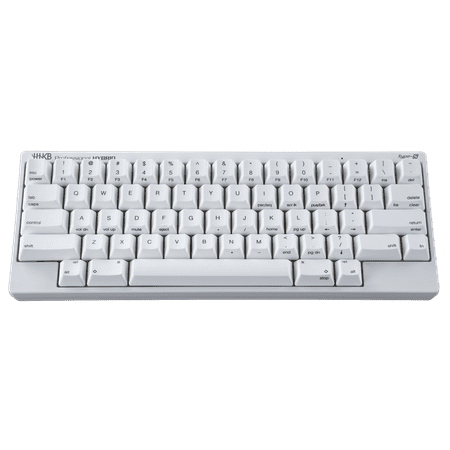
HHKB CG01000-307201 Professional HYBRID Type-S Gaming Keyboard
This is the one. If you ask any long-time HHKB owner what they’d buy today if they were starting over, the answer is the HYBRID Type-S in charcoal. It combines everything PFU has learned about Topre into one board: silenced 45g sliders, Bluetooth 4.2 + USB-C wired, DIP switch programmability, and the dye-sub PBT keycaps that have made HHKB the cult-status board it is. The Type-S silencing makes it appropriate for an office without giving up the deep thock signature. I’ve taken mine into coffee shops without ever getting the side-eye, which is more than I can say for any tactile mechanical I’ve owned.
The 60% layout takes about a week to learn. The Fn key sits where right Ctrl normally lives, and the function row is layered onto the number row. After a few days, you’ll forget there was ever a different way. The board pairs to four Bluetooth devices and switches between them with Fn + Ctrl + 1/2/3/4. I bounce mine between my desktop, a Mac mini, and an iPad without ever touching a cable. Battery life on two AA cells is somewhere in the multi-month range. Mine’s been on the same set since January and the indicator is still solid.
| Layout | 60% (66 keys) |
| Switch | Topre 45g silenced (Type-S) |
| Connection | USB-C + Bluetooth 4.2 (4 devices) |
| Keycaps | Dye-sub PBT |
| Power | 2x AA batteries or USB-C |
| Weight | 540g (with batteries) |
Rating: 9.5 / 10
Pros
- Silenced Topre is genuinely office-quiet
- Bluetooth and USB-C in one board
- Four-device pairing works flawlessly
- Dye-sub PBT caps don’t shine over time
- Programmable via DIP switches and Keymap Tool
Cons
- $300 is real money for a 60% board
- No backlight (HHKB never has)
- 60% layout has a learning curve
- Plastic case feels lighter than the price suggests
Check Final Price on Walmart →
2. HHKB Professional Classic Charcoal — Best Pure Topre
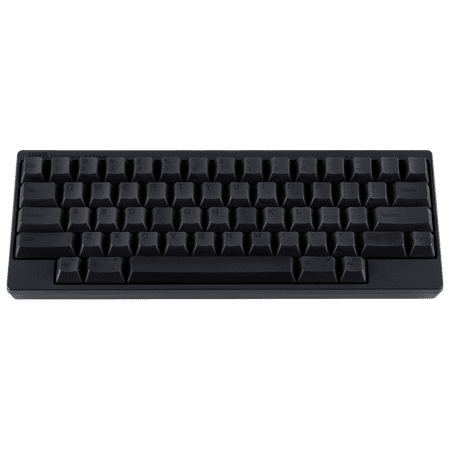
Happy Hacking Keyboard Professional Classic (Wired, USB, Mac, Windows, Charcoal, Printed) with 2 Year Advance Exchange Warranty CG01000-296401
The Classic is what you buy when you want unsilenced Topre and don’t need wireless. Same chassis, same 60% layout, same dye-sub PBT keycaps as the HYBRID, but with the original loud thock instead of the silenced Type-S sliders. There’s a faction of the HHKB community that swears the Classic sounds better than the Type-S, and they’re not wrong. Type-S is more practical. Classic is more satisfying. I keep one on my home desk for that exact reason.
If you’re new to Topre and want to experience what made the switch famous, this is the version to start with. The hollow, resonant pop on each keystroke is something you have to feel to understand. It’s not loud in the way a blue Cherry MX is loud — there’s no click, no scratch, no rattle. It’s a tuned sound, almost percussive. The Classic is wired-only, USB-C, and the rest of the spec sheet mirrors the HYBRID minus the radio. Fewer features for $80 less. For some buyers, that’s the smarter spend.
| Layout | 60% (66 keys) |
| Switch | Topre 45g (unsilenced) |
| Connection | USB-C wired |
| Keycaps | Dye-sub PBT |
| Power | USB bus-powered |
| Weight | 540g |
Rating: 9.2 / 10
Pros
- The classic, unsilenced Topre thock
- USB-C wired keeps latency near-zero
- Same dye-sub PBT keycaps as the HYBRID
- DIP switch programmability
- Costs about $80 less than the HYBRID Type-S
Cons
- Wired only
- Loud enough to bother an open-plan office
- No backlight
- Stock feet have a shallow typing angle
Check Final Price on Walmart →
3. HHKB Professional HYBRID — Best Wireless Value
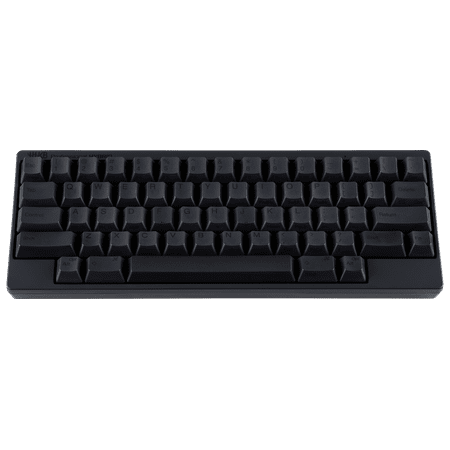
HHKB CG01000-296601 Professional HYBRID Gaming Keyboard
The middle child. The HYBRID is essentially the Type-S without the silencing rings — same Bluetooth, same USB-C, same four-device pairing, same keymap programmability. You save about $35 by giving up the Type-S sliders, which is worth doing if you actually prefer the louder unsilenced sound. The HYBRID is the right pick for someone who wants wireless Topre but isn’t trying to type in a library.
Honestly, I owned the HYBRID before the HYBRID Type-S and the only reason I upgraded was the silencing. The HYBRID was, and still is, an exceptional board. If you work from home, sit in your own office, or just don’t care about being heard, save the $35 and put it toward a keycap set later. The action is identical. Only the acoustic profile differs.
| Layout | 60% (66 keys) |
| Switch | Topre 45g (unsilenced) |
| Connection | USB-C + Bluetooth 4.2 (4 devices) |
| Keycaps | Dye-sub PBT |
| Power | 2x AA batteries or USB-C |
| Weight | 540g |
Rating: 9.0 / 10
Pros
- Bluetooth + USB-C in one chassis
- Pairs to four devices, switches via Fn shortcut
- Same dye-sub PBT caps as the Type-S
- Multi-month battery on two AAs
- Saves about $35 over the Type-S
Cons
- Louder than Type-S — not office-friendly
- No backlight
- 60% layout requires learning
- Bluetooth occasionally needs a re-pair after deep sleep
Check Final Price on Walmart →
4. HHKB Professional Classic White
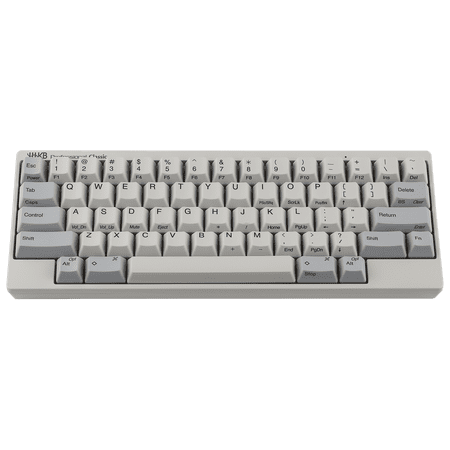
The Fujitsu HHKB was designed for programmers by programmers to provide a unique keying experience and to reduce hand and finger fatigue. Unique characteristics include Electrocapacitive Switches, compact 60 key layout and USB or Bluetooth connectivity.
Mechanically identical to the Classic Charcoal. The only difference is the colorway: a clean, almost-cream white case with light grey legends. There’s a sub-community of HHKB owners who only buy the white version because it photographs beautifully and matches Apple desk setups. If you’ve already decided on the wired Classic and you’re staring at a white desk, this is the obvious choice. If your setup is dark, get the Charcoal — the legends are easier to read against the dark keys.
One thing worth noting on white HHKBs: the keycaps eventually develop a slight ivory tint with use. It’s not yellowing the way ABS does. It’s PBT, just shifting tone slightly over years of skin oil and sun exposure. Some owners love the patina. If you hate it, the Charcoal will look identical at year five. Pick accordingly.
| Layout | 60% (66 keys) |
| Switch | Topre 45g (unsilenced) |
| Connection | USB-C wired |
| Keycaps | Dye-sub PBT, light grey on white |
| Power | USB bus-powered |
| Weight | 540g |
Rating: 9.0 / 10
Pros
- The iconic white HHKB aesthetic
- Identical mechanical behavior to the Charcoal
- Dye-sub legends won’t wear off
- USB-C wired with low latency
Cons
- Light grey legends are low-contrast in dim rooms
- White case shows dust faster
- Will develop a slight ivory tint over years
- Wired only at this price tier
Check Final Price on Walmart →
5. HHKB Studio — Best Premium Programmable
The HHKB Studio is the most ambitious thing PFU has shipped in a decade. Instead of capacitive Topre, it uses new HHKB-tuned linear sliders that emulate the silent Type-S feel without the rubber dome stack. The reason it’s on this list is that the typing experience is dead close to a Type-S, and it adds things no other HHKB has ever done: full QMK-style programmability, a built-in optical pointing stick, and four touch gesture strips on the front and sides of the case. It’s HHKB for people who hate leaving the home row.
At $317.99 it’s the most expensive HHKB in the lineup, and the trade-off is honest. You lose the actual Topre switch — there’s no capacitive dome, no electrostatic read. What you gain is a board that’s deeper, fully remappable per layer, and that lets you scroll, drag, and click mouse buttons without lifting a finger off the keys. For programmers and writers who live in the terminal, that’s epic. For pure Topre purists, this isn’t the board — get the Classic Charcoal instead. But as a premium daily driver that takes the HHKB philosophy further than any board before it, the Studio is the workstation keyboard of 2026.
| Layout | 60% (66 keys) + 4 gesture strips |
| Switch | HHKB silent linear (not Topre) |
| Connection | USB-C + Bluetooth 5.0 (4 devices) |
| Pointing | Optical pointing stick + 3 mouse buttons |
| Programmability | Full per-key remap, 4 layers |
| Power | 4x AA batteries or USB-C |
Rating: 9.3 / 10
Pros
- Built-in pointing stick keeps your hands on the keys
- Four programmable gesture strips for scroll and shortcuts
- Fully remappable per layer via the Studio configurator
- HHKB silent linears feel close to Type-S
- Bluetooth 5.0 pairs four devices
Cons
- Not actually Topre — purists will object
- Highest price in the HHKB lineup at $317.99
- Learning curve for the gesture strips and pointing stick
- No backlight (still)
Check Final Price on Walmart →
6. HK Gaming GK61 — Budget 60% Gateway
Heads up: this isn’t a Topre board. The GK61 uses standard mechanical switches, not Topre EC switches. I’m including it because a real piece of advice for anyone considering a $300 HHKB is to first make sure you actually want a 60% layout. The GK61 is the cheapest, most honest way to test that. For around $35, you get the exact same key arrangement HHKB uses — no arrow keys, no function row, no nav cluster. If you fall in love with it, you graduate to an HHKB and never look back. If you hate it, you saved $265.
Don’t go in expecting Topre-level feel. The switches are entry-level Gaote or Outemu clones depending on the production batch. The case is plastic and rattles. The keycaps will shine in six months. But for layout testing, it does the job. I tell every Topre-curious buyer to do this first. The 60% commitment is the actual gamble. The switch type is the easy part.
| Layout | 60% (61 keys) |
| Switch | Hot-swap mechanical (varies) |
| Connection | USB-C wired |
| Keycaps | ABS double-shot or single-shot, batch-dependent |
| Backlight | RGB |
| Weight | ~600g |
Rating: 7.5 / 10 (for the price)
Pros
- Cheap way to test 60% layout
- Hot-swap means you can experiment with switches
- RGB if you care about that
- USB-C connector
Cons
- Not Topre — completely different feel
- Build quality is what you’d expect for $35
- Keycaps and switches both have a short lifespan
- No wireless
Check Final Price on Walmart →
Topre Alternatives Worth Knowing About
The HHKB lineup dominates this category for a reason, but it’s not the only game in town. Realforce keyboards from Topre Corporation cover the traditional TKL and full-size layouts the HHKB skips. The R3 is the current flagship with Bluetooth + USB-C, variable actuation force (30g/45g/55g), and silenced sliders on the SA variants. If you absolutely need arrow keys and a function row in a Topre board, the Realforce R3 TKL is the answer. It’s just rarely in stock through major US retailers, which is why it didn’t make the main list.
Niz Plum boards are the third option people ask about. Niz uses an electrostatic capacitive switch that’s a close cousin to Topre — same operating principle, slightly different feel, much lower price. A Niz Plum 84 with 35g springs runs around $150 versus the HHKB’s $300, and the typing experience is recognizably in the same family. The downside is build quality is a step below PFU’s tight tolerances, and the keycaps aren’t as premium. If budget is tight and you want capacitive switches, Niz is the workaround. If budget allows, the HHKB is the better long-term board.
Leopold’s FC660C and FC980C were beloved by the community for years — Topre-equipped boards in 65% and 96% layouts respectively. They’ve been hard to source in the US since 2023, and I’d avoid paying secondhand markup for them unless you’re a collector. The HHKB HYBRID Type-S beats them on connectivity and current parts availability anyway.
Verdict
The HHKB Professional HYBRID Type-S in Charcoal is the best Topre keyboard you can buy in 2026, full stop. It’s the most complete expression of what PFU has been building toward since the original HHKB Pro in 2003 — silenced Topre, modern connectivity, the right colorway, dye-sub PBT, and programmability that actually works. If you’re going to spend $300 on a 60% keyboard once, this is the one to spend it on.
The runner-up is the HHKB Professional Classic Charcoal for anyone who doesn’t need wireless and wants the louder, unsilenced thock. The Classic is $80 cheaper and is genuinely a different sound profile — pick it deliberately, not as a downgrade.
Buying Advice — Which Topre Keyboard Should You Get?
The choice comes down to three questions. First: are you typing in an office, a coffee shop, or a shared room? If yes, get a Type-S variant. The silencing rings genuinely matter. Second: do you need wireless? If you’re switching between a desktop and a laptop or tablet, the HYBRID models pair four devices and switch instantly. If you sit at one machine all day, save $80 and get a Classic. Third: charcoal or white? Charcoal hides dust, has higher-contrast legends, and ages better. White looks gorgeous on an Apple-style setup but shows every fingerprint.
If this is your first Topre and you’re nervous about dropping $300 on a board you’ve never touched, do this: buy a cheap 60% board like the GK61 first. Type on it for two weeks. If the layout works for you, the HHKB is a guaranteed upgrade. If the 60% layout drives you crazy, you’ve saved yourself a $300 mistake. The Topre switch is incredible, but no switch saves a layout you can’t live with.
One more piece of practical advice: HHKB pricing on Walmart fluctuates. The MSRP from PFU America is $385 for the HYBRID Type-S and $345 for the HYBRID. The Walmart price often sits below MSRP through third-party sellers, which is why I track it here rather than linking direct to fukutsushop. Just confirm you’re buying from a seller with positive ratings.
FAQ
Is Topre actually a mechanical switch?
Technically no. Topre is an electrostatic capacitive switch — a rubber dome over a conical spring on a PCB. It registers presses through capacitance change rather than a physical contact closure. The keyboard enthusiast community has adopted Topre into the mechanical conversation because it shares more in common with mechanicals than it does with traditional rubber dome boards, but a hardware engineer would tell you it’s its own category.
Why are Topre keyboards so expensive?
Two reasons. First, manufacturing volume is tiny compared to Cherry MX or generic mechanicals — Topre Corporation in Japan makes them in limited batches. Second, the cost of the capacitive sensor PCB is significantly higher than a standard hot-swap mechanical PCB because each key position needs its own sensor pad. There’s no $40 Topre board. There won’t be one. The economics don’t allow it.
HHKB or Realforce — which should I buy?
Different priorities. HHKB is 60% with no arrow keys, no function row, and a remappable layout — built for typists and developers who live on the home row. Realforce is full-size or TKL with traditional layouts and variable-weight versions (30g, 45g, 55g, variable). If you want a small board for typing or coding, get an HHKB. If you want a Topre board with arrows and a number pad, get a Realforce. Both are excellent. They serve different users.
Are Topre keyboards good for gaming?
They’re fine, not optimal. The 45g actuation force is heavier than most gaming-tuned linear switches, and Topre doesn’t have a “speed” variant with shortened pre-travel. Some pros use them for RTS and MOBA games where actuation timing matters less, but for fast FPS work, a light linear switch will outperform Topre on pure mechanical latency. The HHKB is a typing keyboard that happens to game adequately. It’s not a gaming keyboard.
Can I use an HHKB on a Mac?
Yes, and it’s actually one of the best Mac keyboards I’ve used. The DIP switches on the back of the HHKB let you remap the Alt and Cmd positions to match Mac’s expected layout. The HYBRID models support Bluetooth out of the box. The Classic is plug-and-play USB-C. The 60% layout pairs well with macOS’s heavy reliance on Cmd + key shortcuts — your thumbs basically live on Cmd, so a smaller board keeps that ergonomic.



