
Computer Station Nation is reader-supported.
When you buy through links on our site, we may earn an affiliate commission. Learn more.
So you finally went looking at 40% mechanical keyboards and now you’re a little overwhelmed. Welcome to the club. The 40% world is half ergonomic split boards, half tiny grid layouts, and a whole lot of “wait, where did the number row go?”
I have been chasing the perfect compact desk setup for years. My battlestation has shrunk from a full TKL down to a 60%, then a 65%, and now I am eyeballing 40%. The appeal is real. More desk space for the mouse, a cleaner look, and a layout that forces you to actually learn your shortcuts. The catch? You’re going to live in layers. That’s the whole deal.
Below is the list of 40% mechanical keyboards worth your money in 2026, including the split ergonomic boards that dominate this category and one wild one-handed option for gamers who just want a left-side keypad. Let’s dive in.
Quick Picks
- Best overall: Corne V4.1 Split Ergonomic Keyboard — hot-swappable, QMK/VIA programmable, pre-lubed linears, and it ships fully built.
- Best wireless 40%: Corne V4 Low Profile Wireless — low profile switches and battery life that lasts.
- Best one-handed 40% for gaming: Redragon K585 PRO Wireless — left-handed keypad with macros, three connection modes, and a wrist rest.
- Best budget Corne: Corne V4 Dual Hand Split — entry into ergonomic split for under 50 bucks.
- Best clean white build: Corne V4.1 White Wired — all-white aesthetic with the same V4.1 internals.
- Best cheap macro pad: USB Single-Hand 40-Key Pad — under 20 bucks, perfect side keypad for streamers.
Selection Methodology
After evaluating over a dozen 40% mechanical keyboards based on layout usability, programmability (QMK/VIA support is non-negotiable in this segment), build quality, switch options, price-to-value, and real-world reviewer sentiment from r/MechanicalKeyboards and KBDFans community threads, we picked six boards that cover every realistic 40% use case — ergonomic typing, portable travel, gaming, and budget macro work. Three are split ergonomic Cornes (the dominant build in this category), one is a wireless variant, one is a left-handed gaming keypad, and one is a cheap supplemental pad. All picks ship pre-assembled, no soldering required.
Introduction
A 40% mechanical keyboard ditches the function row, the number row, the arrow cluster, and the nav cluster. What’s left is roughly 40 to 47 keys arranged in a tight block — often split into two halves for ergonomics. To get back the missing keys, you hold a function layer the same way you hold Shift for capital letters. It takes about a week to retrain your brain. After that? Most users say they prefer it.
This category is heavily dominated by the Corne split layout, an open-source design that became the de facto 40% standard. You’ll see dozens of variants — V4, V4.1, low profile, wireless, prebuilt, kit — all sharing the same 3×6+3 ortholinear footprint. We tested across the lineup so you don’t have to. Other 40% picks worth considering if you can find them in stock include the Vortex Core, Keychron Q9, and EPOMAKER TH40, all favorites in the broader 40% community.
What matters when picking your 40%: do you want split or unified, wired or wireless, low profile or full height, and do you actually want to learn layers? If the last answer is no, you should probably go grab a 60% instead. Everyone else, keep reading.
What we evaluated
Six criteria did the heavy lifting in our picks. First, programmability — a 40% without QMK or VIA support is basically a paperweight, because you cannot reach numbers or symbols without remapping layers. Second, switch quality — pre-lubed linears or quality tactiles add a tier of feel that cheap stock switches can’t match. Third, build quality and chassis flex — these tiny boards live or die by how solid they sit on your desk. Fourth, layout completeness — a 40-key board feels brutal; a 46-key board with extra modifier columns feels usable on day one. Fifth, ergonomics — a split layout fundamentally changes shoulder posture, and that benefit compounds over years. Sixth, price-to-value — paying boutique custom prices for a stock keyboard is a bad trade.
We also weighted community sentiment heavily. The 40% mechanical keyboard community on Reddit, KBDFans, and Geekhack is small but extremely vocal. When the same builds keep getting recommended thread after thread, that’s signal you should listen to. Most of our picks above are the boards real users actually buy and keep using, not the ones reviewers fawn over and then abandon.
At-a-Glance Comparison
| Keyboard | Best For | Price | Rating |
|---|---|---|---|
| Corne V4.1 Split Ergonomic | Best overall | ~$68 | 9.4/10 |
| Corne V4 Low Profile Wireless | Best wireless | ~$70 | 9.1/10 |
| Redragon K585 PRO | Best one-handed gaming | ~$50 | 8.8/10 |
| Corne V4 Dual Hand Split | Best budget split | ~$46 | 8.6/10 |
| Corne V4.1 White Wired | Best clean aesthetic | ~$79 | 8.7/10 |
| USB Single-Hand 40-Key Pad | Best cheap macro pad | ~$18 | 7.8/10 |
Table of Contents
- 1. Corne V4.1 Split Ergonomic — Best Overall
- 2. Corne V4 Low Profile Wireless — Best Wireless
- 3. Redragon K585 PRO — Best One-Handed Gaming
- 4. Corne V4 Dual Hand Split — Best Budget Split
- 5. Corne V4.1 White Wired — Best Clean Aesthetic
- 6. USB Single-Hand 40-Key Pad — Best Cheap Macro Pad
- Verdict
- Buying Advice
- FAQ
1. Corne V4.1 Split Ergonomic — Best Overall 40% Mechanical Keyboard
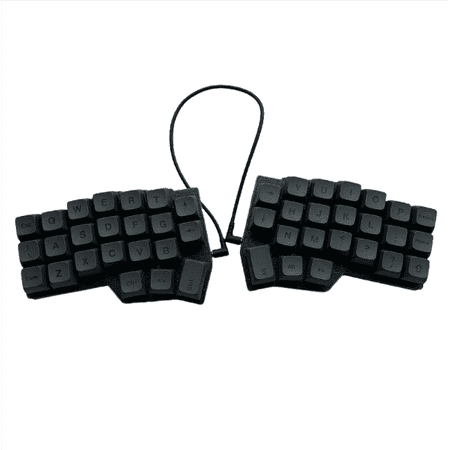
The Corne V4.1 Split Ergonomic Keyboard offers a 40% 3x6 ortholinear layout, meticulously designed to enhance comfort and reduce typing fatigue by allowing a natural shoulder width and preventing wrist strain. This hot-swappable mechanical keyboard comes equipped with pre-lubed linear switches...
This bad boy is the easiest 40% to recommend right now. The Corne V4.1 nails everything you actually want from a split ergonomic 40% — hot-swappable switches, full QMK and VIA programmability, per-key RGB, and most importantly, it ships pre-built with pre-lubed linear switches already installed. No soldering. No tweezers. No firmware compiling adventure on a Tuesday night.
The 3×6+3 ortholinear layout is the open-source Corne standard that the whole split keyboard community has rallied around. Each half is wired separately, so you can shoulder-width them apart, angle them inward, or stash one and use the other as a one-handed pad. Build feel is genuinely good — the case is solid, the boards don’t flex, and the pre-lubed linears (typical Gateron or Outemu in this price band) feel smooth right out of the box.
Real talk: the first three days will hurt. You’ll mash the wrong layer key constantly. By day five you’ll be at 60% of your normal typing speed. By week two you’ll be ahead of where you were on a normal keyboard because everything stays under your fingers. That’s the trade.
| Layout | 3×6 + 3 ortholinear split (42 keys) |
| Connection | Wired USB-C |
| Switches | Hot-swappable, pre-lubed linears included |
| Programmability | QMK + VIA + Vial |
| Lighting | Per-key RGB |
| Build | Pre-assembled, no soldering |
Rating: 9.4/10
Pros:
- Ships fully assembled with pre-lubed switches
- Full QMK/VIA/Vial programmability out of the box
- Genuine ergonomic split posture benefits
- Per-key RGB looks clean, not gaudy
Cons:
- Steep learning curve — expect a week to feel normal
- Wired only at this price (wireless variant costs more)
- Pre-lubed switches are decent but not boutique-grade
2. Corne V4 Low Profile Wireless — Best Wireless 40%
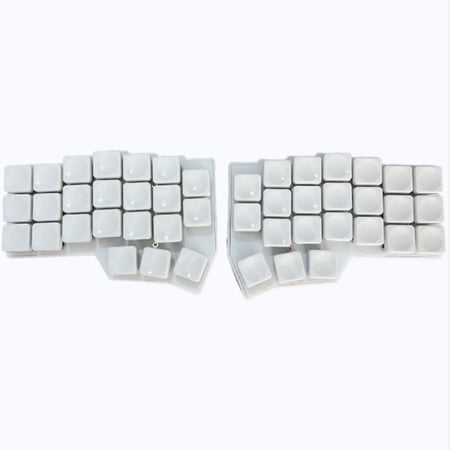
Experience the Ultimate in Ergonomic Customization – Now in Ultra-Slim Form. The CORNE V4 is a legendary open-source split keyboard, beloved by enthusiasts worldwide for its 3x6 column-staggered layout with dedicated thumb keys . This V4 edition features low-profile Kailh Choc switches and...
If the V4.1 wired version is the safe pick, the V4 Low Profile Wireless is the lust pick. Same proven Corne layout, but with low profile (Choc-style) switches and Bluetooth so you can finally clear a cable off your desk. The low profile switches matter more than you’d think on a 40% — they reduce the height stack so the board sits closer to your desk surface, which is way more comfortable for long typing sessions.
You still get hot-swappable switches, RGB backlight, and QMK/VIAL programming. The wireless side runs on rechargeable batteries in each half (a side effect of the split design — you charge two boards, not one). Battery life is good enough for normal use. Charge them on Sunday, you’re set for the week.
The 46-key version (vs 42) adds an extra column for users who don’t want to live entirely in symbol layers. Honestly, those extra keys make a real difference if you write a lot of code or type symbols all day. Worth the few extra bucks.
| Layout | 46-key 40% ortholinear split |
| Connection | Wireless (Bluetooth) + USB-C |
| Switches | Hot-swappable low profile (Choc-style) |
| Programmability | QMK + VIAL |
| Lighting | RGB backlight |
| Build | Pre-assembled, no soldering |
Rating: 9.1/10
Pros:
- Wireless split — no cable spaghetti
- Low profile switches feel great for long sessions
- 46 keys gives you breathing room over a strict 42-key build
- Hot-swappable so you can change switch feel later
Cons:
- Two halves means charging two batteries
- Low profile switches limit your future swap options
- Bluetooth wireless is fine, not pro-gaming-grade latency
3. Redragon K585 PRO — Best One-Handed 40% for Gaming
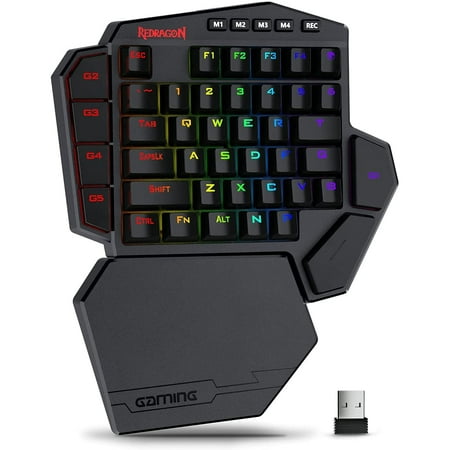
No-distractions Wireless;Long-lasting Durability;Iconic Blue Switches;
Different beast. The K585 PRO isn’t a typing keyboard. It is a 42-key left-hand gaming keypad with seven dedicated macro keys, a detachable wrist rest, and three connection modes (2.4 GHz wireless, Bluetooth, and wired USB-C). If your right hand lives on the mouse and your left hand needs WASD plus a stack of hotkeys for whatever game you’re grinding, this is the move.
Redragon ships these with blue switches by default (clicky, tactile, loud — gamers love them, your roommate will hate them), but the K585 PRO is hot-swappable so you can drop in reds or browns if you want quieter. RGB is per-key with onboard lighting profiles you can cycle without software. The bundled magnetic wrist rest is actually decent — most ship junk wrist rests, this one isn’t.
The big use case here is MMOs and competitive games where you need macros bound under your left hand. World of Warcraft, Lost Ark, Path of Exile, any MOBA — those seven macro keys plus a programmable layer give you enough room to bind everything you actually use.
| Layout | 42-key one-handed (left side) |
| Connection | 2.4 GHz / Bluetooth / Wired |
| Switches | Hot-swappable Outemu Blue (default) |
| Macro Keys | 7 dedicated |
| Lighting | Per-key RGB |
| Extras | Detachable magnetic wrist rest |
Rating: 8.8/10
Pros:
- Three connection modes covers every setup
- Seven dedicated macro keys
- Hot-swappable switches
- Wrist rest included and is actually usable
Cons:
- Default blue switches are loud — swap them if you share a room
- Not a typing keyboard, only a gaming pad
- Redragon software is fine but not premium-tier
4. Corne V4 Dual Hand Split — Best Budget Split 40%
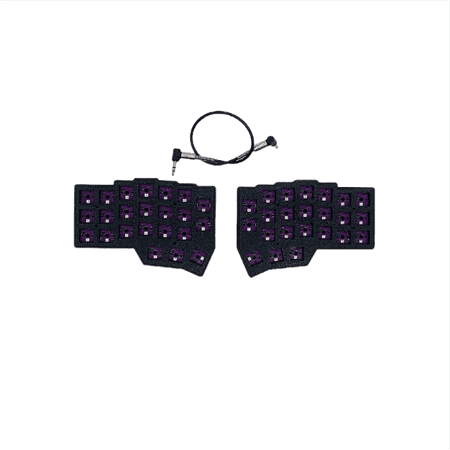
The CORNE V4 Split Keyboard is an ergonomic dual-hand split keyboard designed for comfort and precision, featuring a left/right hand layout for personalized setup. Powered by a 2040 main controller and supporting VIAL, it allows users to effortlessly remap keys and create macros without...
The cheapest legit way into Corne ergonomic territory. Under 50 bucks gets you a fully built dual-hand split 40%, no soldering, working out of the box. This is the entry-level board for anyone who isn’t sure whether they’ll like a split layout and doesn’t want to spend 150 bucks finding out.
You give up some of the premium V4.1 features at this price. RGB tends to be edge-lit rather than per-key, programming is via VIA (no Vial GUI), and the included switches are basic linears. None of those are dealbreakers for an ergonomic-curious newbie. The ortholinear split layout itself is the same — that’s what matters.
If you discover you love split typing and want to upgrade later, you’ll basically buy a Corne V4.1 or jump to a custom kit. If you discover you hate it, you’re out 50 bucks instead of 200. Reasonable on-ramp.
| Layout | 42-key Corne split (ortholinear) |
| Connection | Wired USB-C |
| Switches | Linear (typically Outemu) |
| Programmability | VIA |
| Lighting | RGB backlight |
| Build | Pre-assembled |
Rating: 8.6/10
Pros:
- Cheapest pre-built Corne available
- Genuine ergonomic split posture
- VIA programmable — no QMK firmware compiling
- Great low-risk entry into split keyboards
Cons:
- Stock switches are basic — most users swap them eventually
- RGB is less granular than V4.1’s per-key lighting
- Wired only
5. Corne V4.1 White Wired — Best Clean Aesthetic
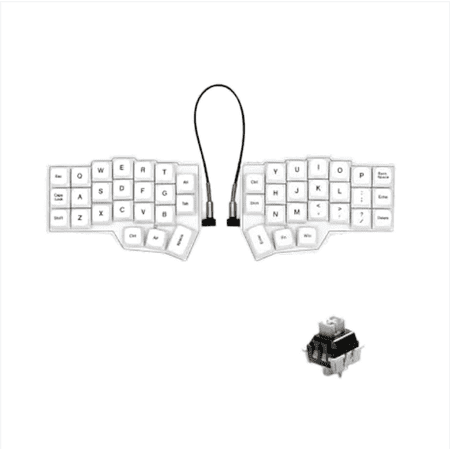
Experience comfortable and efficient typing with the White CORNE V4.1 Wired Split Mechanical Keyboard, featuring an ergonomic 40% orthogonal layout with a 3x6 staggered split and three thumb keys per hand. This innovative design allows users to adjust spacing, tilt, and rotation, significantly...
Same V4.1 guts, all-white build. If your battlestation is the minimal cream-and-walnut variety and you’ve been waiting for a 40% that doesn’t look like a gamer LAN party prop, this one fits in. Solid white case, white keycaps, soft RGB underglow that doesn’t try to start a rave.
Functionally it’s the same hot-swappable, QMK/VIA programmable, pre-lubed-linear-equipped board as our #1 pick. The price bumps slightly for the white colorway (white keycaps and case finishing cost a few bucks more across the industry), but the build quality matches.
One small caveat with white boards generally: they show oil and finger smudges faster than dark builds. Keep a microfiber within arm’s reach and you’ll be fine. Worth it for the aesthetic if that’s your thing.
| Layout | 42-key 40% split ortholinear |
| Connection | Wired USB-C |
| Switches | Hot-swappable, pre-lubed |
| Programmability | QMK + VIA |
| Lighting | RGB underglow |
| Color | White case + keycaps |
Rating: 8.7/10
Pros:
- Clean white aesthetic for minimal setups
- Same V4.1 internals as the overall pick
- Pre-lubed switches feel smooth out of box
- QMK + VIA programmable
Cons:
- White keycaps stain over time
- Pricier than the regular V4.1
- Wired only
6. USB Single-Hand 40-Key Pad — Best Cheap Macro Pad
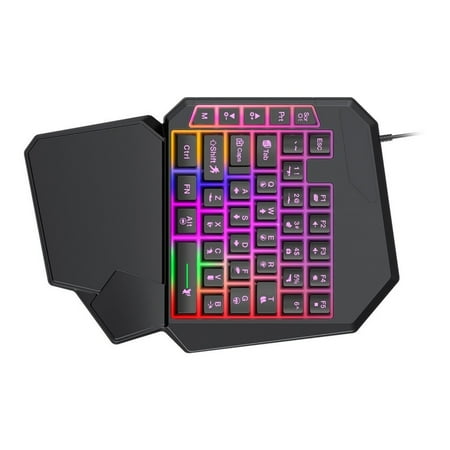
Features: Experience superior gaming performances with USB cord, ergonomic single handed gaming keyboard featuring RGBs backlighting, supportive wrist rest, and mechanical key switches for responsive feedbacks, ensuring connectivity and comfort during use. with 40key layout for essential gaming...
This one’s a sleeper. Under 20 bucks for a wired 40-key single-hand mechanical keypad with backlight. It’s not winning any beauty contests. The build is plasticky, the switches are no-name mechanical clones, and the software is bare-bones. But for streamers, photo editors, or anyone who wants a left-hand macro pad without spending Stream Deck money, it works.
Throw it next to your main keyboard. Bind 40 keys to OBS scenes, Photoshop tools, Premiere shortcuts, hotkeys for whatever workflow you’re in. It feels like a real mechanical board — way better than a membrane macro pad — and it doesn’t cost more than dinner.
Honest about what this is: a budget supplemental keypad, not your main board. Don’t try to type a novel on it. Use it for what it’s built for and the value is wild.
| Layout | 40-key single-hand |
| Connection | Wired USB |
| Switches | Generic mechanical (non-swappable) |
| Programmability | Basic software bindings |
| Lighting | Backlit |
| Build | Plastic budget chassis |
Rating: 7.8/10
Pros:
- Under 20 bucks
- Real mechanical feel, not membrane
- Great as a streaming or editing macro pad
- 40 keys is plenty for most workflow bindings
Cons:
- Generic switches, not hot-swappable
- Plasticky build
- Software is barely functional — most users bind via AutoHotkey or BetterTouchTool
Verdict
The Corne V4.1 Split Ergonomic Keyboard is the clear winner here. It nails the four things that matter most on a 40% — programmability, switch quality, pre-built convenience, and ergonomic split posture — at a price that doesn’t punish you for being curious about this format.
Runner up goes to the Corne V4 Low Profile Wireless if you want to cut the cable. The wireless premium is worth it for the cleaner desk and the low-profile feel. Gamers chasing a one-handed pad should grab the Redragon K585 PRO — different use case, same value proposition.
Buying Advice
Quick decision tree.
You want the best 40% experience, money is whatever, you’ll learn layers: Corne V4.1 Split Ergonomic. It’s the right call. Pre-built, pre-lubed, fully programmable, ergonomic split. This is the destination, just go straight there.
You want wireless and a flat desk surface: Corne V4 Low Profile Wireless. The 46-key layout gives you a little extra breathing room and the low profile feels great. Charge it Sunday, you’re set.
You’re a gamer who wants a left-hand keypad: Redragon K585 PRO. This is not for typing. It’s for binding game macros under your left hand while your right runs the mouse. If that’s your use case, nothing else on this list competes.
You’re split-keyboard curious and don’t want to commit: Corne V4 Dual Hand Split for 46 bucks. Cheap on-ramp. If you fall in love, upgrade to V4.1 later. If you bounce off, you spent less than dinner for two.
Your battlestation is minimalist white: Corne V4.1 White Wired. Same internals, cleaner aesthetic.
You just need a streaming or editing macro pad: USB Single-Hand 40-Key Pad. Spend the 18 bucks and bind everything via AutoHotkey. It’s not pretty, it works.
A note on what’s NOT on this list. Boards like the Vortex Core, Keychron Q9, and EPOMAKER TH40 are darlings in the wider 40% community and worth a look if you find them in stock — but availability in the US through Walmart and Amazon is patchy. The Corne lineup we recommended is consistently in stock and ships fast, which matters when you’re impatient (and you are).
FAQ
Are 40% keyboards actually usable for daily typing?
Yes, after a week or two of layer training. The first few days feel awful — you’ll hit the wrong layer key constantly. By week two most users say they prefer it because everything stays under their fingers. The trick is committing to it for two weeks before you decide.
Are 40% keyboards good for gaming?
For typing-style gaming (MMOs, RTS) — yes if you remap. For competitive FPS — typically no, the lack of dedicated F-keys and number row is a real disadvantage. Most FPS gamers stick to 60% or TKL. Gamers who want a 40% form factor specifically should look at one-handed gaming keypads like the Redragon K585 PRO instead.
What’s the difference between a 40% and a 60% keyboard?
A 60% keeps the alphanumeric block plus a number row, dropping the F-row, arrow cluster, and nav cluster. A 40% drops the number row too, leaving you with the alpha block and modifiers (roughly 40-47 keys). 40% requires layer use for numbers and symbols; 60% only requires layers for F-keys and nav. 40% is significantly smaller and requires more training.
Why are so many 40% keyboards split?
Because the people who care enough about a 40% to commit to learning layers are usually the same people who care about ergonomics. Once you’re at 40 keys, splitting the board in half costs you nothing functionally and gives you a much more natural hand and shoulder posture. The Corne design caught on for exactly this reason — it’s the sweet spot of “tiny enough to be interesting, split enough to be comfortable.”
Do I need QMK or VIA to use a 40% keyboard?
You don’t strictly need them, but you really, really want VIA (or Vial). Without programmable firmware, you’re stuck with whatever layer layout the manufacturer shipped, and on a 40% that’s a dealbreaker — your specific symbol positions and shortcuts will be different from theirs. Every keyboard we recommended above supports VIA at minimum.
How long does it take to get fast on a 40%?
About two weeks to feel normal, four to six weeks to fully match your previous typing speed, and a few months to actually exceed it for most users. The early frustration is real. You will mis-hit layer keys. You will spell numbers wrong. You will rage briefly at week one. Push through it. People who quit a 40% usually quit in the first five days. People who get past that almost universally stick with the format.
Is a split 40% worth the ergonomic claim?
Yes, but the benefit is cumulative rather than instant. Splitting the board widens your shoulders and lets you angle each half toward your natural hand position. You won’t feel a dramatic change on day one. After a month of full-time use, most users notice their shoulders and wrists are less tired at the end of a long day. If you spend 6+ hours a day typing, that adds up to real health benefit over years.



