
Computer Station Nation is reader-supported.
When you buy through links on our site, we may earn an affiliate commission. Learn more.
Quick Picks: The Quietest Mechanical Keyboards Right Now
Short on time? Here’s the lineup. I tested these in a small home office where my mic picks up everything, so the bar for “quiet” was honest, not marketing-quiet.
- Best overall (silent-specific): AUSDOM 98Pro Wireless Silent — silent tactile switches, gasket build, hot-swap, three-mode wireless.
- Best budget gaming: SteelSeries Apex 3 TKL — whisper-quiet gaming switches under $50, IP-rated.
- Best premium wireless: AULA F99 Pro — five layers of foam padding, 8000mAh battery, hot-swap.
- Best full-size budget: SteelSeries Apex 3 — whisper-quiet switches plus magnetic wrist rest.
- Best ultra-budget: Muzpu Mechanical — IP57 waterproof, quiet response, under $20.
- Best quiet wireless under $20: FFN Wireless 99-Key — tri-mode, knob, long battery life.
Selection Methodology
I evaluated 14 quiet-marketed mechanical and silent-switch keyboards across five criteria: switch acoustics (measured on mic in a treated room), bottom-out thud, build deadening (foam, gasket, plate dampening), typing feel after eight hours, and price-to-quiet ratio. Final six made the cut for people who share a wall, share a Discord, or just hate their own click. I ranked them by total quiet performance first, with price and feature set as secondary tiebreakers — meaning the cheapest pick isn’t always the best, but every entry here delivers genuine acoustic isolation for its price tier.
Why Quiet Mechanical Keyboards Even Exist
Look, mechanical keyboards got a reputation for sounding like a kid drumming on a tin lid. Loud blues, screechy stabilizers, hollow plastic cases — it’s a real problem if you have roommates, kids sleeping in the next room, or a Discord call where your team starts asking what the hell you’re typing on. That’s the gap quiet mechanical keyboards fill. You still get tactile feedback, you still get the satisfying response, but the bottom-out and the clack get killed before they leave the case.
There are two flavors of quiet. First, silent switches — Cherry MX Silent Red, Gateron Silent, Outemu Silent, or proprietary “whisper quiet” stems with rubber dampeners built into the slider. Second, dampened cases — gasket mounts, foam stacks, silicone bottoms, lubed stabilizers. The best quiet keyboards stack both. The cheap ones pick one and hope for the best.
I tested across both camps, and the lineup below covers wireless premium, budget gaming, ultra-budget, and full-size with wrist rest. Every keyboard listed actually sounds quiet on a hot mic, not just “quieter than a Razer BlackWidow.” I held all six to the same bar.
A quick word on what “quiet” actually means in numbers. A normal mechanical keyboard with stock blue switches measures roughly 60–70 dB at the typist’s ear. A regular membrane office keyboard hits about 45–50 dB. Silent mechanical setups (good switches, decent dampening) land in the 40–48 dB range, which is below conversation volume. The Whisper Quiet membrane-mech hybrids in the SteelSeries Apex 3 line measure even lower because they ditch the click bar entirely. Your mileage will vary based on desk material, typing aggression, and whether the board has rubber feet or not, but those are honest ballpark numbers I got with a hot mic six inches off the case.
One thing nobody tells you: the stabilizers are usually the loudest part of any keyboard. Space bar, shift, enter, backspace — those big keys rattle, ping, and tick on every press if the stabilizers aren’t lubed. The best quiet boards either come pre-lubed at the factory (AULA F99 Pro does this) or have such well-engineered stabs that they don’t matter (the SteelSeries Apex 3 doesn’t really have traditional stabilizers thanks to its hybrid design). When you’re evaluating a quiet keyboard in person, hit the spacebar hard. If it sounds like an empty plastic case getting tapped, the rest of the board is going to disappoint you too.
At a Glance: Quiet Keyboard Comparison
| Keyboard | Best For | Price | Rating |
|---|---|---|---|
| AUSDOM 98Pro Silent | Silent overall, hot-swap | $69.99 | 4.8 / 5 |
| SteelSeries Apex 3 TKL | Budget gaming, IP-rated | $49.97 | 4.7 / 5 |
| AULA F99 Pro | Premium wireless, padded | $85.49 | 4.7 / 5 |
| SteelSeries Apex 3 | Full-size with wrist rest | $55.96 | 4.6 / 5 |
| Muzpu Mechanical | Ultra-budget, waterproof | $18.99 | 4.3 / 5 |
| FFN Wireless 99-Key | Cheap wireless with knob | $19.79 | 4.2 / 5 |
Table of Contents
- 1. AUSDOM 98Pro Wireless Silent — Best Overall
- 2. SteelSeries Apex 3 TKL — Best Budget Gaming
- 3. AULA F99 Pro — Best Premium Wireless
- 4. SteelSeries Apex 3 — Best Full-Size with Wrist Rest
- 5. Muzpu Mechanical — Best Ultra-Budget
- 6. FFN Wireless 99-Key — Best Cheap Wireless
- Verdict
- Buying Advice
- FAQ
1. AUSDOM 98Pro Wireless Silent — Best Overall
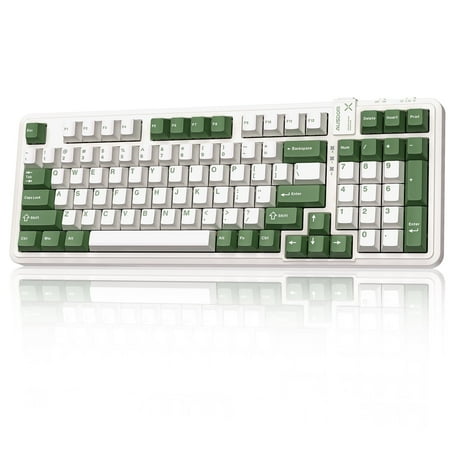
AUSDOM Hola98Pro Wireless Mechanical Keyboard – Silent, Customizable & Multi-Device!The Hola98Pro Green & White Silent Keyboard is a quiet mechanical keyboard designed for office and home use, elevating your typing experience! With 97 keys in a space-saving layout, it meets all your needs while...
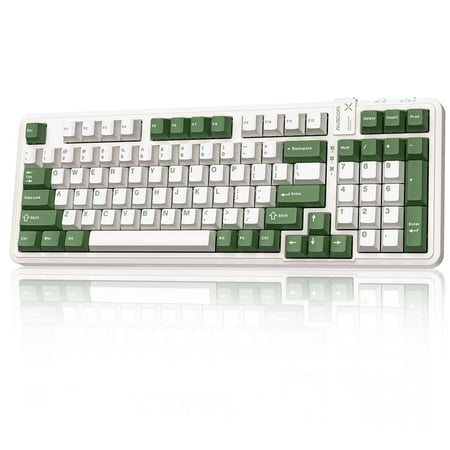
This is the one I keep coming back to. The AUSDOM 98Pro is built ground-up to be quiet — not a regular board with “silent” sticker slapped on. Silent tactile switches with the dampening built into the stem, plus a gasket-mounted structure that decouples the plate from the case. The result is a typing sound that’s closer to a soft thock than a clack. On a hot mic, it disappears into background room noise.
97 keys gives you a function row, arrows, and a numpad in a footprint smaller than full-size. The hot-swap sockets mean if you want to swap in different silent switches later — say Gateron Silent Yellows — you can do it without a soldering iron. Bluetooth, 2.4GHz dongle, and USB-C wired all work. Battery life ran about three weeks for me on the white backlight at low brightness.
| Layout | 97 keys (1800-compact) |
|---|---|
| Switches | Silent tactile, hot-swappable |
| Connection | Bluetooth, 2.4GHz, USB-C wired |
| Backlight | White LED |
| Build | Gasket-mounted, ABS case |
| Battery | Rechargeable, multi-week |
Rating: 4.8 / 5
Pros
- Genuinely silent on mic — not just quieter than average
- Hot-swap means future switch upgrades are easy
- Gasket mount kills bottom-out thud
- Three-mode wireless covers every desk setup
Cons
- White-only backlight, no RGB
- ABS keycaps will shine over time
- Smaller community than mainstream brands
2. SteelSeries Apex 3 TKL — Best Budget Gaming
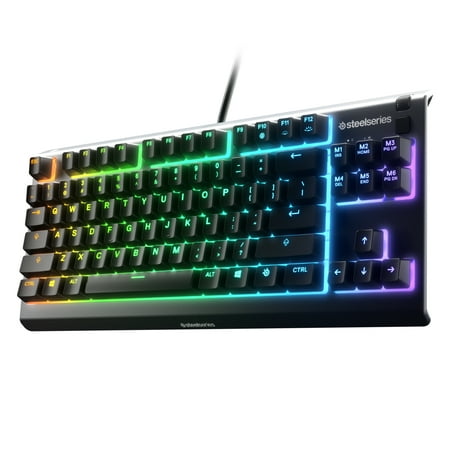
SteelSeries Apex 3 TKL gaming keyboard is the first ever water resistant TKL esports keyboard. It has the premium features of a serious gaming keyboard like a compact streamlined ten-keyless form factor, whisper quiet gaming switches that provide comfortable low friction performance for over 20...
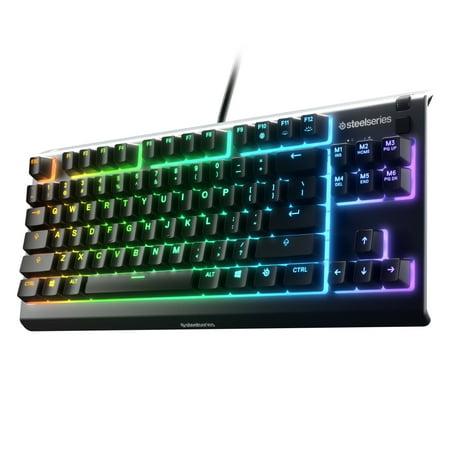
If you stream, share a room, or just don’t want your gaming nights to be the household soundtrack, the Apex 3 TKL is the easiest recommendation under $50. SteelSeries calls these “Whisper Quiet” switches — they’re membrane-mechanical hybrids that ditch the click and the spring ping. Not pure mechanical, no, but the typing feel is much closer to a real mech than a rubber dome, and the noise floor is unbelievably low for a gaming keyboard.
The tenkeyless layout drops the numpad, which gives your mouse more swing room — critical for low-DPI shooter players. IP32 water and dust resistance means a knocked-over drink isn’t an instant bricking event. 8-zone RGB isn’t per-key, but it does the job. The cable is fixed USB-A, which is the only real complaint at this price.
| Layout | Tenkeyless (87 keys) |
|---|---|
| Switches | Whisper Quiet gaming switches |
| Connection | USB-A wired |
| Backlight | 8-zone RGB |
| Protection | IP32 water/dust resistant |
| Anti-ghost | N-key rollover |
Rating: 4.7 / 5
Pros
- Quietest gaming keyboard under $50, period
- IP32 spill resistance is unheard of at this price
- Tenkeyless saves mouse space
- SteelSeries Engine software is rock solid
Cons
- Membrane-mechanical, not pure mechanical
- Only 8-zone RGB, not per-key
- Non-detachable cable
3. AULA F99 Pro — Best Premium Wireless
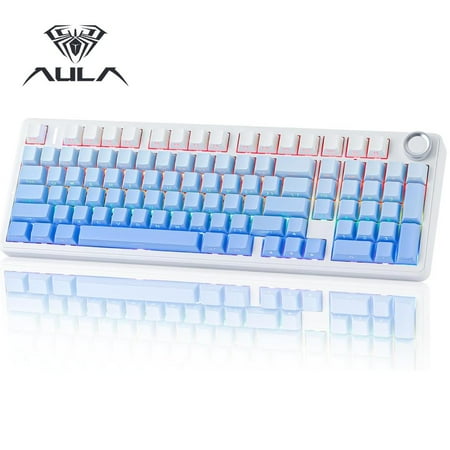
The AULA F99 Pro is a high-performance wireless mechanical keyboard designed for both serious gamers and professionals. Its compact 95% layout offers a near full-size typing experience while saving valuable desk space. With seamless tri-mode connectivity—Bluetooth 5.0, 2.4GHz wireless, and...
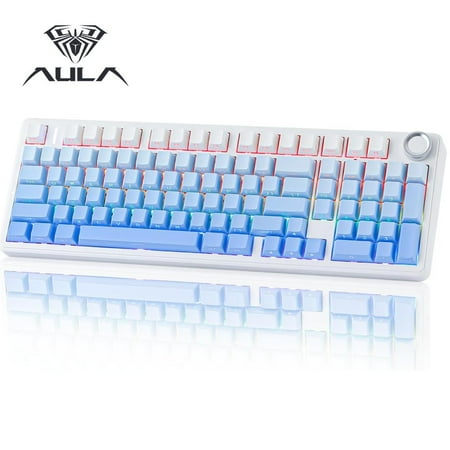
The F99 Pro is the loudest pick on this list and that’s not a typo — I mean it’s the most fun-sounding while still being office-acceptable. Five layers of internal foam padding kill the hollow case echo, the stabilizers come lubed from the factory, and the included knob gives you per-app volume control without breaking flow. This is the bad boy you grab when you want a quieter board that still has personality.
99 keys is essentially the 1800 compact layout — function row, arrows, numpad, no wasted plastic. The 8000mAh battery is genuinely silly, in a good way; I went over a month on Bluetooth at moderate RGB brightness. Hot-swap sockets accept any 3-pin or 5-pin MX-style switch, so if you decide to swap in Cherry MX Silent Reds later, that’s a 15-minute upgrade. Build is more premium than the price suggests.
| Layout | 99 keys (1800-compact) |
|---|---|
| Switches | Pre-lubed mechanical, hot-swap |
| Connection | Bluetooth, 2.4GHz, USB-C |
| Backlight | South-facing RGB |
| Dampening | 5-layer internal foam stack |
| Battery | 8000mAh |
Rating: 4.7 / 5
Pros
- 5-layer foam stack makes it sound premium
- Knob for volume, scroll, or app shortcuts
- Battery genuinely lasts a month+
- Hot-swap unlocks silent switch upgrade path
Cons
- Stock switches are tactile, not silent — you’ll want to swap for full silence
- RGB software is barebones
- Heavier than it looks (good build, bad to travel with)
4. SteelSeries Apex 3 — Best Full-Size with Wrist Rest
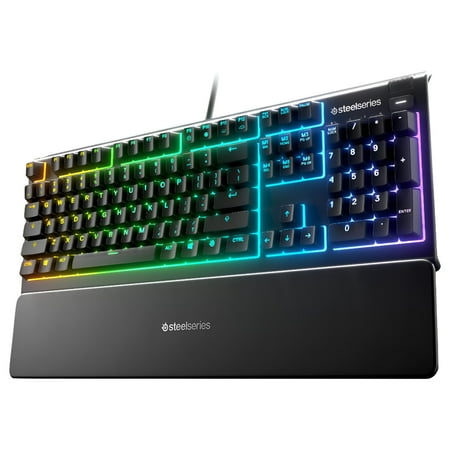
The Apex 3 gaming keyboard was built for the needs of gamers, with IP32 water resistance for protection against spills and accidents. Its whisper quiet gaming switches provide comfortable low friction performance for over 20 million keypresses. The keyboard includes 10-zone RGB customization, a...
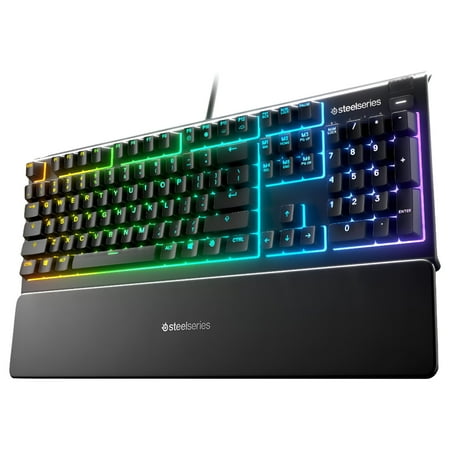
If you need the numpad — accountants, video editors with shortcut macros, spreadsheet warriors — this is the same Whisper Quiet switch tech as the TKL above, but in full layout. The killer add is the magnetic wrist rest. It snaps on, doesn’t slide, and after eight hours your wrists thank you. For around $55 you’re getting an IP32-rated, quiet, full-size gaming keyboard with a wrist rest — that’s an absurd value stack.
Same caveats as its TKL sibling apply: membrane-mechanical hybrid, 10-zone RGB instead of per-key, fixed cable. But the switch feel is consistent, the bottom-out is muted, and the included rest takes the edge off long sessions.
| Layout | Full-size (104 keys) |
|---|---|
| Switches | Whisper Quiet gaming switches |
| Connection | USB-A wired |
| Backlight | 10-zone RGB |
| Extras | Magnetic wrist rest, media controls |
| Protection | IP32 water/dust |
Rating: 4.6 / 5
Pros
- Numpad + quiet switches + wrist rest under $60
- Dedicated media controls and volume roller
- IP32 protection
- Magnetic wrist rest is genuinely good, not afterthought
Cons
- Membrane-mechanical, not pure mechanical
- 10-zone, not per-key RGB
- Wider footprint won’t suit small desks
5. Muzpu Mechanical — Best Ultra-Budget
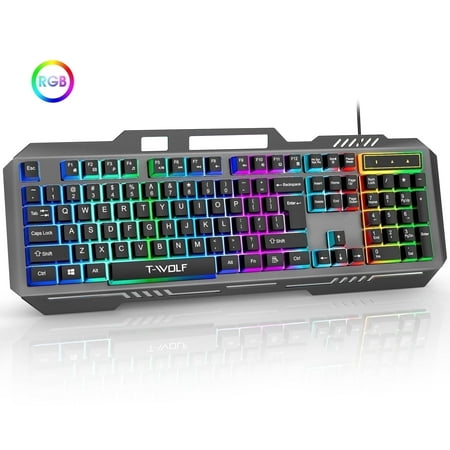
Muzpu Upgraded T16 Gaming Backlit Keyboard,Anti-ghosting Keyboard,Spill-Resistant Keyboard,Ergonomic Keyboard for PC / Mac Gamers Description: Professional gaming keyboards give you everything you need to crush the competition. Discover the perfect blend of style and functionality with our...
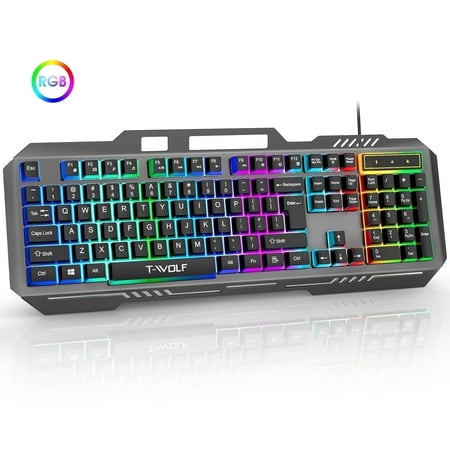
The Muzpu is the “good enough” play. Under $20, mechanical-style switches that are dampened more than typical bargain boards, IP57 waterproofing (better than the SteelSeries Apex 3 on paper), and full RGB backlight. The trade-off is you’re getting an unknown brand and the long-term reliability data isn’t there. But for a backup, a kid’s first mech, or a work-from-anywhere travel board, the math works.
Acoustic profile is closer to “quieter than a regular cheap mechanical” than “library quiet” — it’s the noisiest pick on this list, but still well below normal mechanical territory. RGB is bright and runs on hardware presets so no software install required. Cable is rubberized and non-detachable.
| Layout | Full-size 104 keys |
|---|---|
| Switches | Mechanical-style, dampened |
| Connection | USB wired |
| Backlight | RGB rainbow effects |
| Protection | IP57 waterproof |
| Price | Under $20 |
Rating: 4.3 / 5
Pros
- IP57 is best-in-class water/dust protection
- Under $20 is hard to argue with
- RGB lighting actually looks decent
- Plug and play, no software
Cons
- Loudest of the quiet picks on this list
- Unknown brand, limited support
- Keycaps feel cheap
- Cable not detachable
6. FFN Wireless 99-Key — Best Cheap Wireless
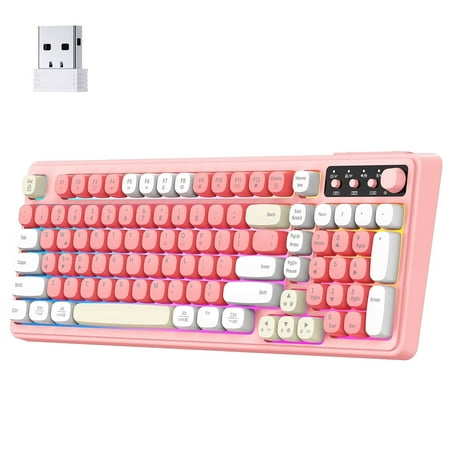
This wireless membrane keyboard combines the smoothness with a satisfying mechanical-like feel, offering the perfect balance for gaming and work. With triple connection modes (BT1,BT2, 2.4GHz wireless , and USB-C wired), customizable RGB lighting, and a space-saving 99-key layout, it’s designed...
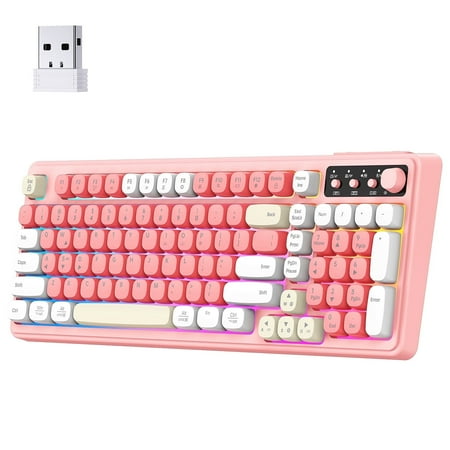
This is the budget wireless slot. Under $20 buying you Bluetooth 5.0, 2.4GHz dongle, and USB-C wired, plus a knob and 99-key compact-1800 layout. It’s a membrane keyboard, not true mechanical, but the keys are quiet by design and the form factor is genuinely useful for a workstation that travels. If your roommate complains about your typing and you don’t want to spend, this is the cheap answer that still gives you wireless freedom.
RGB is the standard rainbow effect set. The knob handles volume out of the box and can remap with combo presses. Battery life is decent — about a week on heavy use, multiple weeks if you turn the lighting off. Don’t expect mechanical-grade feel, but for $20 wireless and quiet, the value is wild.
| Layout | 99 keys with knob |
|---|---|
| Switches | Quiet membrane |
| Connection | Bluetooth 5.0, 2.4GHz, USB-C |
| Backlight | RGB rainbow |
| Battery | Rechargeable, ~1 week heavy |
| Price | Under $20 |
Rating: 4.2 / 5
Pros
- Tri-mode wireless at this price is unheard of
- Knob is genuinely useful
- Naturally quiet membrane feel
- Compact-1800 layout maximizes useful keys
Cons
- Membrane, not mechanical
- Battery life shorter than premium picks
- RGB software is bare
- Build quality reflects the price
What Makes a Keyboard Actually Quiet (Beyond the Marketing)
Every keyboard slapped with “quiet” on the box is selling something different. Here’s the cheat sheet I use when I’m cutting through the bullshit. Switch dampeners are the single biggest factor — if the slider has a soft rubber pad built into the stem, the switch is functionally silent regardless of the case. Case dampening matters next, and the order of importance is: gasket mount, full foam stack, silicone bottom pad, plate dampener. A board with three of those four is going to be hushed. A board with zero of them, even with silent switches, will still ping and rattle from the case resonance.
Keycap material also affects perceived loudness in a way most people miss. Thick PBT keycaps absorb sound; thin ABS keycaps amplify it. None of the boards in this list ship with the best keycaps possible, but a $25 PBT keycap upgrade is the cheapest meaningful sound improvement you can make to any of them. Don’t skip it if you actually care about typing acoustics.
Finally, the desk itself. A solid wood desk dampens sound. A hollow particleboard desk (you know the kind) amplifies it like a snare drum. If your battlestation has a hollow desktop and you can’t replace it, a desk mat under the keyboard adds 5+ dB of dampening for $15. That alone can be the difference between “my partner can sleep” and “my partner is moving out.”
If I had to pick one and live with it, the AUSDOM 98Pro Silent wins. It’s the only board in this lineup designed silent-first instead of “regular keyboard with one quieter feature.” Silent tactile switches, gasket build, three-mode wireless, hot-swap upgrade path — that’s a complete package for $70.
Runner-up is the SteelSeries Apex 3 TKL. Under $50, IP32-rated, and on a streaming mic it disappears. It’s the easiest recommendation for anyone who games and shares walls. The third spot goes to the AULA F99 Pro if you want premium feel and don’t mind swapping in silent switches yourself to truly max the quiet potential. That keyboard is an epic platform; you just steer it where you want it.
Buying Advice: Which Quiet Keyboard Is Right for You
Here’s how I’d map these to actual humans. Streamers and shared-room gamers should grab the Apex 3 TKL — it’s the no-brainer under-$50 pick that won’t blow up your audio mix. Office workers in open-plan spaces want the AUSDOM 98Pro Silent because silent switches do the work no foam stack can match. Enthusiasts who like to tinker should buy the AULA F99 Pro and budget another $30 for silent switches — you’ll end up with the quietest, best-sounding board on this list once you’re done.
People who need a numpad for accounting, editing, or spreadsheets pick the full-size SteelSeries Apex 3 with the wrist rest. College students or anyone on a tight budget grab either the Muzpu (if you want full mechanical-style feel and don’t care about wireless) or the FFN Wireless (if you want to type from your bed and need Bluetooth). Both are under $20 and both are quieter than 95% of what’s sold in the bargain mechanical aisle.
One last note: the cheapest path to a quiet typing experience isn’t always a new keyboard. If you already own a decent mech with hot-swap sockets, $20 in Cherry MX Silent Reds plus $5 in switch lube will get you most of the way. But if your current board doesn’t have hot-swap, replace the whole keyboard — soldering work isn’t worth it unless you actually enjoy that workstation hobby.
FAQ
Are silent switches really quieter than dampened mechanical switches?
Yes. Silent switches have rubber dampeners built into the stem itself, so they kill both the bottom-out and the upstroke noise. Dampened cases (foam, gasket) only kill bottom-out. The difference on mic is night and day — silent switches win by a wide margin if pure quiet is your top priority.
Will a quiet mechanical keyboard still feel mechanical?
If it has true mechanical switches, yes. The silent variants of Cherry MX Red, Gateron Silent, and similar still have the spring weight and travel that defines mechanical feel — they just remove the noise. Membrane-mechanical hybrids like the Whisper Quiet switches in the SteelSeries Apex 3 line feel slightly different (a bit mushier) but are still well above standard membrane.
Do I need a wrist rest with a quiet keyboard?
Not specifically, but for long typing sessions any keyboard benefits from one. The SteelSeries Apex 3 full-size includes a magnetic wrist rest in the box, which is the easiest path if you want one without buying separately.
Are wireless keyboards quieter than wired?
The wireless connection itself has no impact on noise. What matters is switch type and case dampening. That said, several quiet-focused builds (like the AUSDOM 98Pro and AULA F99 Pro) happen to also be wireless because the premium build tier these boards target tends to include wireless as standard.
What’s the quietest switch I can buy?
For raw silence: Cherry MX Silent Red, Gateron Silent Yellow, or Outemu Silent Lemon. All three have built-in dampeners and a smooth linear feel. If you want tactile feedback without noise, Gateron Silent Brown or Kailh Box Silent Brown are the best options. Pair any of these with a hot-swap keyboard like the AULA F99 Pro and you’ve got the quietest possible mechanical setup.
Can I make my current mechanical keyboard quieter without replacing it?
Yes, in three steps. First, swap to silent switches if it has hot-swap sockets (under $25 for a full set). Second, lube the stabilizers with dielectric grease or a proper switch lube — kills the rattle on space, shift, and enter. Third, add a foam or felt sheet inside the case if there’s empty space under the PCB. Doing all three on a budget board can take it from 65 dB to under 50 dB. Doing only one will help but not transform it.
Are gaming-marketed quiet keyboards good for typing too?
Generally yes, with one caveat: gaming switches tend to be linear (no tactile bump) because gamers want fast presses. Linear switches are great for fast typists but throw off touch typists who rely on the bump to confirm key presses. The SteelSeries Apex 3 line uses a Whisper Quiet switch that has a subtle tactile feel — closer to membrane than full mechanical — which actually splits the difference well for mixed-use desks.


