Computer Station Nation is reader-supported.
When you buy through links on our site, we may earn an affiliate commission. Learn more.
Finding the right wheelchair-height desk is one of those purchases that looks simple on paper but gets complicated fast. A standard desk sits around 29–30 inches high with a fixed frame that leaves maybe 25 inches of knee clearance — not nearly enough for most wheelchair users to roll under comfortably. An accessible desk needs to be lower at its minimum height than a standard desk, with enough open space underneath for your knees, thighs, and footrests to fit without hitting a crossbar or support beam. This guide walks you through the measurements that actually matter, the types of desks that work, and what to watch out for so you end up with a setup that fits your body and your workflow. Whether you need a solution for a home office, a shared corporate desk, or a flexible overbed table for multi-location use, the core buying principles are the same: clearance, adjustability, and stability.
Whether you’re outfitting a home office, looking for a rolling overbed table for flexible workspaces, or trying to make a shared desk in a corporate environment accessible, the buying decisions are similar: you need to know your minimum clearance requirements, your preferred surface height, and which desk shapes play nice with wheelchair access. This guide is part of our broader Adaptive & Accessible Computing Equipment: The Complete Buying Guide series covering the full range of accessible workstation components.
What to Look For in a Wheelchair-Height Desk
Five measurements and features separate a desk that works from one that’s a constant frustration. Here’s what to check before you buy. If you’re also shopping for ergonomic input devices, see our Ergonomic Keyboard and Mouse Guide for RSI and Carpal Tunnel for complementary recommendations.
Knee Clearance Height (Minimum 27 Inches)
The Americans with Disabilities Act (ADA) specifies a minimum of 27 inches of clearance from the floor to the underside of the desk. This isn’t a suggestion — it’s the bare minimum needed for a standard wheelchair’s armrest height plus thigh clearance. Many fixed-height desks fall short at 24–26 inches. If you’re in a manual wheelchair, measure from the floor to the top of your thigh when your feet are on the footrests, then add 2 inches for the gap between your thigh and the desk underside. That’s your personal minimum. An electric adjustable desk that goes below 27 inches at its lowest setting (like one that drops to 24 inches) gives you room to dial it in perfectly.
Knee and Toe Clearance Depth
Height alone isn’t enough. The clearance needs to extend deep enough under the desk for your knees and feet. ADA standards call for at least 17 inches of knee clearance depth measured from the front edge of the desk backward, and the toe clearance zone (9 inches above the floor) should extend at least 25 inches deep. Desks with a center support beam or a wide crossbar often violate this — your knees hit the bar before you can roll close enough to use the keyboard. When shopping, check photos of the underside, not just the top. A desk with a C-shaped frame or offset legs is much more wheelchair-friendly than one with a central support.
Height Adjustability Range
An electric adjustable-height desk is almost always the better choice because it lets you set the exact height that works for you. Look for a model whose minimum height goes down to at least 25 inches or lower. Many “standing desks” have a range of 28–47 inches, but 28 inches is still too high for many wheelchair users — you want something that starts at 24–26 inches. Gas-lift pneumatic desks can also work and are often more affordable. Crank-adjustable manual desks are an option but are impractical if you’ll need to adjust height throughout the day.
Desk Width and Surface Area
A standard accessible desk width is 48–60 inches, which gives you room for a monitor, keyboard, mouse, and documents without forcing you to reach too far. Depth should be at least 24 inches, but 30 inches is better — it gives you space to place your monitor at arm’s length while keeping your keyboard and mouse comfortably close. Too wide (72 inches or more) and you may not be able to reach both ends without leaning, which is a stability and ergonomic concern for wheelchair users. A desk that’s too deep can also create problems — if your monitor is pushed back farther than arm’s reach, you’ll end up hunching forward to read the screen or use the keyboard. The sweet spot for most wheelchair users is 48 to 55 inches wide by 28 to 30 inches deep. For an alternative approach to desk design, check out Computer Desks With Recessed Monitors for ideas on integrating displays into the workspace in a way that saves surface depth and improves sight lines.
Mobility and Portability
If you need to use the same desk across multiple locations — bedside, living room couch, different spots in an office — a rolling overbed table or mobile standing desk workstation is your best bet. These come with lockable casters, gas-lift or pneumatic height adjustment, and a compact footprint. They don’t replace a full-size desk for long work sessions, but they’re ideal for flexible use. Look for sturdy casters with locking brakes, a base that clears your wheelchair footrests, and a weight capacity that supports your laptop or tablet.
Key Specs Explained — What the Numbers Mean
Here’s how the specs stack up across the three main price-and-feature tiers of wheelchair-accessible desks.
| Spec | Budget / Overbed Table | Mid-Range Electric Desk | Premium Accessible Desk |
|---|---|---|---|
| Price range | $30–$70 | $200–$500 | $600–$1,200 |
| Min height | 26–30 inches | 24–28 inches | 22–26 inches |
| Max height | 38–46 inches | 46–50 inches | 46–52 inches |
| Knee clearance | Open frame (good) | C-leg (best) or T-leg | C-leg with no crossbar |
| Surface size | 24″ × 18″ approx. | 48″ × 24″ to 55″ × 28″ | 60″ × 30″ to 72″ × 30″ |
| Weight capacity | 15–30 lbs | 175–265 lbs | 265–350 lbs |
| Height mechanism | Gas lift / pneumatic | Electric motor (2-stage) | Electric motor (3-stage) |
| Mobility | Locking casters | Stationary / optional wheels | Stationary or motorized height |
The key takeaway: if you’re buying a full-size desk for daily computer work, the minimum height and leg configuration matter more than the surface finish or brand name. A desk that bottoms out at 28 inches will be too tall for comfortable typing for most wheelchair users, regardless of how nice the desktop looks.
Who It’s For — Matching the Desk to Your Situation
Not every accessible desk fits every user. Here are the common buyer profiles and what each should prioritize.
Full-Time Wheelchair User — Daily Computer Work
You spend 6+ hours at your desk and need something that fits like a glove. Priorities: electric height adjustment with a minimum below 26 inches, C-leg or T-leg frame with zero center obstruction, at least 48-inch width for dual monitors, and a weight capacity that supports your full setup. This is the buyer who should invest in a premium adjustable desk — it’s a health and productivity tool, not just furniture. Pair it with peripherals from our Best One-Handed Keyboards for Limited Dexterity guide for a complete accessible workstation.
Part-Time or Occasional Desk User
You use a wheelchair but spend parts of your day in bed, on the couch, or at different workstations. A rolling overbed table or mobile standing desk is a better fit. You can wheel it where you need it, adjust the height with a gas lift, and keep a laptop or tablet on top. The trade-off is smaller surface area and lower weight capacity — not ideal for a full desktop computer but great for a laptop-and-mouse setup.
Employer or Facilities Manager — Office Accessibility
You’re outfitting a workspace that needs to be ADA-compliant and wheelchair-accessible. The priority is flexibility — electric adjustable desks with a 24–48 inch range, C-leg frames, and enough surface depth to accommodate different users. You’ll want desks that can be shared between able-bodied and wheelchair-using employees, so look for programmable memory presets that let each user save their preferred height. For employees with visual impairments, pairing the desk with a high-contrast keyboard from Best Large Print Keyboards for Visually Impaired Users ensures the whole setup is inclusive.
Student or Dorm Room User
Space is limited, and you may need to move your desk between semesters. A compact overbed table or a lightweight electric desk in the 40–48 inch width range works well. Look for something with locking casters if you need to reposition it, and check that the height range accommodates both your wheelchair and any roommate or shared-use scenarios.
Top Picks — Best Wheelchair-Accessible Desks for Different Needs
These picks come from across the price and functionality spectrum. Prices are current at time of writing; check the linked product page for the latest pricing.
Best Budget Overbed Table — ACCVER Adjustable Overbed Table
ACCVER Adjustable Overbed Table — At $39.99, this is the most affordable entry point for a wheelchair-height adjustable desk. It includes lockable wheels, a gas-lift height adjustment, and a white laminate surface that’s easy to clean. Rated 5 out of 5 from 35 reviews, it’s a solid option for a laptop or tablet workstation that can move between bed and desk area.
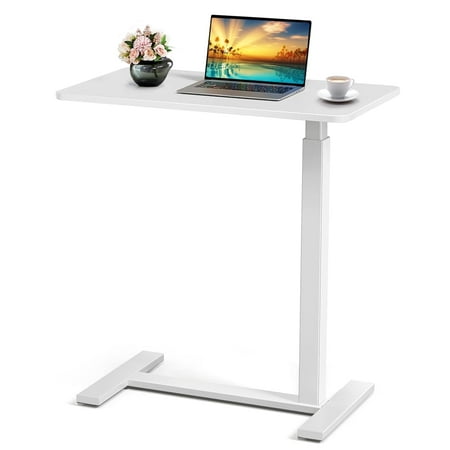
Tired of Uncomfortable, Wobbly Bedside Tables? Meet Your New Multi-Tasking Desk Hero! Whether you're recovering from surgery, working remotely, or just love breakfast in bed, this Adjustable Overbed Table with Wheels is the smart, sturdy, and ultra-convenient solution you’ve been waiting for!...
Best Overbed Table with Pneumatic Lift — EXRACING Pneumatic Standing Overbed Desk
EXRACING Pneumatic Standing Overbed Desk — Priced at $67.99 with a pneumatic height adjustment system, this rolling desk offers smoother height transitions than a basic gas lift. It includes lockable wheels, a black frame, and enough surface space for a laptop, mouse, and notebook. Rated 5 out of 5 from 6 reviews.
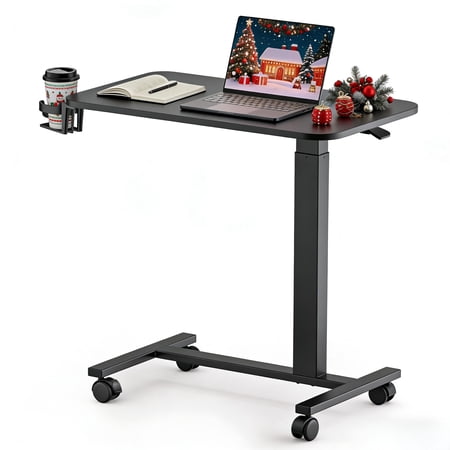
EXRACING adjustable overbed table features a pneumatic height lift (28–41"), smooth-rolling lockable wheels, and a compact design that fits under most beds or sofas. Ideal for working, eating, or relaxing, it supports up to 150 lbs and assembles in minutes—perfect for home, hospital, or dorm use.
Best Rolling Table with Flip-Top — CONCETTA Overbed Table
CONCETTA Overbed Table — $49.99 with a unique single-sided flip top that saves space when not in use. White finish, locking casters, and a highly rated 5 out of 5 from 66 reviews — the most-reviewed option in this roundup. The tiltable surface makes it useful for reading, drawing, or angled laptop work.
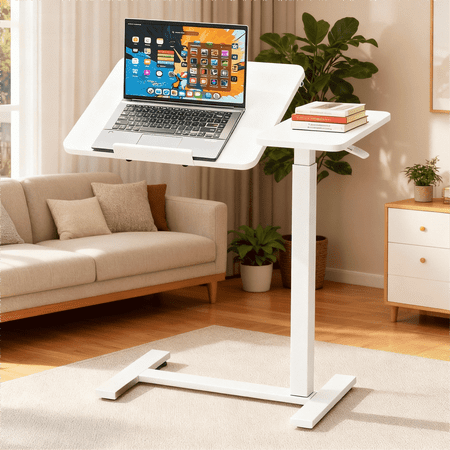
This CONCETTA space-saving C-shaped loft bed desk is a versatile and efficient solution for maximizing functionality in smaller rooms. The unique design features a desk that fits neatly under a loft bed, creating a compact and practical workstation. The C-shape allows for easy access to the desk...
Best Detachable Wheelchair Tray — NFTIGB Wheelchair Tray Table
NFTIGB Wheelchair Tray Table — At $49.49, this isn’t a desk you roll up to — it attaches directly to the wheelchair itself. It includes cup holders, a large 27.95 by 13.39 inch surface, and a universal fit design. Ideal for eating, reading, or using a tablet on the go. The detachable design lets you remove it when not needed.
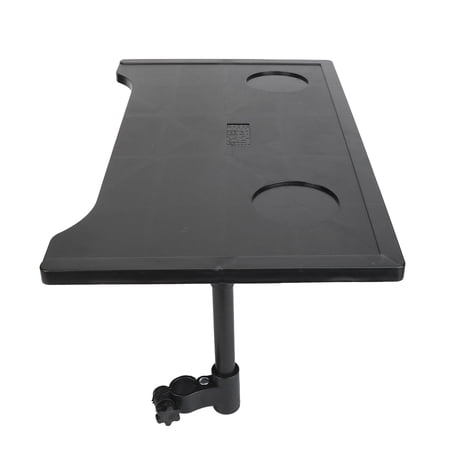
Transform your mobility experience with the NFTIGB Universal Wheelchair Tray Table. Designed specifically for seniors, recovering patients, and individuals with limited mobility, this robust lap desk provides a secure and stable surface for an array of daily activities. Whether you are enjoying...
Best Value Adjustable Table — Danolapsi Adjustable Overbed Table
Danolapsi Adjustable Overbed Table — At $33.83, this is the most affordable option on the list. It features a tiltable tabletop, foldable design for storage, and height adjustment suitable for beds, sofas, and wheelchair use. Rated 3 out of 5 from 3 reviews — the lower rating is worth noting, but for the price, it’s a usable backup or travel option.
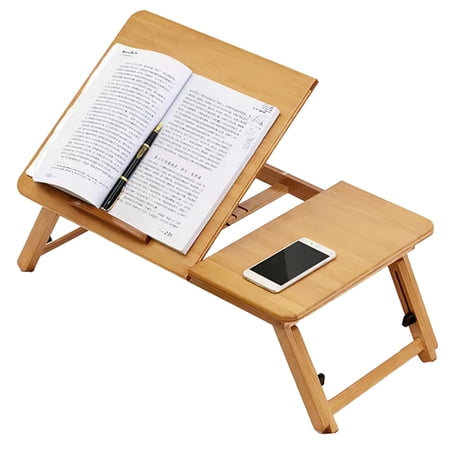
Danolapsi Adjustable Overbed Table with Tiltable Tabletop,Foldable Hospital Bed Tray Desk for Laptop, Eating, Reading & Writing (Height Adjustable for Beds, Sofa & Wheelchair Use)
For dedicated input device recommendations, see our One-Handed Mouse Alternatives for Disability roundup for deeper coverage of accessible pointing devices.
Red Flags to Avoid When Buying a Wheelchair-Height Desk
These are the mistakes that come up again and again in buyer reviews and community forums. Avoid them and you’ll save yourself a return shipping fee and a lot of frustration.
1. Assuming “Adjustable” Means “Wheelchair Accessible”
Most standing desks adjust from 28 inches up — which is already too tall for many wheelchair users at its lowest setting. “Height adjustable” doesn’t automatically mean “accessible.” Always check the minimum height spec. If it doesn’t go below 27 inches, it probably won’t work for comfortable typing from a wheelchair.
2. Forgetting About the Crossbar
A desk can meet the 27-inch knee clearance spec at the front edge but have a support crossbar 15 inches in that blocks your knees. Look at the underside photos carefully. C-leg and T-leg frames are accessible; H-frame or center-pedestal desks are not. This is the single most common complaint in wheelchair-user desk reviews.
3. Ignoring Monitor Arm Clearance
A desk that sits at 26 inches feels great for typing, but a monitor on a standard stand adds another 8–10 inches. Your eye level might end up too low. A monitor arm with full height adjustment solves this — it lets you raise the screen to a comfortable viewing angle regardless of desk height. Budget for a good monitor arm as part of your desk purchase.
4. Buying a Desk That’s Too Wide
A 72-inch desk looks spacious, but if you can’t easily reach both ends from your wheelchair, you’ll end up leaning and straining. For wheelchair users, 48–60 inches is the practical sweet spot. If you need more surface area, consider adding a rolling side table instead of buying a wider desk.
5. Not Measuring Doorway Clearance for Rolling Tables
If you’re buying a mobile overbed table, measure your doorways and hallway width first. Many rolling tables have a base that’s wider than the tabletop, and that base can get stuck in standard 30-inch interior door frames. Look for tables with an A-frame or T-base design that clears doorways more easily. And don’t forget to check the weight limit — some budget tables top out at 15 pounds, which is barely enough for a laptop and a drink.
Frequently Asked Questions
What is the ideal desk height for a wheelchair user?
The ideal surface height depends on your seated position, but most wheelchair users find their comfort zone between 26 and 30 inches. The more important measurement is knee clearance: the desk’s underside must be at least 27 inches above the floor. An adjustable desk is recommended so you can dial in the exact height.
Can I use a standard standing desk from a wheelchair?
Only if the standing desk’s minimum height is low enough — most standard standing desks go down to 28 inches, which is borderline. You’ll need one that reaches at least 26 inches or lower. Also check the leg configuration. Many standing desks have a T-leg or C-leg design that provides good knee clearance, but some have a crossbar that blocks access. Check before you buy.
What’s the difference between an overbed table and a wheelchair desk?
An overbed table is a rolling, height-adjustable surface designed for hospital beds that also works well in wheelchair setups. A full-size wheelchair desk is a permanent or adjustable workstation with a larger surface and higher weight capacity. Overbed tables are better for flexibility and portability; full-size desks are better for daily computer work with multiple monitors.
Do I need an electric desk or is manual adjustment fine?
Electric is strongly preferred if you’ll adjust height more than once a day. Crank-adjustable manual desks are usable but require effort and can be difficult to fine-tune. Gas-lift pneumatic desks (common on overbed tables) are a good middle ground — easy to adjust with a lever but limited in weight capacity and surface size.
What is ADA knee clearance and why does it matter?
ADA knee clearance is the minimum space required under a desk or table for a wheelchair user to sit comfortably. Per ADA Standards Section 306, knee clearance must be at least 27 inches high, 17 inches deep, and at least 30 inches wide. Toe clearance (the space below 9 inches from the floor) must extend at least 25 inches deep. These standards matter because they’re based on real measurements of common wheelchair dimensions — ignoring them means the desk simply won’t fit.
Final Thoughts
A wheelchair-accessible desk doesn’t have to be expensive or hard to find, but it does require paying attention to the measurements that most desk listings don’t emphasize. Focus on minimum height, under-desk clearance (especially crossbars), and surface size that matches how you actually work. Overbed tables are excellent for flexible use and travel; full-size electric adjustable desks are best for daily workstations.
Whichever route you go, measure your wheelchair’s armrest height, thigh clearance, and the width of your doorways before you order. A few measurements now save a return headache later. For a complete accessible workstation, pair your desk with a display that’s easy on the eyes — check our Best Computer Monitor For Low Vision guide for recommendations.