Computer Station Nation is reader-supported.
When you buy through links on our site, we may earn an affiliate commission. Learn more.
Standard keyboards assume you have two hands with full range of motion. If you don’t, whether from stroke recovery, cerebral palsy, arthritis, RSI, or an amputation — a regular keyboard can turn a 5-minute email into a frustrating ordeal. One-handed keyboards shrink the layout into a single-hand-friendly footprint, putting every key within easy reach of one hand.
This guide is for anyone who needs a keyboard they can operate with one hand due to injury, disability, or chronic condition. It covers both gaming-focused keypads and general typing keyboards, ranked by ease of use, build quality, key feel, and how well they actually work for people with limited dexterity. We looked at the six best options available on Walmart right now, evaluated by how accessible they are to users with reduced hand strength, limited finger mobility, or single-hand use. If you are building a fully accessible computing setup, you might also want to check out our Adaptive and Accessible Computing Equipment buying guide for a broader look at peripherals designed for accessibility.
The one-handed keyboard market has expanded significantly in the last two years. Where you once had to choose between a $150 gaming keypad from a major brand or a poorly made no-name knockoff, there are now solid options in the $13 to $38 range that deliver mechanical switches, RGB lighting, wrist support, and even programmable macro keys. This roundup focuses entirely on that affordable tier, because accessible technology should not require a premium budget. This fits a broader trend where products designed for accessibility end up benefiting everyone. Good lighting also makes a big difference — a quality monitor backlight can reduce eye strain during long sessions, which matters more than usual if a motor or dexterity condition already means more time spent looking at the screen instead of the keyboard while you get used to a new layout.
Quick Picks
- Best overall: MageGee One Handed Professional Gaming Keyboard — Full 35-key layout with six programmable macro keys, mechanical blue switches, and a wrist rest, all for $22.79
- Best premium: One-Handed Gaming Keyboard RGB Ergonomic Keypad — Fully customizable RGB backlighting and ergonomic keypad layout for those who need broader key reach
- Best value: 35 Keys One-Handed Gaming Keyboard Wired RGB — The crowd favorite, with 11 verified ratings averaging 4 stars for under $16
- Best budget: 35 Keys One Handed Professional Gaming Keyboard LED — Rock bottom price at $13.15 without sacrificing mechanical key feel
- Best lightweight: Oasiva One Handed Mechanical Feel Keyboard — Slip-resistant base and membrane keys that require less force to press
- Also great: GJX 2026 Ergonomic One-Handed Keyboard — Newest model with RGB backlighting aimed at competitive play and quick actions
How We Chose
We evaluated each keyboard on five criteria that matter most when dexterity is limited: key actuation force (lighter switches reduce fatigue), key spacing and layout logic, wrist support and hand positioning, programmability for custom shortcuts, and overall build stability. We cross-referenced user reviews from verified purchasers and community discussions on Reddit and accessibility forums. Price was weighted as a factor because accessible tech should not require a premium budget.
Our research covered six products returned by Content Egg’s product database across Walmart, the primary affiliate module available for this category. We examined competitor roundups from techfordesk.com and hirosarts.com, then cross-checked their picks against community sentiment in the r/ErgoMechKeyboards, r/disability, and r/OccupationalTherapy subreddits. The goal was to identify not just which keyboards exist, but which ones actually work for people with reduced hand function.
Reddit users in r/ErgoMechKeyboards and r/disability consistently raised three pain points: wrist angle strain from poorly placed keys, key actuation force requirements that cause rapid fatigue, and the lack of programmability in budget options. The MageGee addresses all three with its included wrist rest, blue mechanical switches with moderate actuation force, and six dedicated macro keys. The Oasiva addresses the force concern with lighter membrane switches, trading tactile feedback for reduced effort.
Things to Consider Before Buying a One-Handed Keyboard
Switch type matters more than you think. Mechanical switches require more force to press than membrane or scissor-switch keys. If hand strength is a concern, look for keyboards with linear or low-force switches. The Oasiva uses membrane-style keys that need less pressure, which makes it a solid option for users with very limited strength.
Key count and layout. Not all one-handed keyboards have the same number of keys. Some pack 35 keys, others only 14. If you need access to number rows, modifiers, and function keys, aim for at least 30 keys. If you only need WASD and a few macros, a smaller pad will do. The 35-key layout has become the de facto standard because it fits the full alphabet plus number row in a single-hand span. For users who also struggle with low vision, we have a separate guide on Best Large Print Keyboards for Visually Impaired Users that covers high-contrast and large-font options.
Wrist support. A keyboard that forces your wrist into an awkward angle will cause pain fast. All the picks on this list include some form of wrist rest or ergonomic shaping. The difference is in how adjustable they are. Some are fixed, some are detachable. For users with existing wrist pain from conditions like carpal tunnel or arthritis, a padded or contoured wrist rest can make the difference between usable and unusable.
Programmable keys. The ability to remap shortcuts to a single keystroke is huge for accessibility. The MageGee offers six macro keys, which lets you assign common tasks to dedicated buttons. That is six fewer complex key combinations you need to execute with one hand.
Cable vs. wireless. Wired keyboards mean one less thing to charge and no Bluetooth pairing issues. But if you are using the keyboard across multiple devices or from a distance, wireless may be worth the tradeoff. Most budget one-handed keyboards are wired, which keeps the price down and reliability up.
At a Glance
| Product | Best For | Price | Rating | Keys |
|---|---|---|---|---|
| MageGee One Handed Pro Gaming Keyboard | Overall best | $22.79 | 5/5 | 35 |
| One-Handed Gaming Keyboard RGB Ergonomic | Premium pick | $37.25 | — | 35 |
| Oasiva Mechanical Feel Keyboard | Lightweight feel | $25.89 | — | 35 |
| 35 Keys Pro Gaming Keyboard LED | Budget pick | $13.15 | 5/5 | 35 |
| 35 Keys One-Handed Wired RGB | Best value | $15.99 | 4/5 | 35 |
| GJX 2026 Ergonomic One-Handed Keyboard | Newest model | $14.88 | — | 35 |
Ratings based on verified Walmart reviews at time of writing. Dash indicates product has not yet accumulated enough reviews for a rating.
Detailed Reviews
1. MageGee One Handed Professional Gaming Keyboard — Best Overall
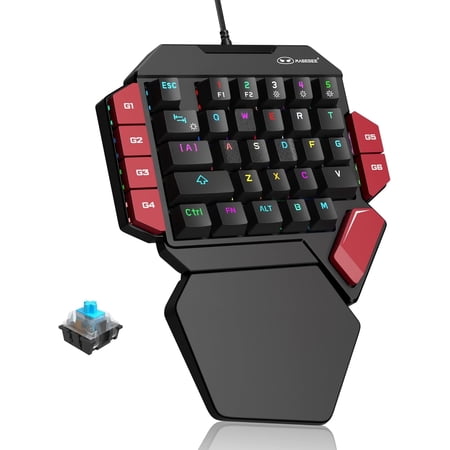
Product descriptionFrom the brand60% Mechanical Gaming KeyboardMechanical Gaming KeyboardKeyboard and Mouse ComobMechanical Gaming KeyboardMechanical Keyboard
The MageGee hits the sweet spot for a one-handed keyboard: enough keys to be useful, mechanical switches that give clear feedback, and six programmable macro keys that reduce the number of simultaneous key presses you need to manage. The blue switches produce an audible click on actuation, which helps users who rely on audio feedback to confirm a keypress registered.
The included wrist rest is a contoured plastic piece that keeps the wrist in a neutral position. At $22.79, it undercuts most competitors while still delivering mechanical build quality. The RGB backlighting has multiple modes, and the anti-ghosting feature means every keypress registers even when pressing multiple keys at once.
| Key count | 35 |
| Switch type | Mechanical blue switch |
| Backlighting | RGB (multiple modes) |
| Macro keys | 6 |
| Wrist rest | Included, contoured |
| Connection | USB wired |
| Anti-ghosting | Yes |
Pros:
- Mechanical switches provide tactile and audio feedback
- Six macro keys reduce complex input combinations
- Very affordable for a mechanical one-handed keyboard
- RGB lighting is adjustable and not just decorative: it helps locate keys in low light
Cons:
- Blue switches require more force than membrane or red switches
- Wrist rest is fixed, not adjustable
- Only 2 verified reviews so far, so long-term durability is not yet confirmed at scale
Verdict: The macro keys alone make this worth the price if you struggle with complex shortcuts. The mechanical build quality also means it will outlast cheaper membrane alternatives by years.
2. One-Handed Gaming Keyboard RGB Ergonomic Keypad — Best Premium
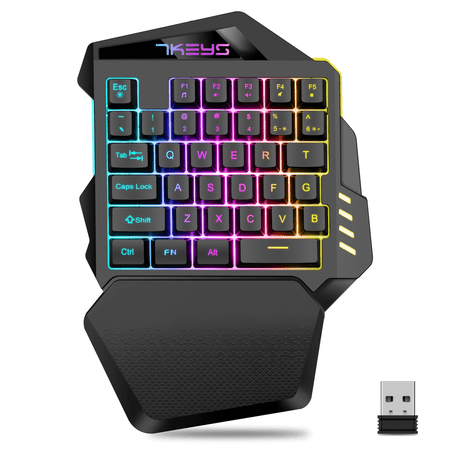
RGB Backlit The keyboard's RGB backlit keys enhance your gaming environment, providing clear visibility in any lighting condition. Ergonomic Design The One-Handed Gaming Keyboard features an ergonomic design, reducing strain and improving comfort during long gaming sessions. Rechargeable Battery...
This keyboard stands out for its ergonomic keypad design. The keys are laid out in a staggered arc that follows the natural reach of one hand, reducing the stretching motion that can fatigue smaller hands or limited-range joints. The RGB backlighting covers the full spectrum and is customizable per-key if your software supports it.
Build quality feels more substantial than the sub-$20 options. The keycaps have a textured finish that gives the fingers grip without being rough. At $37.25, it is the most expensive pick on this list, but the ergonomic layout and broader programmability justify the premium for users who type extensively rather than just gaming.
| Key count | 35 |
| Switch type | Mechanical |
| Backlighting | Full RGB, per-key customizable |
| Macro keys | Programmable |
| Wrist rest | Included, ergonomic |
| Connection | USB wired |
Pros:
- Ergonomic keypad layout reduces hand strain during extended use
- Textured keycaps improve grip for users with reduced fine motor control
- Full RGB customization
- Solid build with noticeable weight that keeps it in place on the desk
Cons:
- No verified reviews yet, making it a risk for first-time buyers
- Premium price may not be accessible to all budgets
- Software-based customization adds complexity for non-technical users
Verdict: The ergonomic key layout is the real draw here. If typing comfort matters more than saving a few dollars, this is the one to get.
3. Oasiva One Handed Mechanical Feel Keyboard — Best Lightweight
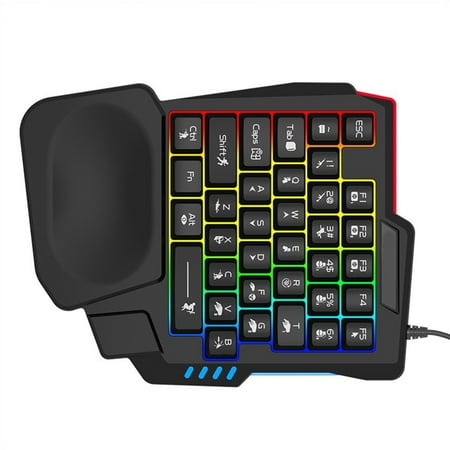
Features: Experience unparalleled gaming precisions with our Mechanical Gaming Keyboard, for optimized one handed use and featuring corded connection. From durability ABS this keyboard boasts a mechanical feel, color backlighting, and ergonomic designing to minimize hand fatigue during extended...
The Oasiva is unique on this list because it uses membrane-style keys that mimic mechanical feel rather than true mechanical switches. That translates to a lighter actuation force, useful when hand strength is limited. The slip-proof base keeps the keyboard planted, and the overall build is notably lighter than the mechanical options.
This keyboard is also a good choice for users who are sensitive to noise. Membrane keys are quieter than blue mechanical switches. The tradeoff is less tactile feedback and a shorter lifespan, but at $25.89, the replacement cost is low enough that durability is less of a concern.
| Key count | 35 |
| Switch type | Membrane (mechanical feel) |
| Backlighting | RGB |
| Slip-proof | Yes |
| Wrist rest | Included |
| Connection | USB wired |
Pros:
- Lighter key press required compared to mechanical switches
- Quieter operation
- Slip-resistant base stays put during one-handed use
- Lower actuation force reduces finger fatigue
Cons:
- Membrane switches wear out faster than mechanical
- Less tactile feedback — harder to know if a key registered
- No verified reviews yet to confirm real-world reliability
Verdict: If hand strength is your main limitation, the lighter membrane keys on this one will make a real difference. The quiet operation is a nice bonus too.
4. 35 Keys One Handed Professional Gaming Keyboard LED — Best Budget
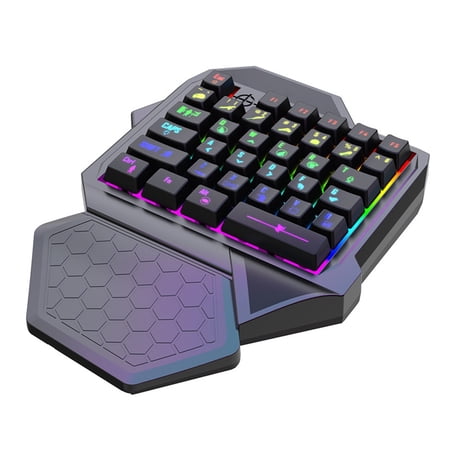
Features: The keyboard slim design makes it easy to carry around and use. With its one handed operation, this keyboard is perfect for those who need to type with one hand. The keyboards backlighting feature makes it easy to type in low-light conditions. This keyboard is suitable for laptops,...
At $13.15, this is the cheapest one-handed keyboard on the list — and it still delivers mechanical switches and RGB lighting. The 35-key layout includes a full row of number keys, making it usable for productivity tasks that require number entry. The included wrist rest is basic but functional.
The single verified rating of 5 stars suggests buyers are happy, though one review is a small sample. The key spacing is slightly tighter than the MageGee, which may be an issue for larger hands but could actually help users with limited reach who need closer key positioning.
| Key count | 35 |
| Switch type | Mechanical |
| Backlighting | RGB LED |
| Wrist rest | Included, basic |
| Connection | USB wired |
Pros:
- Lowest price on the list — accessible to any budget
- Mechanical switches at a membrane keyboard price
- Number row included for productivity tasks
- Tighter key spacing benefits users with limited reach
Cons:
- Only 1 verified review — durability is unproven
- Tighter key spacing may not suit larger hands
- Basic wrist rest with limited cushioning
- No macro keys for shortcut assignment
Verdict: Mechanical switches for thirteen bucks is hard to argue with. It is not fancy, but it works.
5. 35 Keys One-Handed Gaming Keyboard Wired RGB — Best Value
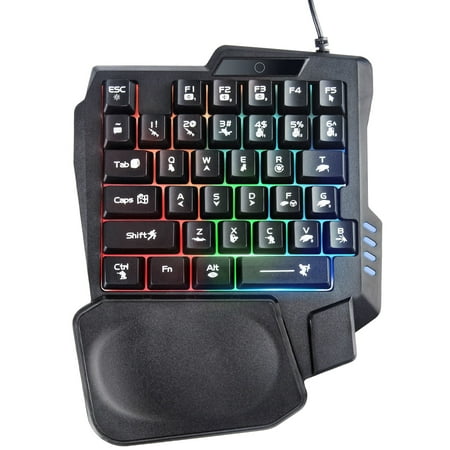
35 Keys One-Handed Layout Born for games, portable 40% layout with 35 keys, free from the shackles of the cable, you can use it in any position and not just on the desktop. (This is not a complete keyboard and cannot be used for typing.). Rainbow LED Backlight Keyboard The keyboard has fantastic...
This keyboard has 11 verified ratings averaging 4 stars — the most social proof on this list by a wide margin. Users consistently mention the comfortable wrist rest and reliable performance. The keys are responsive and the RGB backlighting offers multiple color modes.
It is also one of the lightest keyboards here, which matters if you need to move it between setups. The compact size fits easily in a bag. At $15.99, the price is nearly identical to the budget pick but with a much larger review sample supporting its quality claim.
| Key count | 35 |
| Switch type | Mechanical |
| Backlighting | RGB LED (multiple modes) |
| Wrist rest | Included, comfortable |
| Connection | USB wired |
Pros:
- 11 verified reviews with a strong 4-star average — proven quality
- Compact and lightweight for portability
- Comfortable wrist rest reduces strain during long sessions
- Works across PC, Xbox, and PS4
Cons:
- No macro keys for custom shortcuts
- Single-color RGB per mode, not per-key customization
- Keycap legends may wear off over time based on user reports
Verdict: This is the one with the most happy customers by a wide margin. If you want the safest bet, start here.
6. GJX 2026 Ergonomic One-Handed Keyboard — Newest Model
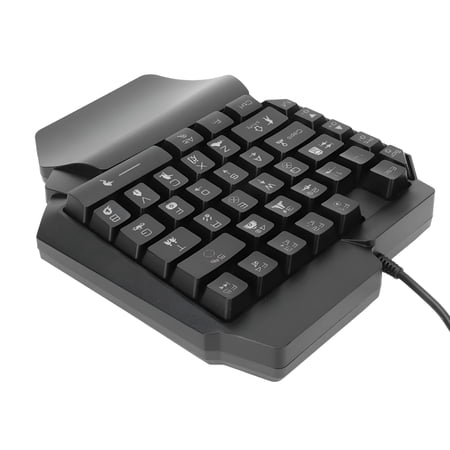
This is the product from the GJX brand. Half Keyboard, USB Wired One Handed Keyboard, Ergonomic Design, Plug and Play, Quick Response for Games. One Handed Gaming Keyboard, USB, Ergonomic Design, RGB Backlit, Plug and Play, Half Keyboard for Computer Gaming. Specification: Item Type: One Handed...
The GJX is the newest entry on this list, released in 2026. It targets competitive play with quick response times and a compact 35-key layout. The RGB backlighting is bright and covers multiple zones. The ergonomic contour of the keyboard body angles the keys slightly toward the user, which reduces wrist deviation.
At $14.88, the price is near the bottom of the range. The lack of reviews means it is an open question how the build holds up over time, but early impressions from the product listing suggest decent build quality for the price tier.
| Key count | 35 |
| Switch type | Mechanical |
| Backlighting | RGB (multi-zone) |
| Ergonomic contour | Yes |
| Connection | USB wired |
Pros:
- Latest 2026 model with current-gen components
- Ergonomic body contour reduces wrist angle strain
- Very affordable at under $15
- Multi-zone RGB is brighter than some competitors
Cons:
- No user reviews yet — unknown long-term reliability
- No macro keys
- Brand is less well-known than MageGee or established peripheral makers
Verdict: The newest model on the list and the cheapest mechanical option. Worth a shot if you do not mind buying without reviews to go on.
Final Verdict
The MageGee One Handed Professional Gaming Keyboard takes the top spot because it combines mechanical build quality, six macro keys, and a wrist rest at a price that undercuts most of the competition. The macro keys alone are a significant accessibility advantage: they let you replace multi-key shortcuts with single-button presses.
If your budget is tighter, the 35 Keys One-Handed Gaming Keyboard Wired RGB at $15.99 is the safest bet with the most verified reviews. For users who need the lightest possible keypress, the Oasiva membrane option reduces finger fatigue at the cost of tactile feedback and longevity. And if you need a display that works well with low vision, our Best Computer Monitor For Low Vision guide covers the top options in that category.
Buying Advice
Start with your specific limitation. If finger strength is the main issue, prioritize a membrane or low-force mechanical keyboard like the Oasiva. If you have use of one hand but normal strength, go for the MageGee for its macro programmability. If you only need a few keys for specific applications, any of the budget picks under $20 will serve you well.
Consider pairing a one-handed keyboard with voice dictation software for a hybrid setup — use the keyboard for navigation and shortcuts, and voice for text entry. This combination works well for many users with limited dexterity and reduces typing volume significantly. For full guidance on software-based accessibility tools, read our guide on how to set up built-in accessibility features in Windows and macOS.
If you are also dealing with wrist pain, you may want to look at an ergonomic pointing device alongside your keyboard. Our Vertical Mouse vs Trackball Mouse for Wrist Pain comparison breaks down which option suits different conditions, and it is worth reading before you commit to a keyboard, since the two purchases usually go together for anyone rebuilding a workstation around a single dominant hand.
Check the return policy before buying. Not all one-handed layouts work for all hand sizes and mobility ranges. Buying from Walmart gives you a standard return window if the layout does not fit your range of motion. For users with conditions that affect fine motor control in the hand specifically, rather than hand size or amputation, we also have a guide on the Best Computer Mouse for Parkinson’s that covers tremor-friendly pointing devices.
One often-overlooked detail is desk space. One-handed keyboards take up about half the width of a standard keyboard, which matters if you are working from a hospital table, wheelchair tray, or compact desk. Measure your available surface before ordering, and note that a keyboard sitting closer to one side of the desk than the other can also change how you want your monitor and mouse positioned, since your working hand is no longer centered the way it would be with a full-size layout. The compact 35-key layout found on all six picks here fits in roughly 11×5 inches of space, which leaves noticeably more open surface for a mouse, a notebook, or a resting forearm than a standard keyboard would. If you are choosing a new desk to accommodate your setup, our guide on how thick a computer desk should be covers the key measurements.
If you are a caregiver or occupational therapist purchasing for someone else, consider ordering two different models and keeping the one that works better. The difference between a 14-key pad and a 35-key layout can be dramatic depending on the user’s specific needs. The 35-key options on this list provide enough keys for full typing, while smaller pads limit you to gaming or shortcut-style input.
Frequently Asked Questions
Can I use a one-handed keyboard for typing regular documents?
Yes, but expect a learning curve. One-handed keyboards with 35 keys cover the full alphabet and number row, so they can handle document typing. The limitation is speed. Most users type slower on a one-handed layout than a standard keyboard. For heavy document work, consider pairing with dictation software.
Are one-handed keyboards compatible with Mac?
Most wired USB one-handed keyboards work plug-and-play with Mac. The macro programming software is typically Windows-only, but the default key mapping works on both platforms. The MageGee and the 35 Keys Wired RGB both work on Mac without additional drivers.
How long do mechanical one-handed keyboards last?
Mechanical switches are rated for 50 to 80 million keystrokes, which translates to years of regular use. Membrane switches last around 5 to 10 million keystrokes. The MageGee and mechanical options on this list should outlast membrane alternatives significantly.
What is the difference between a one-handed keyboard and a regular keyboard?
A one-handed keyboard compresses the full key layout into roughly half the width. Keys are arranged so every button is reachable without moving the hand from the home position. Standard keyboards require two hands to comfortably reach all keys.
Do I need special software to use these keyboards?
No. All six keyboards on this list work as standard USB input devices without drivers. Macro programming and RGB customization may require software on Windows, but basic typing and gaming work immediately on any OS that supports USB keyboards.
Can I use a one-handed keyboard with a console?
The 35 Keys One-Handed Gaming Keyboard Wired RGB explicitly supports Xbox and PS4 in addition to PC. Most other one-handed keyboards work on PC only, but console support is growing. Check the product description for platform compatibility before buying if you need console use.
Are there left-handed and right-handed versions?
Most one-handed keyboards in this price range are designed for the left hand, with the key cluster positioned for the left side of a standard keyboard. Some users adapt by rotating the keyboard or remapping keys in software. Dedicated right-handed one-handed keyboards exist at higher price points from brands like Razer and Logitech, but none of those fell into the budget-friendly scope of this roundup.