Computer Station Nation is reader-supported.
When you buy through links on our site, we may earn an affiliate commission. Learn more.
If your hands shake, a regular mouse is basically designed to fight you. Every accidental click, every cursor that jumps three inches when you didn’t ask it to? That’s not you doing something wrong. That’s a $15 piece of plastic that was never built with tremors in mind. Good news: there’s a whole category of gear built specifically to fix this, and none of it requires you to be a tech wizard to set up.
Parkinson’s is the second most common neurodegenerative condition in the U.S. after Alzheimer’s, according to the Parkinson’s Foundation. So if this is you or someone you’re shopping for, you’re far from alone. The market has caught up. Let’s dive into what actually works.
Try This Before You Buy Anything
Before you spend a dime, there are three free fixes worth trying with the mouse you already own:
- Slow the mouse down. Lowering pointer speed and sensitivity in your OS settings cuts down on accidental clicks and overshoot dramatically. It’s free and takes thirty seconds.
- Lean on your keyboard. Arrow keys, Tab, and Enter can replace a huge chunk of what you’d normally do with a mouse, especially in forms and menus.
- Turn on the on-screen keyboard and mouse keys. Both Windows and macOS have built-in accessibility tools for exactly this. Worth a look before you spend money on hardware.
If none of that’s enough on its own (and for a lot of people it won’t be), here’s where to spend your money.
Quick Picks
If you want to cut straight to the chase, here’s the short version:
- BIGtrack 2.0 Trackball: the biggest, most forgiving trackball on the market. Start here if tremors make fine motor control hard.
- Kensington Orbit Trackball: smaller footprint, scroll ring, and a much lower price than the BIGtrack.
- Logitech MX Vertical: best if your tremor is mild-to-moderate and wrist strain is the bigger issue.
- SteadyMouse: software that filters shake out of the cursor path on any mouse you already own.
- Amaneo USB: a hardware filter that sits between your mouse and computer, works cross-platform including iOS.

1. BIGtrack 2.0 Trackball
The biggest trackball you can buy. And that’s the whole point.
The BIGtrack 2.0 from AbleNet is built around a 3-inch trackball (the largest on the consumer market) with oversized left and right buttons and a drag-lock feature so you don’t have to hold a button down while dragging. The size is the whole design philosophy here: bigger targets mean less precision is required to hit them, which is exactly what tremor management is about.
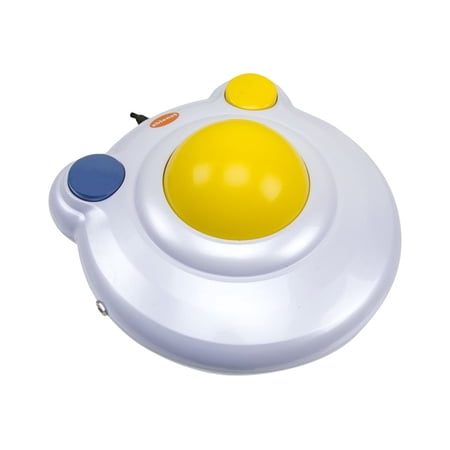
The AbleNet BIGtrack 2 is a large, accessible trackball mouse designed to support individuals with physical or developmental disabilities. Featuring an oversized 3-inch yellow trackball, this plug-and-play device allows for effortless cursor control without the fine motor skill demands of a...
It works on both PC and Mac, ships in wired or wireless, and Reddit’s r/Parkinsons community consistently names it as one of the first things people try when a standard mouse stops working. The honest downside: it’s not cheap, and the wireless version costs meaningfully more than the wired one for no functional benefit beyond the missing cable.
Pros and Cons
Pros
- 3-inch trackball, largest available
- Works on Mac and PC out of the box
- Drag-lock removes the need to hold a button while dragging
Cons
- Expensive relative to a standard mouse
- Wireless version costs a real premium for not much gain
Check it out on Adaptive Tech Solutions
2. Kensington Orbit Trackball
Same idea as the BIGtrack, smaller and cheaper
Kensington has been making trackballs since long before “accessibility” was a marketing buzzword, and the Orbit is their most approachable one: a scroll ring around the ball, a comfortable low-profile shape, and a price that’s a fraction of the BIGtrack. It’s a smaller ball than the BIGtrack (about 1.5 inches), so if your tremor is more severe you’ll get more mileage out of the bigger target. If it’s mild to moderate, the Orbit is the more practical everyday choice.
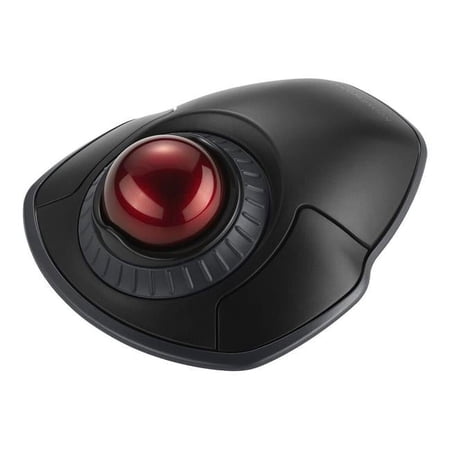
The Kensington trackball legacy continues with the latest addition to the patented Orbit Trackball with Scroll Ring - the Orbit Wireless Trackball with Scroll Ring. You asked for wireless, and Kensington delivered, with the same great features that have made the Orbit Trackball with Scroll Ring...
Pros and Cons
Pros
- Much cheaper than the BIGtrack
- Scroll ring built into the design
- Small footprint, easy to fit on a cluttered desk
Cons
- Smaller ball means less benefit for severe tremors
- No wireless option
Check it out on Kensington.com
3. Logitech MX Vertical
Not a trackball. A different approach entirely.
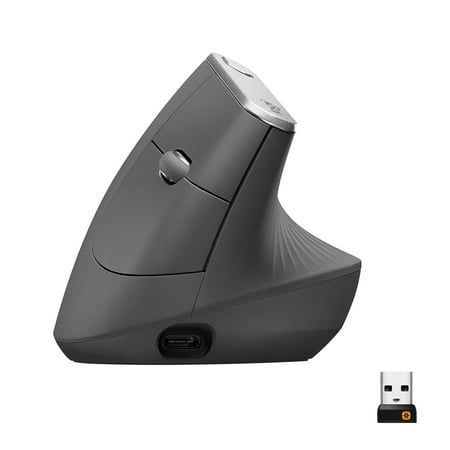
If tremors aren’t your main issue and it’s more about wrist strain or a mild shake that a standard mouse mostly handles, the MX Vertical is worth a look before you commit to relearning trackball movement. It holds your hand in a handshake position instead of flat, which cuts down on the forearm rotation that makes shaking worse for some people. It won’t help nearly as much as a trackball if your tremor is significant, though, since you’re still making the same kind of precision cursor movements, just from a different angle.
Worth reading our full vertical mouse vs. trackball breakdown if you’re not sure which category fits your situation. They solve genuinely different problems.
Pros and Cons
Pros
- Reduces forearm rotation and wrist strain
- No learning curve, still a standard pointing motion
- Widely available, easy to try and return if it’s not the right fit
Cons
- Doesn’t reduce precision demands the way a trackball does
- Not the right pick for moderate-to-severe tremor
4. SteadyMouse
Keep your current mouse, fix the shake in software
SteadyMouse has been around for over a decade with a straightforward pitch: your hand can shake, but the software filters that motion out before it reaches the cursor, and it blocks accidental clicks on top of that. It works with whatever pointing device you already have (mouse, trackball, or trackpad), which makes it the cheapest way to test whether software-side filtering solves your problem before spending money on new hardware. Parkinson’s UK’s own tech guide lists it as an independently reviewed option, for what that’s worth.
Pros and Cons
Pros
- Works with any mouse or trackball you already own
- Blocks accidental clicks in addition to filtering shake
- Cheapest way to test if software alone solves the problem
Cons
- It’s software, not a physical fix, so it doesn’t help with fatigue from holding a standard mouse
- Windows only
Check it out on SteadyMouse.com
5. Amaneo USB Mouse Adapter
The hardware version of the same idea
Made in Germany, the Amaneo USB sits between your existing mouse and your computer and filters tremor at the hardware level instead of in software, which means it works across PC, Mac, iPad, and iPhone without needing an app installed on each device. The site defaults to German, so switch the language before you try to order. It’s a solid pick if you bounce between multiple devices and don’t want to install SteadyMouse-style software on all of them separately.
Pros and Cons
Pros
- Works across PC, Mac, iPad, and iPhone with no software install
- Hardware-level filtering, not tied to one OS
Cons
- No Android support
- Site is in German by default, mildly annoying to navigate
How We Picked These
We cross-checked manufacturer specs against what actual users report in r/Parkinsons and r/disability, and leaned on independent sources like Parkinson’s UK’s tech guide rather than just trusting product marketing copy. We didn’t include anything that’s been discontinued or that user reports flagged as unreliable, even when it still shows up in other “best of” lists around the web.

If hardware alone isn’t cutting it, it’s also worth checking the accessibility settings built into your OS before adding more gear. See our Windows and macOS accessibility setup guide for the specifics. Both operating systems have pointer-precision, click-assist, and dwell-click options buried in their settings that most people never find on their own, and they stack on top of whatever hardware you end up choosing.
FAQ
Do I need a trackball, or will software fixes like SteadyMouse be enough?
Depends on severity. Mild tremor: try SteadyMouse or the Amaneo adapter first. They’re cheaper and don’t require relearning how you move a mouse. Moderate to severe: a trackball’s bigger, more forgiving target usually matters more than any amount of software filtering can compensate for.
Will insurance or Medicare cover any of this?
Sometimes, if it’s prescribed as durable medical equipment or assistive technology by an occupational therapist, and coverage varies a lot by plan and state. Worth asking an OT before buying if cost is the deciding factor; it costs nothing to ask and they may also point you toward options this list doesn’t cover.
What if I need a bigger trackball than the BIGtrack 2.0?
The BIGtrack’s 3-inch ball is the largest widely available consumer option. Beyond that you’re moving into occupational-therapy-prescribed custom equipment territory, which is a conversation for an OT rather than a buying guide.
Bottom Line
Start with the free OS-level fixes. If that’s not enough, a trackball solves the actual precision problem (the BIGtrack 2.0 if tremors are significant, the Kensington Orbit if they’re mild to moderate) instead of working around it. Software like SteadyMouse is the cheapest way to test the waters, and the Amaneo adapter is worth it if you split time across a few devices.
One thing worth planning for up front: a lot of people who need a different mouse for tremor end up needing a different keyboard too, since the same fine-motor issues that make clicking hard tend to make typing hard. If that’s you, our picks for one-handed keyboards are worth reading next rather than treating the mouse as the whole solution.
Don’t be afraid to return something that doesn’t work out. Tremor severity changes day to day and even hour to hour for a lot of people, and a trackball that feels perfect in a showroom can feel wrong after a full week of real use at your own desk. Most of the retailers linked above accept returns within 30 days, and it’s worth actually using that window instead of forcing yourself to stick with the first thing you bought. The same goes for software. SteadyMouse and the Amaneo adapter are both cheap enough to try before committing to a pricier trackball, so there’s no real downside to testing the cheap option first even if you end up needing the hardware anyway.
If you’re rounding out an accessible setup beyond the mouse, check out our picks for the best computer monitor for low vision. A good display matters just as much as a good mouse.