
User Posts: Dustin Montgomery
0

0
Quick answer: If your priority is build quality, sound profile, and a daily-driver keyboard for typing plus gaming, the Attack Shark X68 HE earns its $60 ...
0
0
Full specifications for the Attack Shark X68 HE 60% hall effect mechanical gaming keyboard. This page covers switch specs, polling rate, mount construction, ...
0
0
Quick answer: If you want the absolute cheapest hall effect 60% that still ships with rapid trigger and 8000Hz polling, get the Aula WIN60 HE. If you have an ...
0
0
Full specifications for the Aula WIN60 HE 60% mechanical gaming keyboard. This page covers switch tech, actuation tuning range, polling rate, keycap material, ...
0
0
Quick Answer The MageGee SKY81 wins on value at $39.99, with a foam stack and gasket mount that punches well above its price. The Razer BlackWidow V4 75% wins ...
0
0
The MageGee SKY81 is a budget-tier 75% hot-swappable mechanical keyboard with a five-layer foam stack and a gasket-mounted steel plate. This page lists the ...
0
0
Quick Answer For most buyers, the Aula F75 wins on value — it costs about a third of the Razer and adds tri-mode wireless. Choose the Razer BlackWidow V4 75% ...
0
0
The Razer BlackWidow V4 75% is Razer's enthusiast-tier 75% mechanical keyboard, blending gasket-mount construction, hot-swap PCB, and pre-lubed switches in a ...
0

0
Quick answer The Razer BlackWidow V3 wins on build, switch consistency, software, and out-of-the-box experience. The MageGee Mini 60% wins on price by a ...
0
0
The MageGee Mini Gaming Keyboard is the brand's flagship sub-$20 mechanical board, sold under several colorway SKUs (black, white, pink) but built on the same ...
0
0
Quick answer For most gamers and typists, the Razer BlackWidow V3 wins on build quality, switch consistency, and out-of-the-box experience. Choose the ...
0
0
The Razer BlackWidow V3 is the full-size flagship in Razer's wired BlackWidow line, sitting between the cheaper Lite/Tenkeyless variants and the high-end Pro ...
- « Previous Page
- 1
- …
- 7
- 8
- 9
- 10
- 11
- …
- 83
- Next Page »
User Deals: Dustin Montgomery

Deal
The BestOffice PU Leather Chair is the best-looking option in the BestOffice lineup — brown faux leather with contrast stitching gives it an executive look at a fraction of the cost. The padded seat is generous, and the lumbar curve is pronounced enough to keep your lower back from collapsing after an hour. Good pick if you want ergonomic function without the mesh aesthetic.
Deal
The BestOffice Mesh Chair is the best budget ergonomic option under $40 for lower back pain. The breathable mesh back keeps air moving on warm days, and the S-curve lumbar support is actually shaped for the lumbar region rather than just a flat panel. For $40 it won't replace a Herman Miller, but it's a genuine upgrade from a cheap flat-back chair.
Deal
The BestOffice Massage Chair is the go-to pick if you want lower back relief built right in. The lumbar massage node targets the L3-L5 zone — exactly where desk workers feel it. USB-powered, so no outlet hunting. The high back and padded armrests keep everything supported for long sessions. It's not a luxury massage chair, but for an $80 office chair it does real work.
Deal
The COOLHUT Armless is the best mid-range light blue option if you need a rolling desk chair that fits tight spaces. No armrests means you can slide right up to a narrow desk. The backrest height adjusts, and the seat height covers the standard 17-22 inch range. Upholstery holds up well and doesn't snag.
Deal
The Homy Casa is what happens when you want a pop of light blue at your desk without spending $150. It's a simple accent chair — padded seat, wooden legs, no wheels — which makes it better for a secondary desk or vanity than a full-time work chair. At under $50 it's hard to argue with the price-to-looks ratio.

Deal
The BTMWAY Velvet Chair is the only light blue office chair that actually looks like it belongs in a curated home office. The padded velvet seat is firm enough for 8-hour sessions, and the adjustable height fits desks from 28 to 34 inches. No mesh, no plastic — just a clean, upholstered design that doubles as accent furniture.
Deal
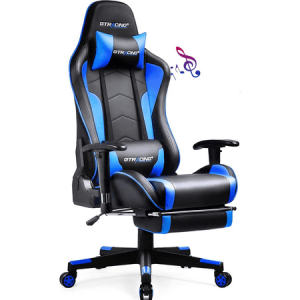
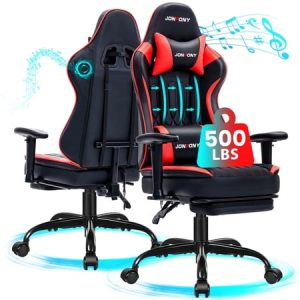
An ergonomic gaming chair with Bluetooth speakers featuring the widest seat in the category (21 in) from GTRACING — the best mid-range pick for average-to-large builds under $150.
★★★★★
Deal
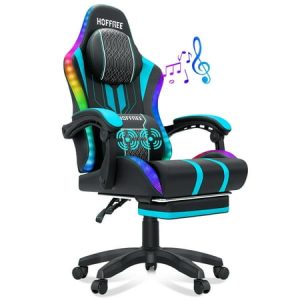
A 500 lb rated gaming chair with Bluetooth speakers, footrest, memory foam seat, and a 1-year warranty — the best budget big-and-tall gaming chair with integrated audio on Walmart.
★★★★★
Deal
A 400 lb rated leather gaming chair with Bluetooth speakers and RGB lighting — the most feature-complete option in the gaming chair with speakers category under $300.
★★★★★
Deal
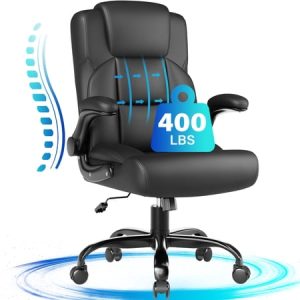
A 400 lb rated leather office chair under $70 with ergonomic lumbar support and a 1-year warranty — the strongest budget big-and-tall pick on Walmart.
★★★★★
Deal
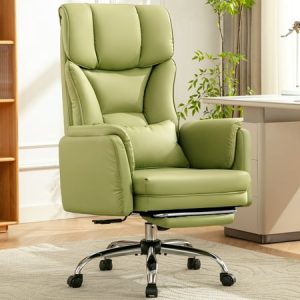
A PU leather big-and-tall chair with a 120-degree recline and three lockable tilt positions — the best tilt control in the COOLHUT lineup, available in avocado green or black.
★★★★★
Deal
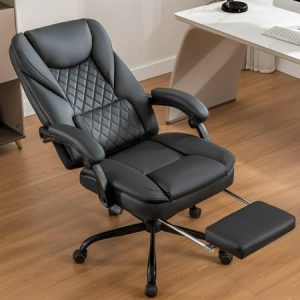
A high-back faux leather executive chair with a working footrest and recliner under $120 — solid comfort for long workdays, best for users between 5'6" and 6'3".
★★★★★
Show next
Browsing All Comments By: Dustin Montgomery