Computer Station Nation is reader-supported.
When you buy through links on our site, we may earn an affiliate commission. Learn more.
Buying computer speakers sounds simple until you’re staring at a wall of options on Amazon with no idea what actually matters. Driver size? Watts? RMS vs peak? 2.0 vs 2.1? It adds up fast. This guide cuts through it.
Step 1: figure out your setup type
2.0 (two speakers): Left and right channel. Simple, compact, works anywhere. Fine for music, video calls, casual gaming. Most budget options are 2.0.
2.1 (two speakers + subwoofer): Adds a dedicated bass driver. The satellites handle mids and highs; the sub handles low-end. Makes a real difference for gaming and movies. Sub usually goes on the floor or under the desk. Costs a bit more.
Soundbar: Single unit under your monitor. Cleaner desk, simpler setup, virtual surround on some models. Tradeoff is less immersion than a proper 2.1.
5.1 surround: Five speakers plus a sub. Home theater territory. Worth it if you have the space and the budget. Overkill for most desks.
Step 2: pick your connection type
3.5mm analog: Plugs into your headphone jack or motherboard audio out. Universal. Sound quality depends on your onboard audio chip — decent on most modern boards, mediocre on cheaper ones.
USB: The speaker uses its own built-in DAC (Digital-to-Analog Converter) and bypasses your motherboard audio entirely. Usually cleaner signal. Plug-and-play on every OS with no drivers.
Bluetooth: No cables between PC and speakers. Convenient if you switch between devices. Look for aptX codec support — it’s better than default SBC and you’ll hear the difference in audio quality, especially with music.
Step 3: understand wattage honestly
For a desk setup where you’re 2–3 feet away, 5–20W RMS total is plenty. The key word is RMS — that’s real sustained output power. Peak wattage is a marketing number that means nothing. A speaker advertising “40W peak” might only do 8W RMS. Always look for RMS specs if you can find them, and ignore peak claims entirely.
Step 4: check your desk space before buying
Measure the space between your monitor and the edge of your desk on each side. Satellite speakers typically need 4–6 inches of clearance each. A subwoofer needs floor or under-desk space — usually around 10×10 inches. Bookshelf-style speakers are larger and can eat half your desk if you’re not careful.
Recommended picks
Cyber Acoustics CA-2014 — reliable stereo under $30
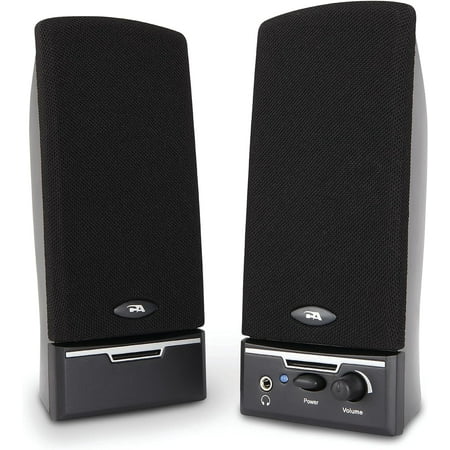
Surprisingly Loud Sound – Stereo computer speakers provide clean, clear audio for music, movies, or calls.
Cyber Acoustics has been making budget computer speakers for decades and the CA-2014 is their solid everyday pick. 2.0 stereo, 3.5mm input, basic controls. Good for most people who just want reliable desktop audio without overthinking it.
CA-2002 Computer Speaker System — compact and clean
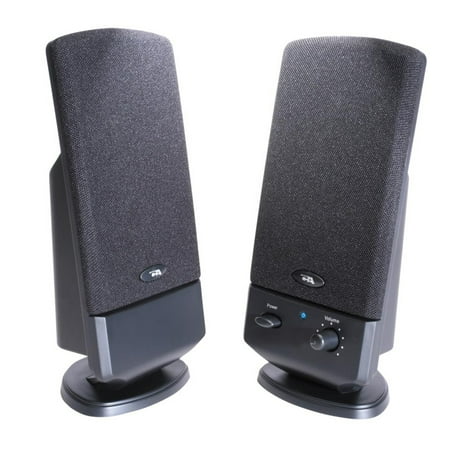
Cyber Acoustics CA-2002 2.0 Speaker System - Black
The CA-2002 is the compact version — smaller footprint, same Cyber Acoustics reliability. At $29.50 it’s a good fit for tight desks where the CA-2014 feels too wide. Straightforward 2.0 stereo with 3.5mm input.
Fasiaou Bluetooth 5.0 Speakers — wireless on a budget

❥❥❥Dear customer: Thank you for coming to our store for shopping. Our store provides 100% refund and return service, with delivery within 24 hours and delivery within 8-12 days. Please contact us in time if you have any questions or dissatisfaction. ☘Household General Speakers Bluetooth Desktop...
Bluetooth 5.0 with Hi-Fi stereo at $16.76. If wireless connectivity is a priority and your budget is tight, this is where to start. AC powered (not USB), which means no power draw limitations. Pairs to your PC or phone without fuss.
Computer Mini Speakers — bare minimum, bare price
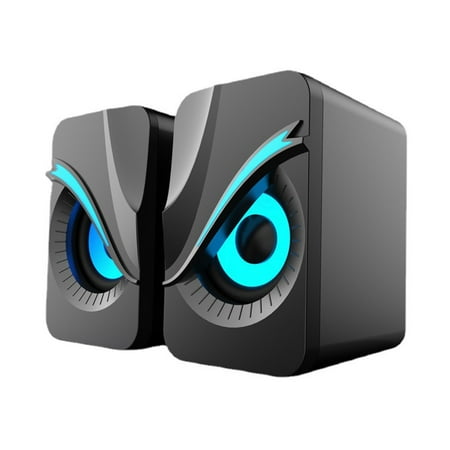
Computer Mini Speakers, PC Speakers,Speakers with Surge Clear Sound, USB C/USB Powered for Computer Desktop PC Laptop Monitor(Black) Description: Product Name: Computer speakers Material: ABS Product color: Black Product size: 10x8x6cm/3.9x3.1x2.4in Packing size: 14x13x9cm/5.51x5.11x3.54in Gross...
$12.08. USB powered. These exist for one reason: they cost almost nothing and they’re still better than built-in laptop speakers. For a secondary machine, a spare desk, or a situation where the budget is genuinely almost zero, these work.
Logitech S150 — plug-in-and-forget USB speakers
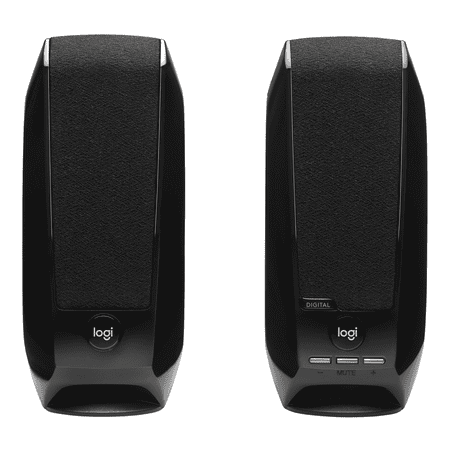
Questions about your S150 Digital USB Speaker System? We've got the answers, videos, downloads and information you need. Search for articles or select a topic below to get started.
Still one of the better USB-only speakers at any price. No setup, no drivers, works everywhere. USB audio means a cleaner signal than a 3.5mm connection. Logitech build quality means it’ll last. $17.84 and worth every cent for a simple plug-and-play setup.
RGB Desktop Speakers with Volume Knob — gaming aesthetic under $22
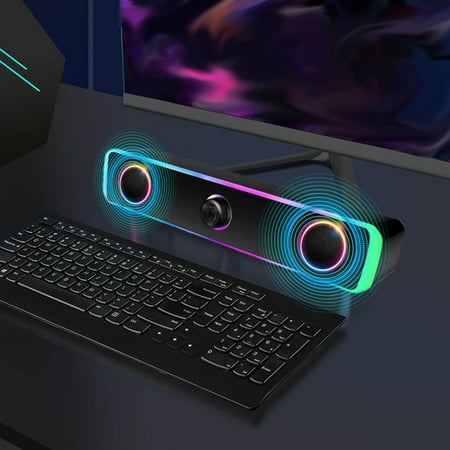
Computer Speakers Desktop Speakers Computer Speakers RGB Lights Desktop Computer Speakers USB Powered Easy Volume Control Features: 【Lightweight Modern Design】The computer speaker is compact in size and stylish takes up minimal desktop space. You' love it whether placed individually each side of...
If RGB matters to your setup, this $21.99 pair delivers it with a physical volume knob and decent desktop audio. Not audiophile territory, but the lights are real and the audio is more than acceptable for gaming and casual use.
Common mistakes to avoid
- Buying based on peak wattage: Means nothing. Use RMS.
- Getting a 5.1 system for a small desk: You won’t be able to place the surround speakers correctly and the immersion won’t work. Stick to 2.0 or 2.1 for desk setups.
- Forgetting the subwoofer footprint: Know where your sub is going before it arrives.
- Skipping USB for 3.5mm on a cheap board: If your motherboard audio is weak, USB speakers bypass it entirely and will sound noticeably better.
Bottom line
For most battlestation builds: 2.0 USB speakers if you want simplicity, 2.1 if you want real bass, Bluetooth if you switch between devices. Don’t overspend — the jump from $15 to $55 is substantial; the jump from $55 to $200 is much smaller. Pick your budget, match it to a setup type, and get something on your desk.