
Computer Station Nation is reader-supported.
When you buy through links on our site, we may earn an affiliate commission. Learn more.
Your monitor gets all the glory. Your GPU gets the benchmark scores. But your keyboard? That’s the one piece of gear your hands never leave. Every word typed, every ability triggered, every shortcut fired — it all goes through those switches. And if you’re still clicking away on a mushy membrane board that came bundled with your PC circa 2015, you’re leaving a lot on the table.
Mechanical keyboards used to mean a $300 minimum buy-in and months of waiting on group buys. Not anymore. You can grab a fully-aluminum board with foam dampening and pre-lubed switches for $50 with next-day shipping. The hardware has gotten genuinely good, and the prices have dropped to match. This guide covers what you need to know to pick the right one for your battlestation.
Quick Picks
If you want to cut straight to the chase:
Best Overall: Razer BlackWidow V3
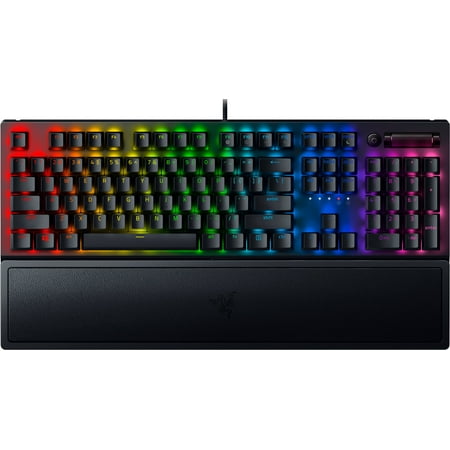
Razer BlackWidow V3 Mechanical Gaming Keyboard: Green Mechanical Switches, Tactile & Clicky, Chroma RGB Lighting, Compact Form Factor, Programmable Macro Functionality, Classic Black. The name that started it all returns to reassert its dominance. Feel the difference with the Razer BlackWidow...
Full-size, built like a tank, with Razer’s own Green switches (tactile plus clicky). The go-to if you want a flagship feel without the flagship price.
Best Budget: onn Gaming Keyboard with Blue Switches
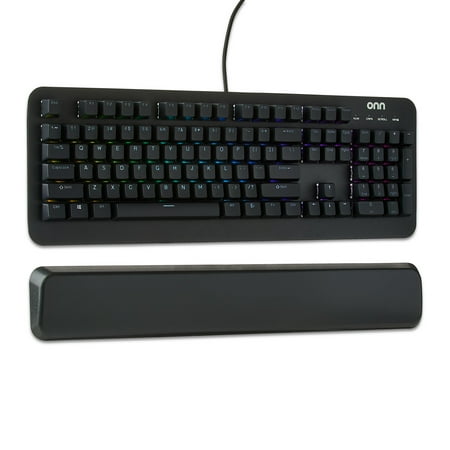
The onn Mechanical Gaming Keyboard is designed for gamers seeking precision and durability. Featuring 104 mechanical blue switches, this keyboard ensures up to 50 million keystrokes. Its adjustable RGB lighting with 16.8 million colors lets you personalize your setup. The magnetic wrist rest...
Real Cherry-compatible Blue switches at a Walmart price. Clicky, satisfying, and way better than it has any right to be at $46.
Best Compact: 60% RGB Mechanical Keyboard
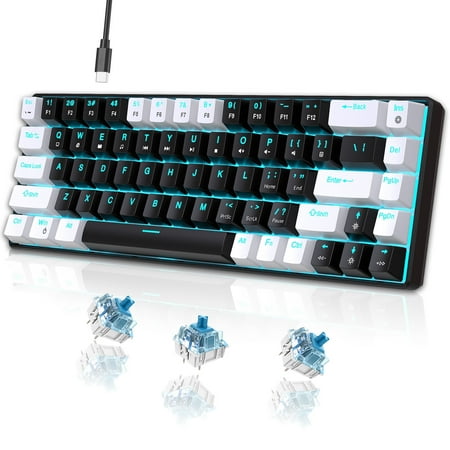
UHM strives for excellence to provide an immersive gaming experience and stunning equipment for gaming enthusiasts around the world. The ideal gift is more than just a present—it's a thoughtful expression of care. Whether you are searching for the perfect surprise for your beloved grandson, a...
68-key compact form factor. Gets the arrow keys in without going full TKL. Under $30. Great for tight desks or travel setups.
Table of Contents
- What Makes a Keyboard Mechanical?
- Switch Types: Linear, Tactile, and Clicky
- Form Factors: How Big Should Your Keyboard Be?
- Gaming vs. Typing: Which Switches Are Right for You?
- Features to Look For
- What the Community Says
- Accessories Worth Getting
- Is It Worth Upgrading?
- FAQ
What Makes a Keyboard Mechanical?
Simple version: each key has its own physical switch underneath it. Press a key, a small spring-loaded mechanism fires and registers the input. That’s the whole thing. Depending on the switch type, you get a tactile bump, an audible click, or a smooth linear stroke with nothing in between.
Membrane keyboards use a rubber dome under each keycap. The dome collapses when you press down. It’s mushy, it’s imprecise, and after a year of hard use it starts to feel like typing through a wet sponge. Mechanical switches are rated for 50 to 100 million keystrokes. The math is not close.
| Feature | Mechanical | Membrane |
|---|---|---|
| Feel | Precise, satisfying | Soft, mushy |
| Durability | 50–100M keystrokes | 5–10M keystrokes |
| Repairability | Swap individual switches | Replace the whole board |
| Noise | Variable (switch-dependent) | Quiet |
| Cost | $30–$300+ | $10–$50 |
Switch Types: Linear, Tactile, and Clicky
This is the one decision that actually matters. Brand, size, RGB — all secondary. Get the switch wrong and nothing else fixes it.
Linear switches
Straight down, no bump, no click. You press, it registers, you release. That’s the whole experience. Gamers love linears because there’s nothing to push through — just a smooth stroke from top to bottom. Cherry MX Red (45g), Razer Yellow (35g), and Gateron Yellow (35g) are the most common. If you’re grinding ranked matches and every millisecond counts, go linear.
Tactile switches
Tactile switches have a noticeable bump partway through the keystroke. You feel the key register without hearing a click. Good for people who split time between gaming and typing — you get feedback without waking everyone up. Cherry MX Brown is the most popular mechanical switch in the world partly because it’s versatile and partly because it’s everywhere. Fair warning: hardcore typists call Browns “fake tactile” because the bump is subtle. They’re not wrong, but Browns are still a solid all-arounder. Want a more pronounced bump, look at Gateron Brown or Topre switches.
Clicky switches
Clicky switches add an audible click on top of the tactile bump. You feel AND hear every keypress register. They’re the most satisfying to type on, and the most annoying to everyone within ten feet of you on a video call. Cherry MX Blue (50g) and Razer Green (50g) are the classics. The 50cN actuation is a bit heavier than Reds or Browns, which makes them slightly slower for gaming but excellent for long writing or coding sessions.
| Switch Type | Feel | Sound | Best For | Example |
|---|---|---|---|---|
| Linear | Smooth, no bump | Quiet | Gaming | Cherry MX Red, Razer Yellow |
| Tactile | Bump, no click | Moderate | Gaming + Typing | Cherry MX Brown, Razer Orange |
| Clicky | Bump + click | Loud | Typing, Coding | Cherry MX Blue, Razer Green |
Form Factors: How Big Should Your Keyboard Be?
A numpad you never use is just dead real estate between your keyboard and mouse. Here’s how the sizes stack up:
Full size (100%)
The whole thing. Numpad, function row, navigation cluster. Best for data entry, finance work, or anyone who genuinely uses that numpad every day. The downside: your mouse ends up way out to the right, which is rough for FPS gaming.
Tenkeyless / TKL (87%)
Drop the numpad, keep everything else. This is the sweet spot for most gamers. Function row stays, arrow keys stay, your mouse hand moves about 3 inches closer to center. TKL is the most popular format among competitive gamers for exactly that reason.
75% and 65%
75% boards compress the function row and navigation keys into a tighter footprint. 65% cuts the function row entirely but keeps the arrow keys. Both work well when desk space is limited. The 65% is the minimum most people want — go smaller than that and navigating documents gets annoying fast.
60%
No function row, no arrow keys, no navigation cluster. Everything lives on function layers. If you need portability or you’re chasing the most minimal battlestation possible, 60% is the move. If this is your first mechanical keyboard, start at 65% minimum. You’ll be glad you have arrow keys the first time you need them.
Gaming vs. Typing: Which Switches Are Right for You?
Honestly, most people overthink this. But since you asked:
Pure gaming? Go linear. Cherry MX Red, Razer Yellow, Gateron Yellow. Smooth actuation, low force, nothing fighting your keypress. The real-world speed difference versus tactile is small, but there’s something psychological about a switch that just goes — no bump to push through.
Mixed gaming and typing? Brown is the answer the internet always gives, and it’s right. The tactile bump keeps your fingers honest during long typing sessions without killing gaming performance. Cherry MX Brown is a safe choice that almost nobody regrets.
Serious typing or coding, noise isn’t a concern? Blue switches. If you’re in an office or on calls, go silent tactile instead — Gateron Silent Brown or Razer Orange. Your coworkers will notice the difference.
Features to Look For
N-Key Rollover (NKRO)
This is how many keys the board can register at once. Gaming boards should have full NKRO — every key press registers regardless of what else is held down. Cheaper boards have 6-key rollover (6KRO), which is fine for most people but can drop inputs during complex key combos.
Wireless vs. wired
Wireless mechanical keyboards have gotten genuinely good in 2026. Logitech LIGHTSPEED and Razer HyperSpeed have latency that’s effectively indistinguishable from wired in real-world play. The tradeoff is cost and battery management. Competitive gamers still mostly run wired. For a workstation setup, wireless is a solid quality-of-life upgrade if you hate cable clutter.
Hot-swap sockets
Hot-swap boards let you pull switches and install new ones without soldering. Big deal if you want to experiment — try Reds, decide you actually want Browns, swap them in 20 minutes. Most enthusiast-tier boards have it. Budget boards often don’t. Check before you buy if this matters to you.
Acoustic mods
Higher-end keyboards come pre-modded with foam layers, gasket mounts, and pre-lubed switches. This reduces the hollow “ping” that cheap boards produce and moves the sound toward that thocky, dampened type-feel the enthusiast community obsesses over. It’s a real difference. If budget allows, it’s worth paying for a board that has this done from the factory.
What the r/MechanicalKeyboards Community Says
r/MechanicalKeyboards has over 800,000 members and they have opinions. The vibe from recent threads:
“Back in the day something of this quality would involve group buys that take months, hunting down specific switches, hours of DIY modding — all for $300 minimum. Now you can get a fully aluminum board with foam and pre-lubed switches for $50 with next-day shipping.”
— r/MechanicalKeyboards top post, March 2026
That post hit 1,800+ upvotes because it’s true. The market has opened up. The tradeoff is more noise — more cheap garbage to sort through before you find what’s actually good. Veteran members still care deeply about custom builds and group buys, and they’ll tell you prebuilts are “soulless.” They’re not entirely wrong. But they’re also not the ones you should be listening to if you just want a great keyboard for your desk.
Questions that come up constantly in the sub: which switches for gaming (linear reds, always, though browns won’t hurt you), whether Keychron is worth it (yes, they’ve become the default first-keyboard recommendation), and whether to lube switches (if you have hot-swap and 20 spare minutes, yes — the difference is real).
Accessories Worth Getting
A wrist rest is close to mandatory for extended typing. Memory foam or leather-wrapped are the most comfortable. A large desk pad anchors the keyboard and gives your mouse room to breathe. If you’ve got a hot-swap board, a keycap set is the easiest visual upgrade you can make — PBT keycaps feel better and last longer than ABS. Grab a $5 switch puller and keycap puller while you’re at it. Two tools that make maintenance and modding significantly easier.
Is It Worth Upgrading from a Membrane Keyboard?
Yes, and the barrier has never been lower. A genuinely good mechanical keyboard is $30 to $50 now. The difference in feel versus a rubber-dome membrane is immediately noticeable, and people who try mechanical keyboards almost never go back.
If you type a lot — work, writing, coding — upgrade now. Same if you’re a gamer who wants precise key response or your current keyboard is mushy and inconsistent. The one case where it’s harder to justify: if you’re on a laptop 90% of the time and your desktop keyboard rarely gets used. For a dedicated workstation setup, it’s a no-brainer.
Go Deeper
These guides cover the rest of the mechanical keyboard world:
- Best Mechanical Keyboards 2026 — tested picks from budget to flagship, organized by use case
- Mechanical Keyboard Switches Guide — deep dive on every switch type, actuation specs, and how third-party brands compare to Cherry MX
- Best Keyboards for Gaming — FPS and MMO picks with polling rate and anti-ghosting specs
FAQ
Are mechanical keyboards actually better for gaming?
Yes, in a few meaningful ways. Individual switches register faster and more consistently than membrane domes. N-key rollover means simultaneous keypresses all register. Linear switches have lower actuation force than most membrane keys, which reduces fatigue in long sessions. The gap isn’t enormous, but it’s real — and the typing experience upgrade alone makes it worth it for most people.
What’s the loudest keyboard switch?
Cherry MX Blue and its clones (Kailh Box White, for example) are the loudest common switches — around 60 to 70 dB in an office environment. Buckling spring switches on vintage IBM Model M keyboards are louder still, but you won’t find those in a modern board. If you work near other people and want something quieter, look at silent tactile switches like Gateron Silent Brown.
What’s the difference between Cherry MX Red and Brown?
Red is linear — smooth press, no bump. Brown is tactile — same 45g actuation force, but with a bump at the actuation point so you feel when the key registers. Reds are better for gaming. Browns are better for mixed use. Both are quiet (no audible click). On the fence? Go Brown.
Do mechanical keyboards help with typing speed?
Maybe. A lot of people report better accuracy and less fatigue, which can mean higher sustained speeds over a long session. The tactile or clicky feedback reinforces finger memory. But raw typing speed is mostly a practice thing — a better keyboard won’t compensate for not typing much. What it will do is make long sessions more comfortable.
How long do mechanical keyboards last?
Switches are rated for 50 to 100 million keystrokes. At roughly 10 million keystrokes per year for a heavy typist, that’s 5 to 10 years per switch. The PCB and case usually outlast the switches. Plenty of enthusiasts are using keyboards that are 15 years old, still running fine after a switch replacement.
What’s a good first mechanical keyboard?
Keychron K2 or K6 if you want hot-swap and solid build quality around $70 to $90. Razer BlackWidow V3 if you want something widely available with a real warranty behind it. Either way, Brown switches for mixed use, Red if gaming is the main use case. Avoid no-name brands under $20 — quality control is genuinely a coin flip at that price.


