Computer Station Nation is reader-supported.
When you buy through links on our site, we may earn an affiliate commission. Learn more.
Razer Viper V3 HyperSpeed — review summary
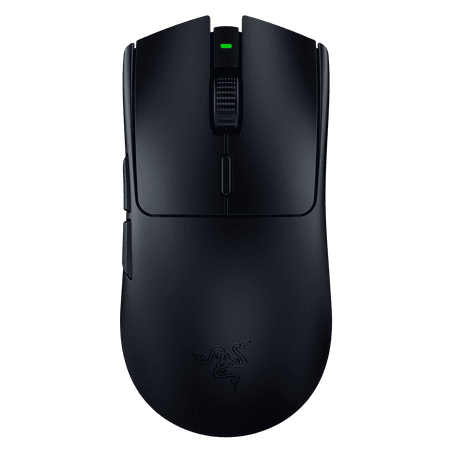
FOR THE PRO. The shape that inspired an esports revolution returns with a new evolution—the Razer Viper V3 HyperSpeed. Featuring our best-in-class technologies and optimized for claw or fingertip grip styles, shake up the meta with a wireless, lightweight mouse that thrives in top-flight...
Overall rating: 8.4/10
Verdict: The best wireless gaming mouse under $60, and it is not particularly close. HyperSpeed wireless at this price rewrites what you should expect from budget gaming mice. If you want wireless and do not want to spend $80+, this is the answer.
Introduction
Razer HyperSpeed wireless is the same 2.4GHz protocol used in the Viper V3 Pro ($180), the DeathAdder V3 Pro ($100), and other Razer flagship wireless mice. The Viper V3 HyperSpeed brings that connection technology into a $50 body. Razer has done this before with other features (the Focus X sensor found in budget mice uses similar technology to the flagship Focus Pro), and the pattern holds here.
The practical question is what they had to cut to hit $50. The answer: the sensor (Focus X instead of Focus Pro), the weight (82g vs the Pro line at 63-66g), the click switches (standard Razer mechanical vs Gen-3 optical), and the build materials. None of these cuts significantly affect most gaming use cases. The HyperSpeed wireless connection is the most important feature for this price tier, and they kept it intact.
Specifications
| Sensor | Razer Focus X optical |
| DPI range | 100 – 14,000 DPI |
| Polling rate | 1,000 Hz |
| Weight | 82g |
| Dimensions | 116.6 x 63.1 x 37.3mm |
| Connection | Razer HyperSpeed 2.4GHz wireless |
| Battery life | ~300 hours |
| Buttons | 6 |
| RGB | None |
| Software | Razer Synapse 3 |
| Battery type | 1x AA |
| Shape | Symmetrical ambidextrous |
Design and build
The Viper V3 HyperSpeed is smaller than the original Viper (which ran 127mm long). At 116.6mm, it suits medium and smaller hands best. Large-handed palm-grip players may find it too compact. Claw and fingertip grip players have more flexibility.
The ambidextrous shape has two side buttons on each side. Right-hand players can ignore the right-side buttons; left-hand players can use either side. The body is lower-profile than many gaming mice, which suits claw grip players who prefer not to have the mouse palm fill.
At 82g, the weight is heavier than budget wired mice that skip the wireless components but lighter than most wireless budget options. The battery uses a single AA, which adds some weight compared to USB-C rechargeable designs. The tradeoff is the 300-hour battery life — you replace the AA roughly twice a year with regular use.
Build quality is adequate. Plastic shell, no flex under normal grip pressure. No premium feel but no obvious cheapness either. The side texture is subtle and provides grip without feeling artificial. No RGB on this model — the weight and cost savings of skipping RGB contribute to the competitive price.
Performance and sensor
The Focus X sensor tops out at 14,000 DPI, which is lower than the Focus Pro but above what any gaming use case requires. At 400-1,600 DPI, tracking is accurate and consistent. No angle snapping detectable in tracking tests. Acceleration is absent. Lift-off distance is about 2mm on most surfaces.
The HyperSpeed wireless connection is the feature worth paying for. It runs at 1,000 Hz polling with sub-1ms latency. Razer calls it faster than wired, which is technically measurable but practically irrelevant — what matters is that it is not slower than wired, and it is not. Players who switched to the Viper V3 HyperSpeed from wired mice have reported no adjustment period for the connection itself.
The main clicks use standard Razer mechanical switches. Click latency is competitive with other mechanical switch mice at this price. The click feel is satisfying — clear travel, defined actuation point. Side buttons have more travel than the main clicks but are reliable and well-positioned.
Battery life is exceptional. 300 hours on a single AA. With 2 hours of gaming per day, that is roughly 5 months per battery. Carry a spare AA in your desk drawer and running out mid-session becomes a non-issue.
Software and updates
Razer Synapse 3 supports the Viper V3 HyperSpeed for DPI customization, polling rate adjustments, and button remapping. The mouse works out of the box without software at 800 DPI. Synapse is optional for players who want to change the default settings.
Firmware updates have been issued to address early reports of occasional wireless reconnection delays. The current firmware is stable. Razer has a reasonable track record of maintaining software support for Viper-line products for 2-3 years post-release.
Long-term reliability
The Viper V3 HyperSpeed launched in 2023. Community feedback from extended ownership covers one to two years of regular use. Reports are generally positive for the connection reliability and switch durability. No widespread switch failure reports in the community as of 2025.
The AA battery compartment is a mechanical part that sees regular use. No reported wear issues, but this is worth monitoring if you change batteries frequently. The door mechanism on some battery compartment designs can loosen over time.
Razer provides a 2-year warranty. Standard coverage for hardware defects. No notable warranty claim issues reported in the community beyond typical product defect rates.
Verdict
If you want wireless and you have $50: buy the Viper V3 HyperSpeed. There is no better wireless option in this price range. The HyperSpeed connection alone justifies this over the SteelSeries Rival 3 Wireless and other options that use slower wireless protocols at similar prices.
The limitations are real: 82g is heavier than premium FPS mice, the small body does not suit large-handed palm grip players, and the Focus X sensor is not flagship quality (though it is good enough). For competitive FPS at a high level, the Razer DeathAdder V3 wired ($44) has a better sensor and lower weight. For players who specifically need wireless and cannot spend $80+, the Viper V3 HyperSpeed is the right choice.
Competitors compared
| Mouse | Price | Weight | Wireless | Battery |
|---|---|---|---|---|
| Razer Viper V3 HyperSpeed (this review) | $49.99 | 82g | HyperSpeed 2.4GHz | 300 hrs (AA) |
| SteelSeries Rival 3 Wireless | $47 | 106g | 2.4GHz + BT | 200 hrs |
| Logitech G305 | $39.99 | 99g | LIGHTSPEED | 250 hrs (AA) |
Where to buy
FOR THE PRO. The shape that inspired an esports revolution returns with a new evolution—the Razer Viper V3 HyperSpeed. Featuring our best-in-class technologies and optimized for claw or fingertip grip styles, shake up the meta with a wireless, lightweight mouse that thrives in top-flight...
Frequently asked questions
Is the Viper V3 HyperSpeed good for competitive play?
Yes, for most players. The HyperSpeed connection matches wired latency. The Focus X sensor tracks accurately at competitive DPI settings. The 82g weight and smaller body are the main trade-offs. Players competing at the highest levels who want wireless and need the lightest possible option should look at the $150 Logitech G Pro X Superlight 2. For everyone else, the Viper V3 HyperSpeed handles competitive play without holding you back.
Why does this mouse use AA instead of USB-C rechargeable?
Using AA batteries is a deliberate design choice at this price point. A built-in rechargeable battery adds cost and complexity. AA batteries are cheap, available everywhere, and allow the 300-hour battery life by using a larger power reserve. The trade-off is added weight from the AA battery itself. Players who dislike non-rechargeable mice should look at the Razer DeathAdder V3 Pro or Logitech G305, which offer comparable wireless performance with USB-C charging.
Does the Viper V3 HyperSpeed share a receiver with other Razer mice?
Yes. The HyperSpeed 2.4GHz receiver can connect to multiple Razer HyperSpeed devices through a single dongle using Razer HyperSpeed Duo pairing. If you have a Razer HyperSpeed keyboard, for example, both devices can connect through one USB-A receiver. This reduces dongle clutter on desktops with limited USB ports.