Computer Station Nation is reader-supported.
When you buy through links on our site, we may earn an affiliate commission. Learn more.
SteelSeries Rival 3 Wireless — review summary
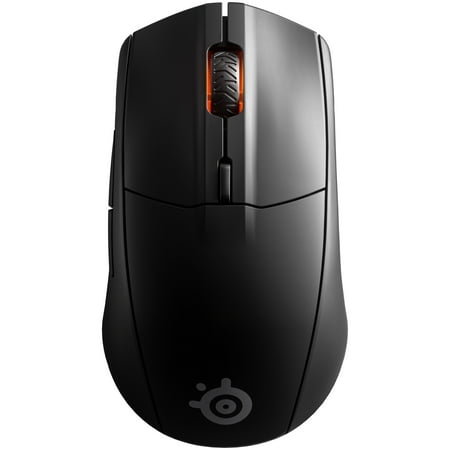
The Rival 3 Wireless utilizes Quantum 2.0 Dual Wireless technology to provide ultra-low latency wireless via 2.4GHz and Bluetooth connectivity. It’s optimized for power-efficiency, giving it an industry-leading 400+ hour battery life. A performance-focused gaming sensor, on-board memory, RGB...
Overall rating: 7.5/10
Verdict: The Rival 3 Wireless is a decent beginner wireless gaming mouse. It works, it connects reliably, and it is comfortable enough for extended sessions. The problem is that the Razer Viper V3 HyperSpeed exists at the same price and does more of what gaming mice need to do well. Buy the Rival 3 Wireless if you specifically want the shape or the Bluetooth option.
Introduction
SteelSeries positioned the Rival 3 Wireless as an entry-level wireless option for players who want 2.4GHz and Bluetooth without spending serious money. At $47, it undercuts most wireless gaming mice from the major brands. The question is whether the compromises to hit that price point are acceptable for the type of player this mouse targets.
The short version: the Rival 3 Wireless is fine. Not great, not bad. For players new to gaming who want wireless and are not sure what they want yet, it is a safe starting point. For players who have used gaming mice before and know what they prefer, the Razer Viper V3 HyperSpeed ($50) and Logitech G305 ($40) both offer more focused gaming performance at similar prices.
Specifications
| Sensor | SteelSeries TrueMove Air |
| DPI range | 200 – 18,000 DPI |
| Polling rate | 1,000 Hz (2.4GHz), 125 Hz (Bluetooth) |
| Weight | 106g |
| Dimensions | 119 x 62 x 38mm |
| Connection | 2.4GHz / Bluetooth 5.0 / USB-C wired |
| Battery life | ~200 hours (2.4GHz), ~400 hours (Bluetooth) |
| Buttons | 6 |
| RGB | Yes (1 zone) |
| Software | SteelSeries GG / Engine 3 |
| Charging | USB-C |
Design and build
The Rival 3 Wireless is an ambidextrous shape, but it leans right-hand in practice. The left side has two side buttons and the right side is plain. The body is 119mm long and 38mm tall — moderate dimensions that fit a range of hand sizes and grip styles without excelling for any particular one.
At 106g, the weight is noticeable. Not uncomfortable, but this is not a lightweight mouse. The plastic shell feels sturdy without being premium. The matte surface resists fingerprints reasonably well. The two side buttons have clear, distinct feel and are well-placed for thumb access.
The scroll wheel has discrete steps and is neither too light nor too stiff. Main clicks have standard mechanical switch feel — no complaints, no particularly satisfying click either. The whole build reads as functional and competent without any standout quality in either direction.
USB-C charging is welcome at this price point. Most budget wireless mice still use Micro-USB. The cable can also be used for wired mode if needed.
Performance and sensor
The TrueMove Air sensor is SteelSeries custom implementation, built on a PixArt chip. It tracks accurately at normal gaming DPI settings. At 800-1,600 DPI, the cursor moves predictably without jitter. At very high DPI settings (8,000+) or extremely fast movements, it shows more noise than flagship sensors, but these are not typical gaming use cases.
The 2.4GHz wireless connection in gaming mode runs at 1,000 Hz polling. No detectable latency in FPS and MOBA play. Bluetooth mode drops to 125 Hz — this is fine for productivity, office use, and low-intensity gaming, but noticeable in fast-paced competitive games. Use 2.4GHz for gaming, Bluetooth for everything else.
Battery life is the Rival 3 Wireless standout feature. Around 200 hours in 2.4GHz mode and up to 400 hours in Bluetooth mode. At 2 hours of gaming per day, you charge it roughly every 3 months. That is genuinely good and better than most wireless mice at any price.
Software and updates
SteelSeries GG (formerly Engine 3) handles DPI configuration, button remapping, and RGB lighting. The software is less demanding than Razer Synapse and does not require an account login for basic configuration. DPI presets are stored on the mouse and persist without the software running.
SteelSeries has maintained reasonably consistent software support for the Rival line. Firmware updates have been released to address early Bluetooth connectivity stability issues. The current firmware is stable based on community reports.
Long-term reliability
The Rival 3 Wireless has a 2-year warranty from SteelSeries. Long-term community reports (2+ years of use) note the main switches holding up well. The side buttons show wear on some units after heavy use. The USB-C port has been reported as a weak point on a small percentage of units after frequent charging cycles, though this is not unique to SteelSeries.
SteelSeries warranty service is generally considered responsive for clear hardware defects. 2 years is the standard for gaming mice in this price range.
Verdict
The Rival 3 Wireless does what it says. Reliable wireless, dual connection modes, 200-hour battery, and a comfortable shape that fits a range of hand sizes. For a first gaming mouse or a secondary mouse for a laptop setup, it works without complaint.
The competition is the problem. The Razer Viper V3 HyperSpeed at $50 has a better wireless protocol, a lighter body (82g vs 106g), and the HyperSpeed connection. The Logitech G305 at $40 has a Hero sensor that outclasses the TrueMove Air. Both cost the same or less. Unless the Rival 3 Wireless shape specifically fits your hand or you need Bluetooth, the competition wins on specs.
Buy this if: you are a new PC gamer who wants wireless, you specifically want Bluetooth for multi-device switching, or the price is at a point where you want to experiment without committing to a more expensive option.
Look elsewhere if: you play competitive FPS, you care about mouse weight (106g is heavy), or you want the best sensor and wireless quality for your money.
Competitors compared
| Mouse | Price | Weight | Wireless | Battery |
|---|---|---|---|---|
| SteelSeries Rival 3 Wireless (this review) | $47 | 106g | 2.4GHz + BT | 200 hrs |
| Razer Viper V3 HyperSpeed | $49.99 | 82g | 2.4GHz | 300 hrs |
| Logitech G305 | $39.99 | 99g | LIGHTSPEED | 250 hrs |
Where to buy
The Rival 3 Wireless utilizes Quantum 2.0 Dual Wireless technology to provide ultra-low latency wireless via 2.4GHz and Bluetooth connectivity. It’s optimized for power-efficiency, giving it an industry-leading 400+ hour battery life. A performance-focused gaming sensor, on-board memory, RGB...
Frequently asked questions
Is the Rival 3 Wireless good for FPS?
Passable for casual FPS play. The TrueMove Air sensor is accurate enough for normal play, and the 2.4GHz connection has no practical latency at 1,000 Hz polling. The weight (106g) is the main issue for competitive FPS — it is on the heavier side for fast flick movements. Players who take FPS seriously should consider the Razer Viper V3 HyperSpeed instead.
Does the Bluetooth connection work well for gaming?
Only for casual gaming. Bluetooth mode runs at 125 Hz polling, which means the cursor position updates 8 times per second less frequently than 2.4GHz mode. In slow games, productivity apps, or casual titles, this is not noticeable. In fast-paced competitive games, the difference is perceptible. For gaming, always use 2.4GHz mode with the included receiver.
How do I switch between wireless modes?
The Rival 3 Wireless has a switch on the underside that cycles between Off, 2.4GHz, and Bluetooth. In 2.4GHz mode, insert the USB receiver and the mouse connects automatically. In Bluetooth mode, hold the pairing button to enter pairing mode and connect via your device Bluetooth settings. SteelSeries GG software provides additional connection status information but is not required for basic mode switching.