Computer Station Nation is reader-supported.
When you buy through links on our site, we may earn an affiliate commission. Learn more.
- Best overall: Logitech G305 LIGHTSPEED ($39.99) — best-in-class sensor, 250-hour battery, true wireless freedom under $40
- Best budget wired: Razer DeathAdder Essential ($24.98) — proven ergonomic shape, braided cable, Razer quality without the Razer price
- Best mid-range wireless: Razer Basilisk V3 X HyperSpeed ($69) — dual-mode wireless plus a scroll wheel that actually does two things
- Best ultra-budget: TSV Gaming Mouse ($10.98) — RGB, side buttons, four DPI steps, and it works
- Best for connectivity: ATTACK SHARK R1 ($28.43) — 55g, Bluetooth 5.0, 2.4GHz, and USB-C wired in one mouse
- Also good: FFN Wireless ($15.79) — three connection modes and 75-hour battery for under $16
The best gaming mice you can buy right now
Most gaming mice are oversold. The box screams 35,000 DPI and “esports-grade” like those numbers matter. They mostly do not. The players who win tournaments use 400 to 800 DPI. What actually separates a good gaming mouse from a bad one is sensor accuracy, click feel, and how it fits your hand after two hours of use.
This list covers six mice across a wide price range — from $10.98 to $69. Some are wireless. Some are for right-handed users only. One weighs 55 grams, which puts it in the same weight class as dedicated ultralight mice that cost three times more. We included context mice too, like the Razer Viper V3 Pro (54g, $159.99) and Logitech G Pro X Superlight 2 (60g, $159.99), so you know exactly what the flagship tier looks like and whether any of these picks can reach it.
This guide is for PC gamers who want a mouse that does not embarrass them, without spending $150 to prove it.
How we picked
We looked at sensor quality (manufacturer spec sheets plus community testing), advertised weight, connection type, and price. We cross-referenced Tom’s Hardware’s definition of “lightweight” — under 80 grams — and noted real-world latency data where available. The 2.4GHz wireless standard is now latency-equivalent to wired; Razer’s own Viper V3 Pro measures 0.54ms wired versus 0.83ms wireless, a gap no human perceives during play. Budget mice were judged on whether they cover the basics well, not whether they match premium options feature-for-feature.
Best overall: Logitech G305 LIGHTSPEED
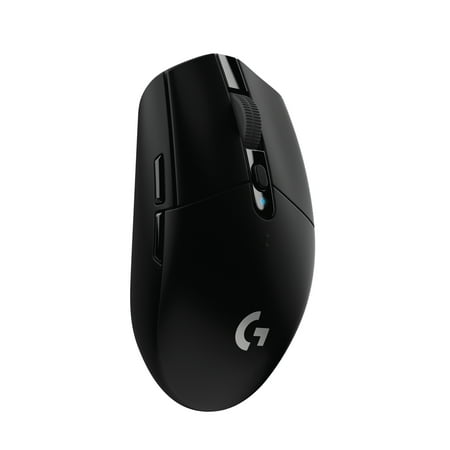
G305 features the next-gen HERO sensor with 12,000 DPI sensitivity and LIGHTSPEED wireless 1 ms performance. It’s long-lasting with 250 gaming hours from one AA battery (an indicator light reminds you before you need a new AA), ultra-portable with built-in nano receiver storage, lightweight...
The G305 is the answer when someone asks for a wireless gaming mouse and does not want to spend $100. At $39.99 it uses Logitech’s HERO 12K sensor, which is the same sensor family found in mice costing twice as much. Sensor quality is not the compromise here.
Battery life is the headline. One AA battery runs it for up to 250 hours. That is not a typo. Competitors in this price range struggle to hit 70 hours. You will change this battery roughly twice a year under heavy use, and it takes a standard AA you can buy anywhere.
LIGHTSPEED 2.4GHz wireless keeps latency in wired territory. The mouse weighs 99 grams — above the 80g lightweight threshold, but not heavy enough to feel sluggish. The shape is ambidextrous and relatively compact, which suits most hand sizes.
Who should skip it: if you have a large hand and grip hard, the compact body may feel cramped after long sessions. Also, there is no onboard rechargeable battery, so you are buying AAs forever. That is a minor annoyance, not a dealbreaker.
For most people reading this, the G305 is the right call.
Best budget wired: Razer DeathAdder Essential
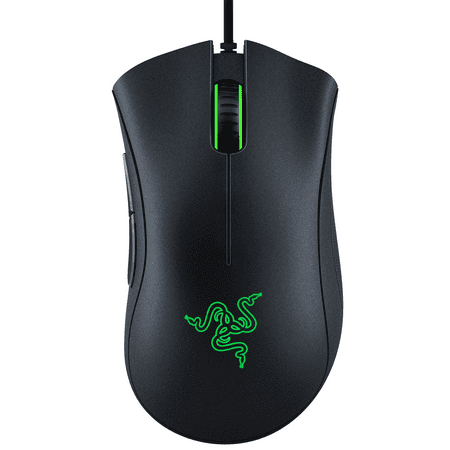
The Razer DeathAdder Essential is the essential gaming mouse to kickstart a proper gaming rig. The 6,400 DPI optical sensor enables fast and precise swipes for great control, while an ergonomic form allows for extended hours of gaming. It’s also built for durability, featuring 5 Hyperesponse...
The DeathAdder Essential has been Razer’s entry-level recommendation for years, and it has earned that position. At $24.98 you get a purpose-built ergonomic shape designed for right-handed palm and claw grips, a 6,400 DPI optical sensor, and a 2.1-meter braided cable that does not fray the way budget cables tend to.
The weight is approximately 96 grams. That is heavier than the ultralight trend, but the shape compensates. A mouse that fits your hand well at 96g beats a mouse that fits poorly at 65g. This one fits most right-handed users well.
One caveat: Razer’s Synapse software has a documented community complaint around memory usage — around 485MB of RAM at idle. If you plan to use DPI switching or lighting customization you will need Synapse. If you just plug it in and play, you do not. The hardware itself does not require the software to function.
For anyone who wants a proper gaming mouse, prefers wired, and has under $25 to spend, this is the pick. Left-handed users need to look elsewhere — the shape is right-hand only.
Best mid-range wireless: Razer Basilisk V3 X HyperSpeed
At $69 this is the most expensive mouse on the list. It earns the price through two features that genuinely matter.
First, dual-mode wireless. The Basilisk V3 X HyperSpeed connects via 2.4GHz for gaming and Bluetooth for when you switch to a different device or want to save the dongle slot. Most mice at this price force you to choose one wireless standard. This one covers both.
Second, the HyperScroll wheel. It operates in two modes: a standard notched scroll for precise control, and a free-spin mode for fast document scrolling or weapon switching. The Focus X sensor handles the tracking. Ergonomic right-hand shape, same family as the DeathAdder.
This is not a lightweight mouse. If your main goal is shaving grams for competitive play, the G305 or the ATTACK SHARK R1 are better fits. The Basilisk V3 X is for the gamer who uses their mouse outside of games too — browsing, productivity, switching between devices — and wants everything handled by one peripheral.
Best ultra-budget: TSV Gaming Mouse
Ten dollars and ninety-eight cents. That is what the TSV Gaming Mouse costs. At that price the conversation is not “is it the best?” — it is “does it work?” and the answer is yes.
It is wired, which removes any wireless reliability concern. It has four DPI settings, RGB lighting if you care about that, and side buttons. Those are the basics. It covers them.
The sensor spec is modest. The build quality will not impress anyone coming from a $40+ mouse. But if you are building a budget PC, grabbing a spare mouse for a secondary setup, or buying something for a younger gamer who does not need premium hardware yet, the TSV delivers exactly what it promises.
Do not buy this as your main mouse if you have $25 to spend. Spend the extra $14 and get the DeathAdder Essential. But if $10.98 is genuinely the budget, this mouse works.
Best for connectivity options: ATTACK SHARK R1
The ATTACK SHARK R1 is the surprise on this list. It costs $28.43 and weighs 55 grams. For context, the Razer Viper V3 Pro — one of the most praised ultralight mice in esports — weighs 54 grams and costs $159.99. The R1 gets within one gram of that at a fifth of the price.
Weight alone does not make a mouse great, and the R1 does not have a flagship-tier sensor. It uses the PixArt PAW3311, capable of 18,000 DPI. That is more than any competitive player uses, but the sensor’s actual accuracy at 400 to 800 DPI is adequate for the price tier.
Where the R1 genuinely wins is connectivity. Bluetooth 5.0, 2.4GHz wireless, and USB-C wired — all three in one mouse under $30. That coverage is unusual at any price. Switch between your gaming PC, a laptop, and a phone without carrying extra hardware.
The tri-mode setup and low weight make this the pick for mobile setups, travel gaming rigs, and anyone who refuses to be locked into one connection type. If you are a competitive FPS player who will stay on one PC at 800 DPI, the G305 has a better sensor story. But for flexibility, nothing here touches the R1.
Also good: FFN Wireless Gaming Mouse
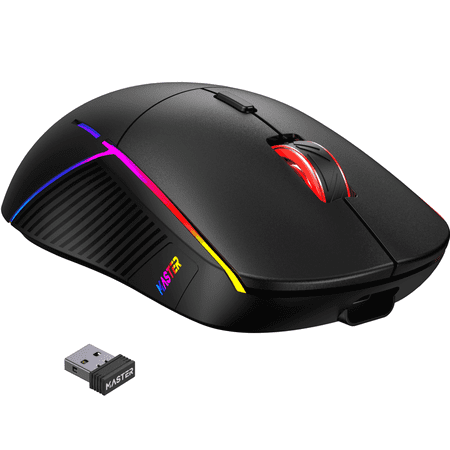
Upgrade your setup with the FFN 3-Mode Wireless Gaming Mouse — a precision tool designed for gamers and creators who need flexible connectivity and customizable control. This lightweight mouse supports 2.4GHz wireless, Bluetooth 5.3, and USB-C wired modes, and features an adjustable DPI range up...
The FFN Wireless Gaming Mouse costs $15.79 and competes directly with the ATTACK SHARK R1 on connectivity. It also offers Bluetooth, 2.4GHz, and USB-C wired. Sensor spec is listed at 24,000 DPI. Battery life is 75 hours on wireless.
Why is it “also good” instead of a category winner? The ATTACK SHARK R1 is 55 grams. The FFN’s weight is not as prominently specified, and the R1’s sensor pedigree (PixArt PAW3311) is more established. At $12.64 less than the R1, the FFN is the pick if budget is genuinely the deciding factor and you still want tri-mode connectivity.
75 hours of battery life is solid. 2.4GHz wireless means no perceptible latency penalty during play. For the price it is hard to argue with what you get.
Side-by-side comparison
| Mouse | Price | Weight | Wireless | Best for |
|---|---|---|---|---|
| Logitech G305 LIGHTSPEED | $39.99 | 99g | 2.4GHz | Best overall wireless value |
| Razer DeathAdder Essential | $24.98 | ~96g | No (wired) | Budget wired, ergonomic shape |
| Razer Basilisk V3 X HyperSpeed | $69.00 | N/A | 2.4GHz + BT | Dual wireless, multi-device users |
| ATTACK SHARK R1 | $28.43 | 55g | BT 5.0 + 2.4GHz + wired | Ultralight, tri-mode connectivity |
| TSV Gaming Mouse | $10.98 | N/A | No (wired) | Absolute minimum spend |
| FFN Wireless Gaming Mouse | $15.79 | N/A | BT 5.3 + 2.4GHz + wired | Cheapest tri-mode option |
Frequently asked questions
What DPI should I actually use for gaming?
Most competitive players use 400 to 800 DPI. That might sound low when your mouse advertises 35,000, but lower DPI gives you finer control over small movements. High DPI settings make the cursor fly across the screen, which feels fast but works against precise aim. Set your DPI in the 400-800 range and adjust your in-game sensitivity from there. You can always go higher for desktop use and switch back for games.
Is wireless gaming mouse latency actually a problem?
Not with 2.4GHz wireless. Razer’s own testing on the Viper V3 Pro shows 0.54ms wired versus 0.83ms over LIGHTSPEED/HyperSpeed 2.4GHz. That 0.29ms difference is not something any human registers during play. Bluetooth is a different story — Bluetooth is fine for productivity but introduces more variable latency than 2.4GHz. If you want wireless for gaming, look for a mouse with a dedicated 2.4GHz receiver, not just Bluetooth.
Does mouse weight actually matter for gaming?
It depends on how you play. Flick-heavy styles in FPS games benefit from lighter mice — under 80 grams by Tom’s Hardware’s benchmark. The ATTACK SHARK R1 at 55g gets into ultralight territory for $28. But if your playstyle is slower and more methodical, or you play strategy and RPG games, weight matters much less. A heavier mouse that fits your hand well beats a featherweight mouse with poor ergonomics every time.
Do I need gaming mouse software?
No. Every mouse on this list works plug-and-play without installing anything. Software like Razer Synapse unlocks DPI customization, lighting effects, and macro buttons — useful features, but optional. One note on Synapse specifically: community reports put its idle RAM usage around 485MB, which is high for background software. If that concerns you, configure your settings once and then uninstall it, or just skip it entirely and use the hardware defaults.
Affiliate disclosure: ComputerStationNation participates in affiliate programs including Walmart’s affiliate program. If you purchase a product through a link on this page, we may receive a small commission. This does not change our recommendations or the price you pay. We are independently owned and the opinions expressed here are our own.