Computer Station Nation is reader-supported.
When you buy through links on our site, we may earn an affiliate commission. Learn more.
Your eyes should not feel like sandpaper after a long session at the battlestation. If you are spending 8+ hours a day in front of a screen with only the monitor glow lighting your workspace, that is a problem worth fixing for $20. A monitor light bar sits on top of your monitor, lights your desk without shooting glare back into your face, and takes about 60 seconds to set up.
After going through 15+ options and cross-referencing thousands of user reviews, five made the cut. Here is what actually held up and why.
Quick Picks
- Best overall: Quntis Computer Monitor Light — auto-dimming, CRI 95+, certified blue light reduction, fits flat and curved monitors
- Best for gaming: INSMART Monitor Light Bar — dual front/back light, 15 RGB effects, Ra98 color rendering, under $30
- Best budget with remote: OGEDNAC Screen Monitor Light Bar — wireless remote, 300–1000 lux range, memory mode, under $20
- Best mid-range stepless dimming: Aship Monitor Light Bar — 20-inch, stepless dimming, curved monitor compatible, $35
- Best under $20 (simple): Monitor Light Bar (USB, 25 modes) — 25 lighting modes, touch control, no-frills but reliable
How we picked these
The cut criteria were simple: asymmetric optical design (no screen glare), at least two color temperature settings, USB power only, and verified availability. Products with fewer than 3.5 stars on 20+ reviews were dropped automatically. These five survived that process.
Best monitor light bars at a glance
| Light bar | Best for | Price | Rating |
|---|---|---|---|
| Quntis Computer Monitor Light | Overall best — auto-dimming, eye certified | $39.95 | ⭐⭐⭐⭐⭐ 4.9/5 |
| INSMART Monitor Light Bar | Gaming + RGB ambiance | $27.79 | ⭐⭐⭐⭐ 4.4/5 |
| OGEDNAC Screen Monitor Light Bar | Budget pick with wireless remote | $19.89 | ⭐⭐⭐⭐ 4.4/5 |
| Aship Monitor Light Bar | Curved monitors, stepless dimming | $35.09 | ⭐⭐⭐⭐ 4.3/5 |
| Monitor Light Bar USB 25-mode | No-frills ultra-budget | $19.99 | ⭐⭐⭐⭐ 4.1/5 |
Table of contents
- Quntis Computer Monitor Light — Best Overall
- INSMART Monitor Light Bar — Best for Gaming
- OGEDNAC Screen Monitor Light Bar — Best Budget with Remote
- Aship Monitor Light Bar — Best for Curved Monitors
- Monitor Light Bar USB 25-Mode — Best Ultra-Budget
- Buying Advice
- FAQ
Quntis Computer Monitor Light — Best overall
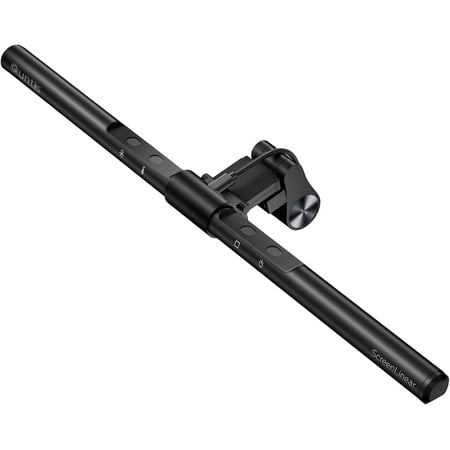
Quntis 15.74" Non-Glare Computer Monitor Light Bar Specifications: Optical Design: 45° asymmetric light path, non-glare and flicker-free design Blue Light Certification: IEC62778 blue light reduction certification Color Rendering Index (CRI): ≥95 Ra Color Temperature Adjustment: 3000K–6500K...
| Spec | Details |
|---|---|
| Length | 15.75 in / 40 cm |
| LEDs | 78 high-CRI LEDs |
| CRI | 95+ |
| Brightness | 0–700 lux (stepless), auto-dim to ambient |
| Color temperature | 3000K–6500K (stepless) |
| Power | USB-C, 5W |
| Monitor thickness | 0.6–1.4 in flat monitors |
| Eye care certs | IEC62778 (blue light), IEC62471 (optical safety) |
Rating: 4.9/5
The Quntis is the pick if you want a monitor light bar and never want to think about it again. It does the one thing that matters — lights your desk without bouncing glare off your screen — and it does it better than anything else under $40.
The 45-degree asymmetric optical design is the core. Light goes down onto your desk and keyboard, not toward your face or monitor. BenQ invented the concept; Quntis delivers it at half the price. With 78 LEDs rated at CRI 95+, colors read accurately under this light. Documents look like documents. Code looks like code. No weird yellow cast washing everything out.
Auto-dimming is what justifies the $40 price. A built-in ambient light sensor reads your room and adjusts brightness to stay around 700 lux, which meets U.S. workplace lighting standards (ANSI/IES RP-1-12). It tracks the room as natural light changes through the day. You set it once and stop thinking about it.
Walmart reviews consistently flag two things: the setup is laughably simple (clip on, plug in, done), and the eye strain reduction is noticeable within days. One buyer put it plainly: “best $40 I’ve spent on my desk.” Hard to argue with that.
The real limitation: flat monitors only, 0.6 to 1.4 inches thick. Curved monitor? Look at the Aship below. And yes, $39.95 is the most expensive option on this list. For daily office or content creation use, it is worth it. For casual occasional use, the OGEDNAC gets you 80% of the way there for half the price.
Pros:
- Auto-dimming adjusts to room light automatically
- CRI 95+ LEDs — accurate color rendering
- IEC blue light and optical safety certifications
- Stepless brightness and color temp adjustment
- Memory function recalls last settings on power-on
Cons:
- Flat monitors only (0.6–1.4 in thick)
- Most expensive option on this list
- Touch controls only, no wireless remote
INSMART Monitor Light Bar — Best for gaming
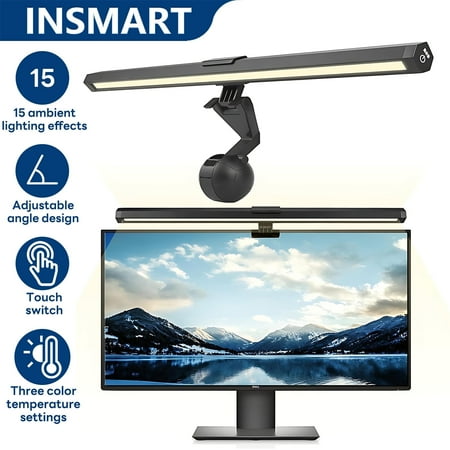
INSMART Monitor Light adopts double-sided light-emitting design, the front provides 6500K/4000K/3000K three color temperatures to meet the needs of office reading, and the back is equipped with 15 kinds of RGB light effects to switch the atmosphere of the game in one key.45°scientific anti-glare...
| Spec | Details |
|---|---|
| Length | 40 cm (15.75 in) |
| Color temperature (front) | 3000K, 4000K, 6500K |
| RGB effects | 15 dynamic backlight modes |
| CRI | Ra98 |
| Rotation | 180-degree lamp body, 70-degree backlight |
| Power | USB, 5W |
| Monitor compatibility | 0.6–1.4 in thick |
| Cord length | 4.9 ft |
Rating: 4.4/5
The INSMART runs two separate light systems: a front work light and a rear RGB backlight with 15 modes. One bar, two functions. That is not something most bars at this price point bother with.
The front light has three color temperatures — 3000K warm, 4000K neutral, 6500K cool — with stepless dimming. The 45-degree anti-glare design keeps it pointed at your desk. CRI is rated Ra98, which is genuinely good for this category. Color accuracy is better than most overhead office lighting you are probably sitting under right now.
The RGB backlight is where it gets fun. Fifteen modes: static, pulsing, wave effects. The backlight rotates 70 degrees, so you can angle it at the wall behind your monitor for bias lighting — the same ambient glow you see in every epic gaming setup photo. Under $30 for all of that is a real deal.
Honest caveat: this is a newer product with a smaller review base than the Quntis. The 3.2-star seller rating on Walmart is the vendor’s overall track record, not a reflection of this specific product’s quality. If you need maximum credentials and a years-long paper trail of user reviews, go Quntis. If you want dual lighting and RGB for a gaming rig without spending extra, go INSMART.
Pros:
- Dual lighting: front work light plus rear RGB backlight
- 15 RGB backlight modes
- Ra98 CRI — exceptional color accuracy
- 180-degree lamp rotation for precise positioning
- Under $30
Cons:
- Fewer user reviews than competitors
- No auto-dimming
- Touch control only, no wireless remote
OGEDNAC Screen Monitor Light Bar — Best budget with remote
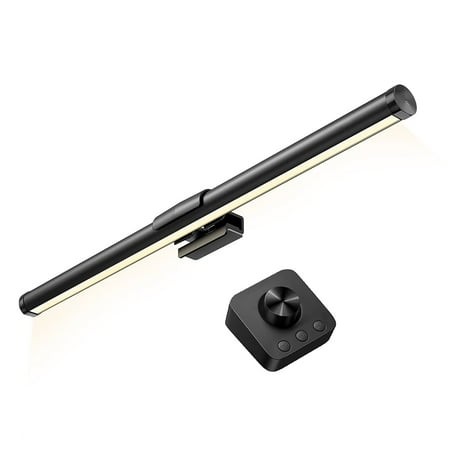
Why do You Need a Monitor Light? Firstly, consider the strain imposed on our eyes during prolonged exposure to screens. The harsh contrast between the luminosity of the monitor and the ambient lighting in the room can lead to eye fatigue and discomfort. OGEDNAC monitor light acts as a...
| Spec | Details |
|---|---|
| Brightness range | 300–1000 lux |
| Color temperature | 3000K–6500K |
| Control | Touch + wireless remote |
| Power | USB |
| Monitor thickness | 15–25 mm (0.59–0.98 in) |
| Cord length | 4.75 ft |
| Memory mode | Yes — saves last settings |
Rating: 4.4/5
Sub-$20 with a wireless remote. That is the whole pitch. Most budget bars make you reach up and fumble with touch controls every time you want to adjust brightness. The OGEDNAC comes with a small remote that handles brightness and color temperature from your chair, no arm gymnastics required.
The 300–1000 lux range is the widest on this list. Three hundred lux at the bottom is dim enough for late-night gaming without blasting your eyes. A thousand lux at the top is bright enough for focused desk work in a dark room. The asymmetric design keeps all of it off your screen.
Memory mode saves your last brightness and color temp so they restore automatically on the next power-on. No resetting every morning. The flicker-free, anti-glare certifications are listed on the product page, and Walmart reviewers confirm the performance matches.
Watch the compatibility spec before ordering. This one fits monitors 15–25 mm thick, which is narrower than the Quntis. Most standard monitors land in that range, but measure your bezel first. Also: the remote dial needs deliberate adjustment to land at a specific setting — reviewers call it slightly finicky. Still, a remote at under $20 is hard to argue with.
Pros:
- Wireless remote included, rare at this price
- Wide brightness range: 300–1000 lux
- Memory mode saves last settings
- Anti-glare, flicker-free certification
- Under $20
Cons:
- Narrower monitor compatibility: 15–25 mm only
- Remote dial requires deliberate fine-tuning
- No auto-dimming
Aship Monitor Light Bar — Best for curved monitors
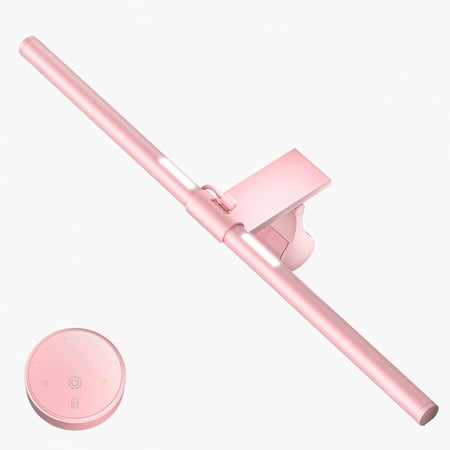
Aship 15.74" Non-Glare Computer Monitor Light Bar Specifications: Optical Design: 45° asymmetric light path, non-glare and flicker-free design Blue Light Certification: IEC62778 blue light reduction certification Color Rendering Index (CRI): ≥95 Ra Color Temperature Adjustment: 3000K–6500K...
| Spec | Details |
|---|---|
| Length | 20.4 in (51.8 cm) |
| Color temperature | 3 modes |
| Dimming | Stepless |
| Power | USB |
| Special compatibility | Curved monitor support |
| Auto-dimming | Yes |
| Price | $35.09 |
Rating: 4.3/5
Curved monitors dominate gaming setups now. 1440p 144Hz curves, 34-inch ultrawides, you name it. Most monitor light bars clip onto flat-edged bezels and that is that. The Aship handles curved monitors too.
At 20.4 inches, it is the longest bar on this list. That matters on a wide screen. A 15-inch bar looks stubby on a 32-inch curved ultrawide and leaves the edges dark. The Aship spans it properly. Stepless dimming means you are not stuck choosing between three preset levels — you dial to exactly where you want. Auto-dimming handles room light changes automatically.
Three color temperature modes cover warm, neutral, and cool white. Standard, not special, but more than enough for most people. The only real knock: no remote. Touch controls are on top of the bar, so you have to reach up. On a tall 32-inch monitor the bezel can be at eye level, so it is not terrible, but a remote would still be better.
Pros:
- Longer bar (20.4 in) covers wide curved monitors
- Explicit curved monitor compatibility
- Stepless dimming for precise brightness control
- Auto-dimming adjusts to room light
Cons:
- No wireless remote
- Only 3 color temperature modes
- Slightly pricier than INSMART or OGEDNAC
Monitor Light Bar USB 25-mode — Best ultra-budget
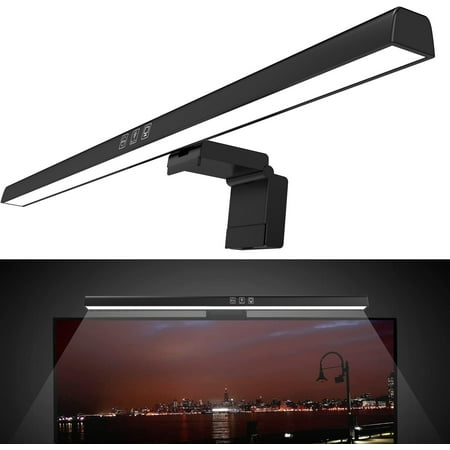
Monitor Light Bar, USB Powered Monitor Lamp for Eye Caring, 25 Lighting Modes, Computer Monitor Desk Lamp, Space Saving LED Screen Light Bar for Desk/Office/Home/Game
| Spec | Details |
|---|---|
| Lighting modes | 25 |
| Power | USB |
| Price | $19.99 |
| Eye care | Anti-glare design |
| Control | Touch |
Rating: 4.1/5
Sometimes you just want a light bar that works and does not cost much. This one clips on, plugs in, and lights your desk. 25 modes, touch controls, no app, no drama. Done.
The 25 modes cover a wide range of brightness and color temperature combinations. Anti-glare design keeps the light off your screen — reviewers confirm it works as described. The touch controls on the bar handle switching.
Where it falls short: no certifications, no auto-dimming, no remote, and no brand name to hold accountable if it dies early. The product listing is thin on technical details. For occasional use, a second monitor setup, or your first experiment with monitor lighting, it is a fine $20 test. But if you are sitting at this desk 8 hours a day, spend the extra $20 and get the Quntis. Your eyes will notice over time.
Pros:
- Under $20
- 25 lighting modes, more variety than pricier options
- Simple plug-and-play setup
Cons:
- No certifications or verified specs
- No auto-dimming
- No remote
- No brand track record
Verdict
The Quntis Computer Monitor Light wins for daily use. Auto-dimming, CRI 95+, certified eye care, stepless control — set it up once and forget it. If you are at your workstation for long hours every day, this is the one.
The INSMART is the runner-up for gaming setups. Dual lighting and 15 RGB modes under $30 is a legit deal — and Ra98 CRI is actually impressive at this price. The OGEDNAC is the smart budget play when you want a remote and do not want to pay Quntis prices.
Buying advice — who should get which
Get the Quntis if you work from home or game daily for 6+ hours. The auto-dimming and IEC certifications pay off over weeks of daily use. CRI 95+ makes a real difference for design work, photo editing, or anything color-sensitive.
Get the INSMART if your setup is gaming-first and you want ambient RGB behind the monitor plus proper desk lighting. The dual-light system at under $30 is a solid choice for anyone building an epic battlestation without a big budget.
Get the OGEDNAC if you want a wireless remote and you are not paying Quntis prices. Sub-$20 with remote control is genuinely hard to beat. Just confirm your monitor bezel is 15–25 mm thick before ordering.
Get the Aship if you have a curved monitor. Longest bar on the list at 20.4 inches, explicitly curved-compatible, and it covers wide screens without looking stubby.
Get the no-name USB bar if you want to try monitor lighting for the first time without a $40 commitment. It works. You will probably upgrade in a few months, but you will at least know for sure whether the concept is worth it for your setup.
One thing worth knowing before you shop: LED bead count means almost nothing without CRI data. A bar with 120 LEDs and no CRI spec can look worse than one with 78 high-quality LEDs rated at 95+. Focus on CRI (90+ for serious use), lux range, and whether the eye care claims are backed by IEC certifications rather than marketing copy.
Also: monitor light bars do not replace room lighting. They reduce the contrast between your bright screen and a dark room, which is the main driver of eye strain. If your workspace is a cave, add a bias light behind the monitor in addition to the bar. You do not have to pick one or the other.
FAQ
Do monitor light bars actually help with eye strain?
Yes, and the reason is simple. Eye strain from screens mostly comes from high contrast between the bright display and the dark space around it. Your eyes keep adjusting between the two. A monitor light bar adds light to your desk surface without adding any to the screen itself, which closes that contrast gap. The American National Standards Institute (ANSI) recommends 500 lux for office environments — the Quntis auto-dims to that exact number, based on the ANSI/IES RP-1-12 standard. That is the actual science behind it, not a marketing claim.
Will a monitor light bar work on a curved screen?
Some do, some do not. Most standard bars are designed for flat monitors with straight top edges. The Aship on this list explicitly supports curved monitors. BenQ ScreenBar Halo also handles curves up to 1000R curvature if you want a premium option. If you have a curved ultrawide, look for “curved monitor compatible” on the product page and confirm the thickness range matches your bezel.
What is the difference between a monitor light bar and a desk lamp?
A desk lamp sits on your desk and throws light in every direction, including toward your screen. A monitor light bar mounts on the monitor itself and uses an asymmetric optical design to direct all the light downward onto your desk. No glare, no reflections. Desk lamps work better for larger work areas away from the screen. Light bars work better for illuminating your keyboard and immediate work surface during screen sessions.
How do I know if a monitor light bar will fit my monitor?
Measure the top bezel of your monitor — the thickness from front to back at the very top edge. Most bars clip onto bezels between 0.6 and 1.4 inches (15–35 mm) thick. The OGEDNAC has a narrower window at 15–25 mm, so measure before ordering that one. Most modern flat monitors fall between 10 and 30 mm. Ultra-thin frameless bezels can be tricky — check product reviews for notes about thin bezel compatibility specifically.
Is a more expensive monitor light bar worth it?
For heavy daily use, yes. The premium on the Quntis ($39.95 vs a $15 no-name) buys you certified eye care standards (IEC62778 blue light, IEC62471 optical safety), auto-dimming that actually reacts to room light, and CRI 95+ LEDs that render color accurately. If you are at your workstation 8+ hours a day, that $20 difference is worth it over months of use. For occasional use or a second monitor setup, a budget bar handles it fine.