
Computer Station Nation is reader-supported.
When you buy through links on our site, we may earn an affiliate commission. Learn more.
The 75% layout has quietly taken over enthusiast desks. It keeps the function row, ditches the numpad, and squeezes the arrow keys back where they belong. So you get tenkeyless function with sub-65% real estate. That is a big deal in 2026.
The category has exploded. Razer, Glorious, Keychron, and a wave of independent makers are all swinging at this size now. Picking the right one is harder than it should be.
This guide cuts through the noise. Six picks. Six different use cases. All vetted against owner sentiment from Reddit and r/MechanicalKeyboards, manufacturer spec sheets, and the boards we’ve spent time on at the workstation. Let’s dive in.
Quick picks — the TL;DR
If you want to cut straight to the chase, here is the short version:
- Best overall: Razer BlackWidow V4 75% — flagship build, hot-swap, and Razer’s quietest stabilizers to date.
- Best wireless: Aula F75 — tri-mode, gasket-mounted, and absurd value at the price.
- Best hot-swap custom: MageGee SKY81 — five-layer dampening, knob, and a sub-$40 price tag.
- Best for long sessions: Aula AU75 — 4000mAh battery, gasket mount, PBT keycaps.
- Best multimedia: COSTOM 75% RGB — built-in screen and Mac/Win compatibility.
- Best budget: MageGee STAR75 — knob, EVA foam, full NKRO under $35.
Selection methodology
After evaluating dozens of 75% boards available on Walmart and the wider keyboard community, we narrowed it to six picks based on six criteria: typing feel and acoustic profile, build quality, switch and keycap quality, connectivity (wired vs tri-mode wireless), value at price tier, and customization headroom (hot-swap, QMK/VIA, software). Each pick wins one specific job — not just “best overall.”
Why 75% is huge in 2026
The 75% layout was a niche format five years ago. Now it is everywhere. Razer makes one. Glorious makes three. Keychron has at least four under different sub-brands. Why the shift?
Three reasons. First, mouse real estate. A standard 104-key board eats 17 inches of desk. A 75% board reclaims roughly 4 inches of space for the mouse, which matters at low DPI. Second, the function row stayed. 60% boards force you onto a Fn-layer for F1–F12, and that breaks workflows for video editors, IDE users, and anyone who lives in spreadsheets. Third, the arrow cluster came back. 65% boards smashed the arrows into the right shift area, which feels cramped to anyone who navigates code or documents with arrows.
So 75% hits a sweet spot. You get the function row, dedicated arrows, and a few navigation keys (usually delete, page up/down, home/end). And you save a brick of desk. For most workstations and battlestations, that’s the layout you actually want.
This guide assumes you already know you want 75%. If you are still on the fence, we cover layouts in our mechanical keyboard pillar guide.
At-a-glance comparison
| Keyboard | Best for | Price | Rating |
|---|---|---|---|
| Razer BlackWidow V4 75% | Best overall | $189.99 | 4.6 / 5 |
| Aula F75 | Best wireless | $65.99 | 4.5 / 5 |
| MageGee SKY81 | Best hot-swap custom | $39.99 | 4.3 / 5 |
| Aula AU75 | Long typing sessions | $61.99 | 4.4 / 5 |
| COSTOM 75% RGB | Best multimedia | $48.73 | 4.4 / 5 |
| MageGee STAR75 | Best budget | $31.44 | 4.2 / 5 |
1. Razer BlackWidow V4 75% — Best overall
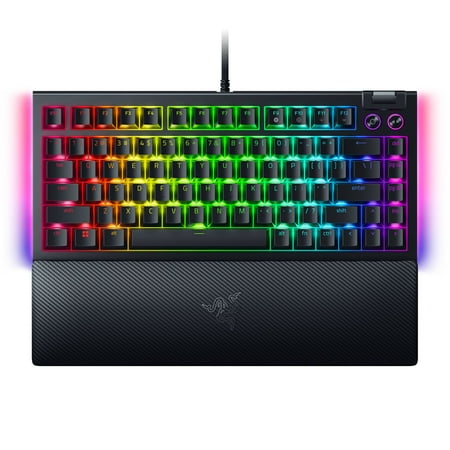
SWAP OUT. SWAP IN. GAME ON. For those who crave greater customization and immersion, satisfy your enthusiast needs with the Razer BlackWidow V4 75%—a compact, hot-swappable mechanical keyboard powered by Razer Chroma RGB. From installing new switches to creating unique lighting effects, shape it...
Razer’s first real swing at the enthusiast 75% market is a hit. The BlackWidow V4 75% takes the company’s gaming-first DNA and bolts it onto a hot-swap, gasket-mounted, sound-tuned chassis that finally satisfies the keyboard nerds. This bad boy is a serious tool.
The chassis is metal, the plate is FR4, and Razer’s switches roll out of the box already lubed. That last detail matters more than people give it credit for. Lubed switches drop typing volume by roughly 5–8 dB and remove the rattle that plagues most prebuilt boards. Razer also added a layer of EVA foam, a layer of poron under the PCB, and a silicone bottom layer. The result is a deep, low-pitched sound profile that competes with custom boards twice the price.
Hot-swap is the headline feature for many buyers. Pull a switch, drop in a different one, no soldering. That is the cheat code for tuning a board to your taste over time. Pair that with the per-key RGB and the Razer Synapse software (love it or hate it, it works), and you have a board that scales from “out of box gaming” to “modded enthusiast” without buying twice.
Where it stumbles: the price is steep at $189.99, and Synapse is still bloatware-adjacent for users who only want the basics. Some owners on Reddit also note that the included Razer Yellow switches are a touch louder than competitor pre-lubed linears like Akko Cream Yellow. Worth knowing if you are noise-sensitive.
| Layout | 75% (81 keys) |
| Switches | Razer Mechanical Yellow (linear, pre-lubed) |
| Hot-swap | 5-pin, supports 3-pin and 5-pin |
| Mount | Gasket mount, FR4 plate |
| Keycaps | Doubleshot ABS, side-printed legends |
| Connection | Wired USB-C, detachable braided cable |
Rating: 4.6 / 5
Pros
- Hot-swap PCB with broad switch compatibility
- Gasket mount + foam stack for a deep, custom-tier sound
- Pre-lubed switches and stabilizers out of the box
- Per-key RGB with full Synapse customization
- Solid metal chassis for the price tier
Cons
- Wired only — no Bluetooth or 2.4 GHz
- Synapse software is heavy on system resources
- ABS keycaps will shine over time
2. Aula F75 — Best wireless
short description is not available
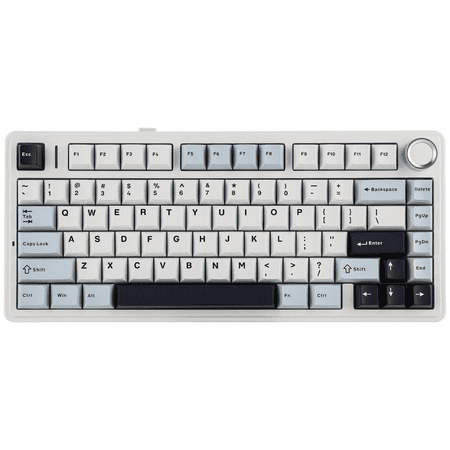
The Aula F75 is one of those boards that keeps showing up in Reddit threads and YouTube budget roundups, and there is a reason. It punches several tiers above its price. Tri-mode connectivity, hot-swap PCB, gasket mount, and a real volume knob — for $65.99. Crazy.
Tri-mode means you get Bluetooth 5.0, 2.4 GHz wireless via the bundled dongle, and USB-C wired. Battery life lands around 50 hours with RGB on and considerably longer with backlight off. That covers a full work week without a charge for most users. The 2.4 GHz mode is the one to use for gaming — Bluetooth latency on any board adds 20–30 ms minimum, which you will feel in fast titles.
Out of the box the typing feel is gentle and bouncy thanks to the gasket mount and pre-applied silicone padding. The included switches are Aula’s own pre-lubed linears, which are decent but not endgame. If you are a switch nerd, the hot-swap PCB lets you drop in Gateron Yellows, Akko V3s, or HMX Cloud — pick your poison. The community consensus is that this board responds dramatically well to a switch upgrade.
The weak spot? Software. Aula’s driver is Windows-only and rough around the edges, and the per-key RGB customization is limited compared to QMK boards. The included keycaps are also thin doubleshot ABS that some users replace within a month. Budget for a $20 PBT set if you want this board to age well.
| Layout | 75% (82 keys with knob) |
| Connection | Bluetooth 5.0, 2.4 GHz, USB-C |
| Battery | ~50 hours with RGB |
| Hot-swap | 5-pin, MX-compatible |
| Mount | Gasket mount |
| Keycaps | Doubleshot ABS |
Rating: 4.5 / 5
Pros
- True tri-mode wireless with stable 2.4 GHz
- Hot-swap PCB welcomes any MX-style switch
- Gasket mount feels far more premium than the price
- Volume knob is satisfying and functional
- Strong battery life with backlight tuning
Cons
- Stock keycaps are thin ABS
- Aula software is Windows-only and basic
- Bluetooth lag is noticeable for fast-paced gaming
3. MageGee SKY81 — Best hot-swap custom on a budget
MageGee 104-Key Wired Keyboard is a full-size, versatile peripheral perfect for gaming, office tasks, and daily use (compatible with PCs and laptops). It features a 7-color rainbow backlight that enhances visibility in low-light spaces while adding dynamic visual appeal to your setup. The full...
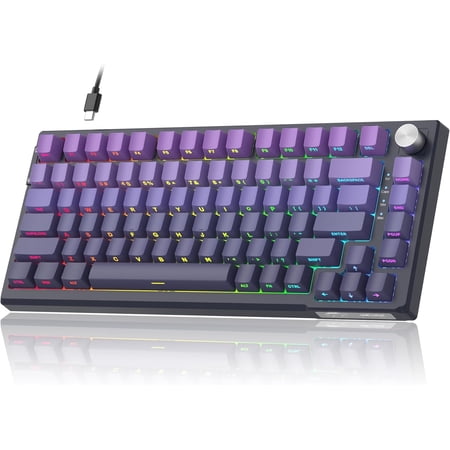
The SKY81 is the gateway drug. It is the cheapest legitimate hot-swap, gasket-mounted board with a five-layer foam stack you can buy. At $39.99 it is half the price of competitors and aimed squarely at people who want to learn keyboard modding without dropping $200 to start.
The construction is a plastic shell over a steel plate, with EVA foam, IXPE film, silicone, poron, and PCB foam stacked between the case and the board. That sounds like marketing but the acoustic effect is real. The board has a deep, almost thocky character that no $40 board has any business producing. Several Reddit threads and r/MechanicalKeyboards roundups have called this out as the budget pick of the year.
The volume knob is a nice touch. The RGB is bright enough. And the hot-swap PCB takes any 3-pin or 5-pin MX switch, so you can graduate this board into something custom-feeling with a $25 switch upgrade. Total project cost: under $70.
Caveats: it is wired only, the keycaps are mediocre ABS that ships unlubed, and the included switches are basic linears with above-average stem wobble. None of that is a deal-breaker at this price, but know what you are getting into. This is a starting point, not an endgame board.
| Layout | 75% (81 keys with knob) |
| Connection | Wired USB-C |
| Hot-swap | 5-pin MX-compatible |
| Mount | Gasket mount with five-layer foam |
| NKRO | Full N-key rollover |
| Keycaps | ABS doubleshot |
Rating: 4.3 / 5
Pros
- Five-layer foam delivers a deep sound profile
- Hot-swap PCB encourages future modding
- Volume knob and RGB lighting included
- Steel plate adds rigidity to the typing feel
Cons
- Wired only
- Stock switches and keycaps are entry-level
- Software customization is limited
4. Aula AU75 — Best for long typing sessions
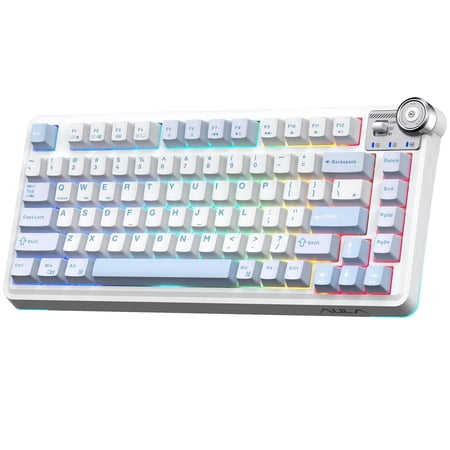
Creamy thocky sound – 5-layer padding for clean, satisfying acoustics 100M keystroke switches – Hot-swappable, built to last 266-hour battery – 4000mAh, weeks of use on a single charge 75% compact design – 25% more desk space, full typing comfort Smart knob + dual mode – Instant control,...
If you sit at the keyboard for eight straight hours, the AU75 is the one to pick. Five-layer padding, gasket mount, real PBT keycaps, and a 4000 mAh battery you can run wireless for days. Aula clearly built this one for the work-from-home crowd that types more than they game.
PBT keycaps are the headline. Most boards in this price range ship ABS, which gets shiny within a few months and feels noticeably slicker than PBT after fingertip oils start collecting. PBT is harder, denser, and stays matte. It is also more expensive to produce, which is why it shows up on this board and not the F75.
The gasket mount and five-layer foam give the AU75 a similar sound profile to the SKY81, but the typing feel is slightly more cushioned because of how Aula tunes the gasket pressure. Owners on the r/Keyboards subreddit consistently report less finger fatigue compared to harder-mounted boards. The 4000 mAh battery delivers around 70 hours with backlight off and 25–30 hours with RGB on a low setting.
The downsides are minor. The included switches are Aula linears that benefit from a swap. The knob feels slightly looser than the F75’s. And the lighting effects are limited compared to the Razer’s full Synapse stack. If you want pretty RGB animations, look elsewhere. If you want a comfortable, quiet, long-haul typing board, this is it.
| Layout | 75% with knob |
| Connection | Wireless and wired (tri-mode) |
| Battery | 4000 mAh, ~70 hours backlight off |
| Hot-swap | Gasket-mounted hot-swap |
| Padding | Five-layer dampening |
| Keycaps | PBT |
Rating: 4.4 / 5
Pros
- PBT keycaps stay matte and durable
- Five-layer foam softens both sound and impact
- Big 4000 mAh battery for week-long wireless use
- Gasket mount reduces finger fatigue
Cons
- Stock switches feel average until swapped
- RGB lighting effects are limited
- Volume knob has slight wobble
5. COSTOM 75% RGB — Best multimedia and Mac/Win
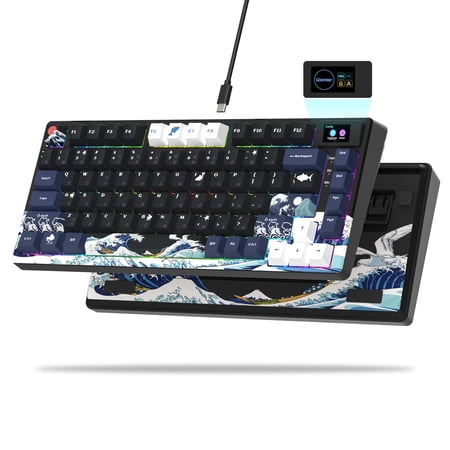
COSTOM SK80 75% Gaming Keyboard is a custom keyboard that combines appearance and performance, featuring a DIY multimedia display screen that allows you to easily create a personalized visual experience; it adopts a 75% layout and cherry profile art theme keycaps, which not only saves desktop...
The COSTOM 75% pulls a clever trick: a built-in multimedia LCD screen above the function row that displays the time, system stats, custom GIFs, and song titles when paired with the included driver. It is a polarizing feature, but if you have ever wished your keyboard told you what is playing on Spotify, this is your board.
The Mac and Windows compatibility is the second big draw. A toggle on the back swaps the layout between Mac and Win modifier orders, including Cmd/Ctrl behavior. That makes this an excellent pick for hybrid users who jump between a MacBook and a desktop without a separate keyboard for each.
Underneath the screen, it is a competent hot-swap board. RGB per-key, doubleshot keycaps, and a typing feel that owners describe as crisp rather than thocky. Not the deepest sound profile in this list, but consistent. The included driver lets you load images and animations to the screen, customize macros, and remap keys. Linux compatibility is hit-or-miss based on community reports.
What to know before buying: the LCD screen is small (around 1.3 inches) and resolution is limited, so do not expect Stream Deck-tier visuals. And the multimedia software runs in the background, which some users dislike. If you do not care about the screen, you are paying for hardware you will not use.
| Layout | 75% with multimedia screen |
| Connection | Wired USB-C |
| Hot-swap | 5-pin MX |
| Compatibility | Mac and Windows toggle |
| RGB | Per-key, full driver control |
| Display | ~1.3 in customizable LCD |
Rating: 4.4 / 5
Pros
- Customizable LCD screen displays GIFs, stats, and song info
- Hardware Mac/Win toggle for hybrid setups
- Hot-swap PCB and per-key RGB
- Solid out-of-box typing feel
Cons
- LCD resolution is limited
- Background driver software always running
- Linux support is inconsistent
6. MageGee STAR75 — Best budget pick
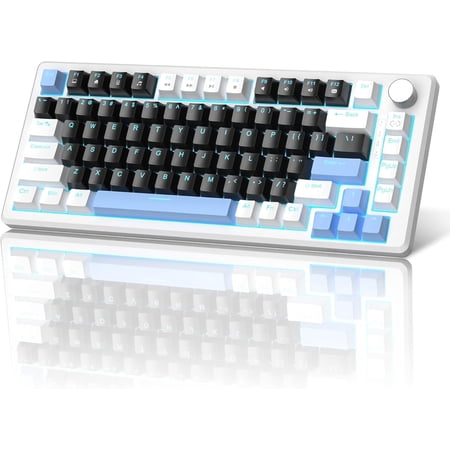
Introducing the MageGee Star75 Wireless Mechanical Keyboard—where compact portability meets premium performance and customizable comfort. Designed for modern users who value both functionality and mobility, this 75% layout keyboard blends innovative design with reliable features, making it the...
For under $35, the STAR75 is the easiest “yes” on this list. It is the board to grab when your kid wants their first mechanical, when you need a backup for a travel setup, or when you simply do not want to spend $100+ on a keyboard. And it is shockingly competent for the price.
The headline features are unusual at this price tier: a real volume knob, EVA foam dampening (one layer, but still there), red linear switches that come pre-applied with a thin lube, and full N-key rollover. NKRO matters for gaming because it means every keypress registers regardless of how many keys are down. Cheap boards usually cap at 6-key rollover, which produces ghosting in titles like Apex Legends or any RTS.
Build quality is, predictably, where the corners get cut. The case is hollow plastic. The keycaps are thin ABS. The stabilizers rattle. None of that is surprising at $31. What is surprising is how usable the board is despite those things. The typing feel is decent. The switches are not amazing but they work. And the layout is correct — not a 65% pretending to be a 75%.
This is not a board you keep forever. It is a board you live with for six months while you decide whether you actually like 75%, then pass on to a friend or move to something better. As an entry point into the format, nothing beats it.
| Layout | 75% with knob |
| Connection | Wired USB-C |
| Switches | Red linear, pre-lubed |
| NKRO | Full N-key rollover |
| Foam | Single-layer EVA |
| Keycaps | ABS |
Rating: 4.2 / 5
Pros
- Volume knob and EVA foam at a sub-$35 price
- Full NKRO for gaming compatibility
- Pre-lubed red linear switches
- True 75% layout, not a 65% knockoff
Cons
- No hot-swap — switches are soldered
- Stabilizers rattle out of the box
- Hollow plastic case
The verdict
The Razer BlackWidow V4 75% is the winner of this round. It is the only board on the list that pairs flagship build quality, hot-swap, and a properly tuned acoustic profile in one package. It is not the cheapest pick — at $189.99 it is the most expensive — but it is the one that will not need a replacement or a heavy mod for years.
If wireless is mandatory, the Aula F75 is the runner-up. Tri-mode connectivity at $65.99 with a hot-swap PCB is genuinely unfair to the rest of the price tier, even with its keycap and software flaws.
Buying advice — who should pick what
Pick the Razer BlackWidow V4 75% if you want one board that will last, you do not need wireless, and you value gaming software (macros, lighting, hardware integrations) alongside enthusiast-grade typing feel.
Pick the Aula F75 if you split time between a desktop and a laptop, or if you want to be able to use the board with a tablet. The wireless versatility is the real upgrade, not raw typing feel.
Pick the MageGee SKY81 if you are new to keyboard modding and want a cheap, low-stakes platform to learn on. Pair it with a $20 set of switches and you have a custom-feel board for under $70 total.
Pick the Aula AU75 if you type for a living and the keyboard sits on your desk eight hours a day. The PBT caps and gasket mount pay off the longest in real-world use.
Pick the COSTOM 75% RGB if you swap between Mac and Windows and you genuinely want the LCD screen feature. Skip it if you do not — there are better-typing boards at this price.
Pick the MageGee STAR75 if your budget is under $40 or you are buying a backup. Do not buy it as a daily driver if you intend to keep it for years.
Frequently asked questions
Is a 75% keyboard worth it over a TKL?
Yes for most users. A 75% board keeps every key a TKL has except for a few navigation keys (page up/down, home/end). It saves roughly 1.5 inches of width and feels much more compact on the desk. The only people who genuinely benefit from TKL over 75% are programmers and writers who lean heavily on the dedicated nav cluster.
Are 75% keyboards good for gaming?
Very good. The format keeps the function row (which matters for hotbar binds in MMOs and weapon swaps in FPS) and gives back desk space for low-DPI mouse swings. Pro CS2 and Valorant players have moved heavily toward 75% and 65% layouts in the last two years for exactly this reason.
What is the difference between 75% and 65%?
A 75% board has the function row (F1–F12) and dedicated arrow keys. A 65% board removes the function row and you access F1–F12 through a Fn-layer combo. 65% is roughly an inch narrower than 75%. If you live in spreadsheets, IDEs, or video editors that lean on F-keys, go 75%. If you do not, 65% is the more compact pick.
Should I buy a hot-swap keyboard?
If you have any interest in keyboard modding or you are not sure what switch type you prefer (linear, tactile, clicky), yes. Hot-swap means you can pull a switch by hand and drop in a different one without soldering. It is a one-time $20 investment in a switch puller and the freedom to experiment forever.
Do I need wireless on a desktop keyboard?
Probably not for daily desktop use. Wired is lower latency and never needs charging. Wireless makes sense if you swap between devices (a desktop and a tablet, or a desktop and a TV PC), or if your desk has cable management constraints. For pure gaming, wired is still the safer pick.
For broader keyboard buying advice, browse our full mechanical keyboards hub covering layouts, switches, and full reviews of pillar boards.



