
Computer Station Nation is reader-supported.
When you buy through links on our site, we may earn an affiliate commission. Learn more.
Here’s the brutal truth about 2026 keyboards: the 65% layout straight up won. Walk into any battlestation right now and you’ll see it. Arrow keys, a tight nav cluster, no number pad eating your mouse real estate, and somehow it still feels like a real keyboard instead of a calculator. That’s why I rewrote this entire guide from scratch.
Six 65% mechanical keyboards made the cut after I narrowed down the field, ranked by what actually matters: hot-swap support, build quality, switch feel, and how much keyboard you get per dollar. Wireless options. Hall Effect picks. Aluminum chassis on a budget. No fluff. No “great for everyone” cop outs. Just real picks.
Quick Picks — Top 65% Keyboards at a Glance
- Best Overall: RK Royal Kludge RK68 — hot-swap, wireless, the safest pick.
- Best for Gamers: ATTACK SHARK X65 HE — magnetic switches, 8KHz polling, esports weapon.
- Best Hall Effect Value: TTTYBA-M68HE Pro — Hall Effect for under $15, the cheapest HE entry on the market.
- Best Hot-Swap Wired: Redragon K631 Gery — wired hot-swap with full RGB, mod-friendly.
- Best Budget: AJAZZ AK680 — EVA foam sandwich, hot-swap, under $30.
- Best Entry-Level Aluminum: SK68 65% Gaming Keyboard — aluminum chassis on a sub-$40 budget.
How I Picked These
I evaluated more than a dozen 65% mechanical keyboards across the past few months and narrowed it down to these six based on five things that actually move the needle: hot-swap socket support, switch quality out of the box (or upgrade ceiling if not), case construction (aluminum vs plastic, foam-filled vs hollow), wireless reliability where applicable, and price-to-feel ratio. If a keyboard rattled, flexed, or shipped with stabilizers that sounded like a pinball machine and couldn’t be fixed easily, it got cut.
Why 65% Is the Hottest Keyboard Layout in 2026
I went 60% for years. Loved the look, hated reaching for arrow keys via Fn layers every time I wanted to scrub through a YouTube video. Then I tried 65% and never looked back. Neither did the rest of the keyboard community. Layout surveys and SERP data both confirm the same thing: 65% and TKL are now the two most popular sizes for gaming in 2026, and 65% is the one closing the gap fastest. Here’s why.
First, the desk math. Competitive FPS players run low mouse sensitivity, often 30 to 50 cm per 360-degree turn. That means a single 180-degree flick can chew up 15 to 25 cm of pad. A full-size keyboard pushes your mouse to the edge of your workspace and forces your right arm into a permanently extended position. Shoulder fatigue is real, and over a long Apex or Valorant session, it absolutely affects your aim. A 65% gives back roughly 4 to 5 cm of mouse runway compared to TKL, with no functional loss for gaming.
Second, the workflow argument. 60% keyboards are gorgeous but punish anyone who uses arrow keys, Home, End, Page Up, or Page Down regularly. If you write code, edit spreadsheets, scrub video timelines, or just navigate documents like a normal human, 60% is friction. 65% solves it. You get a dedicated arrow cluster and a stripped down nav column, usually Delete, Page Up, Page Down, and one or two extras. That’s it. That’s the whole pitch. Compact like 60%, functional like a real keyboard.
Third, hot-swap is now table stakes. Five years ago, a hot-swap PCB was a $200 enthusiast feature. In 2026, you can grab a hot-swap 65% for under $30. That changed everything. You no longer have to commit to a switch type at purchase. Don’t like the linear reds your keyboard shipped with? Pull them out with a $5 puller, drop in tactile browns or clicky blues, done in 10 minutes. Five out of six picks on this list ship with hot-swap support for that exact reason.
Best 65% Mechanical Keyboards — At a Glance
| Keyboard | Best For | Price | Rating |
|---|---|---|---|
| RK Royal Kludge RK68 | Best Overall | $52.99 | 9.2 / 10 |
| ATTACK SHARK X65 HE | Best for Gamers | $41.99 | 9.3 / 10 |
| TTTYBA-M68HE Pro | Best Hall Effect Value | $14.63 | 8.9 / 10 |
| Redragon K631 Gery | Best Hot-Swap Wired | $39.99 | 8.8 / 10 |
| AJAZZ AK680 | Best Budget | $28.99 | 8.5 / 10 |
| SK68 65% Gaming Keyboard | Best Entry-Level Aluminum | $35.99 | 8.4 / 10 |
Table of Contents
- 1. RK Royal Kludge RK68 — Best Overall
- 2. ATTACK SHARK X65 HE — Best for Gamers
- 3. TTTYBA-M68HE Pro — Best Hall Effect Value
- 4. Redragon K631 Gery — Best Hot-Swap Wired
- 5. AJAZZ AK680 — Best Budget
- 6. SK68 65% Gaming Keyboard — Best Entry-Level Aluminum
- The Verdict
- Buying Advice
- FAQ
1. RK Royal Kludge RK68 — Best Overall
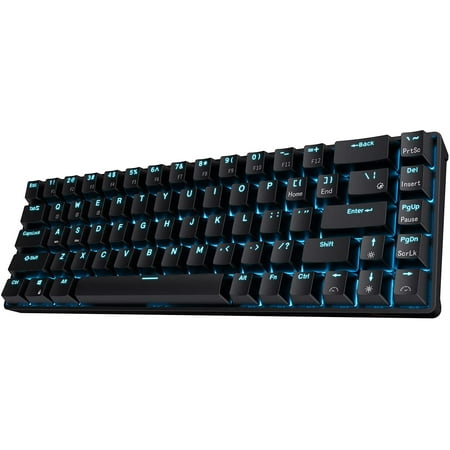
Dual Modes, Reliable Free;65% Layout, Compact Practical;Hot-swappable Quiet Red;DIY Software Supports & High-capacity Battery;Single Blue Backlit, Abundant Dynamic
The RK68 is the keyboard I recommend when someone asks for a 65% and they want it to do everything. Real mechanical switches, hot-swap PCB, three-device Bluetooth pairing, and a price tag under $55. That stack used to cost $150 minimum five years ago. Now it’s the safest pick on the entire list.
The 65% layout here is dialed in. Stand-alone arrow keys (a huge deal for anyone migrating from a 60%), a clean Delete-PgUp-PgDn nav column, and reasonable spacing throughout so you’re not hitting the wrong key during a panic moment in Apex. The stock Quiet Red linears feel decent — not flagship-smooth, but absolutely fine for daily driving. Hot-swap means you can rip them out for tactile browns or clicky blues whenever you want, no soldering required.
Battery life lands around 13 hours with the lightest backlight, which gets you through about two work days of typing. Charging from empty is roughly three to four hours over USB-C. The Bluetooth 5.0 chip pairs to three devices and switches between them with a Fn-shortcut combo. Throw it in a backpack, pair it to your phone or laptop on the go, plug it in at home — it just works.
Honest knocks: the chassis is ABS plastic with a tiny bit of flex if you really lean on it, and the backlight is single-color blue rather than full RGB. Neither is a deal breaker at this price. The hot-swap socket is the cheat code — it future-proofs the entire purchase. You will replace the keycaps. You might replace the switches. The board itself you’ll keep.
Specs
| Layout | 65% (68 keys) |
| Connection | Bluetooth 5.0 (3 devices) + wired USB-C |
| Switches | RK Quiet Red (hot-swap, 3-pin and 5-pin) |
| Battery | 1450 mAh, ~13 hours with backlight |
| Lighting | Single-color blue, 20 modes |
| Frame | ABS plastic |
Pros
- Wireless plus wired, three Bluetooth pairings
- Hot-swap socket is rare at this price point
- Stand-alone arrow keys, no Fn layer gymnastics
- Battery and charging speed are solid
- Compatible with most MX-style switches on the market
Cons
- Single-color blue backlight, no RGB
- ABS plastic chassis has a little flex
- Stock keycaps are basic, plan to upgrade
Rating: 9.2 / 10. The hot-swap socket future-proofs the whole purchase. Grab the RK68 on Walmart.
2. ATTACK SHARK X65 HE — Best for Gamers
If you grind FPS games and want every millisecond of input advantage you can buy, the ATTACK SHARK X65 HE is the keyboard. Hall Effect magnetic switches, 8000 Hz polling rate, 0.01 mm Rapid Trigger accuracy, full QMK driver support — this is competitive-grade hardware in a 65% form factor for under $45.
The story here is the magnetic switches. Instead of physical contact closing a circuit like a traditional mechanical, HE switches sense actuation by magnetic field strength. That means two huge advantages. One, you can adjust actuation depth anywhere from 0.01 mm to a full bottom-out, per key. Two, Rapid Trigger resets the switch the instant you start lifting your finger — which translates directly into cleaner counter-strafes in Valorant and quicker A-D peeks in CS2.
Build is no joke either. PBT keycaps out of the box (so no greasy shine after six months), QMK driver compatibility for serious key-mapping nerds, and 8KHz polling so input latency is essentially zero. RGB is per-key and looks clean. The aesthetics lean a little gamer — there’s some side-printed legend stuff and aggressive font choices — but the performance backs it up.
Caveats: the X65 is wired only. No Bluetooth, no 2.4 GHz. If you need wireless, the RK68 above is your move. Software has a learning curve, especially if you’re tuning per-key actuation depth and Rapid Trigger sensitivity for the first time. Spend an hour on YouTube and you’ll figure it out. The performance ceiling here is well above what the price suggests.
Specs
| Layout | 65% (68 keys) |
| Switches | Hall Effect magnetic (hot-swap) |
| Polling Rate | 8000 Hz |
| Rapid Trigger Accuracy | 0.01 mm |
| Keycaps | PBT |
| Connection | Wired USB-C |
| Driver | QMK compatible |
| Lighting | Per-key RGB |
Pros
- Adjustable actuation depth per key
- Rapid Trigger gives a real edge in FPS games
- 8000 Hz polling rate, near-zero input latency
- PBT keycaps included at this price is rare
- QMK driver support for deep customization
Cons
- Wired only, no wireless option
- Software has a steeper learning curve
- Aesthetics lean gamer, not minimalist
Rating: 9.3 / 10. Best price-to-performance ratio for competitive gaming on the entire list. Check the X65 HE on Walmart.
3. TTTYBA-M68HE Pro — Best Hall Effect Value
This one’s wild. Hall Effect magnetic switches, 8000 Hz polling, Rapid Trigger, hot-swap, side-printed PBT keycaps, RGB — all for under $15. That’s not a typo. The TTTYBA-M68HE Pro is the cheapest way to put HE switches on your desk in 2026, and the spec sheet reads like a $100 board.
You get the same headline performance features as the X65 HE above: magnetic actuation, adjustable trigger depth, 8KHz polling, hot-swap socket. The keycaps are PBT with side-printed legends, which is a nice touch at this price (most boards under $20 ship with cheap pad-printed ABS that wears off in months). Build is plastic — there’s no aluminum top frame here — but it’s not flimsy. The keyboard feels substantially more polished than the price suggests.
The trade-offs at this price point are real. Software is barebones compared to QMK on more expensive HE boards, so per-key tuning is less granular. Stabilizers ship loud, and you’ll probably want to lube them or live with the spacebar rattle. There’s no wireless, the case has noticeable hollow ping, and the switch lifespan ratings are conservative compared to brand-name alternatives.
None of that matters if you’re using this as a try-before-you-buy gateway into Hall Effect. Spend $15, see if Rapid Trigger genuinely improves your aim, decide whether to upgrade later. If you’re a tournament player, get the X65 HE. If you’re curious whether HE is hype, this is the cheapest way to find out, and it’s actually a competent keyboard while you’re testing.
Specs
| Layout | 65% (68 keys) |
| Switches | Hall Effect magnetic (hot-swap) |
| Polling Rate | 8000 Hz |
| Keycaps | Side-printed PBT |
| Connection | Wired USB-C |
| Lighting | Per-key RGB backlit |
| Compatibility | Windows / Mac |
Pros
- Hall Effect magnetic switches at a budget price
- Rapid Trigger and adjustable actuation
- PBT keycaps included, no shine over time
- Hot-swappable for switch upgrades
Cons
- Software is basic compared to higher-end HE boards
- Plastic chassis with hollow ping
- Stock stabilizers are loud out of the box
- No wireless option
Rating: 8.9 / 10. The cheapest legit Hall Effect 65% on the market. See the M68HE Pro on Walmart.
4. Redragon K631 Gery — Best Hot-Swap Wired
The Redragon K631 Gery is the wired hot-swap pick for people who don’t need wireless and don’t want Hall Effect — they just want a reliable 65% with full RGB and a hot-swap socket for under $40. Redragon has been doing budget mechanicals for over a decade, and the K631 is one of the cleanest entries in their lineup right now.
The K631 hits the boring-but-correct checklist hard. 68-key 65% layout with stand-alone arrows. Hot-swappable PCB that takes both 3-pin and 5-pin MX-style switches. Per-key RGB with the usual mode presets. Decent stock linears that you can swap out the moment you want a different feel. It’s not exciting, it’s just well-executed.
Frame is ABS plastic and there’s some flex if you really push on it, but daily-driver typing is rock solid. The stabilizers ship pre-installed and are decent, though the spacebar will benefit from a quick lube job if you’re picky about sound. Compatibility is strong — Redragon’s ecosystem of switch sets and keycaps is broad and cheap, so building this into something more polished over time is straightforward.
Where it loses points: no wireless, no Hall Effect, no aluminum top, and the bundled keycaps are basic ABS that will shine within a year of heavy use. None of that is a surprise at this price. If you want a wired 65% that you can mod over time without breaking the bank, the K631 is a smart starting point.
Specs
| Layout | 65% (68 keys) |
| Connection | Wired USB-C |
| Switches | Hot-swap (3-pin and 5-pin MX) |
| Frame | ABS plastic |
| Lighting | Per-key RGB |
| Keycaps | ABS |
Pros
- Hot-swap PCB for unlimited switch upgrades
- Per-key RGB with solid software control
- Stand-alone arrow cluster for nav
- Great compatibility with Redragon ecosystem
Cons
- ABS chassis flexes under heavy pressure
- Stock keycaps are basic ABS
- Spacebar stab benefits from a lube job
- No wireless option
Rating: 8.8 / 10. The boring-but-correct wired 65% pick. See the K631 on Walmart.
5. AJAZZ AK680 — Best Budget
The AJAZZ AK680 is the under-$30 hot-swap board that punches well above its price tag. 68-key 65% layout, mixed rainbow backlit, programmable, EVA sandwich-mount construction, anti-ghosting full N-key rollover, and red linears that are perfectly competent for daily driving. For thirty bucks, this is a lot of keyboard.
The interesting bit here is the EVA foam sandwich. AJAZZ packed a layer of acoustic foam between the PCB and case to deaden plate ping and case echo. Most boards in this price range sound hollow as a tin can. The AK680 doesn’t. It’s not a flagship gasket-mount thump, but it’s a noticeably more refined sound profile than what you’d expect for the money.
Hot-swap works, anti-ghosting is full N-key, and there’s a software side for RGB and macros if you want it. The included red linears are fine — quiet enough for an office, smooth enough for gaming — and you can swap them out if you decide you want tactile browns later. The ergonomic angle on the case is a small but nice touch for long typing sessions.
Honest read: the keycaps are basic ABS and will shine, the case is plastic, and the software is a little rough around the edges. None of that is shocking at this price. For someone who wants to dip into mechanicals with hot-swap support and isn’t willing to spend more than $30, the AK680 punches harder than almost anything else in the bracket.
Specs
| Layout | 65% (68 keys) |
| Connection | Wired USB |
| Switches | AJAZZ Red Linear (hot-swap) |
| Frame | Plastic with EVA foam sandwich |
| Lighting | Mixed rainbow backlit (programmable) |
| Compatibility | Windows / Mac |
Pros
- Hot-swappable at a sub-$30 price
- EVA foam sandwich gives a cleaner sound
- Anti-ghosting full N-key rollover
- Ergonomic angled case design
Cons
- ABS keycaps will shine over time
- Plastic chassis, no aluminum
- Software is basic and a bit rough
Rating: 8.5 / 10. The under-$30 hot-swap king. Pick up the AK680 on Walmart.
6. SK68 65% Gaming Keyboard — Best Entry-Level Aluminum
The SK68 is the entry-level pick that doesn’t feel like an entry-level pick. Aluminum chassis, 100% hot-swap socket, 68-key 65% layout, full RGB backlight, all for around $36. Most boards under $40 ship with a flexy plastic case. The SK68 doesn’t, and that single detail makes it feel like a way nicer keyboard than the price suggests.
The aluminum chassis is the headline. It adds enough weight that the keyboard sits on your desk instead of sliding around when you’re firing back FPS commands, and the rigidity kills any case flex. Hot-swap PCB takes both 3-pin and 5-pin switches, which means you can drop in tactile browns, clicky blues, or whatever your switch obsession of the month is — no soldering, no skill required. RGB is per-key and surprisingly nice.
Stock switches feel acceptable but unremarkable. They’re not pre-lubed and they don’t have the polish of a Glorious Fox or Cherry MX. That’s where hot-swap pays off: a $20 set of pre-lubed Gateron yellows transforms this thing into something that punches with $80 boards. Until then, the stock experience is perfectly usable for both gaming and typing.
The catches are predictable. ABS keycaps will shine over time, the stabilizers are loud out of the box and want a lube job for the cleanest sound, and there’s no wireless. If you want a wired 65% with a real metal chassis and an upgrade path, the SK68 is hard to argue with at this price.
Specs
| Layout | 65% (68 keys) |
| Connection | Wired USB |
| Switches | Hot-swap (100% socket, 3-pin and 5-pin) |
| Frame | Aluminum |
| Lighting | Per-key RGB backlit |
| Keycaps | ABS |
Pros
- Aluminum chassis at a sub-$40 price
- 100% hot-swap socket
- Per-key RGB backlight
- Standard 65% layout with arrow cluster
Cons
- Stock switches aren’t pre-lubed
- Stabilizers ship loud
- ABS keycaps will shine
- No wireless
Rating: 8.4 / 10. Best aluminum 65% under $40, full stop. See the SK68 on Walmart.
The Verdict
Best Overall: RK Royal Kludge RK68. It’s the keyboard I’d hand someone who told me “pick one 65% and don’t think too hard about it.” Wireless, hot-swap, mechanical, under $55. That combo from a brand with actual track record doesn’t really exist anywhere else right now.
Best for competitive play: ATTACK SHARK X65 HE. Hall Effect switches with 0.01 mm Rapid Trigger accuracy and 8KHz polling, with PBT keycaps included for under $45. The fact that this kind of performance is now an under-$50 purchase is genuinely wild.
Hall Effect on the absolute cheap: TTTYBA-M68HE Pro. Under $15. Magnetic switches. Hot-swap. PBT keycaps. If you’ve been curious whether HE actually improves your aim and don’t want to risk real money finding out, this is the gateway drug.
Buying Advice — Who Should Get What
Casual gamer or first mechanical keyboard: grab the AJAZZ AK680 if you want hot-swap under $30, or the SK68 if you can stretch a few extra bucks for an aluminum chassis. Both will last you years. Both have upgrade paths via hot-swap.
Daily driver, work plus gaming: the RK Royal Kludge RK68 wins this fight. The wireless flexibility, hot-swap support, and reliable typing feel mean it’ll handle 8 hours of writing and a few hours of gaming a night without complaint. The boring-but-correct pick.
You travel or work from a laptop: RK68 again. Three Bluetooth devices, hot-swap, wired fallback, small enough to drop in a bag. There’s no other wireless 65% on this list, so the call is easy.
Competitive FPS or esports: ATTACK SHARK X65 HE for the full Hall Effect experience with PBT keycaps and QMK driver support, or the TTTYBA-M68HE Pro if your budget is tight and you just want to test whether Rapid Trigger actually helps your game. Both will give you a measurable edge over standard mechanical switches.
If you’re still trying to decide whether 65% is even your size, our guide to mechanical keyboards by layout breaks down 60% vs 65% vs 75% with side-by-side photos. Pair it with our ultimate guide to mechanical keyboards if you want to learn switches, keycaps, and the whole stack from scratch.
FAQ — Best 65% Mechanical Keyboards
Is a 65% keyboard good for gaming?
Yes — 65% is one of the two most popular sizes for competitive gaming in 2026, alongside TKL. The compact footprint frees up mouse space for low-sensitivity FPS players, and you keep the dedicated arrow cluster you’d lose on a 60%. The only games where you might miss a function row are MMOs with deep hotbar binds, but even most of those work fine with Fn-layer remapping.
What’s the difference between 60% and 65%?
A 65% keyboard has a dedicated arrow cluster and usually a small column of nav keys (Delete, Page Up, Page Down). A 60% keyboard removes those and forces you to access them via Fn layers. 65% is usually about half an inch wider than 60% but adds enough functionality to be worth it for most users.
Are hot-swap keyboards worth it?
Absolutely. Hot-swap means you can change mechanical switches without soldering. If you buy a board with linear reds and decide six months later that you want tactile browns, you pull the switches with a $5 puller and drop new ones in. No tools, no skill required. Five out of six picks on this list have hot-swap support for that exact reason.
Do I need a wireless 65% keyboard?
Only if you actually use it wirelessly. Wireless adds cost and a battery to charge. If your keyboard lives on one desk, a wired board like the X65 HE or AK680 will give you better value per dollar. If you bounce between a desktop, laptop, and tablet — or you carry your keyboard in a bag — wireless is genuinely useful and the RK68 is the cheapest way to get there.
What’s the deal with Hall Effect switches?
Hall Effect (HE) switches sense actuation by magnetic field strength instead of physical contact. The two big benefits are adjustable actuation depth (you can set how deep a key has to travel before it registers, per key) and Rapid Trigger, which resets the switch the moment you start lifting your finger. For competitive FPS players, Rapid Trigger is genuinely game-changing for counter-strafing. For typing, the practical difference is small.
How long do mechanical keyboards last?
Most quality mechanical switches are rated for 50 to 100 million presses per key. Optical and Hall Effect switches typically push 100 million. In practical terms, a decent mechanical keyboard will outlast at least two laptops. Stabilizers and keycaps tend to wear before switches do, and both are replaceable.


