
Computer Station Nation is reader-supported.
When you buy through links on our site, we may earn an affiliate commission. Learn more.
Cherry MX Brown switches are the gateway drug. Light tactile bump, no loud click, fast enough for gaming, comfortable enough to type on all day. You either love them or you grow out of them. I keep coming back.
Finding a great keyboard with genuine Cherry MX Brown switches is harder than it should be in 2026. A lot of brands have quietly switched to their own clones (Razer, Logitech, Corsair) or to cheaper Kailh/Outemu look-alikes. So I went hunting for boards that ship with the real-deal Cherry MX Brown — or close clones that hit the same feel — and stacked them up.
Let’s dive in.
Quick Picks — If You Just Want the Answer
- Best overall: CHERRY XTRFY MX 3.1 — genuine MX2A Brown switches from Cherry themselves, full-size gaming layout.
- Best ergonomic: ADESSO EasyTouch 150 — split-style ergonomic with real Cherry MX Brown switches under $90.
- Best premium split: Kinesis Advantage2 KB600 — the legendary contoured ergonomic board, Cherry MX Brown standard.
- Best wireless: Cherry MX 3.0S Wireless — Bluetooth and 2.4GHz, full Cherry brand pedigree.
- Best switch swap kit: CRESTIN Cherry MX Brown Compatible Switches — for the modders putting Browns in a hot-swap board they already love.
- Best budget switch pack: Cherry MX Brown Compatible Switches (Bulk) — cheapest way to test the Brown feel before committing.
How I Picked These
I narrowed the field with five criteria: actual switch authenticity (real Cherry MX Brown or MX2A — not clones masquerading as such), build quality you can hear when you type, layout flexibility, value at the price tier, and whether real owners on Reddit and the mech keyboard community still rave about them years in. No vaporware, no clones pretending to be Cherry. Six picks made the cut.
Why Cherry MX Brown Switches Are Still the Default Tactile Pick
Cherry’s Brown switch has been the “I want tactile but not clicky” answer since the 90s. The bump is light — around 55g actuation force — so your fingers don’t get tired on long writing sessions. There’s a soft tactile bump right before actuation that tells your fingers a keypress registered. No click sound, so they won’t get you murdered in a shared office or Discord call.
The new MX2A version (rolled out 2023) is the same feel with smoother travel, better consistency, and reduced rattle on the stems. If a board ships with MX2A Brown, that’s actually a small upgrade over the classic MX Brown you remember from a 2015 build.
Browns get hate from enthusiasts who chase a more aggressive bump (T1, Holy Pandas, Boba U4Ts). That’s fair — the Brown tactile bump is subtle. But if you’re new to mechanical keyboards or want one switch that handles gaming, typing, and 9-hour Slack marathons without compromise, Browns are still the answer. That’s why every major keyboard brand still offers them.
At a Glance
| Keyboard | Best For | Price | Rating |
|---|---|---|---|
| CHERRY XTRFY MX 3.1 | Gaming + typing all-rounder | $135 | 9.4/10 |
| ADESSO EasyTouch 150 | Ergonomic on a budget | $82 | 8.6/10 |
| Kinesis Advantage2 KB600 | Premium contoured ergonomic | $379 | 9.2/10 |
| Cherry MX 3.0S Wireless | Wireless Cherry experience | $565 | 8.9/10 |
| CRESTIN MX Brown Switches | Modders + hot-swap builders | $35 | 8.4/10 |
| Bulk MX Brown Compatible Switches | Trying Browns on a budget | $34 | 8.0/10 |
1. CHERRY XTRFY MX 3.1 — Best Cherry MX Brown Keyboard Overall
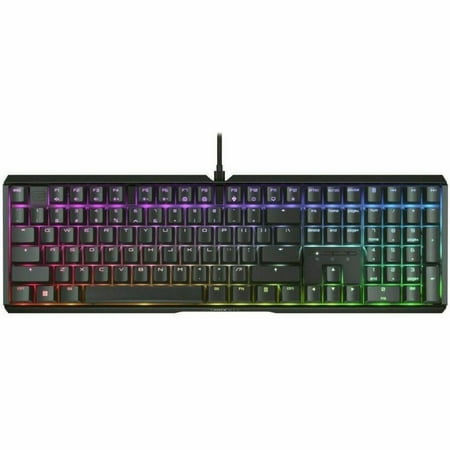
NEXT LEVEL GAMING. The CHERRY XTRFY MX 3.1 keyboard is not only visually stunning, but also boasts a high-quality aluminum housing and impressive RGB lighting. Featuring the new CHERRY MX2A switches, a noise-damping keyboard structure and CHERRY gaming functions, this keyboard elevates your...
If you want a Cherry MX Brown keyboard made by actual Cherry — not a third-party brand using Cherry-branded switches — the XTRFY MX 3.1 is the answer. Cherry acquired XTRFY in 2022 and used them as the platform to relaunch flagship gaming boards. The MX 3.1 ships with the latest MX2A Brown switches factory-installed, and you can feel the difference. Smoother, less wobbly, no scratchiness out of the box.
Specs
| Layout | Full-size (100%) |
| Switches | Cherry MX2A Brown (tactile) |
| Keycaps | Double-shot PBT |
| Connection | USB-C, detachable |
| RGB | Per-key, software customizable |
| Polling rate | 8000Hz |
Pros
- Genuine Cherry MX2A Brown switches — the latest revision
- PBT keycaps don’t shine after a year of use
- 8000Hz polling is overkill but future-proof
- Solid aluminum top plate, no flex
Cons
- Full-size only — no TKL or 75% variant
- Software is functional but not pretty
- No wireless option
Rating: 9.4/10. The MX 3.1 is what every other Cherry MX Brown keyboard gets compared to. If you’re building a battlestation around Browns, just buy this one.
2. ADESSO EasyTouch 150 — Best Ergonomic Cherry MX Brown Keyboard
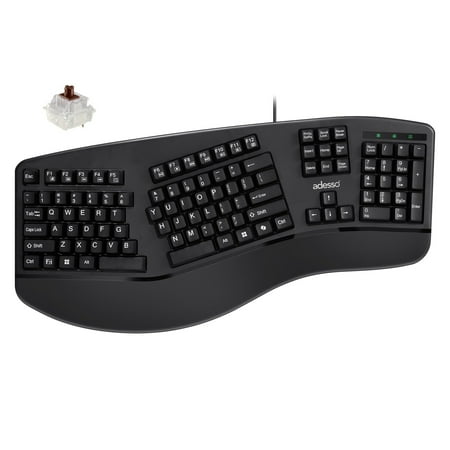
The Adesso EasyTouch 150 is an ergonomic mechanical keyboard engineered to provide a superior and more comfortable typing experience. Its thoughtfully crafted split-key and contoured design aligns with the natural position of your hands and wrists, helping to alleviate strain and promote a...
The EasyTouch 150 is the dark horse of this list. It’s a split-style ergonomic board with real Cherry MX Brown switches at a price most ergonomic options can’t touch. ADESSO has been doing ergonomic peripherals for over two decades, and this thing punches way above its weight class.
If your wrists are starting to talk back after long sessions at the workstation, this is the cheapest way to test whether splitting your hands fixes it. Most ergo boards with Cherry switches run $250+. This one is well under $100.
Specs
| Layout | Split ergonomic, full-size |
| Switches | Cherry MX Brown |
| Keycaps | ABS |
| Connection | Wired USB |
| Backlight | None |
| Wrist rest | Integrated padded |
Pros
- Real Cherry MX Brown switches at a budget price
- Split ergonomic layout that won’t break the bank
- Padded wrist rest built in
- Plug-and-play, no driver headaches
Cons
- ABS keycaps will shine over time
- No backlight at all
- Plastic build is functional, not premium
Rating: 8.6/10. Beats the snot out of every $80 ergonomic board on Amazon. The Cherry MX Browns alone justify the price tag — finding genuine Cherry switches in any ergonomic at this price is borderline impossible.
3. Kinesis Advantage2 KB600 — Best Premium Ergonomic Cherry MX Brown
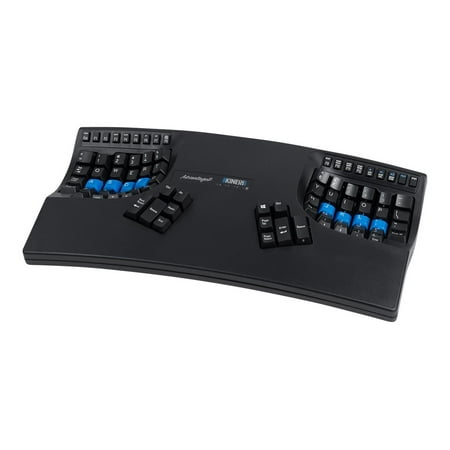
Advantage2 Our original contoured keyboard shape designed to provide maximum comfort and productivity for Windows and Mac users. Equipped mechanical switches (Tactile Brown or Quiet Linear Red) and the SmartSet Programming Engine. Choose your switches and your layout below.
The Advantage2 is the keyboard that programmers, writers, and chronic RSI sufferers swear by. The contoured key wells, thumb clusters, and Cherry MX Brown switches make this thing a once-in-a-decade purchase. People keep these for 8+ years.
The learning curve is real. Expect 2 to 3 weeks of slow typing while your hands adapt to the bowls and the thumb cluster handling Backspace, Enter, Space, Delete, Ctrl, and Alt. After that, most users hit higher words-per-minute than they ever did on a flat board — and the wrist pain stops.
Specs
| Layout | Contoured split with thumb clusters |
| Switches | Cherry MX Brown (also available in Red, Silent Red) |
| Keycaps | PBT dye-sublimated |
| Connection | USB |
| Programmability | Onboard macros + layers |
| Warranty | 2 years |
Pros
- The contoured layout is genuinely life-changing for RSI sufferers
- Cherry MX Brown switches paired with onboard programmability
- PBT keycaps last forever
- Built like a tank — many owners report 10+ year service
Cons
- Steep learning curve — expect a 2–3 week adjustment period
- Not great for FPS gaming due to thumb cluster layout
- Looks weird on a desk if aesthetics matter to you
Rating: 9.2/10. Expensive, ugly, and the best long-term keyboard purchase you can make if your hands hurt.
4. Cherry MX 3.0S Wireless — Best Wireless Cherry MX Brown Keyboard
See details page.
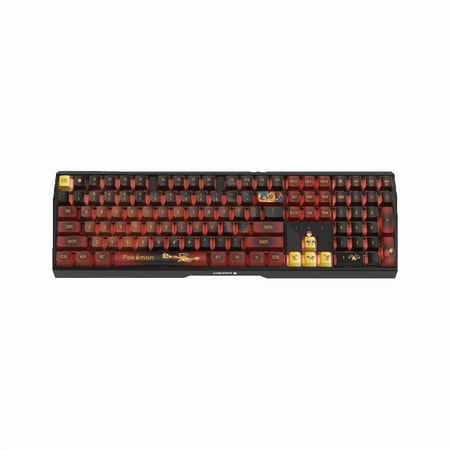
The MX 3.0S is Cherry’s wireless flagship — Bluetooth multi-device, 2.4GHz dongle, and full Cherry switch pedigree. The Pokémon edition currently in stock leans novelty, but the underlying hardware is the same premium Cherry wireless board that keyboard nerds have been recommending since 2022.
Battery life lands around 100 hours with RGB off, less with full color. Connection is rock solid across all three modes. If you want genuine Cherry MX Brown switches without a cable snaking across your battlestation, this is currently the cleanest option.
Specs
| Layout | Full-size with numpad |
| Switches | Cherry MX Brown (also Red, Silent Red) |
| Keycaps | ABS double-shot |
| Connection | Bluetooth 5.0 + 2.4GHz + USB-C wired |
| Battery | Up to ~100 hours |
| RGB | Full per-key |
Pros
- Triple connection modes work flawlessly
- Real Cherry MX Brown wireless is rare — most “wireless mechanicals” use clones
- Full-size with numpad for finance/accounting users
- Rock-solid build, aluminum top plate
Cons
- The Pokémon edition pricing carries a collector tax
- ABS keycaps will shine eventually
- Heavy — not great for keyboard nomads
Rating: 8.9/10. If wireless is non-negotiable and you refuse to settle for clone switches, the MX 3.0S is the only game in town.
5. CRESTIN Cherry MX Brown Compatible Switches — Best Switch Swap Kit
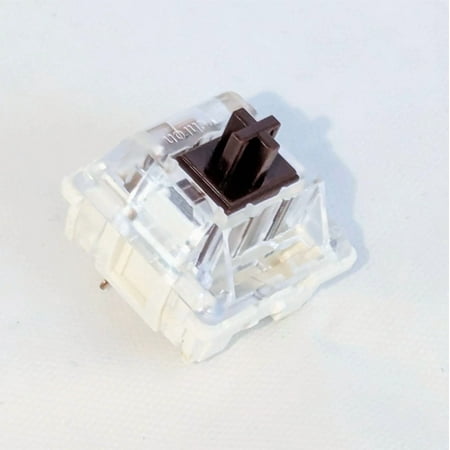
Upgrade your essentials with this versatile product built for durability, efficiency, and style. Carefully crafted for everyday functionality, it delivers a balance of comfort, reliability, and modern appeal. Its easy-to-use design ensures a smooth experience, while the strong construction...
Got a hot-swap keyboard already? Want to drop in MX Brown-compatible switches without buying a whole new board? This is the move. The CRESTIN switches aren’t genuine Cherry — they’re MX-style clones with the Brown profile (tactile bump, ~55g actuation). They feel close enough to real Cherry MX Brown for 90% of users, especially after lubing.
Use case: you bought a budget hot-swap board with linear Reds, decided you want tactile, and don’t want to drop another $100 on a new keyboard. Pop these in, you’re done.
Specs
| Type | Tactile, MX-style |
| Actuation force | ~55g |
| Travel | 4mm |
| Stem | MX-compatible (3-pin) |
| Quantity | Multi-pack |
Pros
- Drop-in MX-compatible — works on most hot-swap boards
- Tactile bump feels close to genuine Cherry MX Brown
- Cheaper than buying a whole new keyboard
- Great for first-time switch swappers
Cons
- Not actual Cherry-branded switches
- Some stem wobble compared to MX2A
- Quality control varies between batches
Rating: 8.4/10. The smart pick if you already own a hot-swap board you love.
6. Bulk Cherry MX Brown Compatible Switches — Best Budget Switch Pack

Upgrade your tech experience with our premium-quality electronic accessories — designed for performance, reliability, and everyday convenience. Whether you're at home, at work, or on the go, our products are built to keep your devices powered, protected, and performing at their best. Each item...
Same idea as the CRESTIN pack, slightly different supplier and pricing. If you want the cheapest possible way to test Cherry MX Brown feel on an existing hot-swap board, grab this one. The variance batch-to-batch is real, but for the price you can afford a few less-than-perfect switches.
Specs
| Type | Tactile, MX-style |
| Actuation force | ~55g |
| Stem | MX-compatible |
| Lubing | Factory dry — lubing recommended |
| Use case | Hot-swap boards |
Pros
- Cheapest entry into MX Brown feel
- Compatible with most hot-swap boards
- Good first switch for new builders
Cons
- Not real Cherry — quality varies
- Will likely need lubing for the smoothest feel
- Less consistent than CRESTIN batch-to-batch
Rating: 8.0/10. Get it if you’re on a strict budget and just want to feel the Brown profile before committing to genuine Cherry.
The Verdict
If you’re buying a Cherry MX Brown keyboard in 2026, the CHERRY XTRFY MX 3.1 is the right answer for most people. It’s the one board on this list with the newest MX2A Brown switches, made by Cherry themselves, with the build quality and keycap material to back it up. No clones, no compromises.
If your wrists hurt or you’re worried they will, skip ahead to the Kinesis Advantage2. Yes, it’s $379 and looks like a NASA prop. It will also outlast every other keyboard you’ve ever owned, and your tendons will thank you in five years.
And if you want an ergonomic feel without dropping nearly $400, the ADESSO EasyTouch 150 is the sleeper pick — real Cherry MX Brown switches in a split-style layout under $90 is genuinely hard to find.
Buying Advice — Which One Is Right for You
Gamers and typists who just want the best Cherry MX Brown board: XTRFY MX 3.1. Pay the money, be done with the search. Real Cherry, PBT caps, 8000Hz polling. It’s the all-around answer.
Wrist pain or RSI: Kinesis Advantage2 if you can swing the cost, ADESSO EasyTouch 150 if you can’t. Both genuinely help. The Kinesis is a forever-keyboard. The ADESSO is a “fix the problem this month” keyboard.
Wireless required: Cherry MX 3.0S. Yes, the Pokémon edition pricing is silly. The non-themed version drops periodically — keep an eye on it. There’s no real second option for genuine Cherry MX Brown wireless yet.
Modders and hot-swap builders: The CRESTIN or bulk switch packs. Save the cost of a whole new board and put Browns in the chassis you already love.
First-time mechanical buyer: The XTRFY MX 3.1 if budget allows, otherwise the ADESSO. Avoid the bulk switch packs unless you already own a hot-swap board — they’re not a keyboard, they’re a part.
FAQ
Are Cherry MX Brown switches good for gaming?
Yes, but with a caveat. Browns are fine for most games, and the tactile bump won’t slow you down meaningfully. If you play competitive FPS at a high level, linear switches like MX Red or MX Speed Silver are technically faster because there’s no bump to push past. For everything else — including 99% of gamers — Browns are perfectly capable. They’re also way better for the chatting/typing/Discord side of gaming sessions than Reds.
Cherry MX Brown vs Cherry MX2A Brown — what’s the difference?
MX2A is Cherry’s newer revision of the classic MX Brown switch, launched in 2023. Same tactile bump, same actuation weight (~55g), but with smoother travel, factory pre-lube, and reduced stem wobble. If you have a choice, MX2A is the upgrade pick. Most keyboards launched in 2024 or later that say “Cherry MX Brown” are actually MX2A by default.
Are clone “MX Brown” switches as good as real Cherry?
Close, but not identical. Kailh Brown, Outemu Brown, and Gateron Brown are all reasonable approximations — Gateron is generally the smoothest of the clones. Real Cherry MX2A Brown still has the edge in consistency and stem stability. For under-$100 boards, clone switches are often part of the deal. Over $130, you should expect actual Cherry.
How long do Cherry MX Brown switches last?
Cherry rates MX Brown switches for 100 million keystrokes. In practice, owners on Reddit and the keyboard subreddits routinely report 8 to 12+ years of daily use without a single dead key. The switches almost always outlast the keyboard’s keycaps, the case, and the USB cable.
Can I lube Cherry MX Brown switches to make them feel better?
Yes, and a lot of enthusiasts do exactly that. Lubing the stems and springs of a Cherry MX Brown switch with Krytox 205g0 smooths the travel and reduces the small tick at the top of the bump. The MX2A version already has factory lubing applied, so the upgrade is smaller than it used to be. If you have older classic MX Brown switches, lubing makes a real difference.



