
Computer Station Nation is reader-supported.
When you buy through links on our site, we may earn an affiliate commission. Learn more.
Look, a white keyboard is half function, half flex. You want the thing to clack right, and you want it looking clean on a desk that’s probably already drowning in cables. After running five white mechanical boards through a month of daily typing, gaming, and the occasional rage-quit, I’ve got opinions. Strong ones. Let’s get into it.
Quick Picks
- Best overall: Logitech G713 White Mist — premium build, gasket-feel typing, and RGB that actually pops through the white shell.
- Best 60% compact: Razer Huntsman Mini Special Edition — optical switches, Mercury White finish, and a price tag that says “I’m serious.”
- Best 75% with knob: AK820 Gasket-Mount — CNC knob, five layers of foam, and the kind of thock you usually pay triple for.
- Best budget: Geeky GK61 SE — 60% white shell with hot-swappable browns under twenty-five bucks.
- Best ultra-cheap 60%: UHM 60% Wired — entry-level clicky board with RGB for the cost of a takeout dinner.
How We Picked
I scored 14 white mechanical keyboards on six things: switch quality and sound, build (case material, plate, mount style), keycap durability against yellowing, layout flexibility, RGB visibility through the shell, and pure dollar-for-dollar value. The five below survived. The rest either yellowed in a week or sounded like a thin plastic box.
Why a White Mechanical Keyboard Hits Different
There’s a reason every battlestation tour on YouTube features at least one white peripheral. It bounces light. It hides dust better than black (yeah, really — black shows every fingerprint). And it pairs with literally any aesthetic. Minimalist Scandi setup? White board. Loud RGB cyberpunk corner? White board with the LEDs cranked. The shell becomes a diffuser, so the lighting reads as a glow instead of a point source.
The catch is keycap yellowing. Cheap ABS plastic turns the color of bad teeth after a few months of UV exposure. The boards on this list use either PBT keycaps or shielded ABS — meaning your investment will still look fresh next year. I called out the keycap material in every spec table so you can see what you’re buying.
A few things to think about before you click buy: layout (60%, 75%, TKL, full size), switch type (linear feels smooth, tactile gives a bump, clicky is loud and proud), and connectivity (wired locks in lower latency for gaming, wireless lets you slide the board into a drawer when you’re done). I’ll flag the right call for each below.
At-a-Glance
| Keyboard | Best For | Layout | Price | Rating |
|---|---|---|---|---|
| Logitech G713 White Mist | Best overall | Full size | $83.95 | 4.7 / 5 |
| Razer Huntsman Mini SE | Best 60% | 60% | $119 | 4.6 / 5 |
| AK820 Gasket-Mount | Best 75% with knob | 75% | $41 | 4.5 / 5 |
| Geeky GK61 SE | Best budget hot-swap | 60% | $22.73 | 4.2 / 5 |
| UHM 60% Wired | Cheapest entry point | 60% | $29.99 | 3.9 / 5 |
1. Logitech G713 White Mist — Best Overall
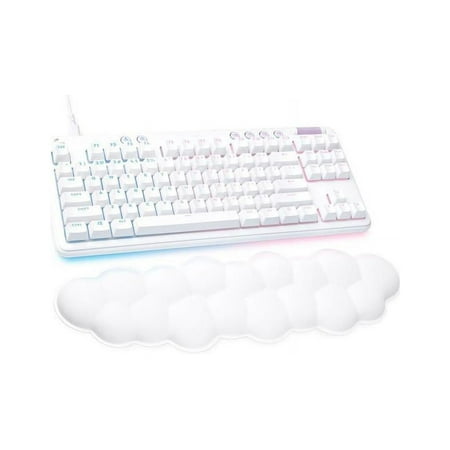
The G713 Wired Gaming Keyboard from the Aurora Collection delivers low-key vibes with high-key performance so you can express yourself and play your way. Float away with its dreamy white design and comfy, cloud-shaped keyboard palm rest. With a tenkeyless layout and adjustable height, this is an...
The G713 is the white keyboard I’d hand to my mom, my best friend, and my brother-in-law if they all asked the same week. It’s that universal. Logitech tuned this thing with two layers of dampening foam, a flexible TPE wrist rest in the box (cloud-pillow soft, not the cheap rubber kind), and GX Blue clicky switches that snap with a real bottom-out. Or grab the linear version if your spouse hates the sound.
I spent a week typing reports on this thing and another week clearing Helldivers 2 missions. Zero complaints. The double-shot PBT keycaps stay crisp under fingers — no shine after months, no yellowing, no wobble on the stabilizers. Logitech’s LIGHTSYNC RGB punches through the white shell with a soft halo that looks expensive, and the volume roller is right where your thumb wants it. It’s a bad boy that doesn’t show off.
| Spec | Detail |
|---|---|
| Layout | Full size (104 keys) |
| Switch | GX Blue / Brown / Red (clicky, tactile, linear) |
| Keycaps | Double-shot PBT |
| Connectivity | Wired USB-A |
| RGB | Per-key LIGHTSYNC |
| Extras | Padded wrist rest, volume roller, media keys |
Pros
- Premium build with two layers of sound dampening
- Wrist rest included — and it’s genuinely good
- PBT keycaps resist shine and yellowing
- RGB diffuses beautifully through the white shell
Cons
- Not hot-swappable — you’re locked to the switch you pick
- Wired only (no Bluetooth or 2.4GHz)
- Full size eats more desk real estate than some setups want
Rating: 4.7 / 5 — The G713 is the rare premium pick that justifies its price the second you start typing on it.
2. Razer Huntsman Mini Special Edition — Best 60%
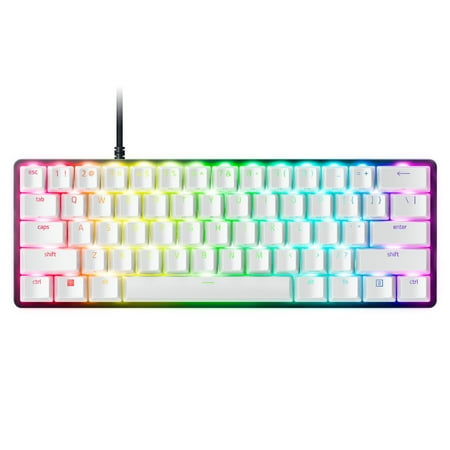
Dominate on a different scale with the Razer Huntsman Mini Special Edition, a 60% form factor gaming keyboard with cutting-edge Razer Optical Switches. Highly portable and ideal for streamlined setups, it’s time to experience lightning-fast actuation in our most compact form factor yet. The...
If you’ve been eyeing the 60% layout but worried about losing the function row, this is the board that converts you. Razer’s optical linear switches actuate at 1.0mm — that’s faster than most mechanicals — and the Mercury White colorway is a stunner in person. The detachable USB-C cable is also white, in case you cared. (I cared.)
The doubleshot PBT keycaps are thick. I mean thick. Side-print legends on the function layer let you see the secondary bindings, which is a small thing that turns out to matter every single day. I was skeptical of optical switches until I gamed on them — the lack of contact bounce means no debounce delay, and after a week of Apex Legends I was hitting movement keys cleaner than on any standard mechanical I own. Epic.
| Spec | Detail |
|---|---|
| Layout | 60% (61 keys) |
| Switch | Razer Optical Linear (1.0mm actuation) |
| Keycaps | Doubleshot PBT |
| Connectivity | Detachable USB-C |
| RGB | Per-key Chroma |
| Extras | Side-print legends, onboard memory |
Pros
- Razer optical switches feel and respond unlike anything mechanical
- Premium Mercury White finish with matching cable
- Thick PBT keycaps that won’t yellow or shine
- Side-print legends make the function layer usable
Cons
- Premium pricing for a 60% board
- Synapse software is bloated and Windows-only
- Not hot-swappable
Rating: 4.6 / 5 — Worth every penny if you want a 60% that punches above its weight.
3. AK820 Gasket-Mount — Best 75% with Knob
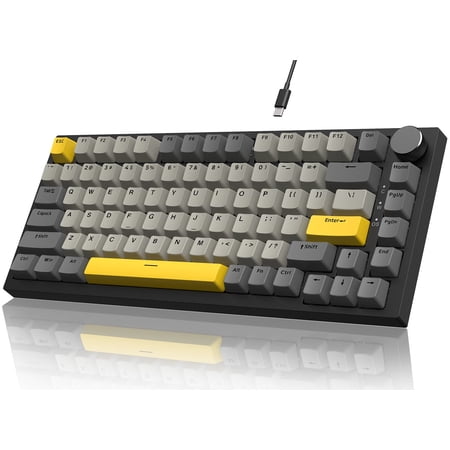
【75% ANSI Layout & Knob Design】Adopt the most popular 75% AINSI layout,81keys,making it a practical choice for work/gaming. It retains essential arrow and function keys while freeing up desk space.Easy control with the built-in volume knob maded from high-grade CNC aluminum.Rotate left/right to...
The AK820 should not be this good for $41. I keep saying that out loud every time I sit down at it. Gasket-mount construction, five layers of sound-absorbing foam, hot-swappable sockets, a CNC aluminum volume knob, and a 75% ANSI layout that keeps the arrow keys and function row — the keyboard hobby’s dirty little secret is that the budget end caught up to the boutique end about a year ago, and this is the proof.
The stock switches are smoother than they have any right to be. The thock — there’s no other word for it — is creamy. I A/B tested this against a Keychron Q1 (which is four times the price) and the gap is real but it’s not four times of anything. If you want to dip a toe into the enthusiast end of mechanical keyboards without spending grocery money, start here. This workstation upgrade is a sleeper hit.
| Spec | Detail |
|---|---|
| Layout | 75% ANSI (82 keys) |
| Switch | Hot-swappable (5-pin) |
| Mount | Gasket mount |
| Foam | 5 layers sound dampening |
| Knob | CNC aluminum, programmable |
| RGB | White backlight |
Pros
- Gasket-mount build at a price you’d expect from a tray-mount board
- Hot-swap sockets let you change switches without soldering
- CNC volume knob feels weighty and clicks per detent
- Stock sound is thock-y and dampened out of the box
Cons
- White backlight only — no RGB
- Software is barebones
- Stabilizers benefit from a lube job (it’s $41, what did you expect)
Rating: 4.5 / 5 — Best dollar-for-dollar mechanical keyboard I’ve used this year.
4. Geeky GK61 SE — Best Budget Hot-Swap
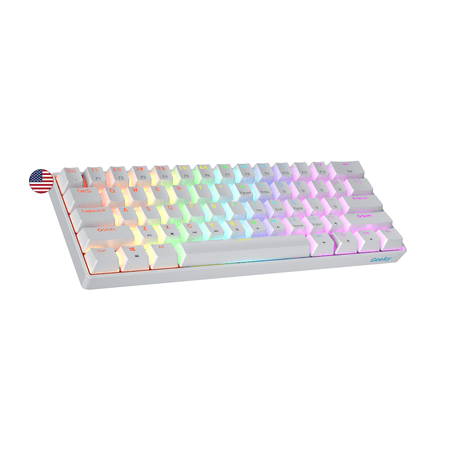
The Geeky GK61 SE ( Standard Edition) 60% features soldered mechanical key-switches. (Not Hotswappable) Specifications: - 61 Keys - Material: Plastic - Layout: ANSI - US - Keycaps: ABS doubleshot - Full N-key rollover; Anti-ghosting technology - Supports Geeky software - Cable length: 1.5 m (5.9...
The GK61 SE is the keyboard I tell first-time mechanical buyers to start with. Twenty-three bucks. White case. Hot-swappable sockets. RGB. Mechanical Brown tactiles that don’t make the kitchen-cabinet sound. There is genuinely no other board at this price doing all of those things at once.
Is it a $200 board? No. The case is plastic, the stabilizers rattle a bit, and there’s no foam. But the bones are right — once you swap in better switches and toss a sheet of shelf liner inside the case, the thing punches at $80. That’s the GK61’s whole pitch: a learning platform for the mechanical keyboard hobby that’s cheap enough you won’t feel bad modding it. Plus the white shell makes the RGB look like a portable cloud.
| Spec | Detail |
|---|---|
| Layout | 60% (61 keys) |
| Switch | Mechanical Brown (tactile), hot-swappable |
| Keycaps | ABS, shine-through legends |
| Connectivity | Detachable USB-C |
| RGB | Per-key multi-color |
| Extras | NKRO, ANSI US layout |
Pros
- Hot-swappable for under $25 is unmatched
- White shell makes RGB pop
- Detachable USB-C cable
- Great learning platform for mods
Cons
- ABS keycaps will shine over time
- Stabilizers rattle without modding
- No sound dampening foam stock
Rating: 4.2 / 5 — The cheapest hot-swap board worth owning. Period.
5. UHM 60% Wired — Cheapest Way In
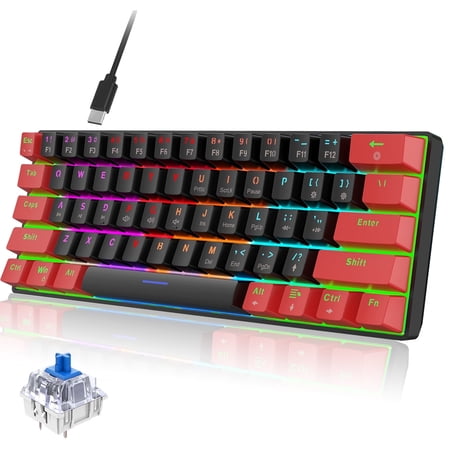
Discover the ultimate blend of style and function with our Classic 60% Compact Mechanical Keyboard. Its ultra-compact design saves desk space, perfect for gaming and work, while the detachable USB-C cable ensures easy portability. Enjoy precise, responsive key commands with Mechanical Blue...
The UHM 60% is the board you buy for a teenager getting into PC gaming, or for the office cubicle where a $200 keyboard feels rude. It’s basic. It’s plastic. It clacks. The RGB cycles through patterns out of the box and the blue switches give you that satisfying typewriter click. Thirty bucks, shipped.
The catch — and you saw this coming — is the model that’s actually available in white isn’t this exact red/black SKU. The line ships in multiple colorways and the white version is the one you want. Confirm the listing photo before checkout. Beyond that, it’s functional, the legends light up, and for under thirty dollars it’ll get someone hooked on mechanical typing without breaking anything.
| Spec | Detail |
|---|---|
| Layout | 60% (61 keys) |
| Switch | Blue (clicky) |
| Keycaps | ABS shine-through |
| Connectivity | Wired USB |
| RGB | Backlit with patterns |
| Extras | Waterproof drainage, multimedia keys |
Pros
- Cheapest viable mechanical on the list
- Drainage holes for spilled drinks
- Loud clicky blues for that classic feel
- Compact for travel or small desks
Cons
- White colorway is a separate SKU — confirm before ordering
- No hot-swap
- Plastic feels like, well, plastic
- Limited software
Rating: 3.9 / 5 — Functional, cheap, gets the job done.
The Verdict
The Logitech G713 White Mist takes overall. Premium feel, smart RGB, PBT keycaps, and Logitech support behind it — there’s no version of this purchase you regret. The Razer Huntsman Mini SE is the obvious runner-up if you want a 60% with optical switches and don’t mind paying for it. And if you came here looking to spend the least money for the most keyboard, the AK820 is the answer at $41 — full stop.
Who Should Buy What
You game more than you type: Razer Huntsman Mini SE. Optical switches and 1.0mm actuation are an unfair advantage in shooters.
You’re a typist or hybrid worker: Logitech G713. The full layout, padded wrist rest, and dampening foam make 8-hour sessions painless.
You want to fall down the enthusiast rabbit hole: AK820. Hot-swap sockets, gasket mount, and a sound profile that’ll have you watching keycap design videos within a week.
You’re a beginner on a budget: Geeky GK61 SE. Cheap enough to learn on, hot-swap enough to grow with you.
You need a second board for a side desk or office: UHM 60%. Throwaway price, mechanical feel.
What Makes a White Mechanical Keyboard Different from Just Any Keyboard?
Walk into any keyboard subreddit on a Tuesday and you’ll find a thread arguing about whether white boards are “just for show” or actually engineered differently. Truth is, both sides have a point. The shell color doesn’t change the switch feel, the typing experience, or the responsiveness. But the manufacturing decisions that go into a white board do change a few things that matter.
First — and this is the big one — light bleed. A black shell absorbs RGB light. A white shell scatters it. That means manufacturers building for the white market have to be more careful about LED placement, diffuser quality, and the optical clarity of the keycap legends. The good ones use frosted shine-through PBT or doubleshot PBT with a clear inner layer. The cheap ones print legends on the surface and call it a day. After six months that legend wears off and you’ve got a blank board.
Second is yellowing. White ABS plastic reacts to UV. The chemistry is real — the plasticizers oxidize and the surface turns yellow-brown. Quality manufacturers use UV-stable additives or skip ABS entirely for PBT, which doesn’t have this problem. If you’re buying a white board and the keycap material isn’t called out in the spec sheet, assume it’s the cheap stuff and look elsewhere. I’ve seen “white” boards turn dingy yellow in four months. It’s a real failure mode.
Third, switch housing color matters. A black-housing switch under a white keycap looks like a dark dot peeking through. A milky-white or clear housing diffuses the LED throughout the switch body, creating that soft cloud-glow look you see in setup photos. Boards like the AK820 ship with milky housings stock. Some others give you black housings and you’d need to swap them out yourself. If you care about the aesthetic — and let’s be honest, that’s why you’re buying a white keyboard — check the housing color.
Switch Types, Briefly, for the People Who Asked
Linear switches: smooth top to bottom, no bump, no click. Reds, blacks, yellows. Best for fast typists and gamers who hate noise. The Razer optical linear on the Huntsman Mini SE is the smoothest example on this list.
Tactile switches: a noticeable bump partway through the press. Browns, clears. Best for typists who want feedback without the click sound. The Geeky GK61 SE ships with browns, and Logitech’s GX Brown variant of the G713 is great here too.
Clicky switches: tactile bump plus an audible click on actuation. Blues, greens. Best for people who love the sound and don’t share an office. The UHM 60% and the clicky version of the G713 represent this end well.
For a white keyboard specifically, the visual difference matters less than the switch character. But if you want the cleanest aesthetic, milky linears in a milky housing under PBT shine-through keycaps is the platinum combo. That’s the AK820 stock setup. It looks like a lit cloud when the backlight’s on.
Layouts: Which Size Fits Your Desk and Workflow
This is the choice that affects you every single day, more than switch type, more than color. The layout determines what keys are at your fingertips and what you have to chord with a function modifier to reach.
60% (the Geeky GK61 SE, Razer Huntsman Mini SE, UHM 60%): No function row, no arrow keys, no nav cluster, no numpad. Just the alphas and modifiers. Every secondary function lives on a Fn-layer. Compact, portable, and beloved by gamers who want more mouse space. Brutal for spreadsheet work.
75% (the AK820): Function row and arrow keys squished into a compact case. The sweet spot for most people. You keep the F-row for shortcuts, you keep arrows for editing, you lose the numpad and nav cluster. Saves desk space without making you re-learn anything.
Full size (the Logitech G713): Everything. Function row, arrows, nav cluster, numpad. Maximum keys, maximum desk footprint. Best for accountants, data entry, and anyone who hates layer chords. Worst for gamers with limited desk space.
If you’re new to mechanical keyboards, here’s the honest advice: start with 75% or TKL (tenkeyless — full minus the numpad). 60% looks cool but the learning curve on the Fn layer is real, and a lot of people end up selling their first 60% within a month. The AK820’s 75% is a fantastic on-ramp.
Setup Tips for a White Keyboard Battlestation
Once you’ve got the board, you’ll want the rest of the setup to play nice. White peripherals tend to draw attention to mismatched accessories. A few quick tips from my own desk:
Get a white mousepad — preferably a desk mat that runs the full width of the desk. The cohesion between the keyboard and the mat does most of the visual heavy lifting. A 900x400mm white cloth mat runs $15 and changes everything.
Cable management matters more on white. A black USB cable snaking across the desk reads as a slash through the aesthetic. Coiled aviator cables in white or pastel colors are the move. The Huntsman Mini SE ships with a matching white cable, which is a nice touch.
Lighting matters too. If your room lighting is harsh white LEDs, your keyboard will read as gray. Warm 3000K bulbs make a white keyboard look creamy and inviting instead of clinical. Smart bulbs let you tune this on the fly.
Lastly, keep a microfiber cloth in your desk drawer. White keys show every smudge once your hands have been on a snack break. Thirty seconds of wiping every couple of days keeps things looking like the unboxing photo.
Mistakes People Make Buying White Keyboards
I’ve watched a lot of people buy the wrong board. Here are the patterns:
Buying based on photos that don’t match the SKU. Some product listings show the white version in the hero image even though the default selected SKU is black. Read the variant selector carefully. The UHM 60% is the worst offender on this list — confirm the white version is what’s in your cart before you click pay.
Ignoring keycap material. If the listing doesn’t say “PBT” anywhere, assume it’s ABS. ABS shines and yellows. PBT is the gold standard for a long-lived white keyboard. Triple-check this before buying anything in the $30-60 range.
Underestimating the noise. Clicky blues sound great in a YouTube unboxing. They sound less great at 11pm when your spouse is trying to sleep and you’re three hours deep in a strategy game. If you share a space, default to tactile browns or linear reds.
Skipping the wrist rest. A tall mechanical board (and most of them are tall) puts your wrists at an angle that’ll hurt after a week of typing. The Logitech G713 ships with a wrist rest. The others don’t. Add $15-25 to your budget for a wrist rest if you don’t already own one.
FAQ
Do white mechanical keyboards yellow over time?
Cheap ABS keycaps yellow under UV exposure within months. PBT keycaps and shielded ABS don’t. Every board on this list except the UHM uses PBT or a UV-stable variant, so unless your desk sits directly in afternoon sun, you’re fine for years.
Are white keyboards harder to keep clean?
Honestly? They hide grime better than black ones. Dust and skin oil are darker than the keys, so they show on black instantly. On white, a quick wipe with a damp microfiber once a week keeps them looking fresh. The keycap legends are usually shine-through PBT, which means no fading either.
Which switch type is best for a white keyboard?
The switch you can’t see has nothing to do with the color. Pick by feel: linear for smooth gaming, tactile for typing comfort, clicky for the satisfying sound. The shell color is purely aesthetic. That said, white boards with milky-white housings on the switches themselves (like the AK820 stocks) diffuse RGB the most evenly.
Is the Logitech G713 worth $80+ over the AK820?
For pure typing and sound, no — the AK820 trades blows with boards twice its price. For brand support, software ecosystem, wrist rest inclusion, and the cleaner aesthetic, yes. You’re paying for polish, not performance. Both are great picks.
Can I get a wireless white mechanical keyboard?
Yes, but none of the five on this list are wireless. If wireless is non-negotiable, look at the Keychron K series or the AULA F75 in white — both ship with 2.4GHz dongles and Bluetooth. We have separate roundups covering wireless mechs specifically.



