Computer Station Nation is reader-supported.
When you buy through links on our site, we may earn an affiliate commission. Learn more.
Razer makes a lot of mechanical keyboards. Like, a lot. Full-size, tenkeyless, 75%, 60%, low-profile, hot-swappable, wired, wireless, Pokémon-themed — at this point the lineup feels less like a product range and more like a buffet. So which one actually deserves a spot on your desk?
This list cuts through the noise. Six Razer mechanicals worth buying in 2026, ranked by what they actually do for your battlestation — not by which has the loudest RGB. The headline pick is the BlackWidow V4 75%, but the right Razer for you depends on whether you want a numpad, a tournament-friendly footprint, or a 60% that fits in a backpack. Let’s dive in.
Quick Picks
- Best overall: Razer BlackWidow V4 75% — hot-swappable, gasket-mounted, finally a Razer enthusiasts respect.
- Best 60%: Razer Huntsman Mini Special Edition — optical switches and the cleanest 60% Razer makes.
- Best value full-size: Razer BlackWidow V3 — under $100, Green switches, wrist rest in the box.
- Best wireless: Razer BlackWidow V4 Low-Profile HyperSpeed — slim wireless mechanical with serious battery.
- Best tenkeyless: Razer BlackWidow V3 Tenkeyless — same V3 keystroke, more mouse room.
- Best themed: Razer BlackWidow V4 X Pokémon Kanto Edition — Charmander, Bulbasaur, Squirtle keycaps, BlackWidow guts.
How We Picked
We evaluated every current Razer mechanical against six criteria: switch quality (Green, Yellow, optical, hot-swap support), build quality (chassis material, mounting style, plate stiffness), feature set (media keys, dedicated macros, USB passthrough, wireless), Chroma RGB execution, software (Synapse stability and per-key macros), and price-to-value. We weighted real owner sentiment from Reddit’s r/MechanicalKeyboards and r/razer alongside long-term reviews from RTINGS, PC Gamer, and Tom’s Hardware. Boards that have been outclassed by their own successors (looking at you, original Huntsman Elite) got cut.
At a Glance
| Keyboard | Best For | Price | Rating |
|---|---|---|---|
| Razer BlackWidow V4 75% | Enthusiast 75% / hot-swap | $189.99 | 9.4 / 10 |
| Razer Huntsman Mini SE | 60% optical gaming | $119 | 9.0 / 10 |
| Razer BlackWidow V3 | Sub-$100 full-size | $99 | 8.7 / 10 |
| Razer BlackWidow V4 LP Wireless | Slim wireless mechanical | $199.99 | 8.9 / 10 |
| Razer BlackWidow V3 TKL | Tenkeyless gaming | $99.97 | 8.6 / 10 |
| Razer BlackWidow V4 X Pokémon | Themed full-size | $109.99 | 8.3 / 10 |
Table of Contents
- Razer BlackWidow V4 75% — Best Overall
- Razer Huntsman Mini Special Edition — Best 60%
- Razer BlackWidow V3 — Best Value Full-Size
- Razer BlackWidow V4 Low-Profile HyperSpeed — Best Wireless
- Razer BlackWidow V3 Tenkeyless — Best TKL
- Razer BlackWidow V4 X Pokémon Edition — Best Themed
- The Verdict
- Buying Advice
- FAQ
Razer BlackWidow V4 75% — Best Overall
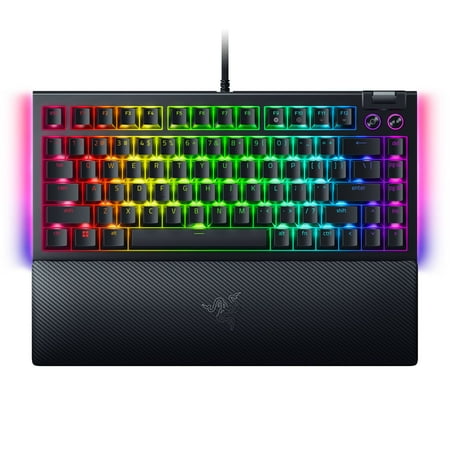
SWAP OUT. SWAP IN. GAME ON. For those who crave greater customization and immersion, satisfy your enthusiast needs with the Razer BlackWidow V4 75%—a compact, hot-swappable mechanical keyboard powered by Razer Chroma RGB. From installing new switches to creating unique lighting effects, shape it...
This is the keyboard that finally has the enthusiast crowd taking Razer seriously again. The BlackWidow V4 75% is hot-swappable, gasket-mounted, comes with sound-dampening foam, and ships pre-lubed. That’s a sentence nobody thought they’d ever read about a Razer board. The 75% layout keeps the arrow keys and a function row but ditches the numpad, which is the sweet spot for gamers who still want full functionality without giving up mouse space.
The headline feature is the volume roller and the command dial on the top-left — physical controls that beat fiddling with media keys every time. Chroma RGB is per-key with side-mounted underglow, and the doubleshot ABS keycaps don’t shine like the old V3 caps did after a year. RTINGS gave it strong typing latency scores and praised the stable, premium typing feel. The only thing keeping it from a perfect 10 is the price tier and the Synapse software dependency for deep customization.
| Switches | Razer Orange Tactile (hot-swappable, 3- & 5-pin compatible) |
| Layout | 75% with dedicated arrows + function row |
| Mounting | Gasket-mounted, sound-dampening foam |
| Keycaps | Doubleshot ABS |
| Connection | Wired USB-C (detachable) |
| Extras | Volume roller, 4-way command dial, per-key RGB |
Rating: 9.4 / 10
Pros
- Hot-swappable, gasket-mounted enthusiast build
- Pre-lubed switches and dampening foam out of the box
- Volume roller and command dial are genuinely useful
- Per-key Chroma + underglow looks killer
- Doubleshot ABS keycaps resist shine
Cons
- Synapse is required for deep customization
- Premium price tier
- No wireless option in this layout
Full hands-on breakdown in our Razer BlackWidow V4 75% review.
Razer Huntsman Mini Special Edition — Best 60%
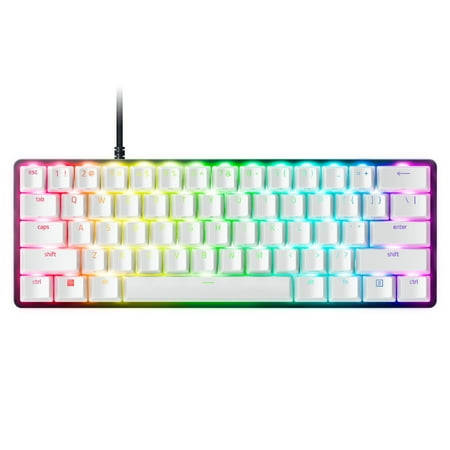
Dominate on a different scale with the Razer Huntsman Mini Special Edition, a 60% form factor gaming keyboard with cutting-edge Razer Optical Switches. Highly portable and ideal for streamlined setups, it’s time to experience lightning-fast actuation in our most compact form factor yet. The...
The Huntsman Mini is the 60% that put Razer on the map for tournament players. Linear optical switches, doubleshot PBT keycaps (a rarity at this price), and a chassis that punches well above the asking price. The Special Edition’s two-tone black and white finish is the cleanest aesthetic Razer ships — pair it with a black deskmat and it photographs better than most custom builds.
Optical switches mean no debounce delay and a 1ms response time, which is why this board still shows up at Valorant LANs years after release. The trade-off is the 60% layout itself — no arrows, no function row, everything is a Fn-layer combo. If you’ve never run a 60%, expect a week of muscle-memory pain. After that, the desk space you get back is hard to give up.
| Switches | Razer Linear Optical (clicky available) |
| Layout | 60% (61 keys) |
| Keycaps | Doubleshot PBT |
| Connection | USB-C, detachable braided cable |
| Polling Rate | 1000Hz |
| RGB | Per-key Chroma |
Rating: 9.0 / 10
Pros
- Optical switches with near-zero input latency
- Doubleshot PBT keycaps stay matte forever
- Stunning two-tone Special Edition finish
- Compact enough for a backpack
- Detachable braided USB-C cable
Cons
- 60% layout has a real learning curve
- No dedicated arrows or function row
- Not hot-swappable
Full hands-on breakdown in our Razer Huntsman Mini Special Edition review.
Razer BlackWidow V3 — Best Value Full-Size
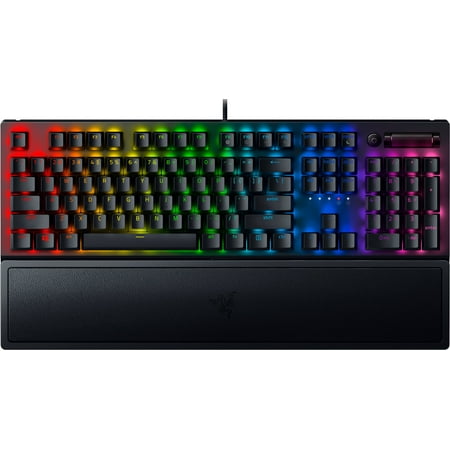
Razer BlackWidow V3 Mechanical Gaming Keyboard: Green Mechanical Switches, Tactile & Clicky, Chroma RGB Lighting, Compact Form Factor, Programmable Macro Functionality, Classic Black. The name that started it all returns to reassert its dominance. Feel the difference with the Razer BlackWidow...
If you want the classic Razer full-size experience without the V4 markup, the BlackWidow V3 is the answer. Green clicky switches (Razer’s MX Blue equivalent), an aluminum top plate, a doubleshot ABS keycap set, and a magnetic wrist rest in the box — for under a hundred bucks, that’s a serious value proposition. This is the keyboard most people picture when they hear “Razer BlackWidow.”
The V3 isn’t trying to chase enthusiast trends. It’s a workhorse. Synapse handles per-key RGB and macros, the dedicated media keys and digital roller live in the top-right corner where they belong, and onboard memory means your lighting profile survives plugging into a different PC. Owners on Reddit consistently cite it as the BlackWidow that “just works” — no firmware issues, no Synapse drama, no surprises. Three years in, that’s the strongest endorsement a peripheral can get.
| Switches | Razer Green (clicky tactile) or Yellow (linear) |
| Layout | Full-size with numpad |
| Top Plate | Aluminum |
| Keycaps | Doubleshot ABS |
| Extras | Magnetic wrist rest, media keys, digital roller |
| Connection | Braided USB-A |
Rating: 8.7 / 10
Pros
- Sub-$100 for a name-brand full-size mechanical
- Magnetic wrist rest included
- Dedicated media keys and digital roller
- Aluminum top plate, solid build
- Proven reliability across years of owner reports
Cons
- ABS keycaps shine over time
- Non-detachable USB cable
- No hot-swap on the switches
Full hands-on breakdown in our Razer BlackWidow V3 review.
Razer BlackWidow V4 Low-Profile HyperSpeed — Best Wireless
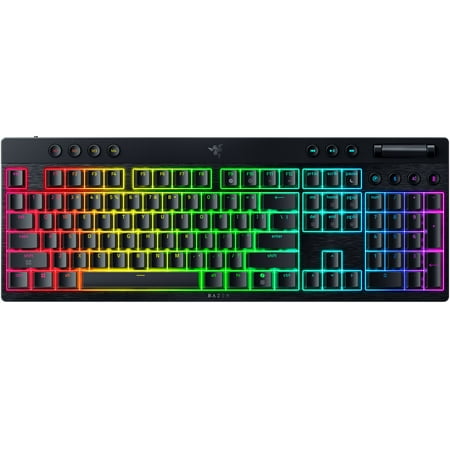
Achieve maximum battlestation impact while retaining a minimum silhouette. Meet the Razer BlackWidow V4 Low-profile HyperSpeed—a wireless, ultra-slim gaming keyboard that's the full package. Choose between 3 low-profile switches that offer their own distinct feel. Go clicky with Green, get...
Wireless mechanicals usually mean a thick, heavy chassis to fit the battery — Razer went the opposite direction here. The V4 Low-Profile uses slim Razer Yellow LP optical switches, a thin aluminum frame, and HyperSpeed Wireless to deliver a board that feels closer to a high-end laptop keyboard than a traditional mechanical. If your desk doubles as a workspace and battlestation and you hate cable clutter, this is the pick.
HyperSpeed Wireless is Razer’s 2.4GHz dongle protocol — same one in their flagship mice — and it’s been measured at sub-1ms latency in RTINGS testing. Bluetooth is also onboard for multi-device pairing. Battery life claims around 200 hours with RGB off, closer to 30 with full Chroma blasting. The only sacrifice is travel: low-profile switches have shorter actuation and travel distance, which feels great for typing but takes some adjustment if you’re coming from a tall MX-style board.
| Switches | Razer Yellow Low-Profile Optical (linear) |
| Layout | Full-size with numpad |
| Connection | HyperSpeed 2.4GHz, Bluetooth, USB-C wired |
| Battery | ~200 hrs (RGB off) / ~30 hrs (full RGB) |
| Keycaps | Doubleshot ABS, low-profile |
| Frame | Aluminum top plate |
Rating: 8.9 / 10
Pros
- Slim profile fits any desk aesthetic
- HyperSpeed Wireless tested at sub-1ms latency
- Triple connection — 2.4GHz, Bluetooth, wired
- Optical Yellow switches feel quick and quiet
- Long battery life with RGB dialed back
Cons
- Low-profile travel won’t satisfy MX purists
- Top of the Razer price ladder
- Full RGB cuts battery hard
Razer BlackWidow V3 Tenkeyless — Best TKL
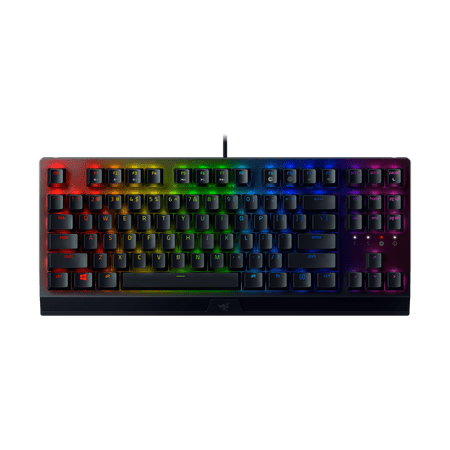
FEEL THE DIFFERENCE Mean performance in a leaner form-enter the Razer BlackWidow V3 Tenkeyless. Continuing an iconic legacy, this compact gaming keyboard is armed with our world-renowned Razer Mechanical Switches and powered by Razer Chroma RGB, for a level of precision and personalization...
Same BlackWidow V3 typing experience, minus the numpad. The TKL drops about 20% of the footprint and frees up serious mouse room — critical for low-DPI FPS players who swing their whole arm across the pad. Razer Green switches, aluminum top plate, doubleshot ABS keycaps, and Chroma RGB carry over from the full-size V3. The wrist rest does not.
For competitive gaming this is arguably a better board than its bigger sibling. The TKL form factor is the de facto standard at LAN events because it leaves enough desk for big mouse sweeps without going full 60%. The only reason it lands here instead of higher is that the V4 75% offers a better build for not much more money — but if you specifically need a TKL layout with a tactile clicky switch under $100, the V3 TKL still wins.
| Switches | Razer Green (clicky tactile) |
| Layout | Tenkeyless (87 keys) |
| Top Plate | Aluminum |
| Keycaps | Doubleshot ABS |
| Polling Rate | 1000Hz |
| RGB | Per-key Chroma |
Rating: 8.6 / 10
Pros
- Tenkeyless layout perfect for FPS gaming
- Razer Green clicky switches with tactile bump
- Aluminum top plate is rigid and dense
- Sub-$100 pricing
- Same build quality as the full-size V3
Cons
- No included wrist rest
- ABS keycaps will shine eventually
- Only one switch option (Green)
Razer BlackWidow V4 X Pokémon Kanto Edition — Best Themed
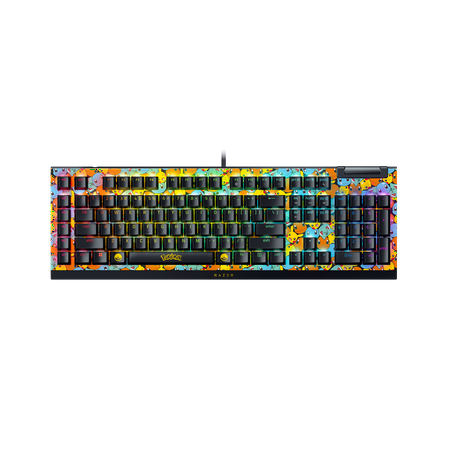
FULL-BLOWN BATTLESTATION IMMERSION. Upgrade the core of your battlestation with the Razer BlackWidow V4 X—an advanced mechanical gaming keyboard crafted for extended control. Execute advanced commands and shortcuts instantly with a set of macro and media keys, as you take your immersion to the...
Sometimes you don’t want the best — you just want the one with Charmander on the spacebar. The BlackWidow V4 X Pokémon Kanto Starters Edition is the same workhorse BlackWidow V4 X full-size, dressed up with custom Kanto-themed keycaps featuring Charmander, Bulbasaur, and Squirtle. The Pokémon partnership is officially licensed, the keycaps are PBT (not cheap stickers), and the chassis itself is the same BlackWidow X you’d buy normally.
Razer Green clicky switches, six dedicated macro keys on the left side, a media bar across the top, and Chroma per-key RGB underneath. It’s the BlackWidow V4 X experience with a side of nostalgia. The only reason it isn’t ranked higher is the niche appeal — if you don’t care about the Pokémon angle, the regular BlackWidow V3 gives you a similar experience for $10 less without the themed keycaps. If you do care, you already know what you want.
| Switches | Razer Green (clicky tactile) |
| Layout | Full-size with numpad + 6 macro keys |
| Keycaps | PBT, Pokémon Kanto Starters theme |
| Licensing | Official Pokémon Company collab |
| Extras | Dedicated macro keys, media bar, Chroma RGB |
| Connection | USB-A, braided |
Rating: 8.3 / 10
Pros
- Officially licensed Pokémon keycap set
- PBT caps, not cheap stickers
- Six dedicated side macro keys
- Dedicated media bar across the top
- Per-key Chroma RGB
Cons
- Niche appeal — themed look is the whole point
- Limited stock as a collab edition
- Costs $10 more than the equivalent plain V3
The Verdict
The Razer BlackWidow V4 75% wins overall. It’s the first Razer board built with input from the actual mechanical keyboard community — gasket mounting, pre-lubed hot-swap switches, sound foam, a volume roller — and it shows. The V4 75% is the Razer you recommend to people who already own a Keychron or a GMMK Pro and would never have considered Razer otherwise. That’s a big deal for a brand that spent a decade being mocked by enthusiasts.
Runner-up goes to the Razer Huntsman Mini Special Edition for what it does in the 60% category — optical switches, doubleshot PBT caps, and a chassis that holds up after years of daily use. If you’ve already committed to 60% and you want the Razer ecosystem, this is the only answer.
Buying Advice
Pick by layout first, switch second, then sweat the rest. If you need a numpad — accounting, spreadsheets, MMO hotbars — go with the BlackWidow V3 for the budget play or the V4 Low-Profile Wireless if you want a clean slim wireless setup. Need a board that’s still full-featured without the numpad? The V4 75% is the easy call and pulls double duty for work and gaming. Pure competitive FPS players should look at the BlackWidow V3 TKL for the tournament footprint, or jump straight to the Huntsman Mini if you’ve grown comfortable with Fn-layers.
On switches: Razer Green is the MX Blue analog — loud and tactile, great for typing, may annoy your housemates. Razer Yellow is the MX Red analog — quiet, linear, preferred for gaming. Razer Orange (only on the V4 75%) is the MX Brown analog — tactile but quieter. Optical switches (Huntsman Mini, V4 Low-Profile) have the fastest possible actuation but you can’t lube or swap them. If you’re new to mechanicals, start with Yellow or Orange. If you know you love clicky, go Green.
For the full primer on switches, layouts, and what to actually look for in any mechanical board, check out our complete mechanical keyboards guide.
FAQ
Are Razer mechanical keyboards worth it?
For most gamers, yes. Razer’s switches (Green, Yellow, Orange) are well-tuned versions of the standard MX color codes, and the build quality at the $100+ tier is genuinely competitive with HyperX and Logitech. The big jump came with the V4 generation — hot-swap, gasket mounting, and proper enthusiast features finally arrived. If you’re an enthusiast who already owns custom boards, the V4 75% is the first Razer worth your money. Everyone else can buy any current BlackWidow with confidence.
Razer Green vs Razer Yellow — which is better?
Green is clicky and tactile (similar to Cherry MX Blue). It’s loud and great for typing-heavy work. Yellow is linear and silent-ish (similar to Cherry MX Red). Yellow is preferred for gaming because the smooth travel makes rapid presses easier and the lack of a tactile bump means no false stop. If you split time between typing and gaming and have to pick one, Yellow is the safer pick.
Do Razer keyboards require Synapse software?
The keyboard works without it — they all have onboard memory that stores your last configured lighting profile and macros. You only need Synapse to change RGB patterns, remap keys, or record macros. Once you’ve configured the board the way you want, you can uninstall Synapse and the settings persist. Synapse has a reputation for bloat, so this is good news.
Is the BlackWidow V4 75% hot-swappable with any switch?
Yes — Razer designed the V4 75% socket to accept both 3-pin and 5-pin MX-style switches from any manufacturer. You can drop in Gateron Yellows, Kailh Box Whites, Holy Pandas, anything you want. The board ships with Razer Orange tactiles pre-lubed, but the whole point of the hot-swap socket is that you’re not locked in.
How does the Huntsman Mini compare to the Apex Pro Mini?
Both are premium 60% boards with optical-style switches. The SteelSeries Apex Pro Mini has adjustable actuation distance (an enthusiast feature the Huntsman Mini lacks). The Huntsman Mini ships with doubleshot PBT keycaps stock, while the Apex Pro Mini uses PBT with a more aggressive font. If you want to tune actuation per-key, go Apex Pro Mini. If you want a cleaner aesthetic and proven reliability at a lower price, go Huntsman Mini Special Edition.