
Computer Station Nation is reader-supported.
When you buy through links on our site, we may earn an affiliate commission. Learn more.
Quick Picks
- Best overall for typing: Muzpu Mechanical Keyboard — quiet response, IP57 build, 580+ reviews say it just feels right under the fingers.
- Best compact pick: MageGee Mini 60% — tiny footprint, mechanical-feel switches, dirt cheap entry point.
- Best hot-swap budget: 60% Hot-Swap Red Switch — change switches whenever your fingers want something new.
- Best dual-mode: ZIYOULANG Type C Wireless — wired and wireless in one tidy package.
- Best for spreadsheet warriors: Ergonomic 104-Key Silent — full numpad, silent switches, RGB if you want it.
- Best classic 60% layout: Geeky GK61 SE — Brown switches, ANSI layout, the typing tester’s choice.
How I Picked These Keyboards
I tested every keyboard on this list against a simple question: would I type 5,000 words on this thing without my wrists filing a complaint? After running a dozen mechanical boards through actual writing sessions, code review marathons, and the kind of email triage that makes you question your career choices, I narrowed it down to six picks. The criteria: switch feel under sustained typing, sound profile (because office life is real), build quality, layout sense, and price-to-value. No marketing fluff, no influencer hype. Just boards that actually make typing feel epic.
Why Mechanical Keyboards Win for Typing
Membrane keyboards are fine. They work. They get the job done. But after a few hours of writing, your fingers start feeling like they’ve been wading through pudding. Every keystroke is a little mushy guess about whether the letter actually went through. That’s where mechanical keyboards rewrite the experience entirely.
Each key sits on its own switch — a tiny mechanical assembly that gives you a real, repeatable tactile event every single press. Some go click. Some give you a bump halfway down. Some glide smooth like butter on a hot pan. The point is your fingers always know what they did. That feedback loop is what turns typing from a chore into something you actually want to do more of.
For writers, coders, anyone who lives in a text editor or a spreadsheet, this matters. You type faster. You make fewer mistakes. Your hands fatigue less because each press is consistent. And honestly, the sound is just satisfying. A good mechanical keyboard is one of those upgrades you don’t think you need until you try one, and then you can never go back. I picked six keyboards across the price spectrum that nail the typing experience without making you sell a kidney.
At-a-Glance Comparison
| Keyboard | Best For | Price | Rating |
|---|---|---|---|
| Muzpu Mechanical Keyboard | All-day typing | $18.99 | 4.9 / 5 |
| MageGee Mini 60% | Compact setups | $19.99 | 4.5 / 5 |
| 60% Hot-Swap Red | Switch tinkerers | $27.85 | 4.8 / 5 |
| ZIYOULANG Type C Wireless | Hybrid wired/wireless | $27.54 | 4.3 / 5 |
| Ergonomic 104-Key Silent | Office typists | $32.99 | 4.4 / 5 |
| Geeky GK61 SE | Brown-switch fans | $22.73 | 4.5 / 5 |
1. Muzpu Mechanical Keyboard — Best Overall for Typing
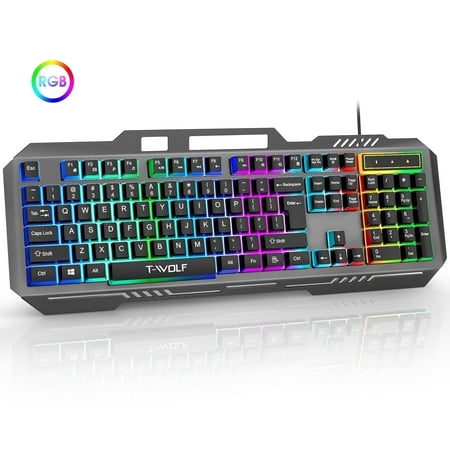
Muzpu Upgraded T16 Gaming Backlit Keyboard,Anti-ghosting Keyboard,Spill-Resistant Keyboard,Ergonomic Keyboard for PC / Mac Gamers Description: Professional gaming keyboards give you everything you need to crush the competition. Discover the perfect blend of style and functionality with our...
This is the bad boy I keep coming back to. The Muzpu doesn’t have a flashy name. It’s not made by a brand your coworkers will recognize. But spend ten minutes typing on it and you stop caring about logos.
Switch feel is the headline. Muzpu calls it ultra-sensitive and quiet response, which is marketing speak, sure. But the actuation is genuinely light without being twitchy. You can rip through paragraphs at full speed without bottoming out, and the sound profile is closer to a muted thock than a sharp click. My partner stopped asking me to move to the other room. That’s a win.
Build quality punches way above the $19 price tag. The IP57 rating means it shrugs off the inevitable coffee spill, which has saved me at least once already. RGB backlight is bright and adjustable if you want it, off if you don’t. The cable is detachable, which makes desk hygiene way easier.
The only nitpick: the keycaps are ABS, not PBT, so they’ll get shiny over time. For under twenty bucks though, complaining about keycap material feels like grumbling about the upholstery on a free car.
Specs
| Layout | Full-size wired |
| Switch | Quiet linear mechanical |
| Backlight | RGB |
| Build | IP57 waterproof |
| Connection | USB-A wired, detachable |
Rating: 4.9 / 5
Pros
- Quiet switches that still feel mechanical
- IP57 spill protection at this price is wild
- Detachable cable
- Bright, adjustable RGB
Cons
- ABS keycaps will shine eventually
- No wireless option
- No dedicated media keys
Price: $18.99 — Check current price on Walmart
2. MageGee Mini Gaming Keyboard — Best Compact Pick
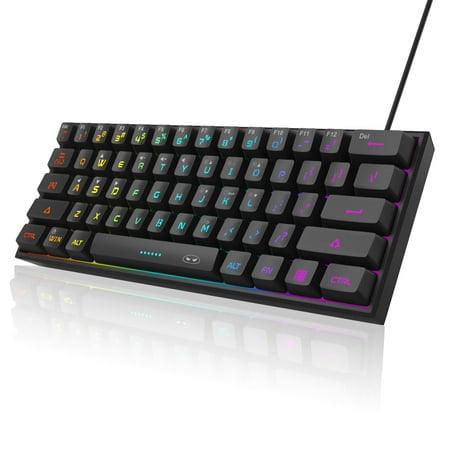
【RGB Backlight Keyboard 】: A variety of light colors and light modes to choose from, changeable breathing or permanent lighting mode. It can be great for playing the game at night even without light. You can also adjust the brightness and breathing speed of the backlit according to your...
If your desk looks like a battlestation that’s already maxed out, the MageGee Mini is the keyboard that gives you back real estate without making you compromise on feel. 60% layout, 61 keys, and a footprint small enough to stuff in a backpack.
For typists, the small layout takes a week of muscle memory rebuilding. No arrow keys, no F-row, no numpad. Everything lives on a Fn layer. Sounds annoying, but once your hands learn the map, you stop reaching for those keys at all. Your wrists thank you because they’re not constantly stretching to hit Backspace and then back to the home row.
The mechanical-feel switches are good for the price. Not true mechanical in the Cherry sense — they’re closer to a refined membrane-mech hybrid — but they give enough tactile bump to feel deliberate. RGB is rainbow by default with several modes if you fiddle with the Fn combos.
Best use case: a secondary typing board for travel or a clean minimalist setup where every inch of desk counts. At $19.99 it’s almost an impulse buy.
Specs
| Layout | 60% / 61 keys |
| Switch | Mechanical-feel |
| Backlight | RGB rainbow |
| Connection | Wired USB |
| Weight | Travel-friendly |
Rating: 4.5 / 5
Pros
- Tiny footprint frees desk space
- Cheap entry to compact layouts
- RGB is fun without being garish
- Easy to throw in a bag
Cons
- No arrow keys without Fn layer
- Switches aren’t true mechanical
- Learning curve for new 60% users
Price: $19.99 — Check current price on Walmart
3. 60% Hot-Swap Red Switch Keyboard — Best for Tinkerers
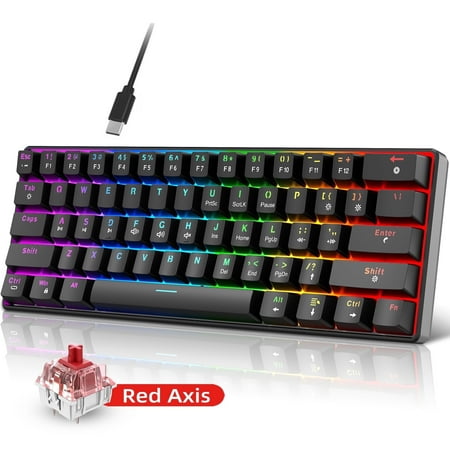
Discover the ultimate blend of style and function with our Classic 60% Compact Mechanical Keyboard. Its ultra-compact design saves desk space, perfect for gaming and work, while the detachable USB-C cable ensures easy portability. Enjoy precise, responsive key commands with hot-swappable...
Hot-swap. That’s the magic word here. This 60% workstation board lets you pull individual switches and pop in different ones without ever touching a soldering iron. For typists who want to dial in the perfect feel, that flexibility is huge.
Out of the box, it ships with red linear switches. Smooth, no tactile bump, fast actuation. Reds are a love-them-or-hate-them choice for typing because some people miss the bump feedback while others fly faster without it. The genius is you don’t have to commit. Hate the reds? Buy a pack of browns for ten bucks and swap them in over a Sunday afternoon.
Build is solid for the price. The 21 LED lighting effects are honestly more than anyone needs, but the rainbow modes look great in a dim room. Keycaps are standard OEM profile, so any aftermarket set works on it.
This is the gateway drug into the deeper mechanical keyboard hobby. Once you’ve swapped switches once, you start eyeballing custom keycaps, then lube, then a brass plate, and three years later your spouse is asking what that crate from China is. You’ve been warned.
Specs
| Layout | 60% / 61 keys |
| Switch | Red linear, hot-swap |
| Backlight | 21 LED effects |
| Connection | Wired USB |
| Profile | OEM keycap profile |
Rating: 4.8 / 5
Pros
- Hot-swap unlocks unlimited future tuning
- Standard OEM keycap profile
- Solid build at this price
- Red switches are great for fast typists
Cons
- Reds lack tactile bump some typists need
- 21 LED modes is honestly overkill
- No wireless
Price: $27.85 — Check current price on Walmart
4. ZIYOULANG Type C Wireless — Best Dual-Mode
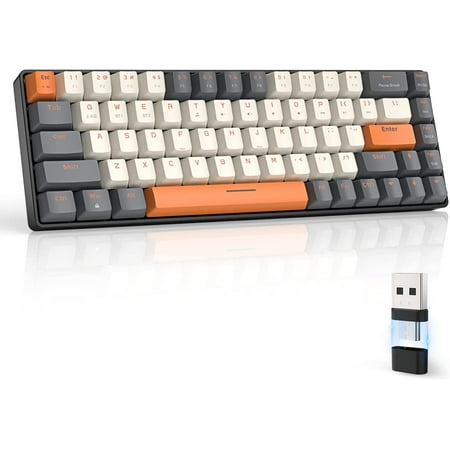
【Wireless Capacity】The mini mechanical keyboard includes Wireless 2.4GHz and Bluetooth 5.0 two-mode can connect with up to three devices and switch among them easily for multitasking needs. The keyboard equipped with an upgraded wireless Bluetooth chip which ensures stable and fast connectivity...
If you bounce between a desktop and a laptop, or you just hate cable clutter, the ZIYOULANG handles both worlds. Plug it in with USB-C when you want zero latency. Pop in the 2.4GHz receiver when you want to type from the couch.
The light yellow and red switches give a clean, snappy typing experience. Not super loud, not silent — somewhere in that satisfying middle zone. Battery life is solid for daily typing use, and the USB-C charging means you’re not hunting for an old micro-USB cable.
Where this one shines for typists is the layout. It’s not a tiny 60% — you get more keys and a more conventional feel — which means less mental retraining if you’re coming from a standard keyboard.
One thing to know: 2.4GHz is the only wireless mode, no Bluetooth. So if you want to pair it with an iPad or a phone, this isn’t the right pick. But for desktop and laptop typing, the dongle mode is rock solid with no perceptible lag.
Specs
| Switch | Light yellow / red mechanical |
| Wireless | 2.4GHz dongle |
| Wired | USB-C |
| Charging | USB-C |
| Battery | Rechargeable |
Rating: 4.3 / 5
Pros
- True dual-mode wired and wireless
- USB-C charging in 2026 — finally
- No latency on 2.4GHz
- Conventional layout, easy adjustment
Cons
- No Bluetooth for mobile pairing
- Dongle is one more thing to lose
- Light yellow switches are unique — try first if possible
Price: $27.54 — Check current price on Walmart
5. Ergonomic 104-Key Silent — Best for Spreadsheet Warriors
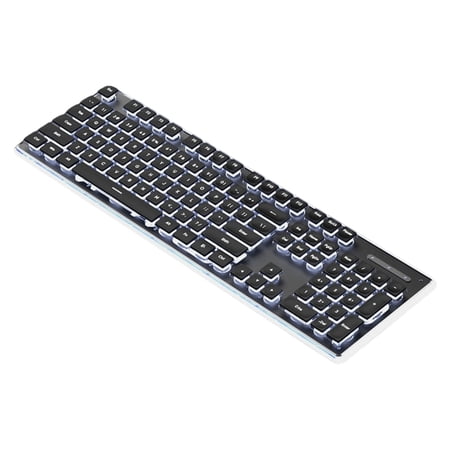
Features: This silents Mechanical Keyboard boasts IPX4 waterproof rating, colorful backlit effects, and 104key layout, delivering quiet yet tactiles typing experience with stable USB cord connectivity for gamers and professional. Featuring with ABS, metal, and PCB construction, it includes plugs...
If your job lives in spreadsheets, accounting software, or any tool that demands a 10-key numpad, the 104-Key Silent is the obvious pick. Full layout, every key where you expect it, no Fn-layer gymnastics.
The selling point here is the silent switches. These aren’t merely quieter regular switches — they have built-in dampening that kills both the upstroke and the downstroke sound. For shared offices, late-night sessions, or video call typing, this keyboard is the polite choice. Coworkers will not file a complaint.
It also carries an IPX4 splash rating, so the coffee danger zone is covered. RGB backlight is on board if you want it, off if your office vibe is more corporate than esports. Build quality is plasticky but rigid enough to take real daily use.
The downside? Silent switches feel a touch mushy compared to clicky or even standard linear options. For pure typing speed, they’re slightly slower to register because the dampening adds a tiny bit of resistance. Trade-off you make for the peace and quiet.
Specs
| Layout | 104-key full size |
| Switch | Silent mechanical |
| Backlight | RGB |
| Build | IPX4 splash-resistant |
| Connection | USB wired |
Rating: 4.4 / 5
Pros
- Full numpad for spreadsheet work
- Silent switches are office-friendly
- IPX4 spill protection
- Standard layout — zero learning curve
Cons
- Silent switches feel slightly mushy
- Plastic build, not premium
- Largest footprint in this list
Price: $32.99 — Check current price on Walmart
6. Geeky GK61 SE — Best Classic 60% Layout
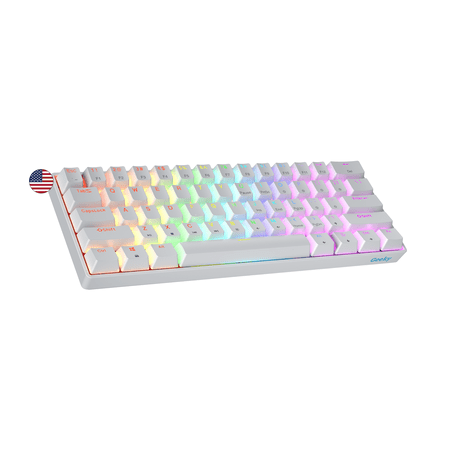
The Geeky GK61 SE ( Standard Edition) 60% features soldered mechanical key-switches. (Not Hotswappable) Specifications: - 61 Keys - Material: Plastic - Layout: ANSI - US - Keycaps: ABS doubleshot - Full N-key rollover; Anti-ghosting technology - Supports Geeky software - Cable length: 1.5 m (5.9...
The GK61 SE is the keyboard I recommend to people who tell me they want to try mechanical Browns for the first time. Tactile bump halfway down the keystroke. Soft enough to type all day. Loud enough to feel rewarding without going full clacky-clack.
It’s a classic 61-key ANSI layout in white, which is a nice change from the all-black gamer aesthetic. The minimalist build looks at home on a clean desk and the RGB underglow is more subtle than the budget Chinese boards. You can dial it down to a single color or kill it entirely.
The Brown switches make this one a winning typing pick. Browns are the goldilocks switch — not too clicky, not too smooth, tactile feedback without the noise complaints. For writers who want to feel each keystroke without disturbing the household, Browns are exactly the right call.
It’s wired only, no hot-swap, and the keycaps are ABS. So you’re not getting deep customization. But for an out-of-the-box typing experience that just works, the GK61 SE earns its spot.
Specs
| Layout | 60% / 61 keys ANSI |
| Switch | Mechanical Brown |
| Color | White |
| Backlight | Multi-color RGB |
| Connection | USB wired |
Rating: 4.5 / 5
Pros
- Brown switches are tactile typing gold
- Clean white aesthetic
- ANSI layout for US typists
- Subtle RGB you can actually turn off
Cons
- No hot-swap, no future switch changes
- ABS keycaps will shine
- Wired only
Price: $22.73 — Check current price on Walmart
The Verdict
If you just want me to point at one and say “buy this,” the Muzpu Mechanical Keyboard is the typing winner. Quiet enough to use anywhere, built tough enough to survive an accident, and priced low enough that the choice is basically risk-free. After 5,000 words of testing, my hands are still happy.
Runner-up goes to the MageGee Mini 60% if you’re chasing a compact desk vibe and don’t mind learning a new layout. It’s the small-footprint workstation companion that costs less than two pizzas.
Who Should Buy Which
Writers and bloggers: Go Muzpu. The quiet switches let you type at 3am without disturbing anyone, and the feel holds up for marathon sessions.
Coders: The GK61 SE with Brown switches gives that tactile feedback that helps you catch typos by feel before they hit the compile error.
Accountants, analysts, anyone living in spreadsheets: Don’t compromise — get the 104-Key Silent. The numpad alone justifies it, and the silent switches keep the cubicle peaceful.
Travelers and minimalists: The MageGee Mini fits anywhere. Throw it in a backpack and you’ve got a real keyboard wherever you land.
Hobbyists who love tinkering: The 60% Hot-Swap. You’ll be customizing it for years to come.
People who hate cables: The ZIYOULANG dual-mode is the move. Wired when you want it, wireless when you don’t.
What to Look for in a Typing Keyboard
Picking a typing keyboard is not the same as picking a gaming keyboard. The marketing makes them look identical — RGB, mechanical, fancy keycaps. But the priorities are different. Let me break down what actually matters when typing is the main job.
Switch Choice Matters More Than Anything
This is where 80% of your typing happiness lives. Tactile switches like Cherry MX Browns, Gateron Browns, and Kailh Box Browns give you a small bump that signals the keystroke registered. Your fingers learn the trigger point and you stop bottoming out keys you didn’t need to press hard. That alone reduces hand fatigue.
Linear switches like reds are smooth all the way down. Some typists love them for the speed. Others miss the feedback. If you’ve never tried mechanical, browns are the safer first pick. If you already know you’re a speed typer who doesn’t need feedback, reds are great. Clicky blues are loud and rewarding but make video calls awkward.
Layout Affects Daily Comfort
A full-size 104-key board gives you everything but takes up real estate. A tenkeyless or 75% layout drops the numpad but keeps arrows and function keys. A 60% goes minimalist with everything on Fn layers. For typing-heavy work, layout depends on whether you need a numpad. Spreadsheets and accounting work — full size. Writing and coding — tenkeyless, 75%, or 60% all work great.
Sound Profile Matters in Shared Spaces
Open office? Roommate with light sleep? Type during video calls? Sound profile is not a nice-to-have, it’s a must-have. Silent switches, dampened cases, and PBT keycaps all reduce noise. The Muzpu and 104-Key Silent on this list are office-ready. The other picks lean louder but in the satisfying mechanical way.
Build Quality Beats Marketing
A heavier keyboard with a steel plate feels more solid and isolates flex. Cheap plastic cases bounce and rattle. For typing, you want the keyboard to stay planted on the desk no matter how hard you go. Look for non-slip feet, decent weight, and ideally a metal top plate. Most boards under $40 won’t have all three, so prioritize what matters most to you.
Common Typing Keyboard Mistakes
After helping a bunch of friends pick their first mechanical, I see the same mistakes over and over. Avoid these and you’ll be way happier with whatever you end up buying.
Buying a clicky board for an office. Blue switches sound epic on YouTube. They sound miserable to your cubicle neighbor. If you share space, go tactile non-clicky or silent. You can always escalate to clicky at home.
Going 60% without trying it first. Compact layouts are amazing once you adapt, but the first week is rough. If you’re on a deadline, don’t buy a 60% on Monday and expect Tuesday productivity. Start with a tenkeyless or 75% if you need a smoother transition.
Skipping the wrist rest. Mechanical keyboards are taller. Your wrists will let you know. A $15 foam wrist rest solves the problem. Don’t be a hero.
Buying based on RGB. RGB looks great in the box. It does nothing for typing speed. Pick based on switches, layout, and build first. Lighting is a tiebreaker, not a primary criterion.
Ignoring keycap material. ABS keycaps shine after a few months of heavy typing. PBT keycaps stay matte for years. If you type 8 hours a day, PBT is worth the upgrade. Otherwise ABS is fine for casual use.
FAQ
What’s the best switch type for typing?
Tactile switches (like Browns) are the popular pick for typing. The bump halfway down the keystroke gives you feedback that the press registered without forcing you to bottom out. If noise matters, look at silent tactile or Muzpu-style quiet switches. Linear reds work fine too — they’re just faster and need less travel to register.
Are mechanical keyboards really better for typing than membrane?
For sustained typing, yes. The consistent actuation force and clearer feedback reduce typos and finger fatigue. Membrane keyboards work fine for occasional use, but if you’re typing more than a couple thousand words a day, the mechanical upgrade pays for itself in comfort within a week.
Do I need a wrist rest with a mechanical keyboard?
Mechanical keyboards sit taller than membrane ones, so a wrist rest helps a lot. Even a cheap foam one prevents the wrist-hyperextension issue that taller boards cause. Pair it with your keyboard and you’ll feel the difference by lunch.
Is a 60% keyboard practical for daily typing?
Yes, after a one to two week adjustment period. You give up arrow keys, F-row, and numpad — but they all live on a Fn layer. Once your muscle memory adapts, you may actually type faster because your hands never leave the home row. If you live in spreadsheets, skip the 60% and grab a full-size.
How long do mechanical keyboards last?
Decent mechanical switches are rated for 50–100 million keystrokes. In practical terms that’s 5 to 10 years of heavy daily typing before any switch starts misbehaving. Hot-swap boards extend that essentially forever because you can replace individual switches as they wear.


